TrustRadius: an HG Insights company

Yooz

Score8.3 out of 10

92 Reviews and Ratings

What is Yooz?

Yooz delivers intelligent financial operations automation that aims to reduce waste, mitigate risk, prevent fraud, and eliminate errors from the AP process. Yooz provides Lean Financial Operations™ for companies of all sizes, offering clarity and control in the most complex environments. The Yooz platform combines a workflow engine, real-time applied AI, and transparency, with advanced fraud detection.

Boasting over 7,000 customers worldwide and processing more than 300 million invoices, Yooz states they aim to make financial operations faster, simpler, deeper, and more secure. Headquartered in Dallas, Texas, Yooz also has offices across Europe.

New Feature: Yooz uses Artificial Intelligence (AI) to streamline and optimize the vendor statement reconciliation process.

Categories & Use Cases

Media

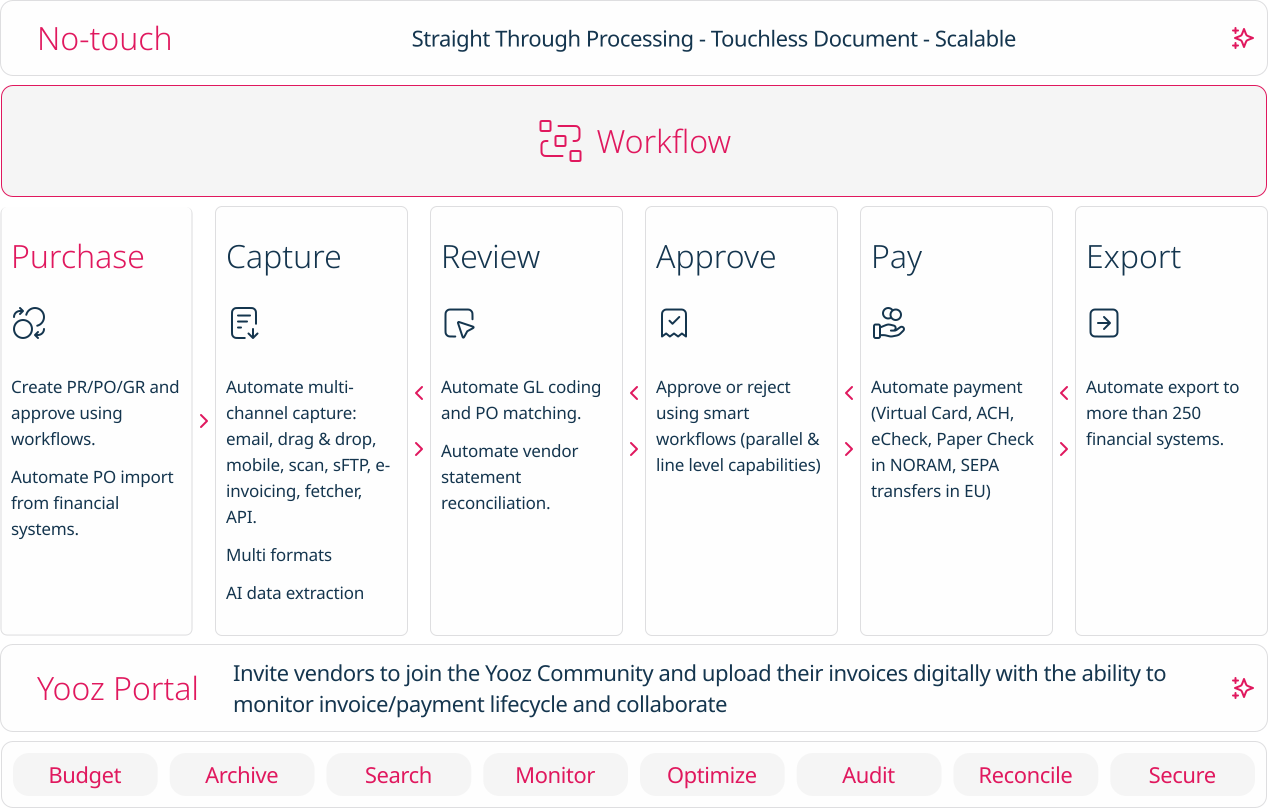
Screenshot of how Yooz works - The solution provides artificial intelligence (AI) and machine learning technologies to help AP teams with invoice automation.
Screenshot of Purchase: Automates PR/PO and approvals using workflows. Additionally users can create purchase requests, automate approval workflows, automatically generate purchase orders, manage deliveries and monitor the budget.
Screenshot of Capture: AI based data extraction to extract invoices. Works for almost any format (PDF, Factur-X, UBL, CII, EDIFACT, etc.)
Screenshot of No touch: Intelligent workflows to automate approvals and payments
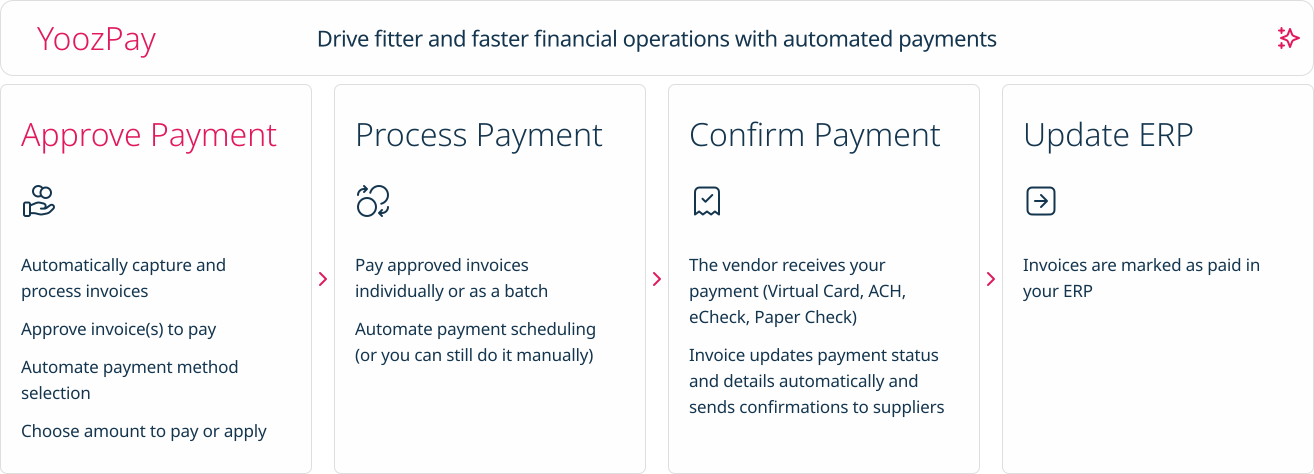
Screenshot of Pay: A Digital Invoice Payment Workflow. Invoices can be paid individually or as a batch,  and vendors receive payment through Virtual Card, ACH, eCheck, or Paper Check.
Screenshot of Export: Invoice capture and automation that integrates with accounting software, or with more than 200 ERPs worldwide.

1 / 6

Screenshot of how Yooz works - The solution provides artificial intelligence (AI) and machine learning technologies to help AP teams with invoice automation.

Top Performing Features

  • Duplicate Bill Detection

    Detects duplicate invoices or expense reports to prevent double payments.

    Category average: 8.9

  • Advanced OCR

    Automatically imports information from invoices, receipts, expense reports, and other scanned documents into the platform.

    Category average: 8.7

  • Customizable Approval Policies

    Policies for different types of approvals can be customized, sent to multiple approvers, automatically approved, etc.

    Category average: 8.7

Areas for Improvement

  • Vendor Management

    Holds information related to vendor terms and contracts.

    Category average: 8.4

  • Payment Status Tracking

    Tracks what stage payments are at in the process, from approval to receipt.

    Category average: 8.7

  • Financial Document Management

    Invoices, expense reports, and associated documents are stored within the platform for any future needs.

    Category average: 7.9

5 Year Yooz User

Use Cases and Deployment Scope

Yooz is part of our ERP suite helping to coordinate the accounts payable process for over 80 separate entities under one management umbrella. After implementing Yooz 5 years ago, we have been able to streamline workflows and invoice tracking from a paper-heavy, in-house operation to one that is fully remote. The dynamic workflow capabilities allow us to send invoices through approval routes based on GL code, amount, vendor or type.

Pros

  • Approval Touting
  • Invoice Tracking
  • Approver Accountability

Cons

  • Change Reporting for Auditors
  • Workflow Exporting for Review
  • User Exporting for Review
  • Tracking actual number of documents to check for overages
  • No payment sync from Sage Intacct back to Yooz unless subscribed to Yooz Pay to pay vendors

Return on Investment

  • Increased scalability of A/P process
  • Allowed business to take on more management clients

Usability

Alternatives Considered

BILL

Other Software Used

Sage Intacct, Emburse Certify, ProfitSword, Corpay

Yooz. Good to Use.

Use Cases and Deployment Scope

We receive lot of emails for our Invoices which are sometimes difficult to segregate as we have shared Mailbox. Yooz helps to directly integrate the Invoices in its platform and also along with it helps automatically updating details to process Invoices in it (Invoice number, Amounts, Taxes, GL codes etc).

Pros

  • Integrating Invoices from emails to its system
  • Automatically processing various details from the Invoices.
  • Sending popup error message in case of Duplications
  • Sending popup error message in case of PO values being utilised

Cons

  • Performance is sometimes slow on Yooz part.
  • Sometimes have encountered Technical difficulties.
  • Need some more high level of reports customization

Return on Investment

  • Saved our valuable Time on processing & reviewing part
  • We were able to cut down on processing people due to Automations hence saving costs
  • Emails management became very easy it tracks all via its API

Usability

Alternatives Considered

Deltek Maconomy, Citrix Endpoint Management and KlearStack

Other Software Used

Deltek Maconomy, Tally, Oracle API Manager

Payables made easy with Yooz

Use Cases and Deployment Scope

As an AP specialist for a home builder in MO & MI, capturing hundreds of invoices weekly for coding, approval and payment is a fast, seamless process with Yooz compared to other programs I've utilized, such as Chrome River and Salesforce. It is very user-friendly, quick and live; therefore, entries are immediate and searchable with all users. Multiple windows may be open for quick reference to previous invoices to ensure consistency. Utility invoices can be searched by account#. Color tags for assigning levels of importance. Words and phrases can be set to follow a specific workflow to reach or skip certain approvers. Confidentiality levels can be selected for sensitive documents. It is effortless to add vendors, account numbers and coding options. You can personalize your tasks list and sort it by preference. There is an option to link additional documents to completed entries. And an option flip documents from a payable invoice to a supporting or accounting document. Approved payables can be exported to Excel for simple importing. Overall Yooz is my choice for our payables needs and I'm happy to work in it all day.

Pros

  • Simplifies the capturing and coding process for payables
  • Allowing # and @ to be used for notifications and tracking is very helpful
  • The ability to search for any piece of data is a great help
  • Tracks utilities by account number when listed in the Description field

Cons

  • I'd like to see my linked documents on the main file instead of having to click to a screen to select the linked doc and then open it. Or at least for the Linked Docs column to be more prevalent. Many users don't even notice it there.
  • Yooz kicks me out all the time. It's too often. And it doesn't care if you're halfway into capturing 7 documents from different locations for one entry either. You have to start all over again. That is extremely frustrating and the biggest issue I have with the program. A lot of time is wasted redoing work lost because of that.
  • Files being locked because another user was in it is also annoying. I've accidently opened a file, closed it and asked someone to look at it and they cannot because it's locked to my user. This has happened when trying to finalize items for exporting to pay and it held us up.

Return on Investment

  • Positive impact - Yooz keeps all of our payables in one location and searchable for any users to track. This cuts down on duplicate payments.

Usability

Alternatives Considered

Emburse Chrome River

Yooz keeps me from needing to hand file invoices and go searching through piles to locate what I need.

Use Cases and Deployment Scope

We upload invoices and factory parts. Then we code them and export to our pay system. I think the AI is a little generic on picking up on items scanned weekly. Some times Yooz will change my total and i cant notice until i get an email from vendor that pay was incorrect. It will change the total and add a line of its own using a Yooz description. I wish it would remember how invoices are coded repeatedly to save typing time. this has slowed down my posting and upload process.

Pros

  • invoices are easily able to be found when needing to lookup for any reason
  • exporting is an easy step to do
  • this program keeps me from needing to hand file invoices and go searching through piles to locate what i need.

Cons

  • when exporting we have to change the total column's to numbers or it will export with the incorrect totals.
  • Yooz needs to not allow itself to add a line to the total and change what you are posting. instead it needs to freeze you from moving on.

Return on Investment

  • need the AI to pickup more info on invoices like the posting codes if same posting over and over again. saves time on typing
  • need excel to export totals into numbers to save time there on adjustmetns.

Usability

Yooz is a great platform

Use Cases and Deployment Scope

Yooz assist our organization on the processing and approving of invoices to be paid. This solution organizes our accounts payable and gives approvers more control over bills. In addition, with the integration with our accounting software (Sage) we can easily export it to Sage, creating a great flow of work. On top of all that, Yooz integrates users with chat communication and notifications.

Pros

  • Processing invoicing
  • Approval of invoices
  • Chat communication

Cons

  • Design of the website
  • Customer service chat
  • Customization

Return on Investment

  • Increased efficiency of processing invoices in at least 80%
  • 100% automatizated
  • 0 errors

Usability

Alternatives Considered

QuickBooks Online

Other Software Used

Sage Intacct
