TrustRadius: an HG Insights company

Agorapulse

Score8.6 out of 10

556 Reviews and Ratings

What is Agorapulse?

Agorapulse is a social media management tool that aims to help mid-sized businesses and agencies better manage their Facebook, Twitter, TikTok, Instagram, LinkedIn, and YouTube activity.

This social media management tool allows users to post content, engage with their community, and download reports from a single dashboard that is designed to be intuitive. Conversations are captured with the inbox -- depending on the social network, it captures comments, mentions, direct/private messages, Facebook ad comments, and Instagram ad comments. All plans include collaboration tools to moderate or assign inbox items which makes getting through the inbox easier.

Current Instagram publishing features include: scheduling stories and carousel posts via push notifications, product tagging, PulseLink in bio, direct image and video publishing, tagging public usernames, and adding locations to single feed posts.

Additional options include external shared calendars to get content feedback and Power Reports to create customized reports in half the time.

The vendor states that thousands of agencies take advantage of Agorapulse's Agency Love program, which includes resources to attract more clients, improve ROI, increase revenue, and master social media management. Agorapulse helps to measure the real business impact of social media campaigns through its Social Media ROI feature.

Media

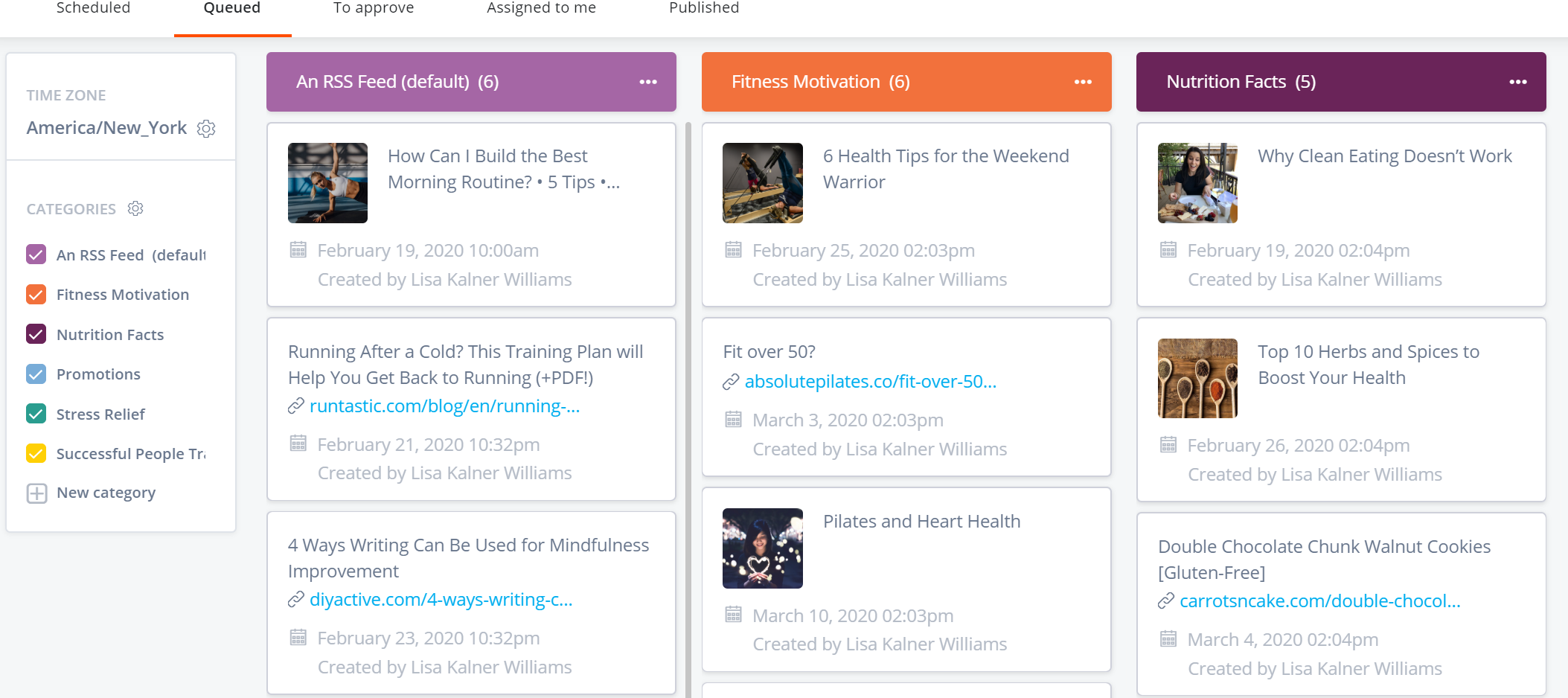
Through a bulk or one-by-one upload, queued content can be organized into categories that make sense for the business and content strategy. Download a CSV of the queued content to share with teammates or clients.
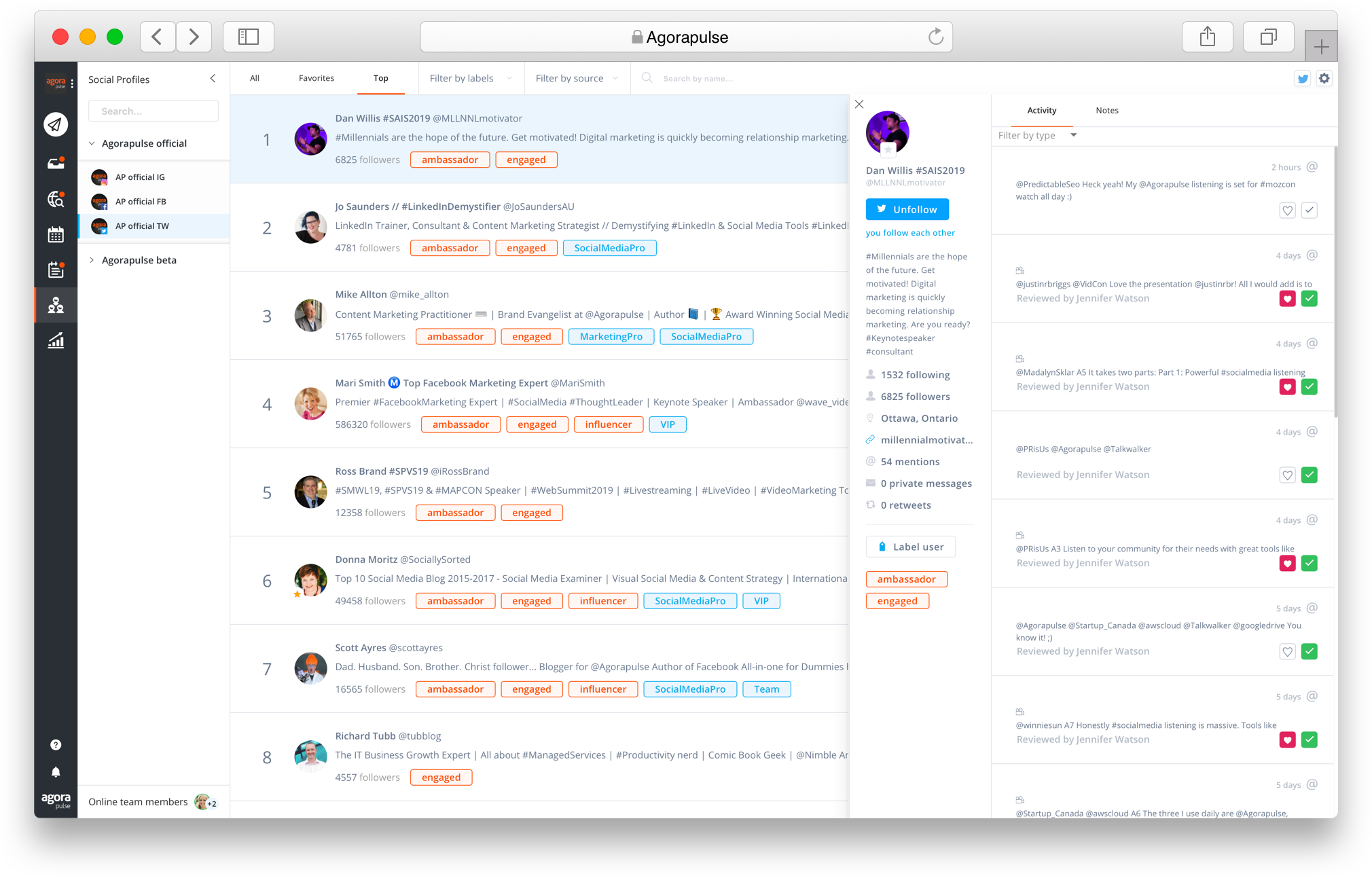
Agorapulse's reports helps to discover trends in a company's social media performance and offers actionable tips to optimize its social presence.
The tool's built-in CRM keeps track of fans and followers (and detractors).
Agorapulse's reports helps to discover trends in a company's social media performance and offers actionable tips to optimize its social presence.
A drag-and-drop calendar displays at glance published, scheduled, queued, and assigned content. Hovering on a date instantly creates content for that day.
The Agorapulse  inbox captures incoming conversations for each social profile. Users can get CRM data on who is sending messages, and send them a saved reply or assign the conversation to a teammate.
Through a bulk or one-by-one upload, queued content can be organized into categories that make sense for the business and content strategy. Download a CSV of the queued content to share with teammates or clients.

1 / 7

Top Performing Features

  • Real-time tracking

    The tool tracks mentions and comments in real-time.

    Category average: 8.5

  • Facebook

    The software allows users to monitor, publish and respond via Facebook.

    Category average: 9.2

  • Campaign success analytics

    Users can analyze the success of campaigns through metrics such as likes, shares, retweets, followers, clicks and conversions.

    Category average: 8.6

Areas for Improvement

  • Content optimization

    The tool can suggest content, as well as the best days and times for content publication and customer engagement.

    Category average: 8

  • Google+

    The software allows users to monitor, publish and respond via Google+.

    Category average: 9

  • Campaigns and promotions

    Users can create campaigns on social media channels, such as contests, sweepstakes, apps, tabs and quizzes.

    Category average: 7.7

Agorapulse brings all your social media together

Use Cases and Deployment Scope

Agorapulse is nice tool that can bring all your social media private messaging and public responses to posts into one setting for easy review and response, including Facebook, Twitter (X), YouTube, and Instagram. It allows a team to work them all from one location rather than having to log into several different platforms.

Pros

  • Bringing all business social media into one location
  • Allowing users to organize messages and responses by oldest ones unworked
  • Can assign messages to team members and tag them with labels for reporting

Cons

  • Reporting doesn't work well when trying to determine how many items an agent worked in a day
  • Their team can be somewhat slow to respond in the event of issues (sometimes several hours)
  • The automatic "assigning" of a sentiment to a message is often inaccurate

Return on Investment

  • User licenses not expensive
  • Having all social media in one platform is highly efficient
  • The reporting could be a little more customizable

Usability

Other Software Used

Email Tracking for Zendesk, Microsoft 365, SnapEngage

Agorapulse the platform for your social strategy needs!

Use Cases and Deployment Scope

We use Agorapulse to schedule our content on Facebook, Instagram, Twitter and LinkedIn for two brands, [...] and ]...]. In addition to content creation and scheduling, we also utlise social listening, inbox, and reporting. The reporting function easily allows us to see which posts have performed well and what we need to change, we can see the best time to post, popular types of post, and lots of details to help plan for most of the channels we use. We have two team members who use the platform daily and we've also made use of the shared calendar function for our manager to approve posts if necessary.

Pros

  • Reporting
  • Listening
  • Planning
  • Inbox

Cons

  • Alt text not transferred over if duplicating post on a different social account
  • Alt text limit for LinkedIn fewer words than is allowed from direct posting
  • Other types of posts for LinkedIn, like document and article, not available

Return on Investment

  • We're able to campaign track through the use of labels, which shows us the impact of engagement through social without having to check each individual platform
  • Social listening on Instagram through hashtags has generated multiple leads for our business development follow up
  • The loss of X (formerly Twitter) for listening, inbox and reporting on our plan has meant that we've had to revert back to checking these social accounts directly and makes reporting harder/more laborious

Alternatives Considered

Hootsuite, Adobe Express and Buffer

Usability

We LOVE Agorapulse!

Use Cases and Deployment Scope

Agorapulse is a dream social media management software!

We were looking for scheduling software that did exactly what's promoted, no hurdles. We're so happy that Agorapulse was that for us! We've tried many different competitors, but Agorapulse is my personal favourite, and the one that I'm going to be sticking with.

Not only is the scheduling software a breeze, but the analytics, assigning posts, inbox, and more, are fantastic features we use on the daily.

We're happy to use this software to post daily across many social media platforms (LinkedIn, Facebook, Instagram, etc.) for both internal use and client use.

Pros

  • Impressive, fast communication (customer support)
  • Easy scheduling tools -- with a nice social media preview feature!
  • Accurate social media metrics reports (and making top performing content easy to see and detailing how it's top performing!)

Cons

  • Adding scheduling for other platforms (like Threads!)
  • Organizing for additional clients (which I know is on the way!)

Return on Investment

  • High ROI
  • Saves time
  • Makes moderation and edits a breeze

Alternatives Considered

Hootsuite, Sprout Social, Sendible, Zoho Social and Later

Other Software Used

GaggleAMP, monday.com, Canva

Usability

So worth it.

Use Cases and Deployment Scope

Being able to schedule content for two different brands across five separate platforms and nine different profiles. See the engagement and reporting on posts

Pros

  • The ability to duplicate content and easily select repetitive hashtags is really helpful and speeds up the workflow.
  • The insight with the reporting is really helpful, from seeing the times followers are motst engaged to seeing how much of a video is completed.
  • The ability to preview the instagram grid is really helpful and was one of the reasons I chose Agorapulse over its competitiors. The look of the grid is important to us.

Cons

  • When it comes to choosing times to post, I would like Agorapulse to suggest times based on the times previous posts got good engagement. A competitor had this functionality but I can't remember who it was.
  • When an image is not the right format/size, I would rather Agorapulse be able to tell me which one it is rather than just leaving me to have to investigate which one is problematic.
  • A shortcuts tab to my most visited sections of Agorapulse would be helpful. E.g. I am always checking the best times to post from the global reporting tab.

Return on Investment

  • +Reducing time needed to schedule posts
  • - It is a bit more complicated compared to other systems which could take a while to teach to other colleagues when I eventually need to show them. (I don't mind that though)
  • + we're able to run social posts parralel with email campaigns with a quick turnaround.

Alternatives Considered

Adobe Express and Loomly

Other Software Used

Adobe PhotoShop, Final Cut Pro

Usability

Want to save time in your Marketing AND get results? Use Agorapulse (Here's why....)

Use Cases and Deployment Scope

We use Agorapulse in our business to help our clients get more out of their marketing. With Agorapulse allows us to focus on marketing our clients' online presence via their social media accounts to get the most engagement, social proof, and ROI. It allows us to plan out the strategies in a way, that we can see the bigger picture as well as finesse the subtle signs given off through engagement. With Agorapulse, we have driven our clients to higher subscriber numbers and engage quicker, as inside the program, we can jump between accounts quickly, and schedule our strategic posts to hit at the right time of the day. This program saves us SO much time that we can focus on being "social" on social media, and create meaningful conversations with the people that matter that most... Our client's clients. We have used other tools in the past, but this one is the one we stick with. I would highly recommend it.

Pros

  • Scheduling Content
  • Very quick Customer Support if needed
  • Seeing comments and messages easily in one spot
  • Ability to post to many different (yet important platforms)
  • The Design and layout looks simple but it's really efficient.
  • Being able to categorize various clients into groups
  • Mass scheduling with the ability to finesse the social media message to it's platform

Cons

  • Adding in newer platforms (although I believe they do this quickly)
  • The ability to edit videos in the backend would be awesome
  • A hashtag generator would be really great.

Return on Investment

  • More time to do other things
  • Better posting times
  • More engagement

Alternatives Considered

Hootsuite

Other Software Used

Adobe PhotoShop, Canva, Adobe Illustrator CC

Usability