TrustRadius: an HG Insights company

Concord

Score3.2 out of 10

16 Reviews and Ratings

What is Concord?

Concord delivers contract management for the 90% of agreements that don't need legal complexity. Founded in 2014, the company serves 1,500+ SMB and mid-market organizations (50-1,000 employees) across North America and Europe from offices in Austin and Paris.

The platform combines contract creation, real-time collaboration, e-signature, and AI-powered review in a single workflow. Business users draft from templates, negotiate in-browser (no more Word attachments), and get AI review in 23 seconds instead of waiting days for legal. Post-signature, automated alerts handle renewals and obligations. Integration with Salesforce, HubSpot, and accounting systems eliminates double-entry.

Concord addresses a simple reality: most contracts are routine business transactions that shouldn't require legal intervention. By enabling sales, procurement, and operations teams to self-serve standard agreements, Concord helps customers to reduce contract cycles.

Languages Supported: All

Concord is deliberately built for SMB/mid-market companies, and removes features that slow contract cycles down, sidestepping consultants, certifications, and 6-figure implementations. Concord states 65% of its customers have no legal team, and that for them, simplicity isn't nice-to-have - it's survival.

Media

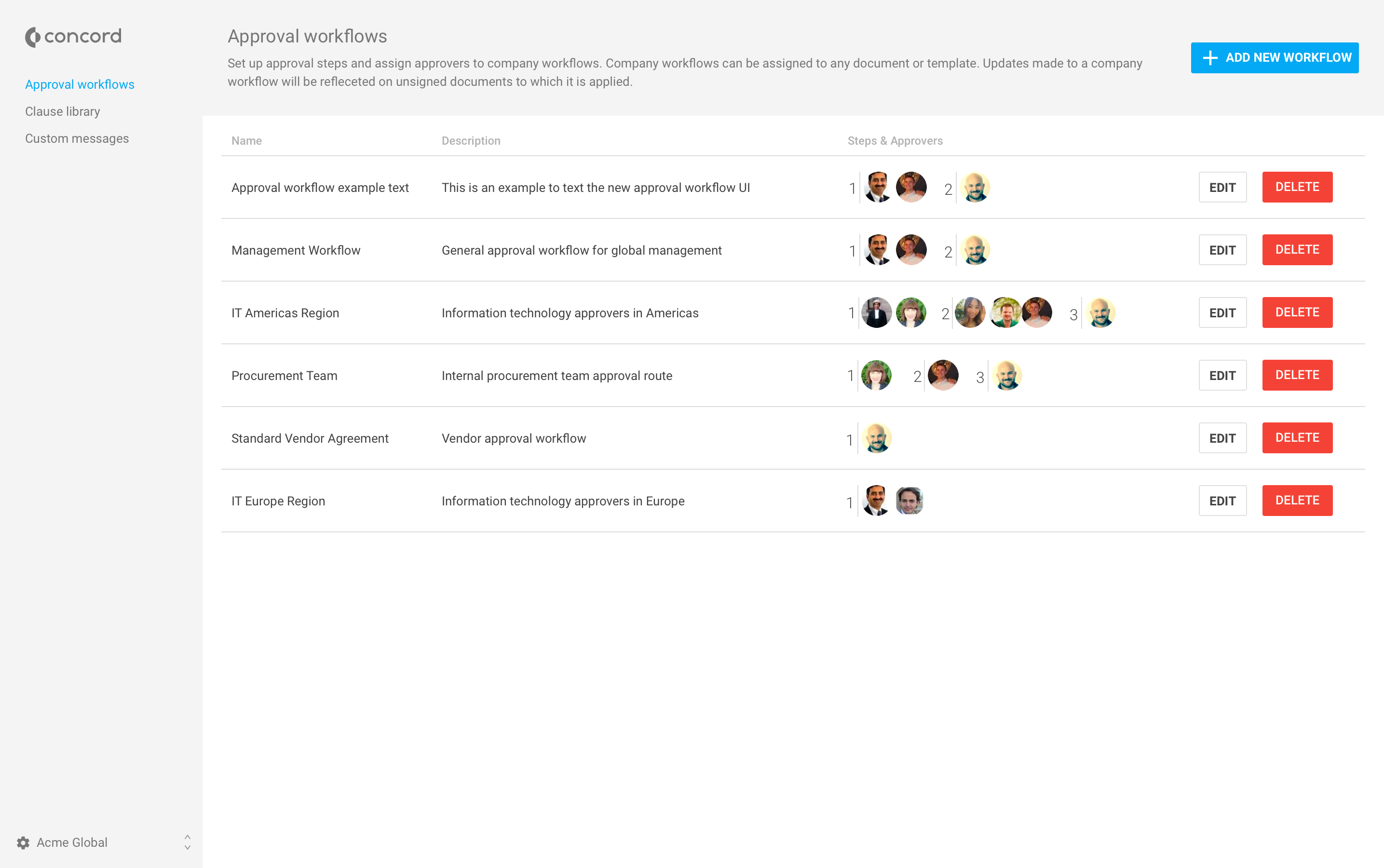
approval workflows. These help to decrease contract cycle times while guaranteeing correct signatures are secured, further driving compliance and protecting against risks.
Concord's advanced reporting, used to gain greater insights into the data in contracts.
the Concord Inbox, with a global search and advanced filtering to make organizing and finding documents easier, and to streamline completing contract-related tasks.
the approval workflows that decrease contract cycle times while guaranteeing correct signatures are secured, further driving compliance and protecting against risks.
online editing and redlining and a summary sheet with a discussion panel that keeps all conversations and changes tracked. A Word integration allows offline edits to also be tracked.
an example of a fully executed contract with legally admissible e-signatures.
a view of the Concord dashboard.

1 / 7

Top Performing Features

  • Contract creation

    Includes a document generator and tools for creating new contracts.

    Category average: 8.8

  • Approval process

    Approval workflows can be configured to streamline and automate the approval process; the approval process is helpful and convenient.

    Category average: 7.7

  • Interdepartmental workflows

    Users can set up interdepartmental workflows so that contracts can flow between teams in a logical and organized manner.

    Category average: 8

Areas for Improvement

  • Contract templates

    Allows users to set up templates or templatize old contracts in order to make new contract creation easier and more consistent.

    Category average: 8.5

  • Clause library/saved fields

    Users can save certain fields of a contract for re-use; these may be stored in a template or a clause library.

    Category average: 7.8

  • Contract search

    Users can easily look up contracts within the database.

    Category average: 8.3

What a game changer!

Pros

  • User friendly
  • Stores templates
  • Clear process flow

Cons

  • Make it easier to find the templates from any page
  • Improve the search function--it's sometimes difficult to find specific documents when searching
  • Change back to "limited editor" and "no editing rights" when sharing documents; the new term of "viewer" makes it seem like nothing can be edited at all

Return on Investment

  • Increased employee efficiency; no longer required to manually create multiple offer letters/contracts
  • Less room for error--multiple layers of approval in an easy to follow work flow
  • Improved candidate experience

Other Software Used

Greenhouse, Slack, Lattice

Usability

CMS Made Easy

Pros

  • Templates are easy to create and utilize.
  • Concord has its internal e-signature tool.
  • Concord can group by template, active, in progress, etc. and color codes the same.

Cons

  • The editing tool is not super user friendly.
  • The emails from Concord often get whitelisted at customers' email sites.

Return on Investment

  • Ease of getting contracts signed.
  • Keeping templates up to date.
  • Streamlined process.

Alternatives Considered

DocuSign CLM, formerly SpringCM and Conga Collaborate (formerly Octiv)

Other Software Used

DocuSign, Adobe Acrobat DC, BMC Helix Remedyforce

Usability

Ease of Use for Prior Contract Management System Administrators

Pros

  • Weekly streamlined summary reporting.
  • Ease of use inbox items.
  • Ease of use administrator settings.
  • Ease of use for other users.
  • Minimal training required.
  • Easy on-boarding and implementation.
  • At your fingers 24/7 assistance.
  • Easy to understand application.

Cons

  • Summary should be default screen, not discussion.
  • Tagging should be kept as simple as possible.
  • Templates could be expounded upon.

Return on Investment

  • Excellent ROI
  • Concord has had positive impact on your overall business objectives.
  • Faster overall conversions.
  • Increased employee efficiency.
  • Probable better customer service.

Great for SMB

Pros

  • Automated templates are incredibly easy to implement. Concord also does, for the most part, very well at keeping formatting when uploading documents in Word. The only downside is if you use formulas (naming convention for contracts), if you do not copy + paste as values before uploading then it will give the contract the name of the formula.

Cons

  • User management has been and still is, a pain point for us. We operate over a dozen entities and for the most part, anyone with access to Concord on our team has the same permissions across all entities. We must manage users one-by-one so onboarding + offboarding can be tedious.
  • The analytics are basic. I wish we could slice and dice and say "Show me only contracts tagged with X tag".

Return on Investment

  • Since our implementation, I am saving a few hours a month in managing our IC contracts.
  • When people have questions about contracts, now it's clear "Hey, look in Concord" versus "Hey, does John or Sally have this contract?".

Great Basic Contracting Tool

Pros

  • e-signatures (with notifications).
  • Templates (upload, create, change).
  • Secure storage.

Cons

  • For what we use, we do not see any areas that are in need of improvement.

Return on Investment

  • Because we are using the free version, there is no overall ROI although it has increased efficiency and customer service.

Other Software Used

Zoom, Skype, Join.me, QuickBooks Online, Accounting by Wave, WordPress, Yoast Wordpress SEO Plugins, Camtasia, Trello, Smartsheet, Asana, LastPass, Google Search Console, Google Analytics