TrustRadius: an HG Insights company

Adobe Acrobat Sign

Score8.5 out of 10

558 Reviews and Ratings

What is Adobe Acrobat Sign?

Acrobat Sign is an e-signature solution that combines simple and secure e-signatures with Adobe Acrobat. With Acrobat Sign, the user can create, sign, send for signature, manage, and track documents from one Adobe platform. The user can create signing experiences for customers and teams by enabling them to sign documents on any device or browser – anytime, anywhere. No additional software download or accounts are needed.

As Microsoft’s e-signature solution, Acrobat Sign integrates with any preferred Microsoft apps, so that users can save time by signing and requesting signatures from Microsoft 365, Teams, and Outlook. Plus, users can access integrations with Salesforce, Workday, and other apps they use every day.

Adobe Sign also helps to minimize legal and compliance risks, and it is designed to be globally compliant and legally-binding in nearly every country in the world.

The vendor's value proposition for Acrobat Sign:

· Global Adobe brand, trusted by Fortune 500 companies and 300K+ customers around the world

· Preferred e-signature solution with Microsoft – with comprehensive integrations with Microsoft apps

· 80+ integrations with key business apps

· Full portfolio of digital solutions – Access to a range of solutions built to grow with the company's needs, no matter the size of the business

· Transparent, all-inclusive pricing – no hidden fees or extra charges

Media

Send, sign, manage and archive documents with 100% legal e-signatures. Collecting e-signatures is as easy as swipe and tap with Adobe Sign. Sign from any device. Legally binding. Works with multiple apps. extremely cost-effective.
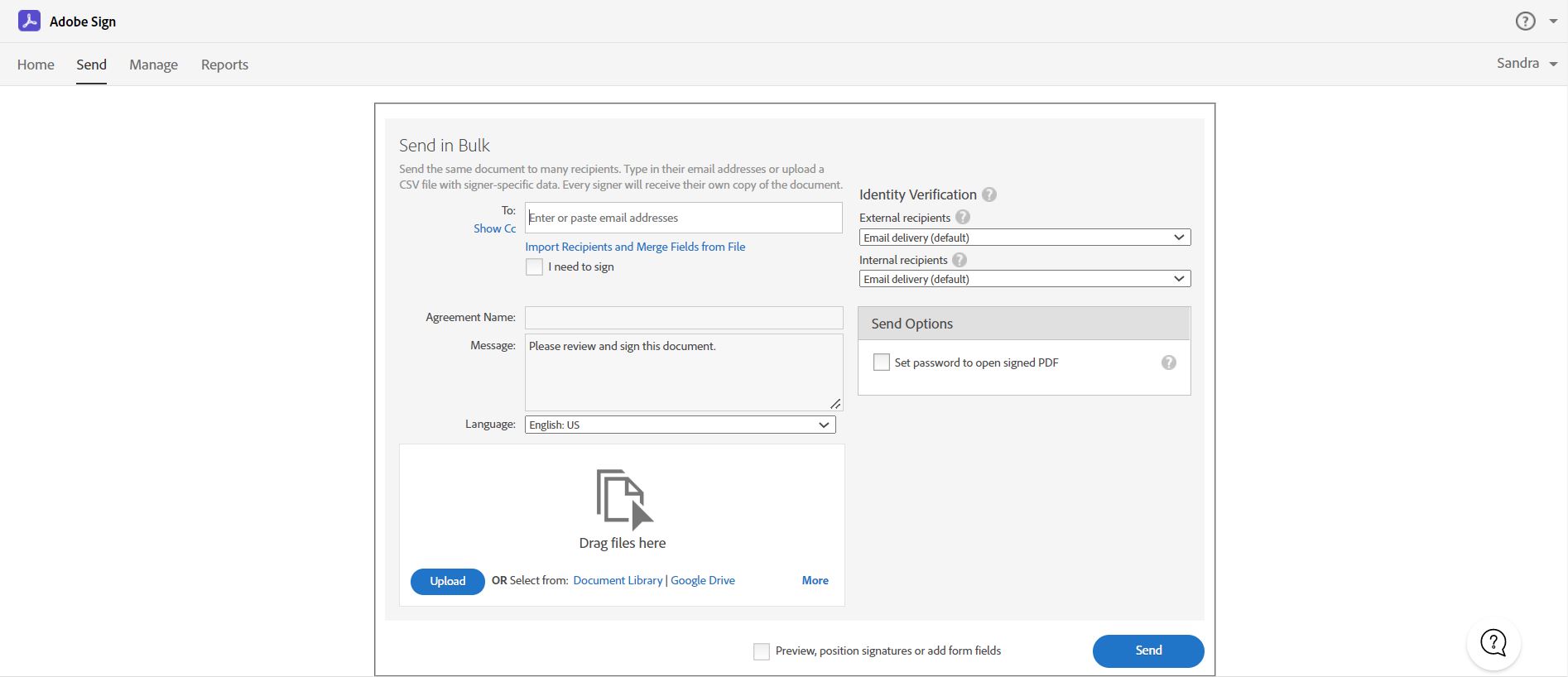
Easily send e-signature requests to multiple recipients using Send in bulk feature.  Send a document to multiple people with one click, and every recipient gets their own personalized form ready to sign.
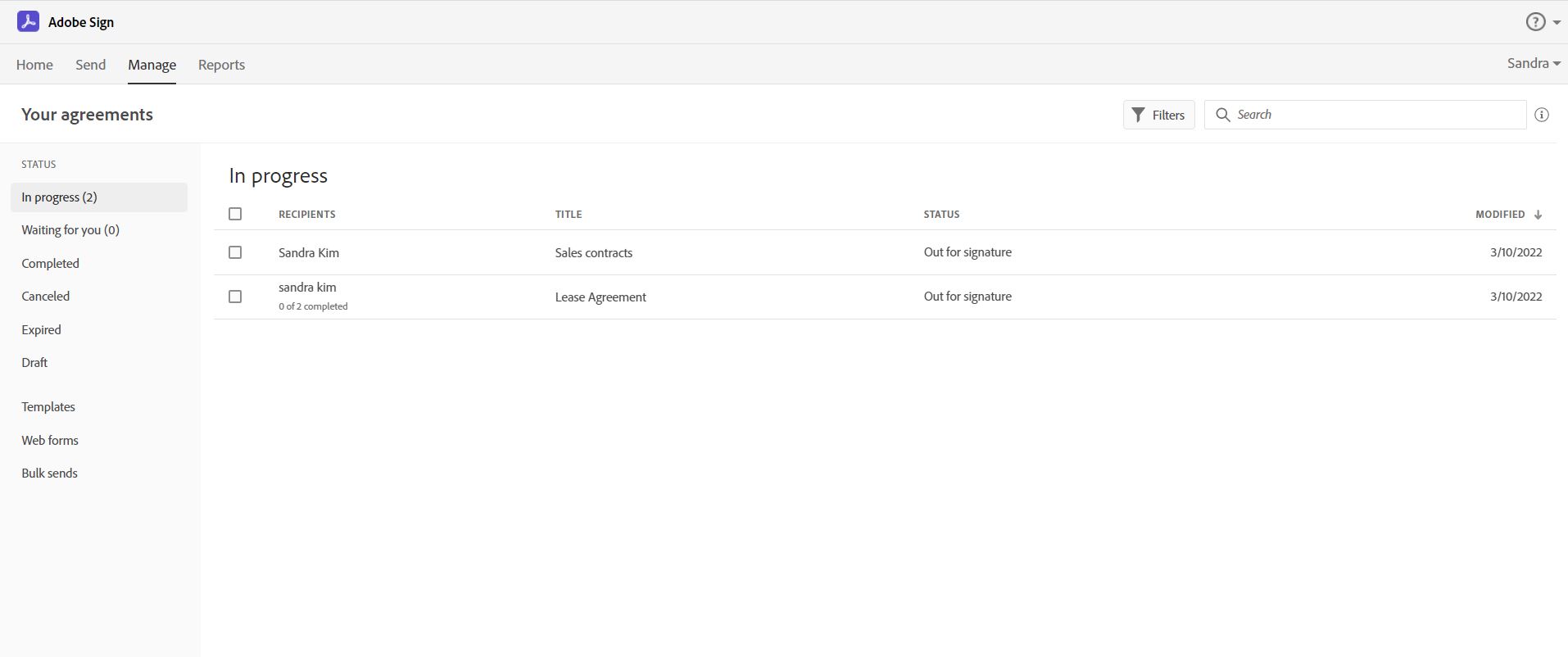
Track and manage signatures with Adobe Acrobat Sign.  Get real-time visibility for every document out for signature, and receive notifications when documents have been signed.
Create an online web form with Acrobat Sign.  It allows your recipients – whether they’re your employees or customers – to quickly access, complete, and sign critical documents without printing or mailing anything.  You will also get immediate access to the data and signatures.

1 / 4

Functional but not intuitive

Use Cases and Deployment Scope

Adobe Acrobat Sign is used to send out contracts for digital signature. I tried one other platform, but the client never received the document. This has gone through successfully so far.

Pros

  • Makes it to the client's inbox
  • Makes collecting signatures quick
  • Allows a specific signing order

Cons

  • The user experience is trash in my opinion. Things are disjointed and spread out. Things are not intuitive.
  • Logging in doesn't take you to the apps you have purchased. It instead takes you to a screen where you can buy more things. Usually I'm logging in to something because I want to use it.
  • It doesn't maintain formatting when uploading non-pdf files.
  • Locked into an annual contract. I would have cancelled already if I weren't because I feel it's so miserable to use. I should have spent more to go with the other big name in e-signing software, who I've used before and had a much better experience with.

Return on Investment

  • I wanted to minimize friction with getting client signatures. This accomplished that.
  • Because this is not intuitive to use, staff time is wasted in preparing documents for signature.

Usability

Alternatives Considered

DocuSign and PandaDoc

Diverse capabilities, but desire for increased user friendliness

Use Cases and Deployment Scope

We use Adobe Sign to get legal signatures on various documents. In HR, I use it to gain signatures on Offer Letters, Promotion Agreements, Disciplinary Documents, and anything that requires proof of review (Ex: Employee Handbook, Dress Code Doc). I will also use it sometimes when I am filling out a form that requires input from other employees.

Pros

  • The template feature is highly convenient, I can save frequently used forms to have them ready for sending quickly and easily
  • The bulk send feature is a huge time-saver. If I have one single document that will need a signature from every employee, I can send it to each person privately, all at the same time.
  • Once I send out a document for signature, I can monitor the progress and even see if the document has been viewed yet.

Cons

  • Sometimes Adobe Sign recognizes where the signature lines and other fields should be placed and it positions the fields accordingly. Sometimes it can't properly interpret the document and I have to manually line up the fields that will be filled in by the receivers
  • I have a lot of trouble when I add text boxes to documents. I can no longer create a text box that allows for multiple lines of text. This makes it difficult when the receivers of the document need to input in-depth feedback or explanations
  • I wish there were a tool to help aid in resizing the field boxes. Sometimes I make a certain size and want to duplicate the field box, but I can only copy and paste if the signer for that box is the same.

Return on Investment

  • Adobe Acrobat Sign has saved us a lot of time due to the bulk send feature.
  • Adobe Acrobat Sign has helped us to become more consistent due to the Template feature
  • Adobe Acrobat Sign is slightly more expensive than our last E-Sign application so our leadership does notice the increase in cost

Usability

Alternatives Considered

DocuSign

Adobe Acrobat Sign from the PDF folk

Use Cases and Deployment Scope

whenever we have a document that needs a digital signature, we use this validated and trusted platform. The days of faxing and getting a signature and then faxing it back and then couriering the original are long done with. Just compose the doc, process it and forward the doc for signature and store

Pros

  • send and send on behalf
  • standard for PDF
  • easy for end users to use

Cons

  • the initial set was hard, Adobe wiped our config and we had to start from scratch
  • the support is off shore so the language barrier was a huge issue

Return on Investment

  • ROI is easy, no more sending courier or snail mail for signatures
  • quick to get results and get the sales rolling

Usability

Alternatives Considered

DocuSign

Other Software Used

EaseUS Data Recovery Wizard Free, EaseUS Todo Backup, Acronis Advanced Backup

Adobe Worth A Cost-Benefit Analysis.

Use Cases and Deployment Scope

To create and customize PDF forms that are easily editable for the end-user. I use this primarily in a capacity for the submission of new contract requests, internal change requests, or the completion of general Human Resources administration forms. These are primarily focused on our Support Office team members (1,200+). Using Adobe Acrobat Sign versus our previous alternatives of Word/Excel documents has streamlined the process and made fillable fields clearer for end-users, as well as making the forms quicker to read with a clearer contrast between the field name and editable box.

Pros

  • Ability to convert an existing Word/Excel form into PDF for the purpose of Adobe Sign.
  • Customization of editable field boxes, e.g., formatting.
  • Mandatory vs. non-mandatory fields are useful for highlighting the really important information.
  • Locking the template once signatures have been added to ensure legitimacy.

Cons

  • Being able to make individual checkbox fields that aren't linked to all the others easily - the process of either copying and then renaming them all individually or else creating a brand new checkbox each time (especially if having to resize it and wanting them all to be consistent) is tedious and time-consuming.
  • The ability of Adobe to 'read' and auto-generate form field boxes off Word/Excel templates - often misses what I would consider quite obvious fields.

Return on Investment

  • From a cost perspective, we prefer alternate platforms.
  • From a setup and ease-of-use perspective, we prefer alternate platforms.

Usability

Alternatives Considered

DocuSign

Other Software Used

DocuSign, DocuSign CLM, SmartRecruiters, Adobe Acrobat, Adobe Acrobat Reader, Smartsheet, Microsoft 365, Microsoft Excel, Microsoft Powerpoint, Microsoft Access, OneNote, Microsoft Teams, Miro, MYOB PayGlobal, Atlassian Confluence, Atlassian Jira Align, Trello, Udemy for Business, Workday Peakon Employee Voice

Adobe Sign...Kinda Changed My Mind

Use Cases and Deployment Scope

The primary function of Adobe Acrobat Sign was to fill our need for software that can be utilized for quotes and legal agreements and signatures. The product must be easy to use with plug in templates that can be modified easily. Additionally, it must have layered authorization capability and integrate into our CRM.

Pros

  • Builds on very familiar Adobe platform
  • Signatures are easy to use
  • Easily editable templates
  • Enterprise security is top notch

Cons

  • Builds on Adobe platform so it is easy to utilize, but many features require enterprise subscription.
  • Integrations available but your CRM integration is only available with enterprise license.
  • Lots of templates but there are additional templates with enterprise only and there was no drag and drop editor.
  • Adobe captures some analytical metrics but many of the analytics we required were not available - specifically metrics related to how the tool converts and reduces use time by our team and the impact on clients.

Return on Investment

  • ROI was impacted by slow adoption metrics and rollout.
  • Cost was a factor when reviewing access levels to software, there were other options that provided more for less cost.
  • There was some pushback from staff and clients when the product was sunset but our choice for replacement quickly gained popularity and the data showed an increase in both conversion rate as well as a reduction in prep time and after sale time.

Usability

Alternatives Considered

DocuSign and PandaDoc

Other Software Used

PandaDoc, Google Analytics, HubSpot CRM