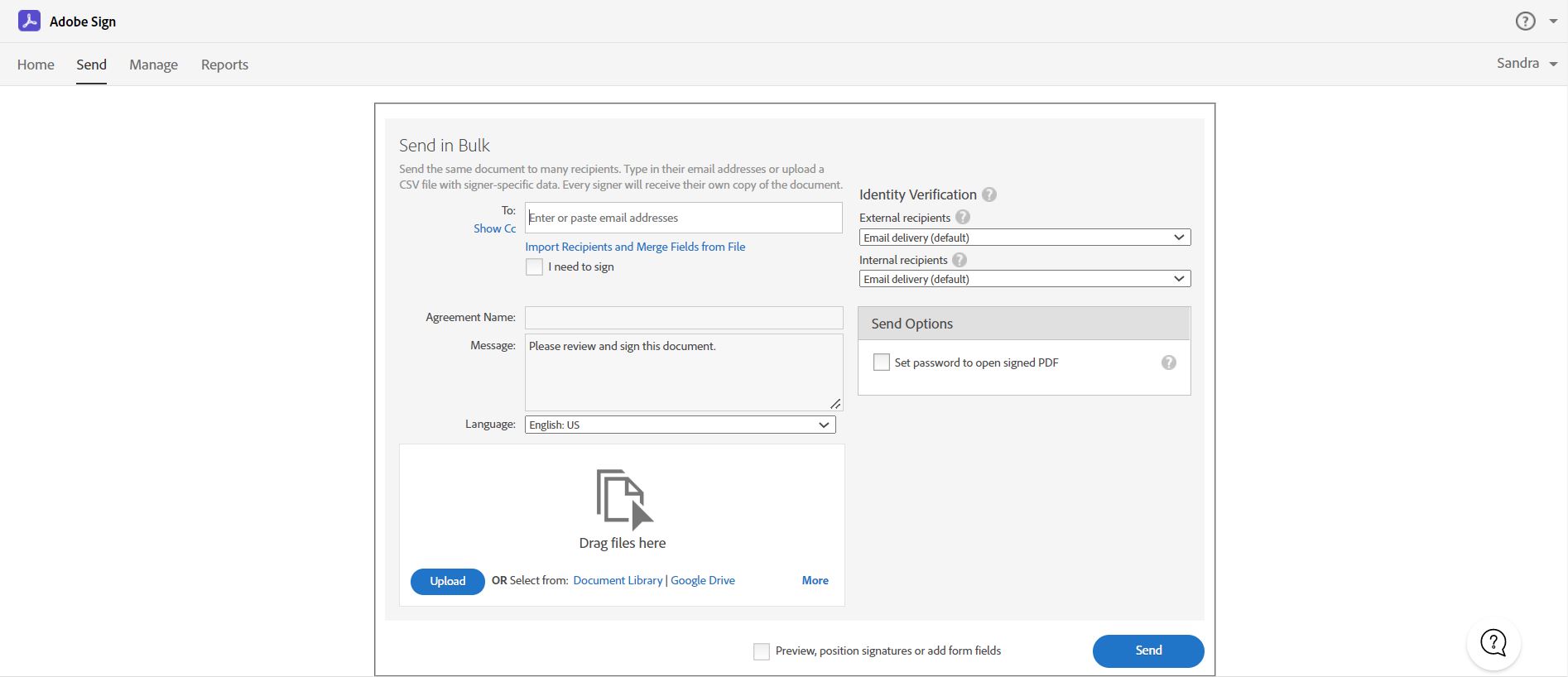
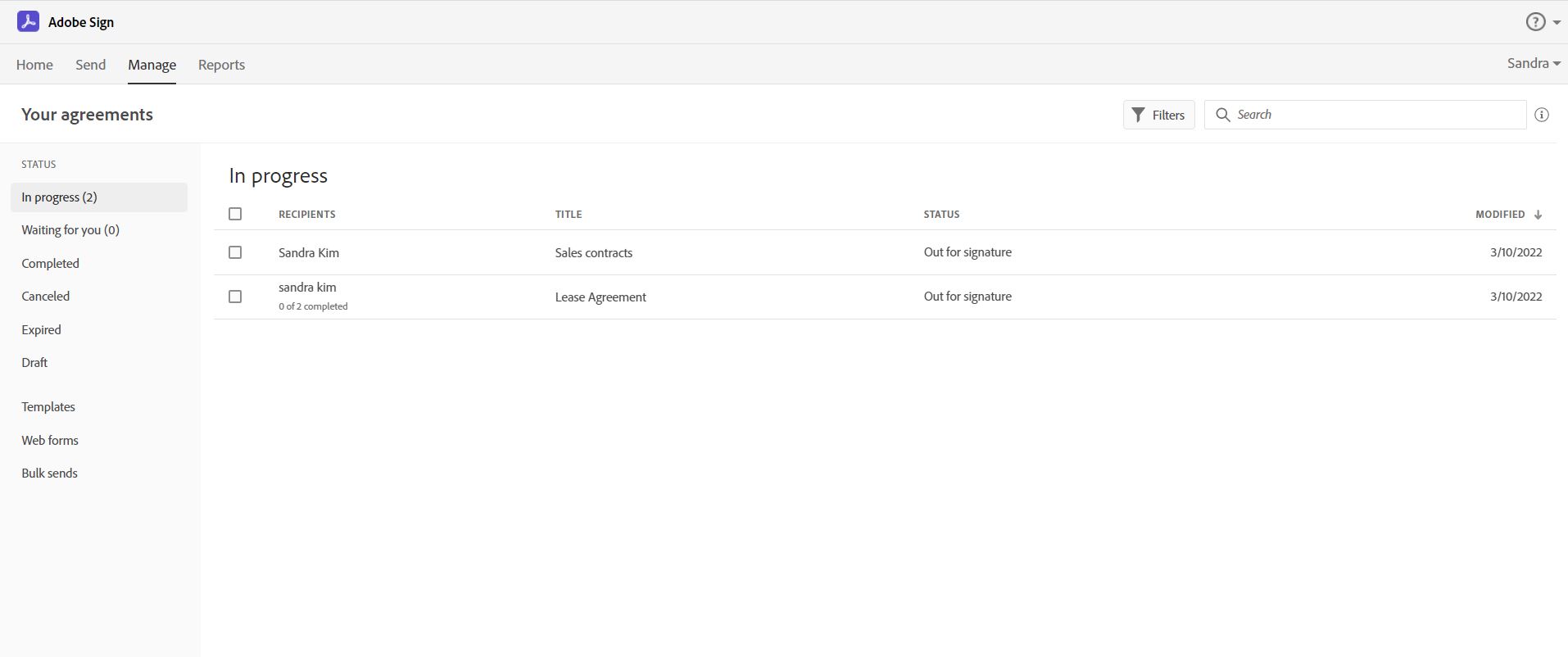
Acrobat Sign is an e-signature solution that combines simple and secure e-signatures with Adobe Acrobat. With Acrobat Sign, the user can create, sign, send for signature, manage, and track documents from one Adobe platform. The user can create signing experiences for customers and teams by enabling them to sign documents on any device or browser – anytime, anywhere. No additional software download or accounts are needed. As Microsoft’s e-signature solution, Acrobat Sign…
$14.99
per month license
airSlate SignNow
Score9.1 out of 10
N/A
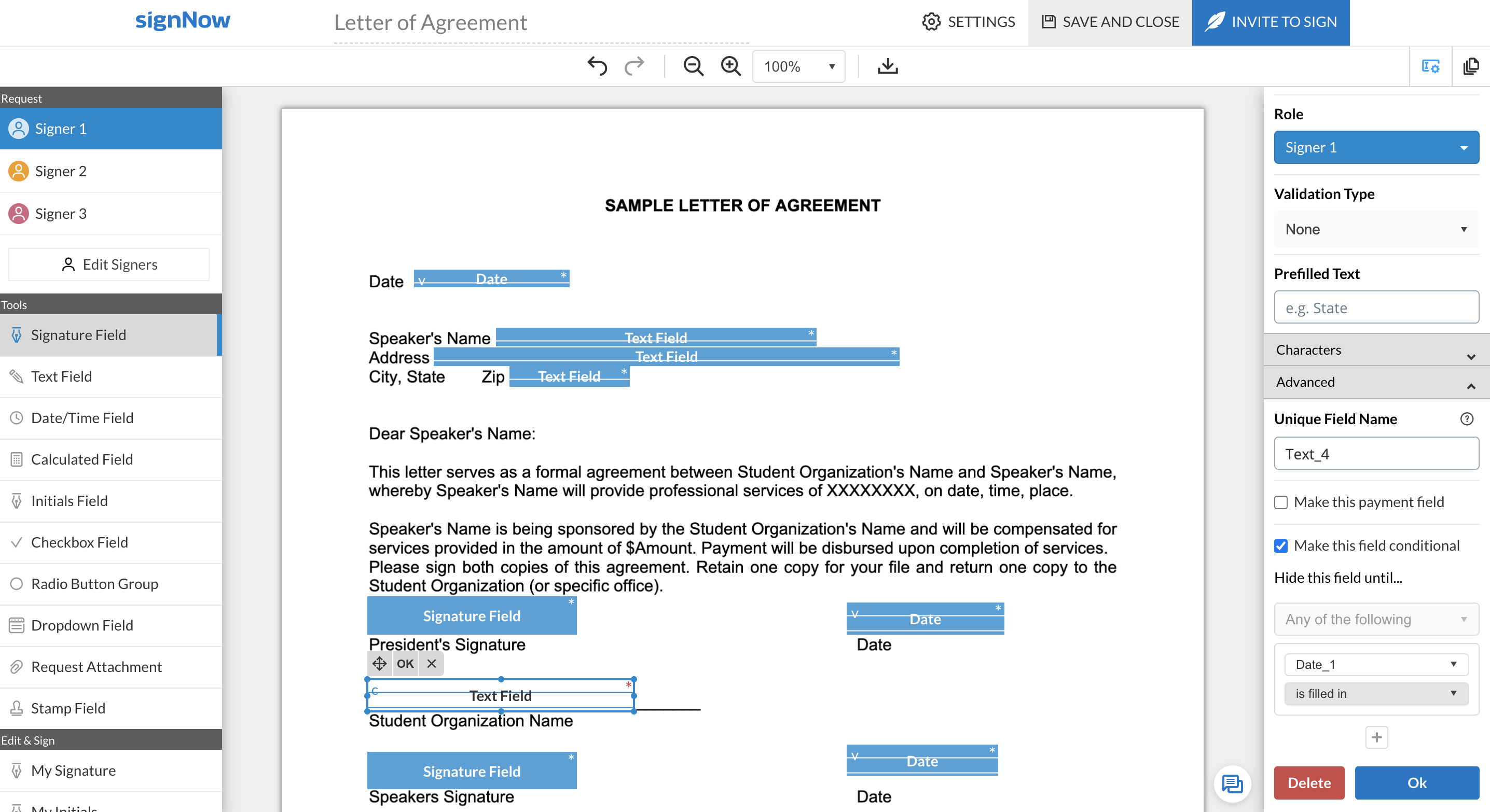
signNow is an eSignature solution with mobile apps for iOS and Android. signNow can be integrated into popular platforms and offers SaaS, public cloud, and private cloud deployment options with the same underlying API. This enables customers to leverage the power and usability of the signNow eSignature platform, while meeting their particular security and compliance requirements.
$1.50
one-time fee per signature invite
Pricing
Adobe Acrobat Sign
airSlate SignNow
Editions & Modules
Acrobat Standard DC for teams
$14.99
per month license
Acrobat Pro DC with advanced e-sign
$16.99
per month license
Acrobat Sign Solutions
Call 800-685-4192 for pricing
Site License
$1.50
one-time fee per signature invite
Business
$20
per month
Business Premium
$30
per month
Enterprise
$50
per month
Offerings
Pricing Offerings
Adobe Acrobat Sign
airSlate SignNow
Free Trial
Yes
Yes
Free/Freemium Version
No
No
Premium Consulting/Integration Services
Yes
Yes
Entry-level Setup Fee
$34.99 license per month
-$8 per user/month
Additional Details
—
All subscriptions include unlimited number of users. Up to a 60% discount available for annual pricing.
More Pricing Information
Community Pulse
Adobe Acrobat Sign
airSlate SignNow
Considered Both Products
Adobe
Verified User
Chose Adobe Acrobat Sign
It's been a while since we used SignNow, but as I recall Adobe Sign had better features and more friendly user interface. We wanted to be able to load multiple different forms into a packet and have shared fields carry through the document, so that when someone entered their …
A de minimis incentive was given to thank the reviewer for their time. The incentive was not used to bias or drive a particular response, nor was the incentive contingent on a positive endorsement. More Info
Jefe de Proyectos de Cómputo in Information Technology at Universidad Iberoamericana A.C. (Education Management, 1001-5000 employees)
Chose Adobe Acrobat Sign
Adobe Sign is very even with the options evaluated in the top of tools for electronic signatures. One of the big things that set it apart is the previous implementation we had with other Adobe products. This greatly simplifies the implementation as well as the necessary …
A de minimis incentive was given to thank the reviewer for their time. The incentive was not used to bias or drive a particular response, nor was the incentive contingent on a positive endorsement. More Info
A de minimis incentive was given to thank the reviewer for their time. The incentive was not used to bias or drive a particular response, nor was the incentive contingent on a positive endorsement. TR verified that a representative sample of customers was invited. More Info
Budget Analyst in Marketing at Renault (Automotive, 501-1000 employees)
Chose airSlate SignNow
In addition to SignNow, I've seen or used DocuSign, Adobe Sign, and DropBox. DocuSign is the most famous, but I found it a bit complicated to use at first. Adobe Sign is also good, but I felt it was more "heavy", with more stuff than we really need. I found Drobox to be very …
A de minimis incentive was given to thank the reviewer for their time. The incentive was not used to bias or drive a particular response, nor was the incentive contingent on a positive endorsement. TR verified that a representative sample of customers was invited. More Info
Office Manager in Customer Service at Capizzi MD (Health, Wellness and Fitness, 11-50 employees)
Chose airSlate SignNow
The most cost-effective platform for our size and needs. Some had barriers such as needing to download an application or not a household name, and thus, needed some more "pointing out" and following up with. SignNow also has a great, Incognito Alerts setting where you can …
A de minimis incentive was given to thank the reviewer for their time. The incentive was not used to bias or drive a particular response, nor was the incentive contingent on a positive endorsement. More Info
Verified User
Chose airSlate SignNow
It comes at about half the cost and has all the same features, so SignNow was an obvious choice.
A de minimis incentive was given to thank the reviewer for their time. The incentive was not used to bias or drive a particular response, nor was the incentive contingent on a positive endorsement. More Info
Verified User
Chose airSlate SignNow
SignNow was the cheapest option at the time, so the decision to use it was driven by the cost alone, given the feature parity.
A de minimis incentive was given to thank the reviewer for their time. The incentive was not used to bias or drive a particular response, nor was the incentive contingent on a positive endorsement. More Info
Owner in Corporate at Dot Xero (Marketing and Advertising, 1-10 employees)
Chose airSlate SignNow
I liked EchoSign when I had signed up. I moved to SignNow (which was CudaSign when I signed up) and paid a lot less. It was inexpensive enough at the time where I could overlook the bad design since AdobeSign (then EchoSign) had a great interface. Fields were easier top place …
A de minimis incentive was given to thank the reviewer for their time. The incentive was not used to bias or drive a particular response, nor was the incentive contingent on a positive endorsement. More Info
Vice President,Latin America in Sales at LiveU (Broadcast Media, 201-500 employees)
Chose airSlate SignNow
User-friendly. SignNow also has an affordable cost for individuals and small businesses while still including a top performance. Only one license works across many different platforms, and it's recognized and accepted across many countries.
A de minimis incentive was given to thank the reviewer for their time. The incentive was not used to bias or drive a particular response, nor was the incentive contingent on a positive endorsement. More Info
A de minimis incentive was given to thank the reviewer for their time. The incentive was not used to bias or drive a particular response, nor was the incentive contingent on a positive endorsement. More Info
Acrobat Sign isn't quite as user friendly as other E-Sign platforms I have used. However, it offers a wide range of features that provide convenience and efficiency. For example, I can have multiple people receive the same document separately, or I can have multiple people receive and review the exact same document. I also like that I can choose to set a signing order or not, this is important for when I send Offer Letters and other things that require order of approvals.
SignNow is particularly useful for simple documents, forms and contracts where there the fields are pretty standards- names, signature block, title. It would be helpful to have features that allow substitution of certain fill in the blanks such that allow you to use the same template but first have a dialog to integrate language for a person, corporation, partnership or LLP. I'm a lawyer and having the ability to assemble variation of this nature into one template would be helpful. Also (and it may do this) the ability to change the actual form/document within the a template would be useful.
A de minimis incentive was given to thank the reviewer for their time. The incentive was not used to bias or drive a particular response, nor was the incentive contingent on a positive endorsement. More Info
Adobe Acrobat Sign tracks whether or not a signer has viewed a document
Adobe Acrobat Sign tracks when a signer has signed, and the document has been sent to the next signer
Adobe Acrobat Sign sends you confirmation emails and progress update emails along the way
Adobe Acrobat Sign provides a "confirmation of signing" page at the end of the document package you put together, to prove the signatures are authentic
A de minimis incentive was given to thank the reviewer for their time. The incentive was not used to bias or drive a particular response, nor was the incentive contingent on a positive endorsement. More Info
A de minimis incentive was given to thank the reviewer for their time. The incentive was not used to bias or drive a particular response, nor was the incentive contingent on a positive endorsement. More Info
Builds on Adobe platform so it is easy to utilize, but many features require enterprise subscription.
Integrations available but your CRM integration is only available with enterprise license.
Lots of templates but there are additional templates with enterprise only and there was no drag and drop editor.
Adobe captures some analytical metrics but many of the analytics we required were not available - specifically metrics related to how the tool converts and reduces use time by our team and the impact on clients.
A de minimis incentive was given to thank the reviewer for their time. The incentive was not used to bias or drive a particular response, nor was the incentive contingent on a positive endorsement. TR verified that a representative sample of customers was invited. More Info
When using shared templates, the option to rename the document is at the bottom of the signatures page. I would like that to be visible sooner as some of my team misses it and sends documents to clients with the templated name instead of the correct name because they forgot to scroll down far enough to see it.
CC'ed contacts used to show suggestions as you typed the email if you've sent that person a document before, but that functionality no longer shows on our account. I'd like to see that brought back.
It would be nice if we could add folders to our documents page so that we could sort sent and signed documents into individual client folders. The search feature works fine, but folders would help clean up the view for my team.
A de minimis incentive was given to thank the reviewer for their time. The incentive was not used to bias or drive a particular response, nor was the incentive contingent on a positive endorsement. More Info
It is by far the easiest service we have used to obtain digital signatures from employees. In the past we had done it by hand (a process I would not recommend for 1500+ employees) and with another company that would not allow us to create our own forms and would charge us for each form.
A de minimis incentive was given to thank the reviewer for their time. The incentive was not used to bias or drive a particular response, nor was the incentive contingent on a positive endorsement. More Info
The features are too limited. The biggest issue though is the flexibility for editing existing forms without having to create a whole new form. The other issues are its payment partner options, lack of automation, and logic flow. We plan to quit this software and use other software in its place.
A de minimis incentive was given to thank the reviewer for their time. The incentive was not used to bias or drive a particular response, nor was the incentive contingent on a positive endorsement. TR verified that a representative sample of customers was invited. More Info
I've had very little trouble with it in all my uses with it. I do wish the text boxes you add wouldn't cut off the text if you entered too many words and that it would adjust it's size to fit within the space you've provided. However, that just takes a little refining in the initial set up of the document before you send it out.
A de minimis incentive was given to thank the reviewer for their time. The incentive was not used to bias or drive a particular response, nor was the incentive contingent on a positive endorsement. TR verified that a representative sample of customers was invited. More Info
In terms of core functionality - adding options for signatures, text, dates, check boxes, etc., as well as customising the body of the request, the title of the request, follow-ups / reminders for signature, etc., SignNow is great. It's really easy to navigate and use in this regard. SignNow loses points when it comes to the end-user who needs to sign. There's an option for them to either use the app (which is most prominent in the page that shows when they open the request) or to sign using their browser (which is much smaller). I had my assistant create this step by step guide for our clients, so they can complete the request the way we need them to:https://docs.google.com/presentation/d/1FopYjlykHMFjIAQjgaNLtNIvSCQND_kb86-U9bA5M2A/edit?usp=sharing As far as I'm aware, you can't make it mandatory for them to draw their signature, and there's no option to remove the prompt for them to download the app when signing on their mobile device. I really wish these were options, but they don't take away from the fact it does what it is intended to do, and it does it well.
A de minimis incentive was given to thank the reviewer for their time. The incentive was not used to bias or drive a particular response, nor was the incentive contingent on a positive endorsement. More Info
I would have rated this a 9 or greater had they not had had such critical outages. They have taken steps to resolve this so I may come in and revise this
SignNow is always available when I need it. It seems that most updates occur outside of business hours so I have full functionality when I need it most between the hours of 8am-6pm EST. There has only been I time when I experience application errors when I need to use the system but it did not last long and the issue was resolved within a few hours.
A de minimis incentive was given to thank the reviewer for their time. The incentive was not used to bias or drive a particular response, nor was the incentive contingent on a positive endorsement. More Info
The Adobe Acrobat Sign's performance are excellent.
When we send electronic document by email for signature all the customers receive it regularly, nobody has any issue to open it and the signature phase was very easy. The user-friendly aspect of this product reduce or reset the call for IT support
A de minimis incentive was given to thank the reviewer for their time. The incentive was not used to bias or drive a particular response, nor was the incentive contingent on a positive endorsement. TR verified that a representative sample of customers was invited. More Info
It is a great tool to get signatures from the client and has reduced a lot of overhead that was caused before resulting in very long delays. With the integration of Adobe Acrobat Sign, we have reduced this delay making the process much smoother and more efficient.
A de minimis incentive was given to thank the reviewer for their time. The incentive was not used to bias or drive a particular response, nor was the incentive contingent on a positive endorsement. More Info
781 / 5,000Translation resultsTranslation resultMy experience with airSlate SignNow support has been super ok so far. I only had to contact them once because a document got stuck when I was signing it, so I sent them an email and they responded the next day. They solved the problem, but I found it a bit slow... They could have more direct support, like live chat or even WhatsApp. I believe that if there was a subscription plan for dedicated support it would also be very interesting. For example, a large company with several signature routines, including important signatures that block important workflow processes and sometimes with high added value, these companies, due to the risks, do not want to stop a process because of a signature, so they would not mind investing a little more in dedicated support. Minha experiência com o suporte do airSlate SignNow foi super ok até agora. Só precisei entrar em contato uma vez porque um documento travou na hora de assinar, aí mandei um e-mail e eles responderam no dia seguinte. Resolveram o problema, mas achei meio demorado... podia ter um suporte mais direto, tipo chat ao vivo ou até WhatsApp, acredito que se houvesse um plano de assinatura para suporte dedicado também seria bem interessante, por exemplo uma empresa grande com varias rotinas de assinaturas, entre elas temos assinaturas importantes que travem procesos de Workflow importantes e as vezes de alto valor agregrado, essas empresas devido as riscos não querem parar um processo por conta de um assinatura, por isso não ligariam de investir um pouco mais em suporte dedicado.
A de minimis incentive was given to thank the reviewer for their time. The incentive was not used to bias or drive a particular response, nor was the incentive contingent on a positive endorsement. TR verified that a representative sample of customers was invited. More Info
The best types of training are well integrated into the product and Echosign does this well. As mentioned earlier in my review - there are some areas of functionality that can be difficult to understand ("only I sign") for the novice user. Other areas such as macro usage, bulk signature and so on were easily learned and understood via the online tools.
It was nice to be shown the basics of the system and be able to see or understand the specific functions our company would need to use, such as the template creation, document grouping and document group templates. Being taught on how to use these functions, made learning them much easier.
A de minimis incentive was given to thank the reviewer for their time. The incentive was not used to bias or drive a particular response, nor was the incentive contingent on a positive endorsement. More Info
We did not use it in the manner that most companies do, so I am pleased with how our company handled implementation. We will be pushing the full company over into Echosign for various processes which will incorporate more of an implementation effect.
Make sure you know exactly what you need before implementation and be sure to ask how to use the most important functions of the system that you will be using.
A de minimis incentive was given to thank the reviewer for their time. The incentive was not used to bias or drive a particular response, nor was the incentive contingent on a positive endorsement. More Info
They are just different. Adobe's number one feature that puts it above it's competitors is that your document, the signing process, all of it exists within Adobe. There is no need to go from Word, to Adobe, to DocuSign. It saves you time and makes life easy for you (and for your clients).
A de minimis incentive was given to thank the reviewer for their time. The incentive was not used to bias or drive a particular response, nor was the incentive contingent on a positive endorsement. TR verified that a representative sample of customers was invited. More Info
I chose airSlate SignNow over DocuSign primarily due to the superior ease of use and a more intuitive user interface (UI). airSlate SignNow's UI stood out with its simplicity and well-thought-out design, making the entire process of signing and managing documents much more straightforward.The drag-and-drop functionality and the ability to customize signature fields in airSlate SignNow were additional factors that tipped the scale in its favor. These features not only streamlined the signing process but also allowed for a more personalized and efficient document management experience.
A de minimis incentive was given to thank the reviewer for their time. The incentive was not used to bias or drive a particular response, nor was the incentive contingent on a positive endorsement. More Info
At the beginning we assigned Adobe Acrobat Sign just to Purchase Office Department because at that moment we needed a tool that supported us to avoid manual signature and was compliance with remote working.
Now we are using it also in other situation because it help us with time and we can also reduce cost
A de minimis incentive was given to thank the reviewer for their time. The incentive was not used to bias or drive a particular response, nor was the incentive contingent on a positive endorsement. TR verified that a representative sample of customers was invited. More Info
A de minimis incentive was given to thank the reviewer for their time. The incentive was not used to bias or drive a particular response, nor was the incentive contingent on a positive endorsement. TR verified that a representative sample of customers was invited. More Info
A de minimis incentive was given to thank the reviewer for their time. The incentive was not used to bias or drive a particular response, nor was the incentive contingent on a positive endorsement. More Info