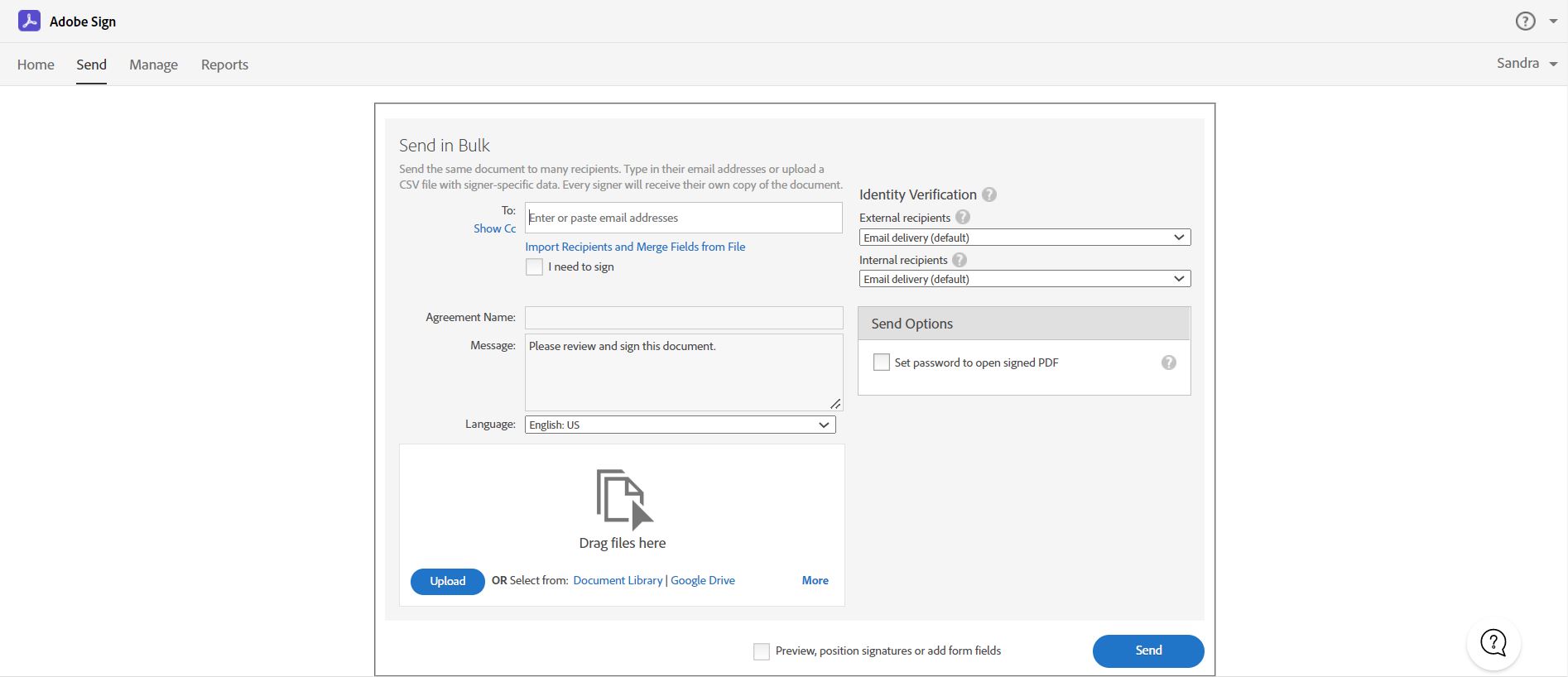
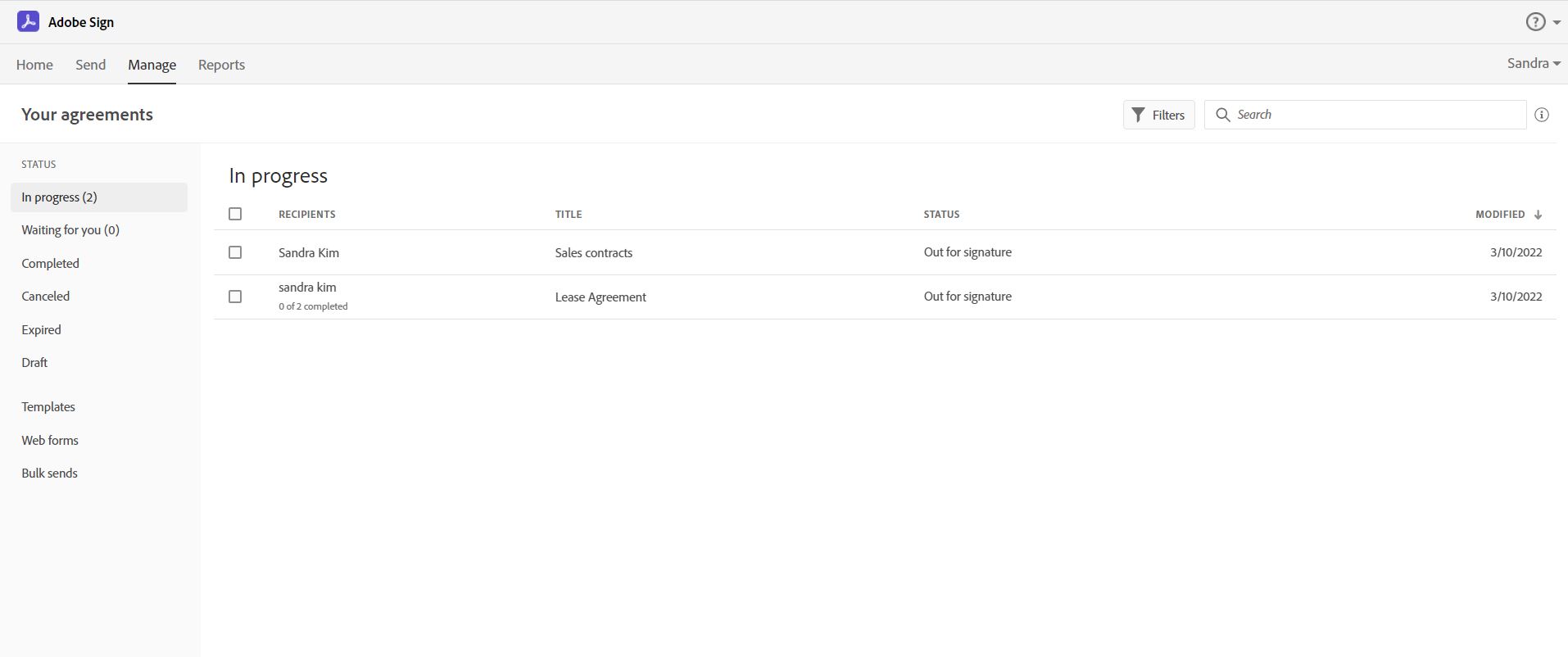
Acrobat Sign is an e-signature solution that combines simple and secure e-signatures with Adobe Acrobat. With Acrobat Sign, the user can create, sign, send for signature, manage, and track documents from one Adobe platform. The user can create signing experiences for customers and teams by enabling them to sign documents on any device or browser – anytime, anywhere. No additional software download or accounts are needed. As Microsoft’s e-signature solution, Acrobat Sign…
$14.99
per month license
PandaDoc
Score9 out of 10
N/A
PandaDoc headquartered in San Francisco offers their eponymous electronic signature platform for sales teams, containing sales proposal automation and CPQ (configure, price, quote) features, and integration with CRMs.
$35
per month per seat
Pricing
Adobe Acrobat Sign
PandaDoc
Editions & Modules
Acrobat Standard DC for teams
$14.99
per month license
Acrobat Pro DC with advanced e-sign
$16.99
per month license
Acrobat Sign Solutions
Call 800-685-4192 for pricing
Starter
$35
per month per seat
Business
$65
per month per seat
Enterprise
Contact Sales
Offerings
Pricing Offerings
Adobe Acrobat Sign
PandaDoc
Free Trial
Yes
Yes
Free/Freemium Version
No
No
Premium Consulting/Integration Services
Yes
Yes
Entry-level Setup Fee
$34.99 license per month
Optional
Additional Details
—
PandaDoc offers a free eSign plan and 3 paid packages for eSigning and document automation. All plans include unlimited documents and eSignatures. Evaluations start with a free 14-day trial. Up to a 46% discount for annual pricing.
More Pricing Information
Community Pulse
Adobe Acrobat Sign
PandaDoc
Considered Both Products
Adobe
Verified User
Chose Adobe Acrobat Sign
I chose Acrobat Sign over DocuSign based on cost. Having used DocuSign previously, it would have been worth the extra money to stay with them. PandaDoc seemed straightforward and cost-effective, but I wanted to use a brand that would have wider recognition.
A de minimis incentive was given to thank the reviewer for their time. The incentive was not used to bias or drive a particular response, nor was the incentive contingent on a positive endorsement. More Info
Sales and Customer Success at Cross-Sell in Sales at Cross-Sell (Automotive, 11-50 employees)
Chose Adobe Acrobat Sign
Using DocuSign for years and then Adobe Acrobat Sign, the decision to try PandaDoc was a surprise but they quickly captured our teams interest and eventually our business. The analytics, drag and drop features for template creation and the ability to modify documents on the fly …
A de minimis incentive was given to thank the reviewer for their time. The incentive was not used to bias or drive a particular response, nor was the incentive contingent on a positive endorsement. TR verified that a representative sample of customers was invited. More Info
Verified User
Chose Adobe Acrobat Sign
They are just different. Adobe's number one feature that puts it above it's competitors is that your document, the signing process, all of it exists within Adobe. There is no need to go from Word, to Adobe, to DocuSign. It saves you time and makes life easy for you (and for …
A de minimis incentive was given to thank the reviewer for their time. The incentive was not used to bias or drive a particular response, nor was the incentive contingent on a positive endorsement. TR verified that a representative sample of customers was invited. More Info
Verified User
Chose Adobe Acrobat Sign
Adobe Sign has the brand-name edge on the other products. It is towards the upper end of the price range, with features comparable to the others. It would be a stronger contender if it had support and if logging in wasn't such a challenge. Not my first choice, but not a bad …
A de minimis incentive was given to thank the reviewer for their time. The incentive was not used to bias or drive a particular response, nor was the incentive contingent on a positive endorsement. More Info
Executive Assistant in Corporate at Hercules LED (Utilities, 11-50 employees)
Chose Adobe Acrobat Sign
I like that its incorporated WITH ALL Adobe products so I can create a PDF or edit one and attach my signature RIGHT there or send it off for signature all in one go.
A de minimis incentive was given to thank the reviewer for their time. The incentive was not used to bias or drive a particular response, nor was the incentive contingent on a positive endorsement. TR verified that a representative sample of customers was invited. More Info
PandaDoc
Verified User
Chose PandaDoc
ease of use and simplicity for the customer experience
A de minimis incentive was given to thank the reviewer for their time. The incentive was not used to bias or drive a particular response, nor was the incentive contingent on a positive endorsement. More Info
A de minimis incentive was given to thank the reviewer for their time. The incentive was not used to bias or drive a particular response, nor was the incentive contingent on a positive endorsement. More Info
Verified User
Chose PandaDoc
much better. The pricing structures worked a lot better than the other companies because we are a small clinic
A de minimis incentive was given to thank the reviewer for their time. The incentive was not used to bias or drive a particular response, nor was the incentive contingent on a positive endorsement. More Info
A de minimis incentive was given to thank the reviewer for their time. The incentive was not used to bias or drive a particular response, nor was the incentive contingent on a positive endorsement. More Info
Partner and Director in Corporate at SurrogateFirst (Professional Training & Coaching, 11-50 employees)
Chose PandaDoc
We chose PandaDoc for its ease of use and tools that allow a professional feel. The convenience for our clients to review and sign agreements also helped us make the decision to go with PandaDoc.
A de minimis incentive was given to thank the reviewer for their time. The incentive was not used to bias or drive a particular response, nor was the incentive contingent on a positive endorsement. More Info
A de minimis incentive was given to thank the reviewer for their time. The incentive was not used to bias or drive a particular response, nor was the incentive contingent on a positive endorsement. TR verified that a representative sample of customers was invited. More Info
CEO (Chief Executive Officer) in Corporate at thedigital505 (Internet, 1-10 employees)
Chose PandaDoc
PandaDoc is way easier to use than any other document system that I’ve experienced. The value proposition is definitely better than competitors, both the desktop and mobile user experience is significantly better, the functionality is much more intuitive, and the product is …
A de minimis incentive was given to thank the reviewer for their time. The incentive was not used to bias or drive a particular response, nor was the incentive contingent on a positive endorsement. More Info
A de minimis incentive was given to thank the reviewer for their time. The incentive was not used to bias or drive a particular response, nor was the incentive contingent on a positive endorsement. More Info
A de minimis incentive was given to thank the reviewer for their time. The incentive was not used to bias or drive a particular response, nor was the incentive contingent on a positive endorsement. More Info
Consultant in Professional Services at Tangible Results Now! (Professional Training & Coaching, 1-10 employees)
Chose PandaDoc
PandaDoc stacks up above and beyond. It's replaced having to create a document in Word, save it to PDF, and then upload it for signature in an e-sign tool. I can create my documents in the editor. Present proposals in presentation mode instead of powerpoint and send directly …
A de minimis incentive was given to thank the reviewer for their time. The incentive was not used to bias or drive a particular response, nor was the incentive contingent on a positive endorsement. More Info
Verified User
Chose PandaDoc
We selected PandDoc initially for the cost savings and grew very happy with it after using for several months.
A de minimis incentive was given to thank the reviewer for their time. The incentive was not used to bias or drive a particular response, nor was the incentive contingent on a positive endorsement. More Info
A de minimis incentive was given to thank the reviewer for their time. The incentive was not used to bias or drive a particular response, nor was the incentive contingent on a positive endorsement. More Info
Verified User
Chose PandaDoc
PandaDoc is more accessible and easy to use then several of its competitors which we have trialed but do not match up to all of the functionalities available in this software. Lacking straight forward navigation and all of the field tools offered even in the unpaid version. We …
A de minimis incentive was given to thank the reviewer for their time. The incentive was not used to bias or drive a particular response, nor was the incentive contingent on a positive endorsement. More Info
Co-Founder + Co-CEO in Marketing at ALLAUR (Marketing & Advertising, 1-10 employees)
Chose PandaDoc
PandaDocs is way easier to use on the back end. So much more capabilities and custom field options. Because of this, it makes it extremely easy for recipients to complete fields accurately. Using Adobe, we would have to upload existing documents for signature but with PandaDocs …
A de minimis incentive was given to thank the reviewer for their time. The incentive was not used to bias or drive a particular response, nor was the incentive contingent on a positive endorsement. TR verified that a representative sample of customers was invited. More Info
Chief of Staff in Human Resources at Hearken (Newspapers, 1-10 employees)
Chose PandaDoc
We looked at several other products, most notably Adobe and DocuSign. We found PandaDoc to be easier to use and a better value. There might be a couple of additional features with Adobe or DocuSign, but PandaDoc has done everything we've needed for our amount of e-signing needs …
A de minimis incentive was given to thank the reviewer for their time. The incentive was not used to bias or drive a particular response, nor was the incentive contingent on a positive endorsement. More Info
Verified User
Chose PandaDoc
We tried DocuSign first but found the learning curve too steep. PandaDoc was able to launch almost instantly for us.
A de minimis incentive was given to thank the reviewer for their time. The incentive was not used to bias or drive a particular response, nor was the incentive contingent on a positive endorsement. More Info
A de minimis incentive was given to thank the reviewer for their time. The incentive was not used to bias or drive a particular response, nor was the incentive contingent on a positive endorsement. More Info
A de minimis incentive was given to thank the reviewer for their time. The incentive was not used to bias or drive a particular response, nor was the incentive contingent on a positive endorsement. TR verified that a representative sample of customers was invited. More Info
A de minimis incentive was given to thank the reviewer for their time. The incentive was not used to bias or drive a particular response, nor was the incentive contingent on a positive endorsement. TR verified that a representative sample of customers was invited. More Info
Verified User
Chose PandaDoc
While much less powerful, PandaDoc gives much more aesthetic depth.
A de minimis incentive was given to thank the reviewer for their time. The incentive was not used to bias or drive a particular response, nor was the incentive contingent on a positive endorsement. More Info
Verified User
Chose PandaDoc
PandaDoc's integration with Pipedrive and template design capabilities helped it win out over these other services. Again, the major complaint is not having a radio button in as a form element. It is desperately needed and still means we are hanging on to these other services …
A de minimis incentive was given to thank the reviewer for their time. The incentive was not used to bias or drive a particular response, nor was the incentive contingent on a positive endorsement. TR verified that a representative sample of customers was invited. More Info
Verified User
Chose PandaDoc
The main reason we selected PandaDoc was the Bulk Send feature. Our data comes out of other databases in Excel and I didn't want to have to use yet another 3rd party software to load that information before integrating with an eSignature engine. PandaDoc was one of the only …
A de minimis incentive was given to thank the reviewer for their time. The incentive was not used to bias or drive a particular response, nor was the incentive contingent on a positive endorsement. TR verified that a representative sample of customers was invited. More Info
A de minimis incentive was given to thank the reviewer for their time. The incentive was not used to bias or drive a particular response, nor was the incentive contingent on a positive endorsement. TR verified that a representative sample of customers was invited. More Info
Verified User
Chose PandaDoc
We compared it to Adobe Sign but this came out a lot more expensive. PandaDoc is a very reasonable price for the amount you can do on it.
A de minimis incentive was given to thank the reviewer for their time. The incentive was not used to bias or drive a particular response, nor was the incentive contingent on a positive endorsement. More Info
A de minimis incentive was given to thank the reviewer for their time. The incentive was not used to bias or drive a particular response, nor was the incentive contingent on a positive endorsement. More Info
PandaDoc and Adobe Sign are both tools competing in the eSignature software space. PandaDoc’s key feature is eSignature. However, it also supports contract and proposal management. PandaDoc also has a related tool Quote Roller, focused on sales proposal automation.
Adobe Sign, as its name suggests, is primarily focused on eSignature as well. While an increasing number of eSignature products feature advanced functions such as in-app document creation, tracking, and real-time collaboration, a simple eSignature tool is an attractive choice for administrators who need a large number of signatures for a small selection of documents.
Adobe Sign reviewers are primarily working in mid-sized companies and in the Computer Software space. PandaDoc reviewers are primarily small businesses, but have their largest representation industry-wise from Computer Software companies as well.
Features
A key selling point of Adobe Sign is its integration with Adobe Acrobat, which is a commonly used tool for designing and arranging online documents. This allows administrators to seemingly create and alter documents on the fly without inefficient and error-prone editing processes.
PandaDoc really speaks to its utility as a sales support tool. The value proposition from PandaDoc is that using its features can help sales teams “crush their quota from propose to close”. PandaDoc seeks to accomplish this goal by providing insights into document workflows, changes, and analytics to streamline, automate, and improve upon online document management and eSignature user experiences.
Limitations
Adobe Sign’s standard plan features all the necessary capabilities of an eSignature software, however, it does not support advanced eSignature authentication, which is a requirement for some organizations. Adobe Sign’s online support and documentation have also left many reviewers with much to be desired. This makes Adobe Sign difficult to learn or troubleshoot, which is a major con.
PandaDoc’s biggest drawback appears to be its ease-of-use. Many reviewers report that there is a learning curve with PandaDoc and that memorizing its intricacies, especially as they change between upgrades, can make use across large teams and departments difficult. PandaDoc continues to be popular, however, given it has a version available completely free and with a high-rated payment portal.
Pricing
Adobe Sign does not have a free version available. Standard pricing starts at $20.99 per license a month. Each license supports up to 8 users. Enterprises with multiple teams and departments requiring eSignature functionality are encouraged to contact their sales team for customized pricing and access to features outside of the Standard plan.
PandaDoc’s cheapest paid plan starts at $9 per month per user, designed for use by individuals within a department or organization. Its Business plan is $49 per month per user and introduces an unlimited number of created documents, CRM integrations, a content library, custom branding, and workflow tracking.
Acrobat Sign isn't quite as user friendly as other E-Sign platforms I have used. However, it offers a wide range of features that provide convenience and efficiency. For example, I can have multiple people receive the same document separately, or I can have multiple people receive and review the exact same document. I also like that I can choose to set a signing order or not, this is important for when I send Offer Letters and other things that require order of approvals.
As a small business, the polished, professional look of every PandaDoc document never fails to impress our clients. It's seamless and easy to collect e-signatures, a huge plus, as many e-signature software services provide only that feature for a cost, without the other features PandaDoc has. I am disappointed that the pricing tiers recently changed, so now you get less value for the price. PandaDoc has been great for sending proposals to our clients which include the terms of agreement and the price we quote them, with space at the end for them to sign upon approval. This signals to us that they've accepted and we proceed by sending them an invoice (through another software). Ideally, PandaDoc would automatically follow up or simultaneously send an invoice as well - but this is a Business Plan feature now. But love that we can track when prospects open our documents. We used to pay $35/month for the Essentials Plan, which no longer exists and has become the Starter Plan, which no longer includes unlimited templates or pricing tables - those are Business Plan features. So that downgrade in value was disappointing as it's not a cheap service for a small business, and I'm considering moving to their free plan.
A de minimis incentive was given to thank the reviewer for their time. The incentive was not used to bias or drive a particular response, nor was the incentive contingent on a positive endorsement. More Info
Adobe Acrobat Sign tracks whether or not a signer has viewed a document
Adobe Acrobat Sign tracks when a signer has signed, and the document has been sent to the next signer
Adobe Acrobat Sign sends you confirmation emails and progress update emails along the way
Adobe Acrobat Sign provides a "confirmation of signing" page at the end of the document package you put together, to prove the signatures are authentic
A de minimis incentive was given to thank the reviewer for their time. The incentive was not used to bias or drive a particular response, nor was the incentive contingent on a positive endorsement. More Info
A de minimis incentive was given to thank the reviewer for their time. The incentive was not used to bias or drive a particular response, nor was the incentive contingent on a positive endorsement. More Info
Builds on Adobe platform so it is easy to utilize, but many features require enterprise subscription.
Integrations available but your CRM integration is only available with enterprise license.
Lots of templates but there are additional templates with enterprise only and there was no drag and drop editor.
Adobe captures some analytical metrics but many of the analytics we required were not available - specifically metrics related to how the tool converts and reduces use time by our team and the impact on clients.
A de minimis incentive was given to thank the reviewer for their time. The incentive was not used to bias or drive a particular response, nor was the incentive contingent on a positive endorsement. TR verified that a representative sample of customers was invited. More Info
A de minimis incentive was given to thank the reviewer for their time. The incentive was not used to bias or drive a particular response, nor was the incentive contingent on a positive endorsement. More Info
It is by far the easiest service we have used to obtain digital signatures from employees. In the past we had done it by hand (a process I would not recommend for 1500+ employees) and with another company that would not allow us to create our own forms and would charge us for each form.
A de minimis incentive was given to thank the reviewer for their time. The incentive was not used to bias or drive a particular response, nor was the incentive contingent on a positive endorsement. More Info
The reason I gave it a rating of 7 is because it's probable, but not for sure. This is because there are a few little things we don't love about pandadoc. Mostly that there is not conditional logic such as: they must either fill this field out OR this one. Also it's a little pricey. But we'll probably stay because it's good enough and a pain to switch to something new
A de minimis incentive was given to thank the reviewer for their time. The incentive was not used to bias or drive a particular response, nor was the incentive contingent on a positive endorsement. TR verified that a representative sample of customers was invited. More Info
I've had very little trouble with it in all my uses with it. I do wish the text boxes you add wouldn't cut off the text if you entered too many words and that it would adjust it's size to fit within the space you've provided. However, that just takes a little refining in the initial set up of the document before you send it out.
A de minimis incentive was given to thank the reviewer for their time. The incentive was not used to bias or drive a particular response, nor was the incentive contingent on a positive endorsement. TR verified that a representative sample of customers was invited. More Info
Once you get the hang of it, it's very easy to use. There can be a slightly steep learning curve to get fully in on the system. The new editor v2 has really improved usability and allows us to collaborate on documents simultaneously. Once the templates and library items are set up, a new document, whether it be a sales or HR document, takes very little time to complete.
A de minimis incentive was given to thank the reviewer for their time. The incentive was not used to bias or drive a particular response, nor was the incentive contingent on a positive endorsement. TR verified that a representative sample of customers was invited. More Info
I would have rated this a 9 or greater had they not had had such critical outages. They have taken steps to resolve this so I may come in and revise this
A de minimis incentive was given to thank the reviewer for their time. The incentive was not used to bias or drive a particular response, nor was the incentive contingent on a positive endorsement. More Info
The Adobe Acrobat Sign's performance are excellent.
When we send electronic document by email for signature all the customers receive it regularly, nobody has any issue to open it and the signature phase was very easy. The user-friendly aspect of this product reduce or reset the call for IT support
A de minimis incentive was given to thank the reviewer for their time. The incentive was not used to bias or drive a particular response, nor was the incentive contingent on a positive endorsement. TR verified that a representative sample of customers was invited. More Info
The documents load quickly for the most part but sometimes if there are larger documents with a high number of variables it could take a bit longer to get the document to show up. Most of the time the document comes on the screen relatively quickly allowing for quick access to documents to be edited and sent out.
A de minimis incentive was given to thank the reviewer for their time. The incentive was not used to bias or drive a particular response, nor was the incentive contingent on a positive endorsement. More Info
It is a great tool to get signatures from the client and has reduced a lot of overhead that was caused before resulting in very long delays. With the integration of Adobe Acrobat Sign, we have reduced this delay making the process much smoother and more efficient.
A de minimis incentive was given to thank the reviewer for their time. The incentive was not used to bias or drive a particular response, nor was the incentive contingent on a positive endorsement. More Info
Recently I could not upload a pdf to a contract - support was very responsive and easy to work with. They got back to me the next day with an apparent fix - however when I opened the document nothing had changed. I then could not respond to the rep who was helping me because it was a "no-reply address", the problem still has not been solved and we had to make alternate arrangements to get this to the client. Never had it happen before and was only with this one contract.
A de minimis incentive was given to thank the reviewer for their time. The incentive was not used to bias or drive a particular response, nor was the incentive contingent on a positive endorsement. More Info
The best types of training are well integrated into the product and Echosign does this well. As mentioned earlier in my review - there are some areas of functionality that can be difficult to understand ("only I sign") for the novice user. Other areas such as macro usage, bulk signature and so on were easily learned and understood via the online tools.
We did not use it in the manner that most companies do, so I am pleased with how our company handled implementation. We will be pushing the full company over into Echosign for various processes which will incorporate more of an implementation effect.
A de minimis incentive was given to thank the reviewer for their time. The incentive was not used to bias or drive a particular response, nor was the incentive contingent on a positive endorsement. More Info
They are just different. Adobe's number one feature that puts it above it's competitors is that your document, the signing process, all of it exists within Adobe. There is no need to go from Word, to Adobe, to DocuSign. It saves you time and makes life easy for you (and for your clients).
A de minimis incentive was given to thank the reviewer for their time. The incentive was not used to bias or drive a particular response, nor was the incentive contingent on a positive endorsement. TR verified that a representative sample of customers was invited. More Info
We used Dropbox back when it was still HelloSign. At the time, new templates were very hard to create. We had to upload a PDF and then add the fields from there. With PandaDoc, we are able to drag and drop the text, images, logos, and fields we need easily. This has saved our team an immense amount of time.
A de minimis incentive was given to thank the reviewer for their time. The incentive was not used to bias or drive a particular response, nor was the incentive contingent on a positive endorsement. More Info
At the beginning we assigned Adobe Acrobat Sign just to Purchase Office Department because at that moment we needed a tool that supported us to avoid manual signature and was compliance with remote working.
Now we are using it also in other situation because it help us with time and we can also reduce cost
A de minimis incentive was given to thank the reviewer for their time. The incentive was not used to bias or drive a particular response, nor was the incentive contingent on a positive endorsement. TR verified that a representative sample of customers was invited. More Info
A de minimis incentive was given to thank the reviewer for their time. The incentive was not used to bias or drive a particular response, nor was the incentive contingent on a positive endorsement. More Info
A de minimis incentive was given to thank the reviewer for their time. The incentive was not used to bias or drive a particular response, nor was the incentive contingent on a positive endorsement. TR verified that a representative sample of customers was invited. More Info
A de minimis incentive was given to thank the reviewer for their time. The incentive was not used to bias or drive a particular response, nor was the incentive contingent on a positive endorsement. More Info