TrustRadius: an HG Insights company

SolarWinds NPM

Score7.2 out of 10

608 Reviews and Ratings

What is SolarWinds NPM?

SolarWinds NPM is a monitoring and performance management platform. It provides performance troubleshooting support, auto network discovery, customizable thresholds, and can be rapidly deployed.

Read more details.

Media

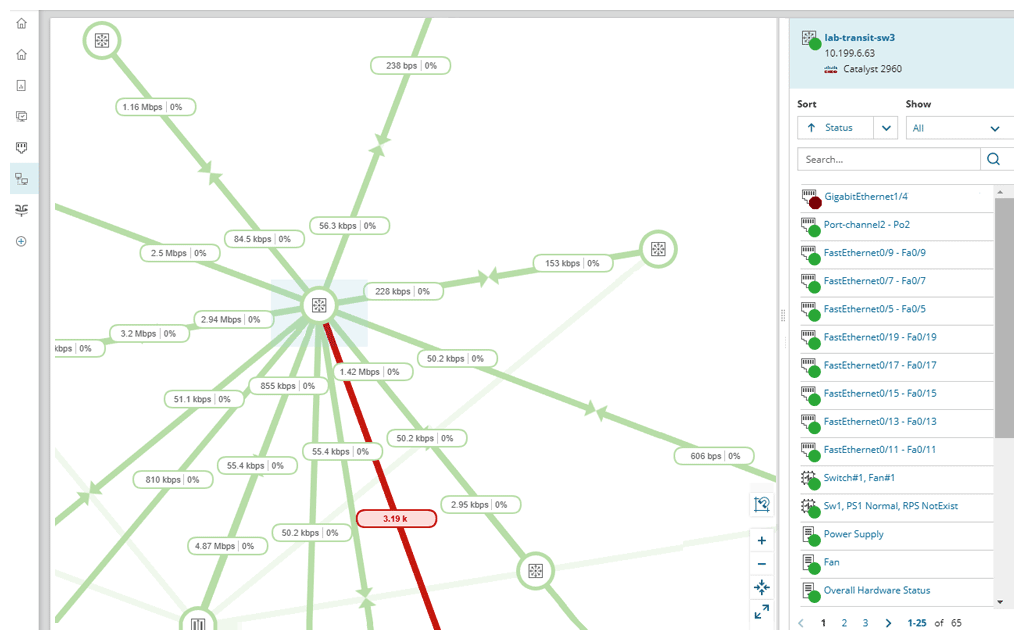
Screenshot of Network monitoring software used to reduce network outages and detect, diagnose, and resolve multi-vendor network performance issues.
Screenshot of See relationships for routers, switches, interfaces, volumes, and groups, updated automatically without user intervention to maintain the network, not network maps.
Screenshot of Reduce visibility gaps into critical network switches, firewalls, and load balancers with Network Insight for Cisco Nexus, Cisco ASA, and F5 BIG-IP.
Screenshot of Reduce the flood of unnecessary network alerts. Create alerts based on simple or complex nested trigger conditions, defined parent/child dependencies, and network topology.
Screenshot of Identify dead zones and improve wireless coverage. With its network monitoring tool, users can access out-of-the-box wireless reports, including wireless availability and rogue access points.
Screenshot of Configure alerts by calculating dynamic baseline threshold data with network performance monitoring software.

1 / 6

Screenshot of Network monitoring software used to reduce network outages and detect, diagnose, and resolve multi-vendor network performance issues.

Top Performing Features

  • Alerts

    Alerts warning of critical infrastructure component failure can be sent via email or SMS or other channel

    Category average: 9

  • Hardware health monitoring

    Ability to monitor key hardware metrics including temperature, fan speed, and power supply

    Category average: 9

  • Network monitoring

    Monitoring network device availability and performance indicators like bandwidth, packet loss, CPU, WAN links, etc.

    Category average: 8.9

Areas for Improvement

  • Wireless infrastructure monitoring

    Ability to monitor wireless access points, controllers, and connected clients

    Category average: 7.6

  • Packet capture analysis

    Interception of data packets provides performance-related information such as network and application response times, and traffic type analysis

    Category average: 7.3

  • Network mapping

    Dynamic mapping tool allows the network topology to be mapped showing performance metrics, and link connection and utilization

    Category average: 7.8

Who Buys & Uses SolarWinds Network Performance Monitor (NPM)

A highly recommended network management tool.

Pros

  • Alerting
  • Auditing and Search
  • General Monitoring
  • SNMP Montioring
  • Reporting

Cons

  • Less resource hungry
  • Writing reports could be a little simpler
  • Can get on the expensive side

Return on Investment

  • Efficiency
  • Lighter workload
  • Overall cost savings

Easy, Big and Mostly Reliable Network Performance Monitoring for Large Organizations

Use Cases and Deployment Scope

Our company uses SolarWinds NPM to monitor the health of our network and servers. We have thousands of devices and it's very helpful to know which are functioning properly in one dashboard. Alerting is also a key feature of the SolarWinds NPM and is essential to our job duties. We are all able to keep track of malfunctioning equipment without having to dive through thousands of logs. Setting up alerts to cell phones and emails is also pretty easy to do and we could not live without it during our on-call rotations.

Pros

  • Alerting on the SolarWinds NPM platform is straightforward to set up, customizable, and works reliably.
  • Being able to set up basic and more complex monitoring is a nice touch. Even devices that don't support SNMP can be monitored via a simple ping.
  • Visibility of all network and server device health on one dashboard is very convenient.

Cons

  • The SolarWinds NPM UI/UX isn't exactly the most modern-looking, but it gets the job done.
  • Updates to SolarWinds can be tricky at times and have broken the system in the past.
  • Configuring and scripting some of the advanced features can be confusing, but the thwack community is always very helpful.

Return on Investment

  • SolarWinds NPM helps minimize the resources needed to stay on top of network health.
  • SolarWinds NPM allows our on-call personnel to rely on its alerting instead of waiting for users to report issues.

Alternatives Considered

Cisco Prime LAN Management Solution

NPM is a great tool for your networking team!

Use Cases and Deployment Scope

We choose to use SolarWinds because the legacy Monitor tool was not cover some areas/alerts/vendors. Also, we were looking for a tool able to identify and act in some alerts. We are using NPM to monitor the infrastructure, to provide some stats that can help us to identify possible issues in the future, and to automatize some regular actions.

Pros

  • Monitor Cisco devices in general
  • Monitor Azure Gateways
  • Provide different kind of reports
  • Provide different kind of alerts

Cons

  • Pollers for Aruba Devices
  • The SolarWinds support team is not familiar with non-Cisco vendors, so it's hard to get some support from them.
  • Bugs sometimes is happening
  • Sometimes the Dashboard delays to show the current status of Nodes/Services

Most Important Features

  • Netpath services
  • Wireless stats & reports
  • Orion Maps
  • Orion Dashboards
  • Orion Network Overview

Return on Investment

  • Able to predict the future with the Forecast reports.
  • with NPM I can monitor the WAN circuits then decide if it needs a upgrade or not.
  • Able to provide quick responses for alerts, reducing the MTTR for some services

Other Software Used

ManageEngine ADManager Plus, Checkmk, Site24x7 All-in-One Monitoring, OP5 Monitor

Usability

SolarWinds NPM brings all your Network Tools into a single Toolbox

Use Cases and Deployment Scope

We use SolarWinds Network Performance Monitor (NPM) to monitor the availability and performance of our networks across 15 geographically dispersed sites. This includes network devices, Servers, Virtual Machines and even our bandwidth consumption. SolarWinds NPM is a powerful and yet user-friendly solution with a variety of very useful tools and performance monitors allowing you to proactively manage your network and be alerted to potential issues using proactive monitoring and threshold management. The system is able to manage a wide variety of devices regardless of manufacturer and brand. There are also a host of very useful reports which can be customized to the organization's needs and automated according to run as needed.

Pros

  • Excellent Network Reporting
  • Great performance monitoring with various KPIs
  • Proactive alerting with alerts when approaching set thresholds

Cons

  • It would be great to have Root Cause Analysis built into the platform
  • The Network mapping feature could use a friendlier interface
  • The Network Monitoring Platform does not include the Topology Mapper.

Return on Investment

  • Reduced downtime resulting in creased productivity and improved user experience
  • Improved quality of service and overall user satisfaction
  • Ability to better quantify IT spending and closely forecast upgrades and budgetary requirements on the areas that will produce the best results.

Alternatives Considered

PRTG Network Monitor

Other Software Used

PRTG Network Monitor, FortiClient, FortiAP, FortiAnalyzer

If you're looking for advanced monitoring, NPM has it - but it falls short

Use Cases and Deployment Scope

We essentially use it to monitor our network devices - switches, routers, firewalls, ETC. We have our uplink interfaces monitored as well so that we can see usage and report on them as needed for things like bandwidth bottlenecks both internally and externally.

Pros

  • Notify us when a network device goes down and comes back online.
  • Reports for network interfaces.
  • Fairly simple to add or remove a network device.

Cons

  • The software upgrade process is a little hairy and has caused me trouble on occasion.
  • The server that it needs to run is a bit of a resource hog along with the SQL server.
  • Some additional features like the network map are a bit clunky compared to some other products that we use.

Return on Investment

  • Compared to other products, I think it's a bit pricey for what we are using it for.
  • There have been a few occasions where we were able to see historical device performance when deciding if a particular device or the link between devices needed more attention and address it as needed.
  • NPM allowed us to notice a network bottleneck when a group of users reported slow Internet speeds.

Alternatives Considered

Site24x7 All-in-One Monitoring, Extreme Ethernet Switches, ArubaOS, Statseeker and Progress WhatsUp Gold (formerly Ipswitch WhatsUp Gold)
