
TrustRadius: an HG Insights company

SolarWinds Server & Application Monitor

Score7.1 out of 10

657 Reviews and Ratings

What is SolarWinds Server & Application Monitor?

SolarWinds Server & Application Monitor (SAM) delivers application and server monitoring capabilities. SAM allows for self-service for easy setup, 1200+ monitoring templates, and customization options, as well as integrate with other SolarWinds products.

Read more details.

Media

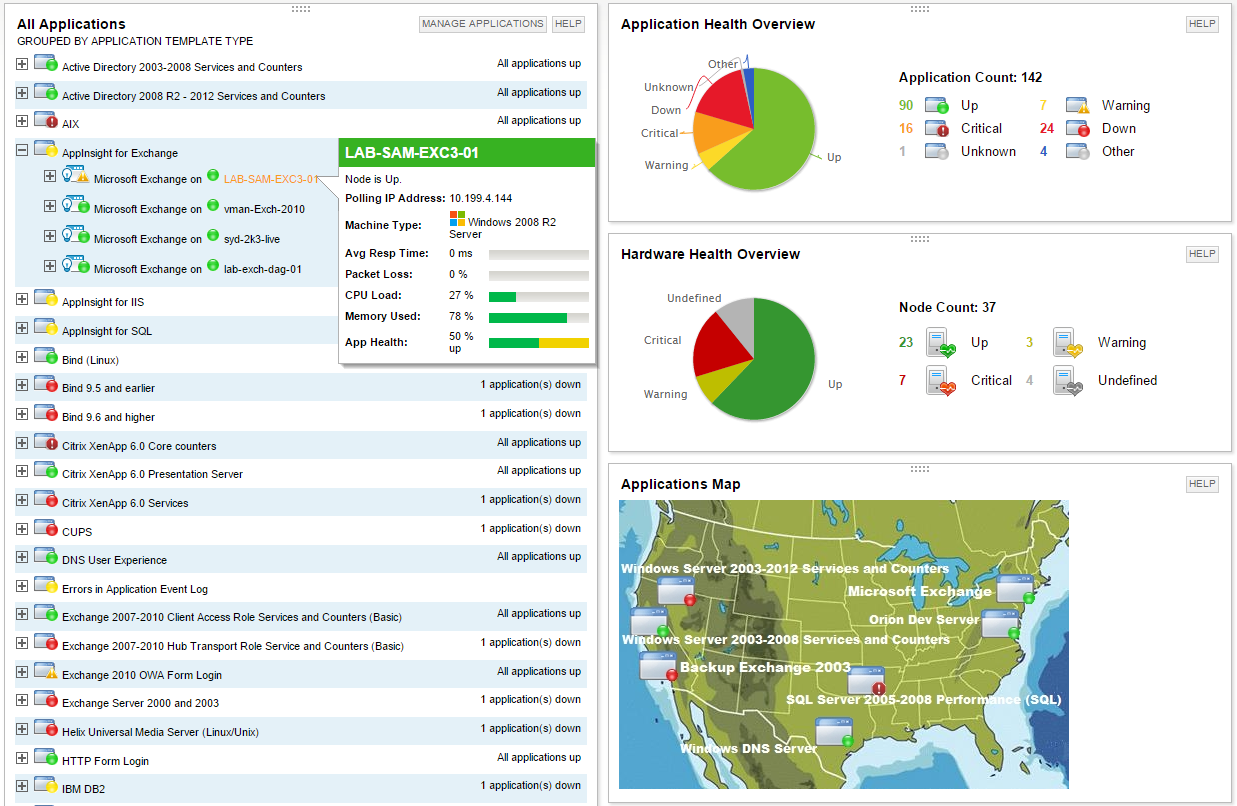
Screenshot of Multi-vendor application performance monitoring
Screenshot of Multi-vendor server monitoring
Screenshot of Application dependency mapping with AppStack™ dashboard
Screenshot of Microsoft Exchange performance monitoring with AppInsight™ template
Screenshot of Microsoft IIS performance monitoring with AppInsight™ template
Screenshot of Server hardware health monitoring
Screenshot of Built-in virtualization monitoring for VMware and Hyper-V environments
Screenshot of Easily extend monitoring to any custom or home-grown application

1 / 8

Screenshot of Multi-vendor application performance monitoring

Top Performing Features

  • Server availability and performance monitoring

    Ability to monitor server availability

    Category average: 9.4

  • Server usage monitoring and capacity forecasting

    Ability to assess server usage and forecast future needs

    Category average: 8.8

  • IT Asset Discovery

    Discovery of hardware and software assets on the network

    Category average: 8.5

Areas for Improvement

  • Application performance management console

    The management console is used to manage monitoring agents and et thresholds, etc.

    Category average: 7.9

  • Out-of-the box templates to monitor applications

    Built-in templates for specific applications

    Category average: 7.5

  • Collaboration tools

    Collaboration tools enable DevOps staff to collaborate by adding notes/comments and also integrating with external collaboration tools like ticketing systems

    Category average: 7.5

Who Buys & Uses SolarWinds Server & Application Monitor

Big, but effective

Use Cases and Deployment Scope

We monitor servers and network gear to track uptime, and to alert when certain resource metrics are reached on a system (e.g., low disk space). My team does not use configuration management abilities. We're also working to integrate SNMP monitoring of data center power gear and PDUs, in order to get away from the vendor's proprietary client and to have our monitoring more standardized.

Pros

  • Server uptime monitoring
  • SNMP monitoring
  • Reporting
  • Network device monitoring

Cons

  • The web interface reloads when certain options are chosen from pop-up menus, which interrupts quick page navigation.
  • Configuring custom SNMP alerting is onerous.
  • I wish custom reporting was easier to use.

Return on Investment

  • Saves spending on duplicate solutions.
  • Save wasted time on manual system checks.
  • Stored credentials save system admins from writing down passwords.

Alternatives Considered

Nagios Core

Other Software Used

Nagios Core

SolarWinds is a useful resource for IT Management

Use Cases and Deployment Scope

We use SolarWinds as our inventory management tool and it is an invaluable resource that allows us to keep track of all of the computers and the software installed on our computers. This helps us keep track of who has what device(s), when it was purchased, and if the user needs more room on their hard drive when it comes time to replace their computer.

Pros

  • Inventory management
  • Software management
  • Computer age and refresh scheduling

Cons

  • Would like a Linux agent
  • Would love to be able to see when a device was first added to the database

Return on Investment

  • This product has been a huge asset to our department.

SolarWinds Server & Application Monitor Review

Use Cases and Deployment Scope

SolarWinds Server & Application Monitor (SAM) is part of my company's monitoring toolset which enhances the overall value proposition of our SolarWinds Orion investment. Being a global company, we currently utilize four Orion instances across multiple data centers and public cloud providers. SAM is currently monitoring on-prem and public cloud Windows and Linux-based applications in addition to providing latency metrics for RDS endpoints in AWS. SAM provides historic metrics in addition to being part of an overall toolset to troubleshoot issues in real-time.

Pros

  • Realtime monitoring of common OS and application metrics.
  • Visibility of past performance issues for server application events/issues.
  • Fast, out-of-the-box setup.

Cons

  • Provides basic monitoring/visibility. Visibility into detailed/fine-grained issues best suited for more specialized/expensive solutions.
  • Licensing per monitored application rapidly uses up purchased license count.
  • More out-of-the-box templates or easier setup of monitoring less-common applications would make the solution more appealing given the target audience of the product.

Return on Investment

  • Ability to sunset multiple legacy monitoring platforms.
  • A single pane of glass across global locations (Enterprise Operations Console) simplifies monitoring for junior staff.
  • A single toolset allows staff from across the global environment to share knowledge and quickly set up/modify monitoring.

Alternatives Considered

Datadog, IDERA Precise for Applications, Prometheus, AppDynamics and Progress WhatsUp Gold (formerly Ipswitch WhatsUp Gold)

Other Software Used

SolarWinds NetFlow Traffic Analyzer (NTA), SolarWinds Network Configuration Manager (NCM), SolarWinds Network Performance Monitor (NPM), Cisco Intersight

SolarWinds Server & Application Monitor (SAM) is good tool to monitor your applications and make calls via APIs.

Use Cases and Deployment Scope

Little information about health and availability of applications. We need to better monitor our applications and handle applications in API format.

Pros

  • Handling API requests.
  • Monitoring SQL thresholds.
  • Monitoring DHCP pools.

Cons

  • Cover non-windows based applications.
  • API Poller doesn't provide friendly messages when getting issues to retrieve info.
  • Unable to edit Authorization Poller settings.

Return on Investment

  • SAM can help to reduce the MTTR for some applications.
  • SAM helped me to tune my SQL instances better than reduce my workload costs.
  • SAM can help me to automatize some procedures, then reduce the human workload cost.

Alternatives Considered

Site24x7 All-in-One Monitoring

Other Software Used

Jira Service Management (Jira Service Desk), Checkmk, Splunk Enterprise Security (ES)

Safe, robust and reliable.

Use Cases and Deployment Scope

The tool is used to monitor the entire technology infrastructure allied with other vendors. Here it is useful to identify outages, failures, and performance degradation, the scope of action involves the communication, servers, services, and business layers. Through this monitoring, alarms, reports, integration with ITIL-based tools, and other items such as e-mail, SMS, and messaging applications are generated.

Pros

  • Monitors windows and linux servers.
  • NETFLOW based data traffic.
  • Scripting and automating actions.
  • Integration with other tools.
  • Robust and well-distributed architecture.
  • Constant updates and specialized support center.
  • Training and educational content.

Cons

  • Capacity reports.
  • Modern interface.
  • Possibility to use other OS and DB as platform software, in addition to Windows and SQL Server.

Return on Investment

  • 60K monitored components
  • Annual SLA above 99%
  • 500GB of historical data in the last year.
  • Approximately 100 incidents daily.

Alternatives Considered

SolarWinds NetFlow Traffic Analyzer (NTA), AppDynamics, Dynatrace, Checkmk, Nagios Core, Zabbix, Splunk Application Performance Monitoring (APM) and ThousandEyes

Other Software Used

Dynatrace, AppDynamics, Zabbix