TrustRadius: an HG Insights company

Teamcenter

Score8.2 out of 10

172 Reviews and Ratings

What is Teamcenter?

Teamcenter is a product lifecycle management system designed to help organizations integrate and standardize product development processes across functional silos.

Media

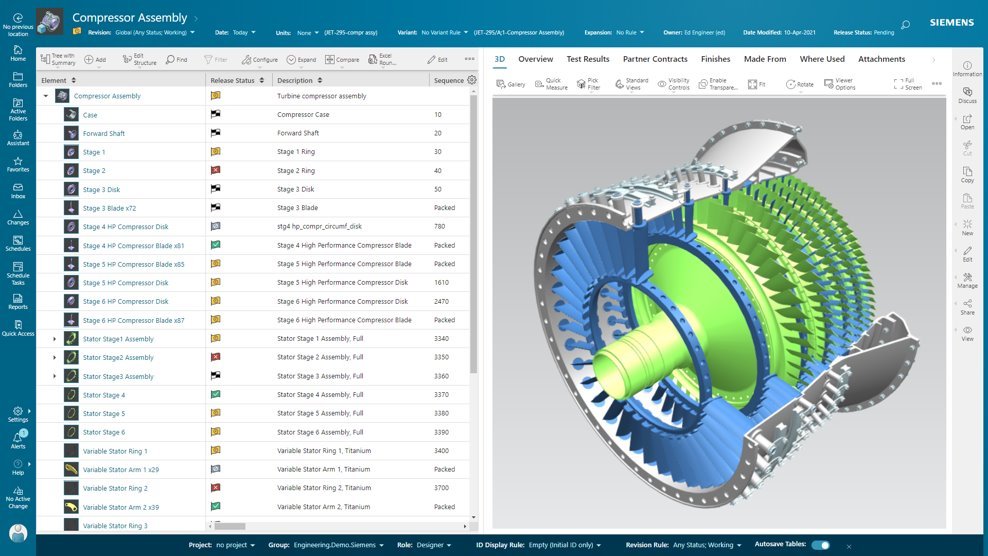
Active Workspace, the User Interface (UI) to drive Teamcenter. With no install required, it is a visual UI to navigate through products and processes, with tooltips to guide users along the way.
BOM configuration, in Teamcenter. With flexibility in how a BOM is managed and defined, it can provide an up-to-date source of information that eliminates the need for standalone spreadsheets and systems. Teamcenter X provides a flexible BOM management strategy that enables a single, accurate product definition for all who interact with the BOM.
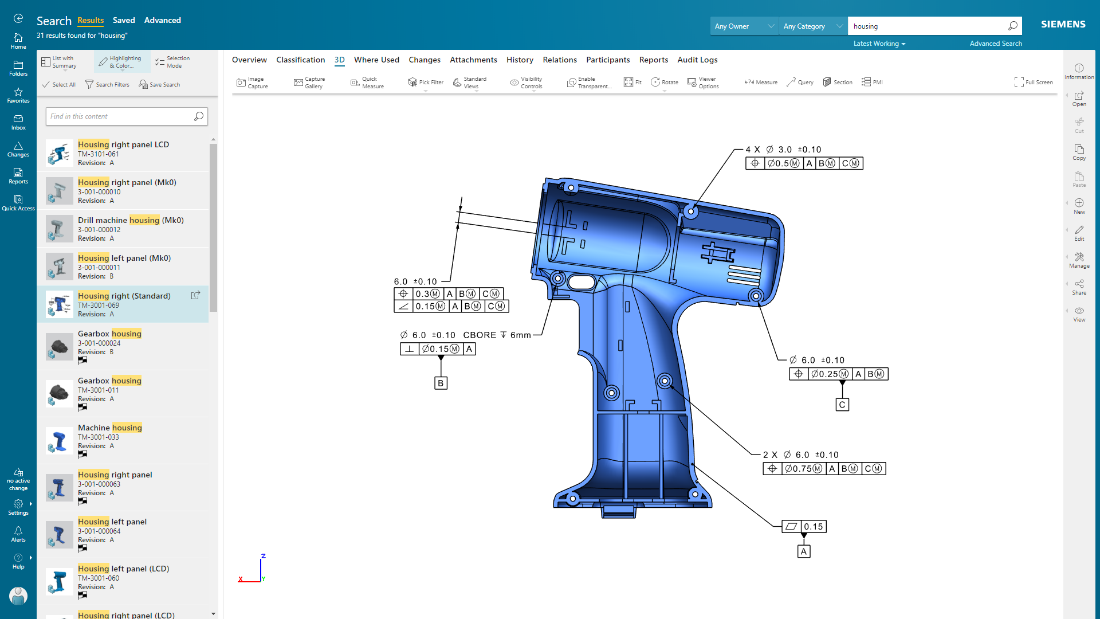
Teamcenter X search and analytics capabilities provides a streamlined product lifecycle management (PLM) search experience to help quickly find data. Teamcenter X visually presents search results in logical groups so users can drill down through product structures and relationships.
Product design intent can be communicated, and product data visualized, in their entirety using 2D and 3D visualization and markup capabilities. The user can also visualize and interrogate Product Manufacturing Information (PMI).
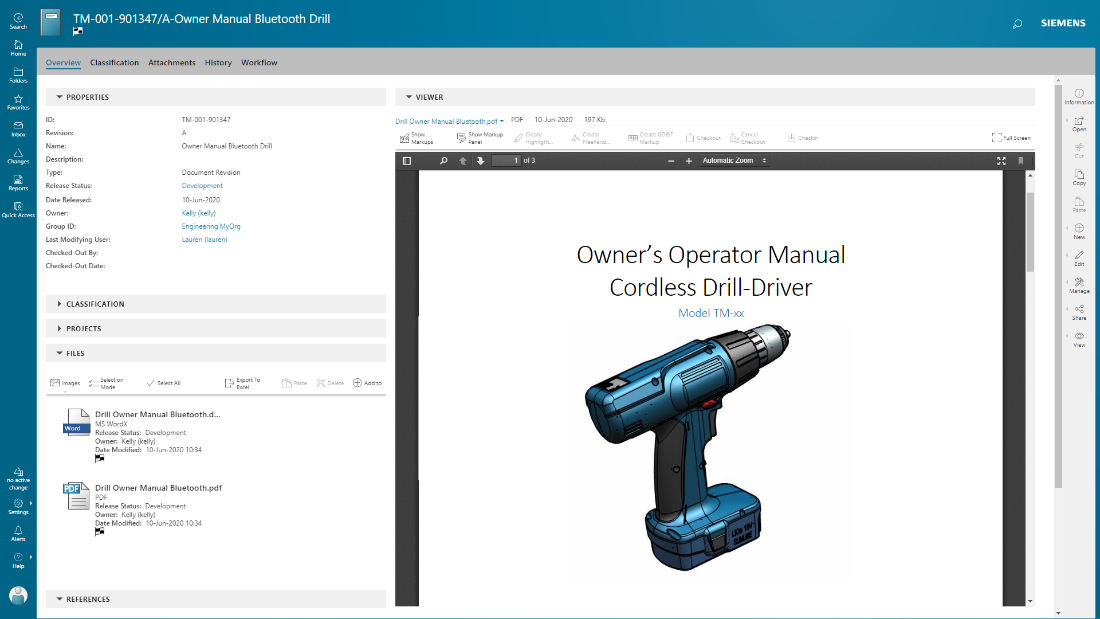
documents are managed in conjunction with product development, with integrated PDF for viewing and markup.

1 / 5

The best software for manufacturing teams

Use Cases and Deployment Scope

We use Teamcenter to manage product data, engineering changes, and design collaboration. It helps reduce manual errors, speeds up approvals, and improves version control across teams. Our scope includes CAD management, BOM handling, and workflow automation.

Pros

  • revision control
  • integrates smoothly with CAD tools
  • workflow automation helps manage engineering change orders with proper approvals and traceability

Cons

  • In our experience, the user interface can feel cluttered and slow, especially for new users.
  • I think search performance and filtering options could be faster and more intuitive.
  • For us, customization often requires complex IT support instead of simple configuration options

Return on Investment

  • Teamcenter has delivered strong ROI by improving design collaboration
  • cutting down rework
  • speeding up product releases

Alternatives Considered

PTC Windchill

Other Software Used

Slack, Google Meet, ZoomInfo Sales, Microsoft Teams

A story of Teamcenter in a Energy Manufacturing company

Use Cases and Deployment Scope

We use Teamcenter to manage entire lificycle of our product, from CAD to BOM

Pros

  • Lot of integration available
  • High level of customization
  • Good support

Cons

  • AWC should be more user configurable
  • Preference should be more clear to use and user friendly
  • Error message shold be more clean for the user

Return on Investment

  • Teamcenter with his BOM struvture gives us possibility to control entire product structures
  • Thanks to high level of comatibility we can manage 3D from various format
  • JT integration allow manufacturing users to visualize directly 3D Model and BOM structures

Alternatives Considered

PTC Windchill

Other Software Used

Microsoft 365, ServiceNow Now Platform, SAP Fieldglass

Teamcenter will help business to work on the overall products life cycle of a business

Use Cases and Deployment Scope

As we are mostly a service based start up but some times we also lunch new products that could cater our old customers which helps us in improving their overall experience with the company and Teamcenter is a tool that creates the complete life cycle of these products so that they can launched and also get serviced properly even after sales is done.

Pros

  • The data of all the products can easily be checked through the dashboard of Teamcenter
  • The software can easily be integrated with ERP and CAD for enhanced operations and designing
  • Helps multiple team to work for the same project from remote locations

Cons

  • For setting up Teamcenter we needed a professional outsourced IT team that configured it with our business
  • Also, it costed us more then 25k to complete it's setup with all the license and support team
  • Whenever we process a large range of data on it I have noticed a significant amount of lagging maybe because the initial setup could have been better or there might be some other reason

Return on Investment

  • There is no wastage of time and energy on the products on which we are unsure, so now we launch our products by data based discussions
  • But there will be need of a IT team for any kind issues in software for support
  • The total number of sales has been increased by 23% after its installation and complaints has been decreased by 67%.

Workflows and Product Lifecycle made simple with Teamcenter

Use Cases and Deployment Scope

Our main use case with Teamcenter is the centralization of workflows and connecting different organizational silos to work together on a product lifecycle. Additionally, our product development has become more efficient and quicker with the introduction of Teamcenter, mainly through the comprehensive integrations that it provides and also with the tailored solution that it provides us.

Pros

  • Document handling is very much smooth and stable with Teamcenter
  • The version control feature is outstanding with Teamcenter
  • Communication gap between internal teams is greatly reduced, thereby improving overall efficiency

Cons

  • Direct Integrations for compliance matching is difficult with Teamcenter
  • While working with large data files, the performance of Teamcenter is sub par
  • The overall user interface feels a bit outdated and could use more vibrant colors.

Return on Investment

  • The centralized workflow management saves a lot of time and effort for us and improves overall efficiency
  • The level of customizations provided by Teamcenter is very good and allows to get niche requirements done smoothly
  • We have seen a 25% boost in our overall efficiency and 20% increase in our product lifecycle with the introduction of Teamcenter

Other Software Used

Oracle Analytics Cloud, Zoho Books, Microsoft 365

test Teamcenter

Use Cases and Deployment Scope

We use Teamcenter in our organisation for a plm service connected with catia V5. It is our data center cloud for our all 3d and drawing data. But it is not the best software plm for catia V5. It is much more useful with NX. But we can manage the life cycle of our product.

Pros

  • manage data
  • open and transfer
  • data library classification

Cons

  • interoperability with catia
  • modification of product data
  • improve the experience of user

Return on Investment

  • gestion of data process
  • revision and production go
  • problem between drawing and 3d connection
