TrustRadius: an HG Insights company

Teamcenter

Score8.2 out of 10

172 Reviews and Ratings

What is Teamcenter?

Teamcenter is a product lifecycle management system designed to help organizations integrate and standardize product development processes across functional silos.

Media

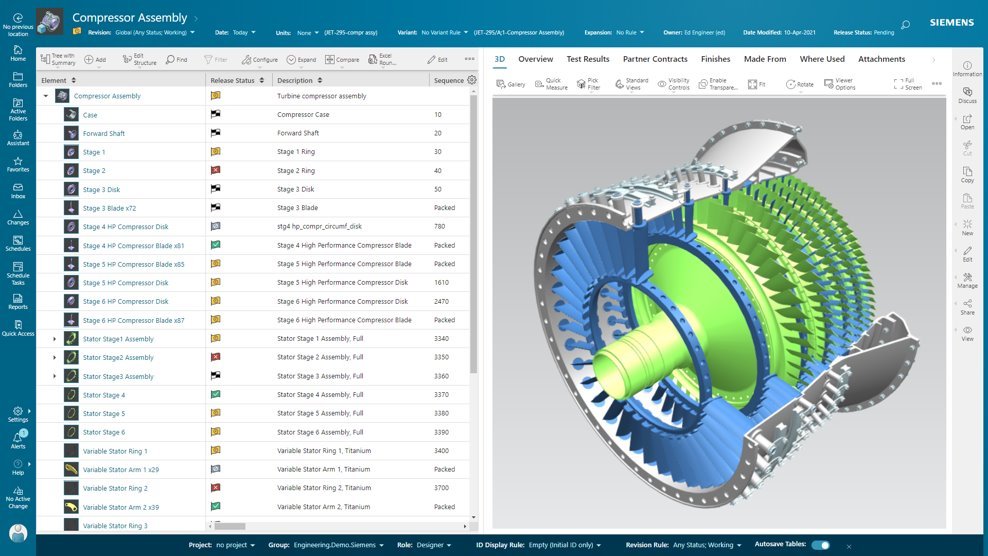
Active Workspace, the User Interface (UI) to drive Teamcenter. With no install required, it is a visual UI to navigate through products and processes, with tooltips to guide users along the way.
BOM configuration, in Teamcenter. With flexibility in how a BOM is managed and defined, it can provide an up-to-date source of information that eliminates the need for standalone spreadsheets and systems. Teamcenter X provides a flexible BOM management strategy that enables a single, accurate product definition for all who interact with the BOM.
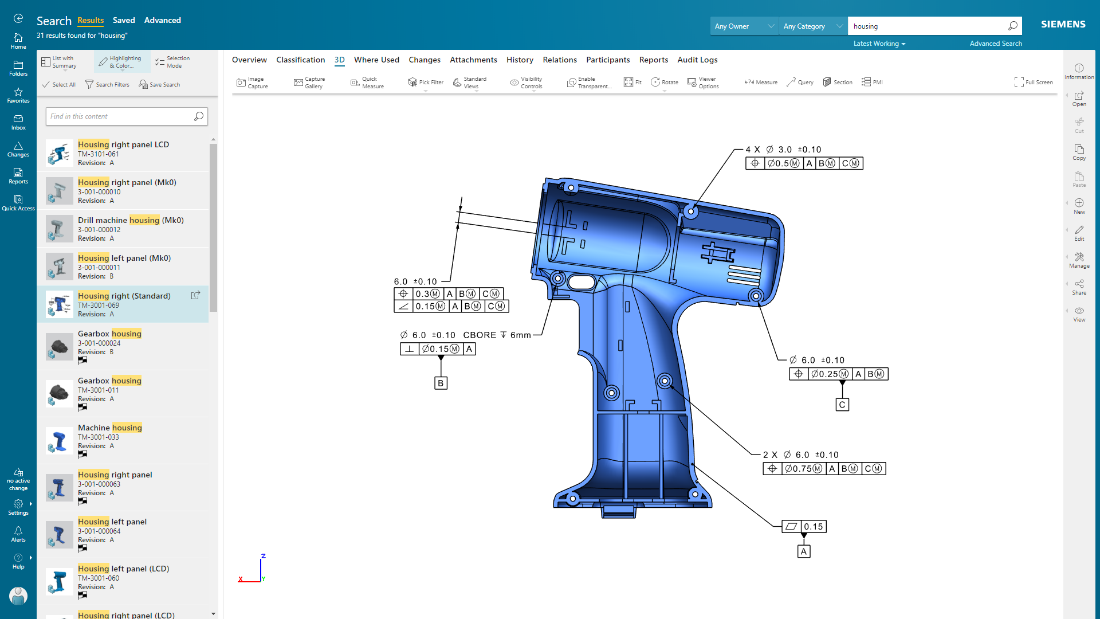
Teamcenter X search and analytics capabilities provides a streamlined product lifecycle management (PLM) search experience to help quickly find data. Teamcenter X visually presents search results in logical groups so users can drill down through product structures and relationships.
Product design intent can be communicated, and product data visualized, in their entirety using 2D and 3D visualization and markup capabilities. The user can also visualize and interrogate Product Manufacturing Information (PMI).
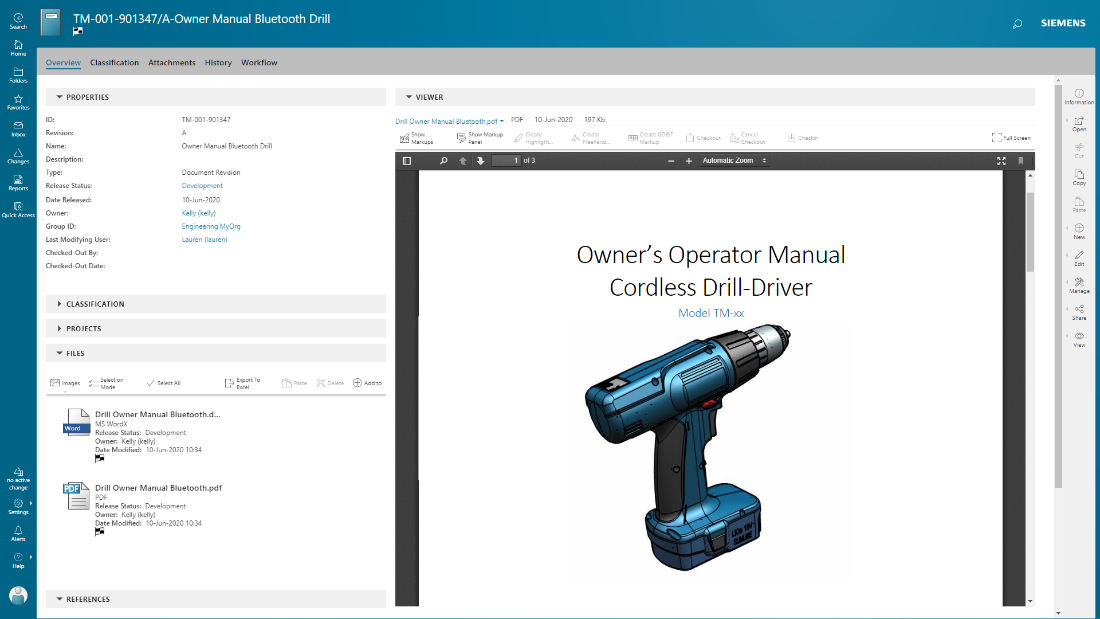
documents are managed in conjunction with product development, with integrated PDF for viewing and markup.

1 / 5

The best software for manufacturing teams

Use Cases and Deployment Scope

We use Teamcenter to manage product data, engineering changes, and design collaboration. It helps reduce manual errors, speeds up approvals, and improves version control across teams. Our scope includes CAD management, BOM handling, and workflow automation.

Pros

  • revision control
  • integrates smoothly with CAD tools
  • workflow automation helps manage engineering change orders with proper approvals and traceability

Cons

  • In our experience, the user interface can feel cluttered and slow, especially for new users.
  • I think search performance and filtering options could be faster and more intuitive.
  • For us, customization often requires complex IT support instead of simple configuration options

Return on Investment

  • Teamcenter has delivered strong ROI by improving design collaboration
  • cutting down rework
  • speeding up product releases

Alternatives Considered

PTC Windchill

Other Software Used

Slack, Google Meet, ZoomInfo Sales, Microsoft Teams

A story of Teamcenter in a Energy Manufacturing company

Use Cases and Deployment Scope

We use Teamcenter to manage entire lificycle of our product, from CAD to BOM

Pros

  • Lot of integration available
  • High level of customization
  • Good support

Cons

  • AWC should be more user configurable
  • Preference should be more clear to use and user friendly
  • Error message shold be more clean for the user

Return on Investment

  • Teamcenter with his BOM struvture gives us possibility to control entire product structures
  • Thanks to high level of comatibility we can manage 3D from various format
  • JT integration allow manufacturing users to visualize directly 3D Model and BOM structures

Alternatives Considered

PTC Windchill

Other Software Used

Microsoft 365, ServiceNow Now Platform, SAP Fieldglass

Maximizing our development efficiency

Use Cases and Deployment Scope

Teamcenter in our organization plays an important role of company’s product lifecycle management framework. We use it to interconnect the processes of design, engineering, and production in order to eliminate intermediaries. The system resolves major business issues, such as information organization, version control and the lack of efficient flows. Our solutions cover the integrated product data requirements integration of change management processes and real-time global collaboration.

Pros

  • Teamcenter stands out when it comes to compiling data belonging to a product for easy access by various parties.
  • They are also impressive to know about the capability of the platform regarding large data and complex products. Also integration of Groco with other systems such as CAD tools and ERP has helped in eradicating manual transfer of data thereby improving efficiency.
  • It has an effective change management structure that helps in noting and inputting changes without complications.

Cons

  • Teamcenter can confuse users, especially novices and training employees to use this software may take a lot of time.
  • Customization is also time consuming and most of the time is needed IT assistance. The reporting could be a tad better which is why sometimes, creating extensive reports take several steps. Having a clearer dashboard and easier setting modifications could be a major improvement to the current design.

Return on Investment

  • Teamcenter roll out and customization took us not more than six months and the training was also done concurrently. The changes could be observed immediately and a sense of team work was improved within a period of about three months.
  • After six months one of the areas that we noted improvement was on the reduction of errors and increased efficiency in decision making. It was effective to implement since it did not interrupt other projects that were being worked on.

Teamcenter will help business to work on the overall products life cycle of a business

Use Cases and Deployment Scope

As we are mostly a service based start up but some times we also lunch new products that could cater our old customers which helps us in improving their overall experience with the company and Teamcenter is a tool that creates the complete life cycle of these products so that they can launched and also get serviced properly even after sales is done.

Pros

  • The data of all the products can easily be checked through the dashboard of Teamcenter
  • The software can easily be integrated with ERP and CAD for enhanced operations and designing
  • Helps multiple team to work for the same project from remote locations

Cons

  • For setting up Teamcenter we needed a professional outsourced IT team that configured it with our business
  • Also, it costed us more then 25k to complete it's setup with all the license and support team
  • Whenever we process a large range of data on it I have noticed a significant amount of lagging maybe because the initial setup could have been better or there might be some other reason

Return on Investment

  • There is no wastage of time and energy on the products on which we are unsure, so now we launch our products by data based discussions
  • But there will be need of a IT team for any kind issues in software for support
  • The total number of sales has been increased by 23% after its installation and complaints has been decreased by 67%.

Provides business proven PLM for intricate projects

Use Cases and Deployment Scope

The case of product creation and management is that we use Teamcenter to consolidate product data for the engineering, purchasing and quality assurance. It expunges issues such as inefficient and inconsistent data, slow approval process and inability to keep track of changes made to a product. Our use case also entails BOM control as well as change orders and technical compliance documentation.

Pros

  • Teamcenter’s strength is in coordinating data and the best feature is that it provides the truth of information.
  • Work flow automation has helped to minimize errors and the audit trail has helped to put into check decisions made. Among all benefits of the system, the integration with CAD tools is especially beneficial for engineering personnel.

Cons

  • There is need for the user interface of the site to be improved and to have more sleek appealing designs.
  • The software is some of the time clumsy and the search itself can be confusing. The licensing model might also be disadvantageous for extended teams that would like to implement the system step by step.

Return on Investment

  • In this case the implementation process took approximately eight months and full adoption not more than a year. It truly became evident discernible increase of improvements with reference to data accuracy and sharing as well as cross departmental co-ordination within the first four months of using the system.
