TrustRadius: an HG Insights company

Rencore Code (SPCAF)

Score8.8 out of 10

17 Reviews and Ratings

What is Rencore Code (SPCAF)?

Many organizations that use Office 365 are exposed to security risks that they are unaware of. As they extend SharePoint to meet their business needs, they build applications using technologies that range from end-user Microsoft Flow to developer-focused SharePoint Framework. Unfortunately, all of these custom applications are capable of circumventing the security measures organizations have in place exposing the organization and its data to security risks.

Rencore's mission is to help customers to extend SharePoint and Office 365 correctly and avoid security and compliance risks. Rencore integrates with the complete DevOps process and enables organizations to validate their applications already during the early development stages as well as when using them in production. With a vast database of over 1000 rules, we offer the only software solution in the market capable of detecting issues specific to extending SharePoint and Office 365 varying from security risks to not using market best practices.

Rencore helps users collaborate more securely and get more value out of their Office 365 investments. Their partnership with Microsoft ensures that Rencore compliments security capabilities available with Office 365 and the Microsoft cloud.

Media

Using third party libraries allows you to build your SharePoint and Office 365 applications faster and focus on functionality specific for your organization. But regularly, security vulnerabilities are discovered in these external dependencies. If left unpatched, they become a security risk for your organization and its data. Rencore automatically warns you when any of the third-party libraries used in your applications has known vulnerabilities that could be exploited to hack your environment.
Third-party libraries are regularly updated to improve performance and stability. Many organizations however don’t know when a new version of the library they use in their SharePoint and Office 365 applications is released and they keep using the old versions which exposes them not only to bugs but also to security risks. Rencore automatically warns you when a new version of a library that you use is available allowing you to verify the contents and the impact of the upgrade.
Without proper tooling, it’s impossible to successfully enforce an application governance plan in SharePoint and Office 365. The number of ways in which users could possibly extend SharePoint combined with the thousands of pages and hundreds of settings that can be configured, make it impossible to continuously monitor for alignment with the organizational policies. 

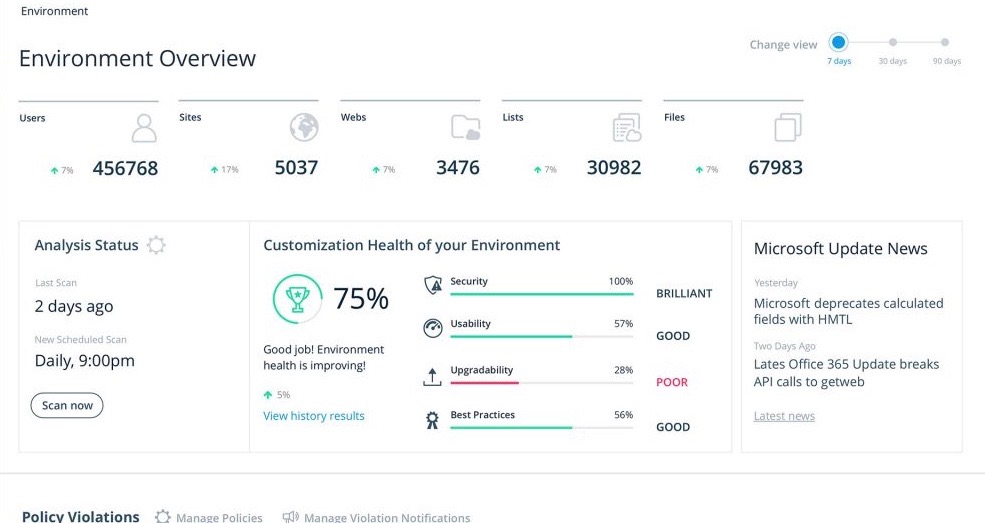
Rencore helps you understand the configuration of your tenant as well as discover the different SharePoint and Office 365 applications used in your organization. With Rencore you will easily understand how these applications are built, which dependencies they have and which possible risks they expose your organization to.
Your organization tailors SharePoint and Office 365 to its specific needs to get more value of its investment in the platform. But each organization has different needs and is subject to different laws and regulations. 

Rencore allows you to configure what policies you want to enforce in your tenant. Each violation gets reported so that you can take corrective action and successfully enforce your organization’s application governance plan.
As you start discovering issues in your SharePoint and Office 365 environment, you will be taking corrective actions to mitigate the risks. Rencore helps you track these issues and the related tasks so that you can easily follow up on the status of each issue and control that your organization is improving over time.
It’s not enough to have your SharePoint and Office 365 applications verified for compliancy with your organization’s policies before using them in production. As your applications evolve, they will require changes and each change exposes you to a number of risks. Rencore helps you track how your applications change over time, even if these applications don’t follow centralized deployment and are managed by power-users. Each change is assessed for potential risks that it could expose your organization to.
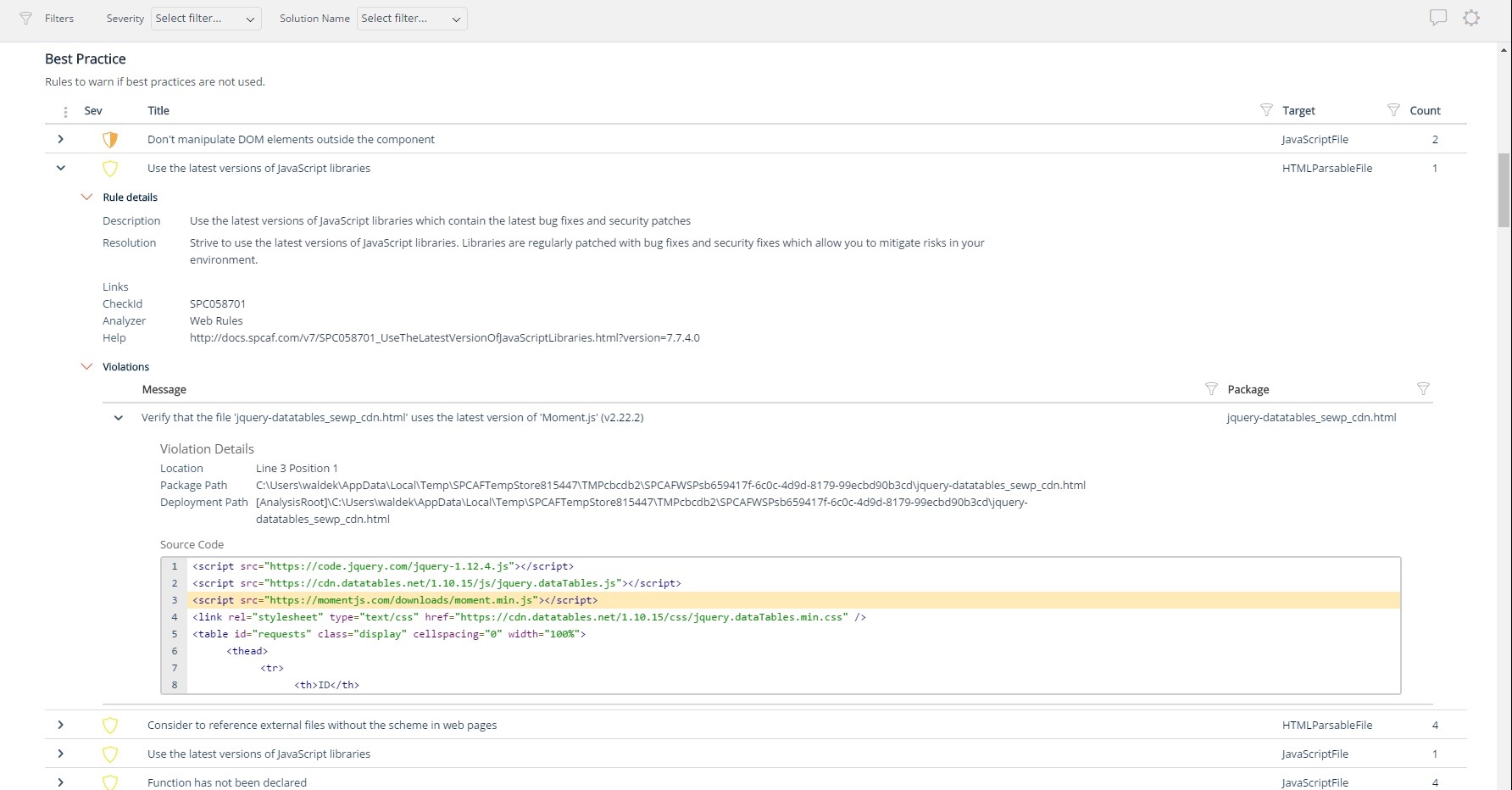
Just because your application works, doesn’t mean it’s robust and sustainable. Building SharePoint applications requires extensive knowledge and understanding of the platform and there are many considerations you have to take into account. Using its database of over 1000 rules, Rencore verifies your applications against the Microsoft recommendations and industry best practices to help you ensure that your application will yield the results it promised.
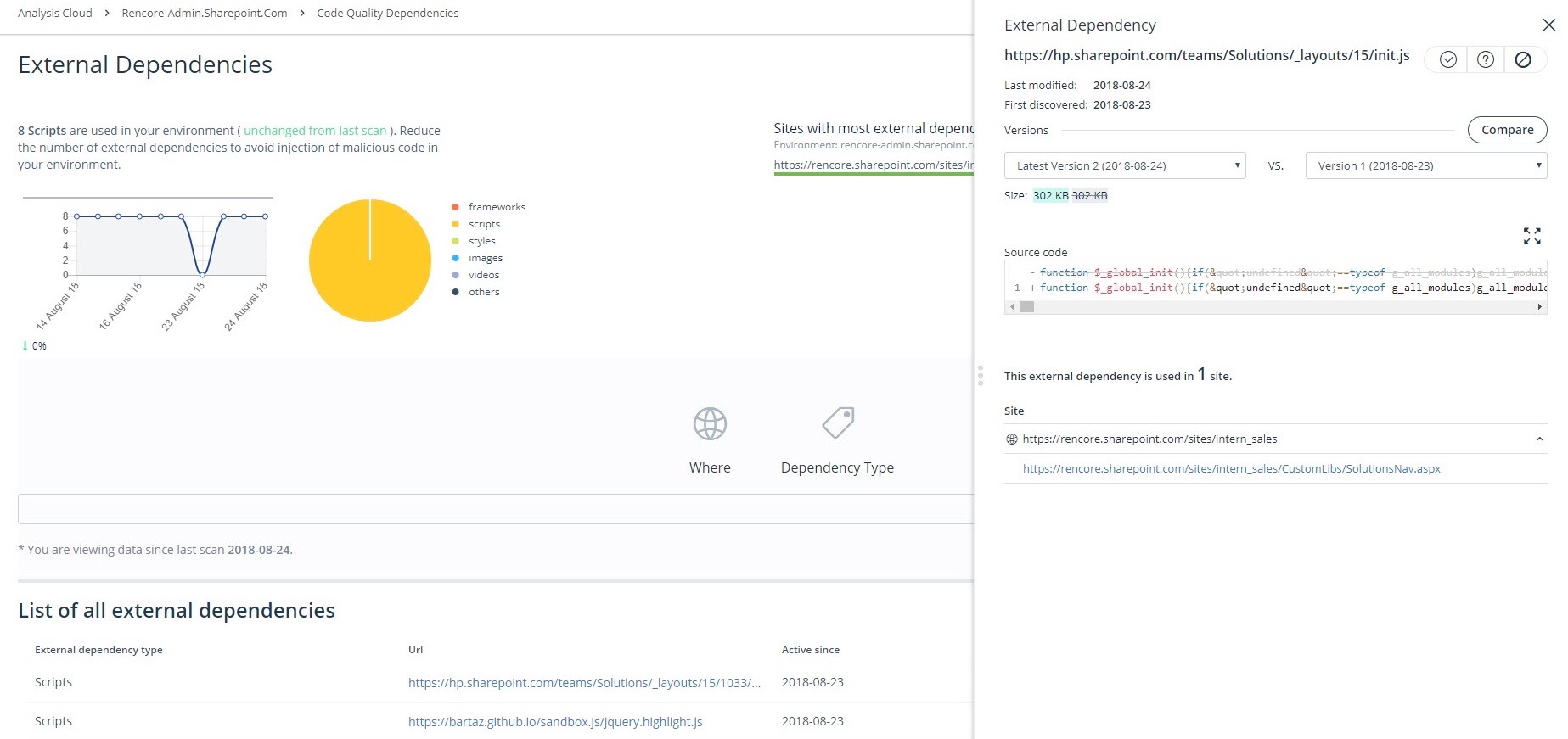
SharePoint empowers users to solve their problems using turn-key solutions available on the Internet. By embedding a few-lines of code from the Internet, users can include complete applications in SharePoint. But users have hardly understanding of what the scripts they use actually do and how they handle confidential information. Rencore helps you discover and manage SharePoint applications and their dependencies allowing you to ensure the security of your confidential information.
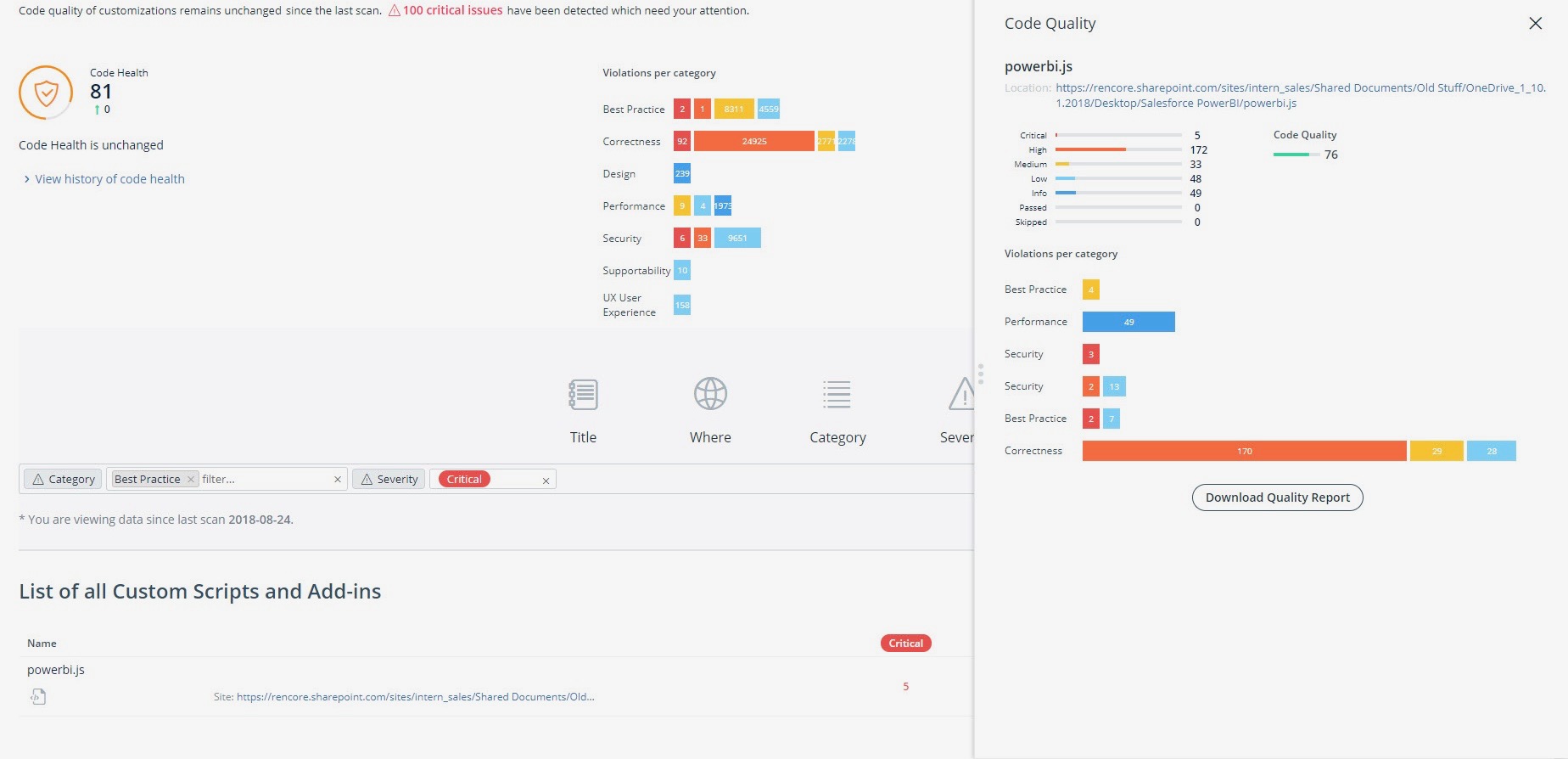
Rencore gives you powerful insights into the quality of your SharePoint Solutions and Add-ins, SharePoint Framework components, JavaScript and PowerShell files and detects security and performance issues before you deploy your applications to production.
To be able to define impact of a change in your application or the effort required to maintain it, you have to first understand its complexity. Rencore analyzes the relationships between the different components of your applications and visualizes them helping you to understand the structure and complexity of your application which is invaluable as your application evolves over time.
As the application is developed, often its manually maintained documentation becomes outdated. Rencore helps you understand the contents of your solution and with each analysis automatically generates documentation which always reflects the latest state of your solution.
Metrics gathered by Rencore during the analysis of your applications, are input for your calculations to quantify the effort required to support your applications or get insights into the performance of your team.
By continuously monitoring your applications using Rencore, you can track changes in quality over time. This gives you invaluable insights into your team’s performance and knowledge as well as the effect of scope changes on quality over time.

1 / 13

A must-have for your SPFx project!

Pros

  • Support - It is very quick relative to other vendors in this space and also very thorough.
  • Product Features - It appears to be the only product in the market that has ALL the pieces for a baseline SPFx project versus no tools or manual activities.

Cons

  • Documentation online could be more current and though this is a challenge for all vendors, it should be a major goal.
  • More examples beyond the core templates would be nice.

Return on Investment

  • The clear impact was the amount of time saved code reviewing or going through lines of code marked off by other tools that are not relevant. We cannot put a number on it since the project started off with the tool in place but based on the rules applied it could be as high as 20% of the project time.

Rencore cloud tools, worth a good look!

Pros

  • Rencore is a company formed of people that have lived the Microsoft community, they have a deep understanding of the needs of businesses that aren't met by the standard Microsoft tools.
  • Rencore staff are heavily involved in the Microsoft ecosystem, with many of them spending personal time working on projects such as the Patterns and Practices foundation. This adds to their strength and knowledge of the Microsoft platform.
  • Their products are well known in the community and often used by Microsoft staff themselves. Their support of MVPs ensures that they receive feed back at all levels ensuring a stronger platform of products.

Cons

  • I'd like to see a cheaper subset of tools for the 'citizen developer' to try and enforce good practice at all levels.

Return on Investment

  • For clients that I work with converting their old farm solutions to client side/Azure, the Rencore tool has significantly reduce the time to learn and improved code quality.

A unique position on the market when it comes to code quality, transformation and platform governance.

Pros

  • Unique expert knowledge of their target platforms. Not many companies have such a unique position in their target market. Their employees have a deep understanding of SharePoint, Office 365 and Azure and also regularly advise Microsoft on these matters.
  • Community involvement and contribution to open source projects. Key employees at Rencore are considered thought leaders in their area of expertise and contribute to high profile Microsoft open source initiatives.
  • Rencore's unique position when it comes to code quality analysis in the SharePoint space sets it apart. There's really no alternative.
  • Platform governance is another Rencore strength. No other product provides the insights into your SharePoint Online environment with full auditing of not only configuration changes but also who changed which code where and when. Again no alternatives exist.

Cons

  • Rencore's product line is of course still a bit of a niche: SharePoint code quality is not something every organization on the planet is concerned with - although Rencore does much more than that.
  • We feel Rencore's marketing efforts are mainly targeted at technologists. There's a lot of other potential, especially for their platform governance product.

Return on Investment

  • Valuable insights into large existing SharePoint customizations that would otherwise would have taken weeks to analyze and assess on quality.
  • Without Rencore's tooling, it would be impossible to track changes to client-side code. For example, we can tell exactly who changed which JavaScript in which webpart in the environment.
  • Transformation tools helped developers migrate their existing code bases to the cloud, while already providing an automatically translated code base to start from.

Other Software Used

SysKit

Rencore: SharePoint Development the right way.

Pros

  • Code Analysis and review
  • Risk Profiling
  • Patterns and Practices guidance
  • Code Transformation

Cons

  • I really don't have any areas that I could find for improvement as an Architect.

Return on Investment

  • Better performing SharePoint Development.
  • Production build, test and release cycles are drastically reduced.

Other Software Used

SysKit, Metalogix Content Matrix

As a SharePoint software vendor, you have to use Rencore

Pros

  • The software development audit process is very good
  • With SharePoint Customization Analysis Framework, you see how good your code quality is
  • The Rencore certificate helps us to communicate our software quality to our customers

Cons

  • Cloud Analytics for small customers

Return on Investment

  • We reduced bugs in our software so we have less effort needed in our support department.
  • We improved our deployment process, so we have less effort needed in repairing customer environments, and we have less downtime.