
TrustRadius: an HG Insights company

MindManager

Score8.5 out of 10

515 Reviews and Ratings

Start a Free Trial

Contact about MindManager

Please fill out the form below to get in touch.

Alludo

Connect with Alludo

What are you interested in?

Already have an account?

You hereby consent to have TrustRadius share the information supplied on this form with Alludo so that Alludo and TrustRadius may contact you in regard to the information requested.

What is MindManager?

MindManager is a mind mapping and project management tool that aims to boost users’ productivity. It is designed to facilitate a wide range of project types, and includes cross-platform functionality and 3rd party integrations.

Media

Mindmap
Reverse Brainstorming
MindManager for Microsoft Teams
MindManager Snap
MindManager Go
Mind Maps in MindManager
Organizational Charts in MindManager
Timelines  in MindManager
Flowcharts  in MindManager
Venn & Onion Diagrams  in MindManager
Kanban Boards  in MindManager
Funnel Charts  in MindManager
Matrix Diagrams  in MindManager
SWOT
MindManager Jira Integration
Gantt Pro Excel
Sticky Notes
Activity digest
Easy file sharing
Whiteboard

1 / 20

Top Performing Features

  • Drag-and-Drop Capabilities

    Provides an intuitive interface where users can easily drag elements like nodes, branches, and connectors to create and customize their mind maps.

    Category average: 8

  • Notes and Attachments

    Allows users to add notes, links, images, and attachments to nodes in the mind map for additional information and context.

    Category average: 7.9

  • Color and Style Customization

    Offers options to customize the color, font, shape, and style of nodes, branches, and connectors to visually enhance the mind map.

    Category average: 7.6

Areas for Improvement

  • Integration with Task Management

    Integrates with task management tools to convert mind map nodes into actionable tasks, set priorities, deadlines, and track progress.

    Category average: 6.9

  • Mind Map Revision History

    Keeps a record of changes made to the mind map, allowing users to track revisions, revert to previous versions, and collaborate effectively.

    Category average: 6.8

  • Real-time Collaboration Tools

    Supports real-time collaboration among multiple users, allowing them to work on the same mind map simultaneously and share ideas.

    Category average: 6.7

One of the best Project Management Software.

Use Cases and Deployment Scope

It helps to brainstorm various ideas. To run various product development and Commercialization plans. It also helps delegate tasks to different employees. I really like various Mind Maps that are already present in the system. I'm big into creative solutions, and this helps to navigate through tough solutions by opening up a space for better thinking capacity.

Pros

  • Brainstorming
  • Project Management.
  • Tags

Cons

  • Connection with Phone.
  • A bit lower price.
  • A little better interface for the Flow charts.

Return on Investment

  • Saved Time.
  • Project management efficiency.
  • Team building.

Alternatives Considered

monday.com

Other Software Used

Interactive Project Manager, Built for Teams, Excel Chart Animation

Is mind mapping a superpower for you?

Use Cases and Deployment Scope

Twenty years ago, an instructor impressed his class by using MindManager. I was fortunate to be there. Today, mind mapping is one of my superpowers. It is my favorite tool to learn by organizing notes, to go deeper and explore an idea, to create and present strategic plans, and to visually manage an innovation project. MindManager also captivates my audience when I use it to prepare and present a conference, class, or seminar. A well-designed mind map allows me to present complex concepts in a different and straightforward way. It is possible to insert icons, pictures, and URL links, among other elements. One of the key improvements

that I have seen is the following. Ten years ago, I used to share mind maps

with my audience in multi-page PDF files; it was an ordeal to prepare them.

Nowadays, it is much easier to share them as HTML files that my audience can

interact with using a Web browser. I look forward to using MindManager for many

years to come.

Pros

  • Allows me to learn by organizing notes.
  • Enables me to create and present strategic plans.
  • Empowers me to present complex concepts in a different and straightforward way.
  • Captivates my audience when I prepare and present a conference, a class, or a seminar in MindManager.
  • Allows me to share mind maps in a variety of formats like JPG, PDF, and HTML.

Cons

  • I would love to see a free —downloadable, or cloud-based— smaller, limited MindManager version.
  • I would like to see a free way to export old native MMAP files into current HTML files. Or new native MMAP files into old native MMAP files.
  • I wish Alludo would establish an affordable way to upgrade an old MindManager license into the current version.
  • I would like to see Alludo offering a program with free trial licenses for teachers and students using MindManager as an aid in their learning process.

Return on Investment

  • MindManager allowed me to impress my audience by presenting complex cyber-security and information security concepts in a different and straightforward way. It meant income as instructor since I got the same diploma engagement three times in a row with the Mexico City government.
  • In March 2021, the CEO of GSB Solutions, a former employer, invited me to design an innovation program for the company. I used MindManager to create the program, explain the concepts, and the implementation plan. All in one mind map. After presenting it to the CEO, I was promoted from Operations Coordinator —a part-time position— to Innovation Manager —a full-time position— earning four times my initial salary. The same mind map served to visually manage the program for 18 months.

Other Software Used

Microsoft 365, Paragon Hard Disk Manager, Microsoft Windows, Ubuntu, Puffin Browser, Adobe Acrobat Reader, Adobe Acrobat Sign, Microsoft Teams, Microsoft Teams

Explain difficult issues in an understandable way

Use Cases and Deployment Scope

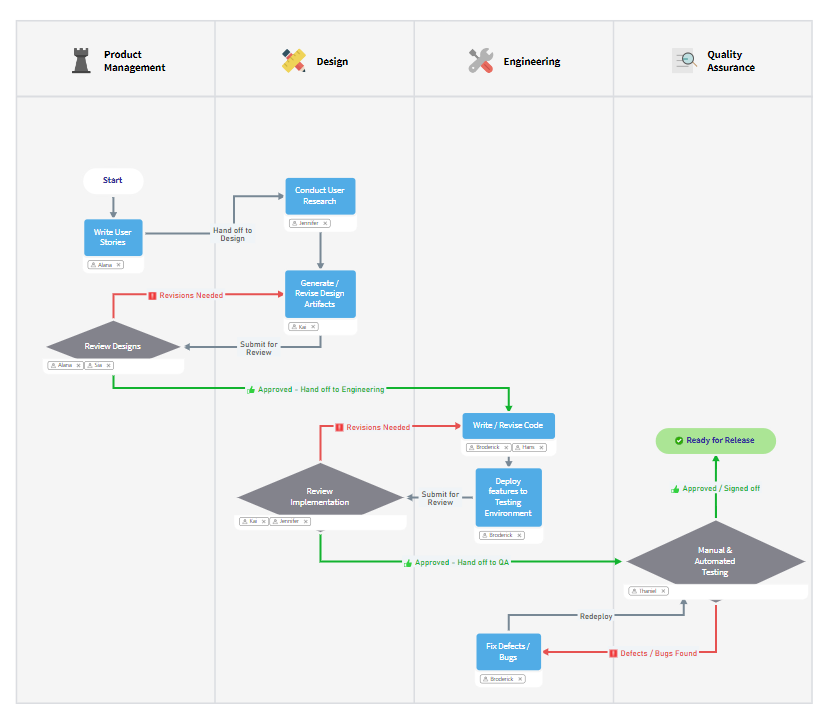
I use MindManager for brainstorming, project management and generally for visualizing all kinds of issues. With MindManager, for example, technical connections can be displayed wonderfully. I also use MindManager to create flowcharts or visualize processes with swimlanes. My last project was the creation and clear presentation of a technology competency matrix

Pros

  • flow charts
  • all tasks of project management
  • collecting ideas on a whiteboard
  • easy to create swimlanes

Cons

  • it would be helpfull to show sizes like DINA0, DINA1,...in the background
  • Scaling and formatting objects is cumbersome
  • The ability to insert watermarks would be helpful

Return on Investment

  • Elaborations appear very professional and underline your expert status
  • Very clear working basis for brainstorming
  • Save time by reusing templates that have already been created

Other Software Used

Canva, Microsoft 365, Stackline

If I had to have only one tool, this would be it.

Use Cases and Deployment Scope

I have been using MindManager for nearly 20 years for document structure analysis, project management, stakeholder analysis, and ideation workshops with mind maps.

J'utilise MindManager depuis près de 20 ans pour l'analyse de structure documentaire, la gestion de projets, l'analyse de parties prenantes et des ateliers d'idéation avec les cartes heuristiques.

Pros

  • Connecting document structure directories to topics
  • Identify activity managers
  • Use of icons and images to make everything visual
  • Provide a global vision of the context in evaluation
  • Relationships between subjects easy to create
  • Topic coating
  • Connecter des répertoires de structure documentaire à des sujets
  • Identifier les responsable d'activités
  • Utilisation des icones et images pour rendre le tout visuel
  • Donner une vision globale du contexte en évaluation
  • Relations entre les sujets facile à créer
  • Enrobage de sujets

Cons

  • Nothing, perfect for my needs and easy to use
  • Rien, parfait pour mes besoins et facile d'utilisation

Return on Investment

  • Save time by making complex environments visual.
  • Sauver du temps en rendant visuel des environnements complexes.

Alternatives Considered

Xmind and Mind42

Mindmapping at its best!

Use Cases and Deployment Scope

I've been using MindManager for about 20 years for a variety of purposes:Project management, event organization, brainstorming, preparing decision-making documents, test organization, and much more.The program is a great help in collecting keywords, ideas, and/or tasks and structuring them neatly. I've had the opportunity to try out other mind mapping programs (both freeware and licensed), but none compares to MindManager in terms of functionality and ease of use.I wouldn't want to be without this tool anymore and can highly recommend it to anyone interested!

Ich nutze den MindManager bereits seit ca. 20 Jahren und das für die verschiedensten Zwecke: Projektmanagement, Eventorganisation, Brainstorming, Vorbereitung von Entscheidungsvorlagen, Testorgansisation u. v. m. Das Programm hilft mir vorbildlich dabei, z. B. Stichworte, Ideen und/oder Aufgaben zu sammeln und sauber zu strukturieren. Ich hatte bereits Gelegenheit, auch andere Mindmapping-Programme (Freeware, aber auch lizenzpflichtige Programme) auszuprobieren, doch beim Funktionsumfang und der unkomplizierten Nutzbarkeit kommt keines an den MindManager heran. Ich möchte das Tool nicht mehr missen und kann es allen Interessierten nur wärmstens empfehlen!

Pros

  • Brainstorming
  • Project management
  • Organization of events
  • Structuring tasks
  • Projektmanagement
  • Organisation von Events
  • Aufgaben strukturieren

Return on Investment

  • Compliance with deadlines
  • Compliance with quality goals
  • Ease of structuring the recorded points (ideas, tasks, etc.)
  • Einhaltung von Terminzielen
  • Einhaltung von Qualitätszielen
  • Einfachheit der Strukturierung der festgehaltenen Punkte (Ideen, Aufgaben etc.)

Other Software Used

Stackfield, Microsoft Teams, Microsoft Project, OneNote