TrustRadius: an HG Insights company

GoTo Webinar

Score8 out of 10

539 Reviews and Ratings

What is GoTo Webinar?

GoToWebinar is GoTo’s webinar and online conferencing solution, and offers features like audience polling and Q&A, flexible scheduling experiences, and webinar templates. It offers CRM integrations and reporting & analytics tools to help engage clients’ audiences.

Categories & Use Cases

Media

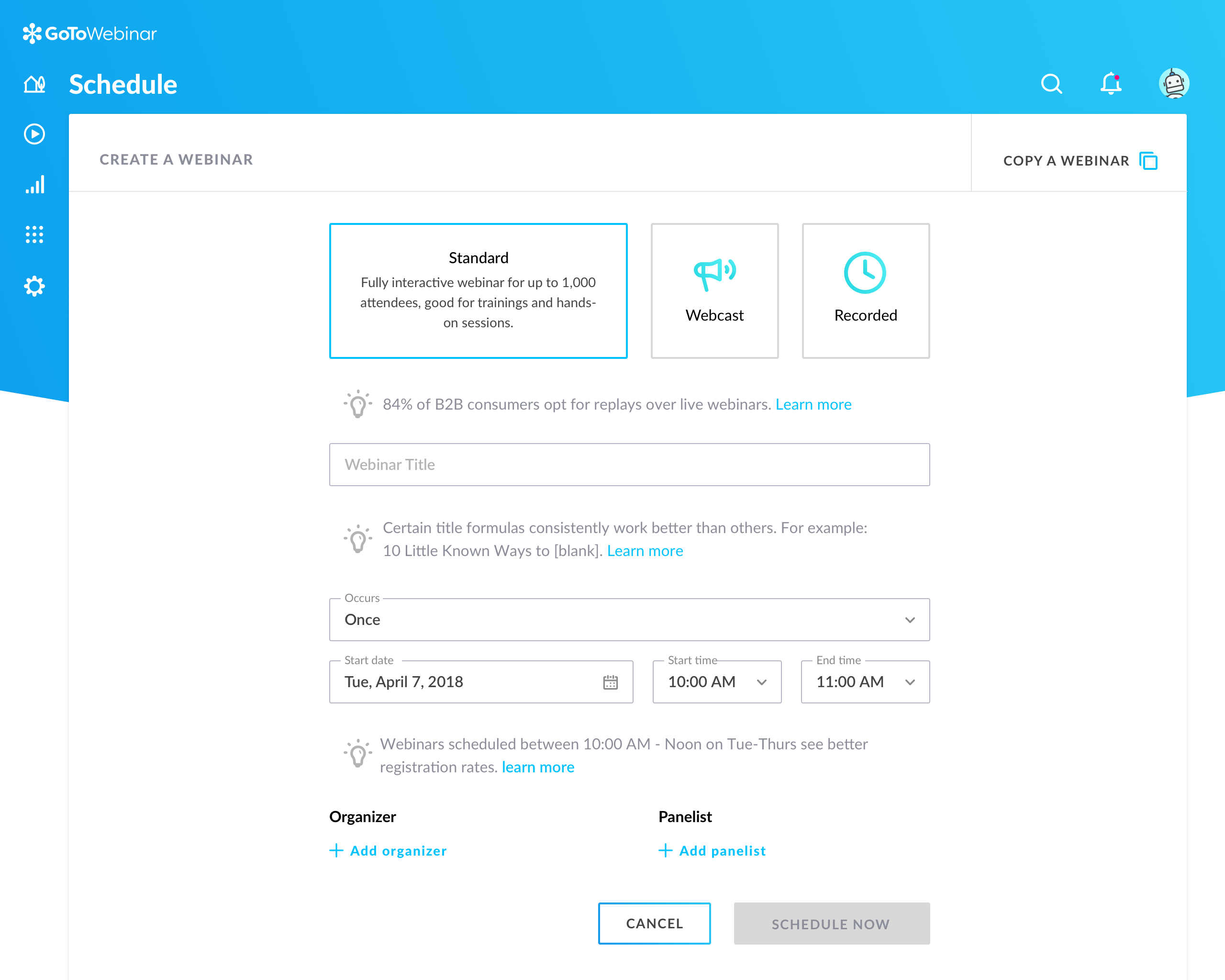
Setup flow for a new webinar in GoTo Webinar.
Organizer's Control Panel and in-session experience

1 / 2

Top Performing Features

  • Q&A

    Attendees can ask questions during the presentation.

    Category average: 8.5

  • Event registration

    Attendees can register in advance for upcoming online events (such as webinars).

    Category average: 8.6

  • Slideshows

    Presenters can present slideshows during the meeting within the web conferencing platform.

    Category average: 8.2

Areas for Improvement

  • Mobile support

    Attendees can access meetings/webinars from mobile devices.

    Category average: 7.4

  • Dashboards

    Users can create, customize and share dashboards, which provide an overview of the most important metrics.

    Category average: 7.1

  • Data exportability

    Data can be exported via a CSV or Excel file for further reporting and analysis outside of the tool.

    Category average: 7.5

Systems Integration Specialist

Use Cases and Deployment Scope

We use GoTo Webinar for online training and events. It helps us reach more people without traveling. It's easy to use and shows how well things went. It saves time and helps our business grow.It keeps everything organized, so we can focus on connecting with our audience.

Pros

  • GoTo Webinar makes setting up and running webinars simple, even for beginners.
  • It has tools like polls, chat, and Q&A that help keep the audience engaged and allow for interactive communication during the webinar.
  • The platform runs smoothly, even for large events, and ensures that attendees can join without issues, providing a consistent and professional experience.

Cons

  • GoTo Webinar could offer more options for customizing the look and feel of webinars, such as adding more branding or theme options to match your company’s style.
  • The analytics and reports can be hard to understand, especially for users who want simple, easy-to-read data on attendee engagement and performance.
  • The cost of GoTo Webinar can be a bit high, especially for smaller businesses, and it would be great to see more affordable pricing options or flexible plans.

Return on Investment

  • GoTo Webinar has helped us connect with more people, expanding our audience without the need for travel, which has boosted our marketing efforts.
  • The interactive features like polls and Q&A have led to better audience participation, helping us build stronger relationships with attendees.
  • The platform’s price can be a bit high, so while it delivers great value, it has also increased our expenses, impacting our budget.

Usability

Alternatives Considered

Class for Zoom, Microsoft Teams and Webex App

How to help you to connect to your customers.

Use Cases and Deployment Scope

We use it as a remote tool to support our customers. We support industrials 24 hours at 7 days a week. The scope is only as a support tool to our customers, the problems are that we can't use all the features we wanted to have. Lots are still in progress.

Pros

  • Doesn't matter how many customers we want to support
  • Nice management tools to see the history
  • Centralized dashboard to have a nice overview

Cons

  • Timeline of development can be better
  • Need some skills to use it as an external helpdesk
  • Give a quick document to connect to your customer

Return on Investment

  • Positive to have an insight in number of calls by customer
  • Negative is not having the freedom to use the data to your own reports
  • Positive interaction with our callers

Usability

Alternatives Considered

Anywhere365

Other Software Used

Anywhere365, Microsoft Power Automate, Microsoft Power BI, Microsoft 365

Simple to use and master

Use Cases and Deployment Scope

We used GoTo Webinar to execute marketing webinars for clients, prospects and internal employees. It was our standard in-house tool for several years and every member of the marketing team had access to use this software on a weekly basis. This tool helped us quickly plan and develop webinars for end users.

Pros

  • Easy to set up webinars
  • Simple to learn to use
  • Q&A feature is simple to operate

Cons

  • UX is not great compared to competitors
  • Occasional glitches occurred during webinars.
  • Recordings were slow to upload

Return on Investment

  • It made it easy to schedule webinars quickly
  • It was simple to teach employees how to use
  • Host controls were easy to understand

Usability

Alternatives Considered

Zoom Webinars and ON24

GoTo Webinar: Keeping Webinars Accessible

Use Cases and Deployment Scope

I use GoTo Webinar to remotely attend Continuing Education webinars. This software makes attending such webinars very easy. I typically receive a GoTo Webinar link, which then will produce an event that I can put on my calendar. The interface itself is not dissimilar to Zoom and other video conferencing software, which makes it quite accessible.

Pros

  • Simple User Interface that runs smoothly.
  • Links to webinars make it easy for attendees to register for and attend virtual events.
  • GoTo Webinar event streams tend to be quite stable.

Return on Investment

  • GoTo Webinar makes getting CEUs easy and cost effective, since travel time is removed from the equation.
  • GoTo Webinar allows people from all over the world to attend a Webinar, which is good for any industry or trade.

Usability

Alternatives Considered

Zoom Events & Webinars

Other Software Used

Webex Webinars, Zoom Events & Webinars

If you are looking for a Digital Platform to manage your Digital Event. GoTo Webinar is a reliable option

Use Cases and Deployment Scope

I use GoTo Webinar for Manage Webinars for participants over 500 plus. I have giving online classes for Digital Marketing Students pursuing to develop a freelancing Career and GoTo Webinar has helped me a lot for that. It was easy share recorded session to my participants. Promotion is easy through GoTo Webinar.

Pros

  • Host Webinar
  • Record Meetings
  • Online Event Planning and Promotion
  • Pre and Post joining emails

Cons

  • Syncing Email Marketing Campaigns
  • Syncing WhatApp Marketing for Webinar
  • Connecting Webinar to Social Accounts

Return on Investment

  • It has a good but indirect return on Investment
  • If Social Platforms like WhatsApp, Facebook are directly linked with it can have very good impact on Sales directly
  • Social Book marking can help increase Sales Impact

Usability

Alternatives Considered

Skype

Other Software Used

Upwork, YouTube Mentions, Instagram for Business