TrustRadius: an HG Insights company

Emburse Certify

Score6.7 out of 10

101 Reviews and Ratings

What is Emburse Certify?

Certify is travel and expense management software developed by the company of the same name in Maine, which merged with Chrome River in 2019 to form Emburse.

Media

Certify Homepage - User interface for all users that includes a quick view of their expenses, pending expense reports and approval requests.
Certify Mobile - Snap photos of receipts on the go and upload them instantly to your virtual Certify Wallet.
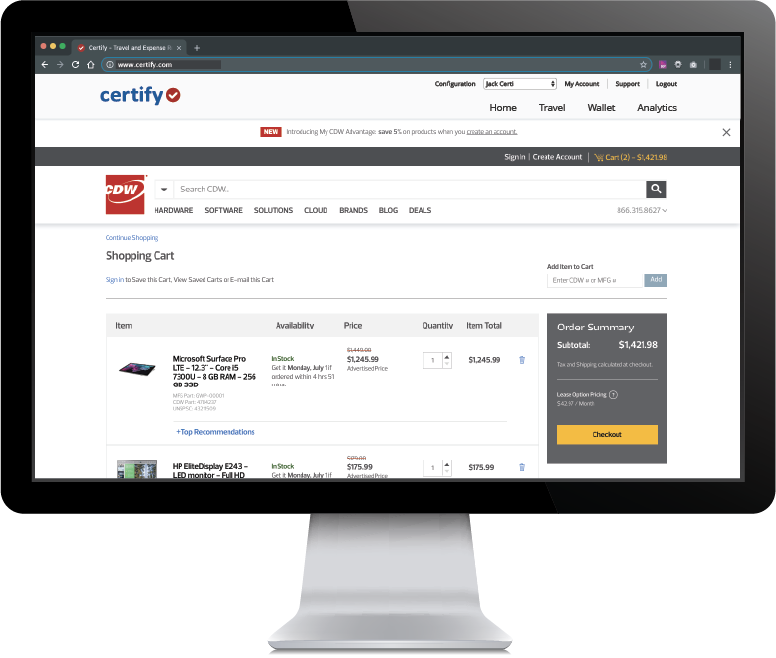
Certify Travel - Now, corporate travel is even easier. Introducing Certify Travel, your end-to-end corporate travel solution to simplify bookings for employees while helping your company manage travel practices and costs. All for one low monthly fee and no booking fees! Certify Travel is easy to use, yet it is also a powerful enhancement to your company’s expense management system.
Certify Reporting & Analytics
Certify AP- manage cashflow with accounts payable automation
Certify AP- streamlining employee purchasing

1 / 6

Top Performing Features

  • Payment Status Tracking

    Tracks what stage payments are at in the process, from approval to receipt.

    Category average: 8.3

  • Customizable Approval Policies

    Policies for different types of approvals can be customized, sent to multiple approvers, automatically approved, etc.

    Category average: 8

  • Financial Document Management

    Invoices, expense reports, and associated documents are stored within the platform for any future needs.

    Category average: 8.3

Areas for Improvement

  • Corporate Card Reconciliation

    Allows companies to reconcile employee expenses with company card statements.

    Category average: 8.2

  • Advanced OCR

    Automatically imports information from invoices, receipts, expense reports, and other scanned documents into the platform.

    Category average: 7.8

  • Payment Audit Trail

    Allows admin users visibility into the entire payment process, from receiving the expense claim or invoice to the payee receiving payment.

    Category average: 8.4

Huge time saver and easy to use.

Use Cases and Deployment Scope

All employees have the app installed on their phones in order to upload receipts for credit card purchases.

Pros

  • Easy uploads
  • Drop down categories
  • No need to save and carry receipts around

Cons

  • Sometimes all the information is not populated and total amounts are incorrect
  • I have to go online to fix receipts that do not merge with the report

Return on Investment

  • Quicker processing time for in house employee
  • Quicker processing/delivery time for our 3rd party accounting firm
  • Everyone is accountable for making sure all entries are correct

Usability

Other Software Used

Bluebeam, Procore

Emburse Certify for the win!!!

Use Cases and Deployment Scope

Emburse Certify is the tool our organization uses for expensing receipts for business use. Our finance team create a report each month and we are able to upload our receipts and state the reason for the purchase. This is completely automatically. There is also a great app that allows us to upload our receipts as soon as we make a purchase which prevents the employee from misplacing the receipts.

Pros

  • Keep a record of expenses
  • outlines the expense
  • easy upload of receipts

Cons

  • N/A, The feature is easy to use and user-friendly

Return on Investment

  • Easy to manage expense reports
  • Set up for reminders for employees

Alternatives Considered

SAP Concur

Other Software Used

Paycor, Workvivo, Microsoft Teams

Emburse Certify Review

Pros

  • Tracks for duplicate receipts - Based on receipt date and amount, Certify will flag duplicate receipts and with a click drill down to the report it has matched to duplicate to.
  • Split Expenses - The split expense function is easy to use and understand. Certify allows for multiple splits by amount or percentage.
  • Report Executive - Allows for the automatic building of expense reports based on a predetermined time.
  • Credit Cards - Merge receipts option. This option will merge together receipts and expense lines based on date and amount.

Cons

  • Unsophisticated - This platform is too simple for a system anymore robust than QuickBooks.
  • Reporting - There are over 50 reports in the system and not one of them will yield a report showing "current expense reports awaiting approval". The Custom Report Builder is limited in scope. Once a report is written, it is stifled by preset parameters.
  • Navigation - There is not a "Save" button anywhere in the platform. "Return" is not a universal term for "Save". It's clunky to use. Navigational icons change meanings depending upon how/when they are used. When creating a report, that entering a receipt date range is mandatory, is a complete waste of time and useless.
  • Wizards - Throughout the software "wizards" are referred to as the list of red colored instructions one encounters upon having left out needed information. A wizard is not a list instructions. It is a guided set of instructions that lead to the correct result.
  • Support - The first tier of support in Certify is not knowledgeable of the software. Our system has been put into chaos on more than one occasion due support having not something correctly. There is no obvious way to call them. They don't even have people in chat anymore. It's a stupid bot.

Return on Investment

  • Certify has eliminated the double data entry we were doing, but any platform we chose would have accomplished that.
  • Due to the limited reporting functionality, Certify has not been helpful as an expense management reporting tool.

Other Software Used

Sage Intacct, DocuSign

Usability

Powerful software, if it worked the way it was supposed to

Pros

  • Mobile app is very good, particularly at matching receipts with expenses
  • Web-based desktop interface is user-friendly
  • Automated expense reports are attractive for busy managers

Cons

  • After-sales support is terrible
  • Not all credit card programs are supported
  • Integration with other programs is complicated

Return on Investment

  • Overall initial cost was lower than many competitors
  • Amount of configuration and testing time required from internal implementation team was difficult to manage
  • Failure of the implementation resulted in additional costs, and confusion when trying to undo configurations and integrations

Alternatives Considered

Concur Travel and Expense and Paycom

Other Software Used

Ceridian Dayforce, Microsoft Dynamics SL, Comcast Business VOIP (VoiceEdge)

Usability

Certify is Certifiably great!

Pros

  • Integration with Amtrav or other travel booking systems. Certify has a tight integration with travel systems that makes it feel nearly like one cohesive tool.
  • Easy expense options. Use OCR on receipts, import from credit cards and merge items, approve and inquire about expenses. Track your submissions.
  • Easy UI. Friendly and easy to navigate without getting lost.

Cons

  • Mobile app. The mobile app is basically a web view of the mobile version of the page and isn't native. That experience could be much smoother.
  • Certify hasn't implemented SSO completely according to the SAML 2.0 protocol, so which IdP workflows work, SP is still broken. This makes it harder to take action from a link in an email as you always need to use the IdP workflow specifically.

Return on Investment

  • We have reduced the amount of time our operations department has to spend booking flights to 0.
  • Hotel bookings have been greatly streamlined and we are looking to eliminate human interaction with this process once CC authorisations are handled.
  • We have eliminated the wait time between operational travel research and client approval time -- it can all be handled in one single step now.

Usability

Alternatives Considered

Concur Expense

Other Software Used

AmTrav, BetterCloud, Google Voice