TrustRadius: an HG Insights company

AppsAnywhere

Score9.7 out of 10

10 Reviews and Ratings

What is AppsAnywhere?

AppsAnywhere is a software deployment and delivery solution designed to transform the student's technology and learning experience in higher education institutions. The software integrates with various technologies and uses leading application virtualization software to deliver 100% of software applications on-demand, making it the only solution currently available that can do so. With AppsAnywhere, students can access any app they need on any device, both on-campus and remotely, regardless of whether they are using Windows or Mac.

In addition to improving student access to apps across devices, AppsAnywhere also reduces overhead costs associated with traditional solutions like virtual desktop infrastructure (VDI). As a result, more than 1.5 million students across 150 higher education establishments worldwide currently use AppsAnywhere for streamlined access to their required educational tools. Every second around the world, ten apps are launched by university students and staff through this innovative product - showcasing its immense popularity and effectiveness as an app deployment solution.

Media

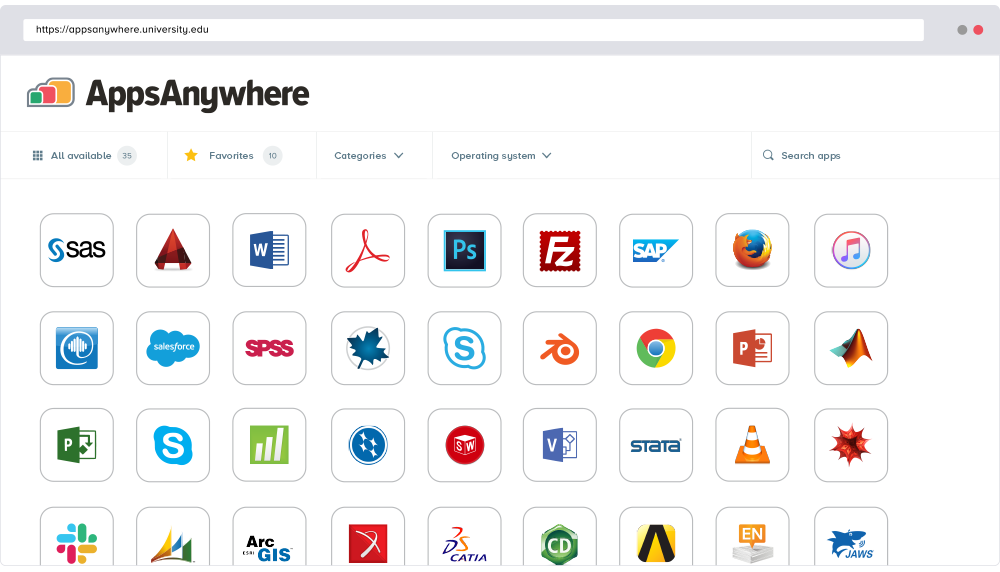
AppsAnywhere brings together all university or college software apps into a single app store platform, on any device.

Top Performing Features

  • Application support

    Support for a wide range of applications and application types

    Category average: 7.2

  • Ease of deployment

    Level of difficulty installed on host servers

    Category average: 8.1

  • Application packaging

    Ease of packaging 32 or 64-bit apps into single executable

    Category average: 7.5

Areas for Improvement

  • Security

    Limiting access to apps by domain authentication, IP address etc.

    Category average: 7.2

  • Device support

    Capable of delivering apps to wide variety of endpoints, including mobile devices

    Category average: 7.2

AppsAnywhere | Save time and a lot of problems with centralized app deployment

Use Cases and Deployment Scope

I'm a big fan of AppsAnywhere in the organization i deployed it. It makes it so much easier to deploy and manage applications across desktops, laptops, and mobile devices. AppsAnywhere helps us solve the problem of having to manually update applications on multiple devices, and also ensures that users always have access to the most up-to-date version. We use it for a variety of tasks including application deployment, remote management, and user access control.

Pros

  • It's incredibly user friendly and provides great functionality for deploying, managing and accessing apps.
  • The integration with my existing IT infrastructure is seamless and the customisation options are really helpful for optimising the user experience.
  • The analytics it provides are also really useful for keeping track of usage.

Cons

  • The search function could be more intuitive.
  • I feel like there could be more options for customizing the look and feel of the app.

Most Important Features

  • It's a great tool for quickly distributing apps to users.
  • It's easy to manage apps across multiple platforms, and the automated updates help keep everything running smoothly.
  • It gives users access to all their applications from any device.

Return on Investment

  • It has been incredibly easy to use, saving us time and money while also streamlining workflow processes.
  • We where able to quickly launch new applications, allowing us to keep up with users needs.
  • The reporting tools have also been very helpful in tracking usage and understanding how our users interact with our applications.

Alternatives Considered

Oracle VM VirtualBox, Amazon WorkSpaces (VDI) and Kasm Workspaces

Other Software Used

Oracle VM VirtualBox, Kasm Workspaces, Amazon WorkSpaces (VDI)

Great once you've found it

Use Cases and Deployment Scope

The university uses AppsAnywhere to deploy, install and launch a wide range of applications to Windows machines on any of our campuses. Some applications are very large and time consuming to install on every machine individually. Updates and licensing restrictions, including maximum number of seats, can then be managed centrally. From the student's point of view, there is a 'one-stop shop' for any specialist application, which is always in the same place, regardless of where you are working exactly.

Pros

  • Shows end users a full list of every application that is actually available to them
  • Install a specialist application on any Windows machine on our network
  • launch the application for use

Cons

  • AppsAnywhere is difficult to find to start it. End-users don't know to look for 'AppsAnywhere' or what it looks like. They tend to look under the Start menu when looking for the target specialist application - can't find it. On the task bar, end-users do not recognise the AppsAnywhere icon. It can be frustrating to show them
  • once in AppsAnywhere the search box does not stand our, so users tend to scroll down a very long list of 100's of applications to get to 'ZBrush'. the filters provided are not particularly useful eg most categories include nearly the entire set of applications
  • AppsAnywhere does not automatically learn your frequently delivered applications, so there is no 'Recents'. Users can create a list of Favourites manually, but this is too bothersome

Most Important Features

  • licensing control
  • ease of use for end-users
  • centralised updating and delivery

Return on Investment

  • more flexible use of laboratory space - any class can take place anywhere (well, more so with AppsAnywhere). students can choose where they work
  • relieves technical support of burdensome machine by machine installations
  • relieves technical support of burdensome license management - some manual solutions are soooo time consuming

Alternatives Considered

VMware Horizon

Other Software Used

Figma, Axure RP, Otter.ai

Usability

User friendly and reliable to use

Use Cases and Deployment Scope

AppsAnywhere is a single stop shop solutions to have all the apps at one place and which makes life easier to make students engage better and also have the software ready to use and experiment without having to manually install each every piece of software, the title system of the icon makes it easier to use.

Pros

  • straight forward user interface to get people using it
  • navigation through it is a breeze
  • question and answers chat option to get queries resolved

Cons

  • a bit laggy
  • user interface can be improved
  • integration is a bit rusty

Most Important Features

  • Navigation of the user interface
  • accessibility of the apps
  • Quick adaption of the tool

Return on Investment

  • It has increase new courses usage by 40%
  • The engagement of the user is increasing 15%
  • increase of user by 10%

Alternatives Considered

VMware Horizon and Kasm Workspaces

Other Software Used

AWS Backup, Azure App Service, Parallels Desktop

Simple and easy to access

Use Cases and Deployment Scope

AppsAnywhere is resolving the problem of accessing programs without downloading the original softwares. It helps me because I can use it on my computer without worrying about technical issues or performance degradation, I don't even need to download those heavy softwares. It doesn't even matter if I'm using MAC or windows, this app works on both.

Pros

  • It works on both Mac and Windows
  • Easy access to softwares
  • I can use Windows-support software while using Mac system

Cons

  • It doesn't have mobile version
  • Internet re-connection can be improved
  • It can be more user-friendly

Most Important Features

  • Easy to use
  • large amount of softwares
  • light-weight web launch

Return on Investment

  • It helps us get reports faster
  • easy access to some softwares
  • saving much more time

Alternatives Considered

Citrix Endpoint Management

Other Software Used

Citrix Endpoint Management, Citrix Virtual Apps, Blender

AppsAnywhere software platform for any device

Use Cases and Deployment Scope

I use AppsAnywhere in my workplace university. AppsAnywhere is the software we use to give our staff access to the software used for work. It can be accessed on campus or off campus, whenever you have your internet connection. Both Windows and Mac users can use AppsAnywhere, as it is compatible with both.

Pros

  • Mobile accessibility
  • Compatible with any operating system
  • Ideal for university students and staff

Cons

  • Quicker customer support responses
  • Antivirus and malware protection would be good additions
  • File transfer options would be a good feature

Most Important Features

  • Multi-user capability
  • API
  • Network security

Return on Investment

  • Easy to setup and use
  • Easy to train others using the software
  • Security peace of mind

Alternatives Considered

Amazon WorkSpaces (VDI)

Other Software Used

Amazon WorkSpaces (VDI)