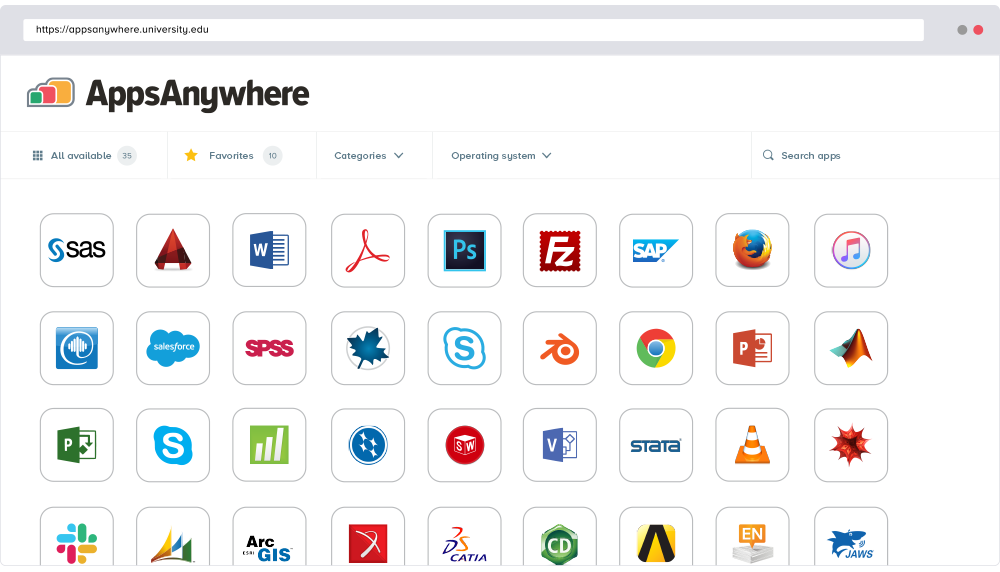
AppsAnywhere
is a software delivery platform that gives students and staff access to
the software they need to get their work done wherever they are, both on and
off campus.
Boasting more than 2 million students at over 200 universities
and colleges worldwide, the vendor states AppsAnywhere improves student outcomes by making
software available on any device, including BYOD, thanks to their unique approach
to virtualization. Used by higher ed
institutions, including University…
N/A
Citrix DaaS
Score8.7 out of 10
N/A
Citrix DaaS (formerly Citrix Virtual Apps and Desktops, or XenDesktop) is a virtual desktop infrastructure (VDI) and application virtualization solution from Citrix.
I have been monitoring the use of this app for the past year now and it has been incredibly useful in providing my team with easy access to the applications they need. It is well suited to organizations with a large variety of applications and users that need to access them from multiple devices. It has been very easy to deploy, manage and maintain, and I love the fact that users can easily find what they need without having to navigate complex menus. (search can still be abit better). Still a really good pick :)
A de minimis incentive was given to thank the reviewer for their time. The incentive was not used to bias or drive a particular response, nor was the incentive contingent on a positive endorsement. More Info
DaaS is ideal in large-scale environments that require centralized, secure management. Remote workforces at large organizations. Highly regulated industries like finance. It allows for easy security and monitoring over one aspect instead of multiple remote machines. DaaS is not ideal for organizations with small budgets due to the pricing and organizations with lousy network connectivity. This would make the end-user experience terrible.
A de minimis incentive was given to thank the reviewer for their time. The incentive was not used to bias or drive a particular response, nor was the incentive contingent on a positive endorsement. More Info
A de minimis incentive was given to thank the reviewer for their time. The incentive was not used to bias or drive a particular response, nor was the incentive contingent on a positive endorsement. More Info
A de minimis incentive was given to thank the reviewer for their time. The incentive was not used to bias or drive a particular response, nor was the incentive contingent on a positive endorsement. More Info
A de minimis incentive was given to thank the reviewer for their time. The incentive was not used to bias or drive a particular response, nor was the incentive contingent on a positive endorsement. More Info
A de minimis incentive was given to thank the reviewer for their time. The incentive was not used to bias or drive a particular response, nor was the incentive contingent on a positive endorsement. More Info
A de minimis incentive was given to thank the reviewer for their time. The incentive was not used to bias or drive a particular response, nor was the incentive contingent on a positive endorsement. More Info
Almost everyone you tell to use it to access a specialist application can find the software they need and install it. However, surprisingly many have difficulties finding AppsAnywhere under the start menu or on the task bar - it is not a icon or name they recognise, and they really want to lunch the target specialist software (Zbrush or whatever). Once you find it, many people ignore the search function which is probably the fastest method, and browse the long list alphabetically, because the standard filters do not help much. Favouriting is rarely used as it is too burdensome and not an issue for users when they are looking for the applicationt hey need.
A de minimis incentive was given to thank the reviewer for their time. The incentive was not used to bias or drive a particular response, nor was the incentive contingent on a positive endorsement. More Info
Getting the environment setup took me three months of off and on work, with 3 complete rebuilds of the environment. Utilizing the WebUI to access the environment had presented so many random issues that we had to require end users to use the Citrix Reciever App. As it was the only stable solution. Aside from that, it hasn't required much admin intervention since the stand-up was completed.
A de minimis incentive was given to thank the reviewer for their time. The incentive was not used to bias or drive a particular response, nor was the incentive contingent on a positive endorsement. More Info
A de minimis incentive was given to thank the reviewer for their time. The incentive was not used to bias or drive a particular response, nor was the incentive contingent on a positive endorsement. More Info
The performance of XenDesktop is the best in the industry because of the fine-tuned protocol and years of updating. Overall, I don't think there is a better performer on the market. The question is if the added complexity of running XenDesktop is really worth the performance gain. While the latest version of XenDesktop is the easiest to deploy so far, it is still more challenging than the competitors.
A de minimis incentive was given to thank the reviewer for their time. The incentive was not used to bias or drive a particular response, nor was the incentive contingent on a positive endorsement. More Info
The support is great when you get an engineer that knows what they are doing but getting that individual sometimes takes a while. Overall, they are professional and polite and competent in their knowledge. Sometimes the cases are open for an extended period of time which becomes very frustrating when dealing with critical issues.
A de minimis incentive was given to thank the reviewer for their time. The incentive was not used to bias or drive a particular response, nor was the incentive contingent on a positive endorsement. More Info
A de minimis incentive was given to thank the reviewer for their time. The incentive was not used to bias or drive a particular response, nor was the incentive contingent on a positive endorsement. More Info
A de minimis incentive was given to thank the reviewer for their time. The incentive was not used to bias or drive a particular response, nor was the incentive contingent on a positive endorsement. More Info
Take it slow and read the directions each step of the way. If you are not familiar with Citrix products, use a reseller or other experienced engineer to assist you in the setup of your environment
A de minimis incentive was given to thank the reviewer for their time. The incentive was not used to bias or drive a particular response, nor was the incentive contingent on a positive endorsement. More Info
The AppsAnywhere team is very quick in setting up things and also having everything in a single place. The bundle of the apps can be easily configured as the documentation is also very straightforward while setting up things and also having the team to work accordingly customize as per the needs
A de minimis incentive was given to thank the reviewer for their time. The incentive was not used to bias or drive a particular response, nor was the incentive contingent on a positive endorsement. More Info
Citrix Virtual Apps & Desktops is platform agnostic (we can use any underlying hypervisor technology) and really flexible for any use case. Using a golden image and provisioning it (with Machine Creation Services or Provisioning Services) is powerful and really straightforward, compared to the complexity in Microsoft RDS of maintaining a coherent farm, or the limitation of VMware Horizon to run on VMware Products.
A de minimis incentive was given to thank the reviewer for their time. The incentive was not used to bias or drive a particular response, nor was the incentive contingent on a positive endorsement. More Info
A de minimis incentive was given to thank the reviewer for their time. The incentive was not used to bias or drive a particular response, nor was the incentive contingent on a positive endorsement. More Info
A de minimis incentive was given to thank the reviewer for their time. The incentive was not used to bias or drive a particular response, nor was the incentive contingent on a positive endorsement. More Info
XenApp has allowed us to continue support of legacy applications and all access of those applications to users across the globe with any device.
XenApp can also manage software licenses by restricting number of users, number of concurrent sessions, or combination of both to required specification.
While initial investment in XenApp can be costly, continuing support and upgrade are very cost effective and product stability is excellent.
While there are competing products from Microsoft and VMware, when it comes to remote application access, XenApp is the best of breed.
A de minimis incentive was given to thank the reviewer for their time. The incentive was not used to bias or drive a particular response, nor was the incentive contingent on a positive endorsement. More Info