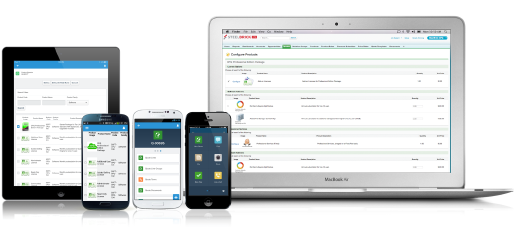
Salesforce Revenue Cloud (formerly Salesforce CPQ or SteelBrick) is built and delivered on the Salesforce Platform and Salesforce1 Mobile App which enables users to create accurate sales quotes quickly and submit error-free orders on the fly from any device.
$30
Per User per Month
SAP Sales Cloud
Score 8.3 out of 10
N/A
SAP Sales Cloud (formerly SAP Cloud for Sales) is a cloud sales application with sales automation, enterprise resource planning (ERP) integration, and collaboration capabilities.
N/A
Pricing
Salesforce Revenue Cloud
SAP Sales Cloud
Editions & Modules
Basic
$30
Per User per Month
Professional
$50
Per User per Month
Enterprise
$75
Per User per Month
No answers on this topic
Offerings
Pricing Offerings
Salesforce Revenue Cloud
SAP Sales Cloud
Free Trial
Yes
No
Free/Freemium Version
No
No
Premium Consulting/Integration Services
No
No
Entry-level Setup Fee
Optional
No setup fee
Additional Details
—
—
More Pricing Information
Community Pulse
Salesforce Revenue Cloud
SAP Sales Cloud
Features
Salesforce Revenue Cloud
SAP Sales Cloud
CPQ
Comparison of CPQ features of Product A and Product B
Salesforce Revenue Cloud
7.7
Ratings
12% below category average
SAP Sales Cloud
-
Ratings
Quote sharing/sending
7.90 Ratings
00 Ratings
Product configuration
5.10 Ratings
00 Ratings
Configuration options
5.10 Ratings
00 Ratings
Pricing rules
8.00 Ratings
00 Ratings
Price adjustment
8.00 Ratings
00 Ratings
Purchase history and open contracts
9.00 Ratings
00 Ratings
Guided selling/Sales portal
6.00 Ratings
00 Ratings
CPQ reporting & analytics
8.90 Ratings
00 Ratings
CPQ-CRM integration
9.90 Ratings
00 Ratings
Attachments to quotes
9.00 Ratings
00 Ratings
Order capturing
8.00 Ratings
00 Ratings
Sales Force Automation
Comparison of Sales Force Automation features of Product A and Product B
Salesforce Revenue Cloud
-
Ratings
SAP Sales Cloud
8.2
Ratings
6% above category average
Customer data management / contact management
00 Ratings
8.80 Ratings
Workflow management
00 Ratings
8.60 Ratings
Territory management
00 Ratings
7.20 Ratings
Opportunity management
00 Ratings
8.00 Ratings
Integration with email client (e.g., Outlook or Gmail)
00 Ratings
7.90 Ratings
Contract management
00 Ratings
8.30 Ratings
Quote & order management
00 Ratings
8.30 Ratings
Interaction tracking
00 Ratings
8.50 Ratings
Channel / partner relationship management
00 Ratings
8.60 Ratings
Customer Service & Support
Comparison of Customer Service & Support features of Product A and Product B
Salesforce Revenue Cloud
-
Ratings
SAP Sales Cloud
8.2
Ratings
8% above category average
Case management
00 Ratings
7.90 Ratings
Call center management
00 Ratings
8.60 Ratings
Help desk management
00 Ratings
8.00 Ratings
Marketing Automation
Comparison of Marketing Automation features of Product A and Product B
Salesforce Revenue Cloud
-
Ratings
SAP Sales Cloud
7.5
Ratings
1% below category average
Lead management
00 Ratings
7.30 Ratings
Email marketing
00 Ratings
7.60 Ratings
CRM Project Management
Comparison of CRM Project Management features of Product A and Product B
Salesforce Revenue Cloud
-
Ratings
SAP Sales Cloud
8.2
Ratings
8% above category average
Task management
00 Ratings
8.10 Ratings
Billing and invoicing management
00 Ratings
8.10 Ratings
Reporting
00 Ratings
8.60 Ratings
CRM Reporting & Analytics
Comparison of CRM Reporting & Analytics features of Product A and Product B
Salesforce Revenue Cloud
-
Ratings
SAP Sales Cloud
8.4
Ratings
10% above category average
Forecasting
00 Ratings
8.30 Ratings
Pipeline visualization
00 Ratings
8.40 Ratings
Customizable reports
00 Ratings
8.50 Ratings
Customization
Comparison of Customization features of Product A and Product B
Salesforce Revenue Cloud
-
Ratings
SAP Sales Cloud
7.7
Ratings
3% above category average
Custom fields
00 Ratings
8.00 Ratings
Custom objects
00 Ratings
7.30 Ratings
Scripting environment
00 Ratings
7.70 Ratings
API for custom integration
00 Ratings
7.80 Ratings
Security
Comparison of Security features of Product A and Product B
Salesforce Revenue Cloud
-
Ratings
SAP Sales Cloud
8.6
Ratings
3% above category average
Single sign-on capability
00 Ratings
8.80 Ratings
Role-based user permissions
00 Ratings
8.30 Ratings
Social CRM
Comparison of Social CRM features of Product A and Product B
Salesforce Revenue Cloud
-
Ratings
SAP Sales Cloud
7.2
Ratings
2% below category average
Social data
00 Ratings
7.30 Ratings
Social engagement
00 Ratings
7.20 Ratings
Integrations with 3rd-party Software
Comparison of Integrations with 3rd-party Software features of Product A and Product B
Salesforce Revenue Cloud
-
Ratings
SAP Sales Cloud
7.7
Ratings
5% above category average
Marketing automation
00 Ratings
8.00 Ratings
Compensation management
00 Ratings
7.40 Ratings
Platform
Comparison of Platform features of Product A and Product B
CPQ is great if you can devote the time to it to make it perfect for your sales team. It requires a lot of time and energy to build it out and customize, but once that's done it is one of the most powerful tools you will have. Having an expert in CPQ is really helpful as well.
1. Better understanding of customer choice and sales insights. 2. High chance that we can convert the lead into sales as SAP analyzes the customer's need and behavior. 3. As it analyzes the data behind the scenes, a better price deal closing is possible, as it gives that level of insight.
Salesforce CPQ is great for being able to quickly and easily build product bundles in an intuitive and visually appealing way.
The product catalog and ability to easily add fields to product records makes setting up products really simple and adds a lot of value to reporting within Salesforce.
Basic product and configuration rules are very easy to understand and set up.
Our Salesforce is very messy, which tells me it's not super easy to clean up.
I always have a really hard time removing a contacts from an account - it seems like you can't simply remove the relationship so we have lots of people named DO NOT CONTACT or things of that nature.
Sometimes when saving it doesn't seem like things actually save.
I know what SAP CRM can do in the future. We are very happy with the product and think it is a great choice for both SAP ERP users and even those who do not use other SAP products. We have both Salesforce and SAP CRM, and we feel that Salesforce is a good product for a few years, but SAP CRM is a more fully-featured product and is a better choice for complex organizations capable of running installed software of this complexity. It is often just a question of budget.
In short, SAP CRM is a complete service that will help improve marketing strategy and productivity. It covers various topics, from big data analytics to resource management and housing sales data. SAP CRM has a long list of features and can do them all.
There have been some issues with multi-year pricing of certain products and services which we have been assured will be resolved but I guess are still underway, the support team apart from this has not been needed much and in the rare scenarios, it has been needed the resolutions of conflicts has been prompt and quick, so the overall support would have my high regards for being so helpful and customer-oriented so as to assure good performance of their toolset and customer satisfaction.
SAP's customer service is quick and efficient, with a response time of fewer than some minutes. In either case, you'll get instant help from the vendor or online forums. In addition, the vendor provides excellent global support for this tool. Like Salesforce, SugarCRM, etc., it's probably fine as a standalone CRM option.
Training was mostly completed over a couple conference calls, and reading the API documentation. Our developers were able to implement quickly after reading the documentation.
I would rate the implementation a 7. While the process overall was successful, there were challenges related to data migration, integration with other systems, and initial user adoption. However, the support from SAP during the implementation phase was helpful, and we were able to resolve the major issues as the process progressed.
This has better product capabilities like Manage Order, Mobile, pricing module, select product offers service channel. What I like best is the integration with Salesforce, the ability to create and connect opportunities and there is a lot of flexibility in this tool. It has a very user-friendly platform & navigation across pages is the best Also I like how fast I can create quotes. I also like how detailed you can get with reporting. Any possible metric we can think of can be tracked, measured, and integrated.
One of the most outstanding features of SAP Sales Cloud is its easy integration with our existing SAP ecosystem. This was essential because we used SAS/4HANA in our operations. Its ability to have a single platform that easily integrates sales data with other company operations was a huge advantage for us. In contrast, some of the other systems we explored required significant changes or integration work, which would have raised our overall costs and level of complexity.
I choose this rating because the sales and supply chain network has been strengthened by the use of this product. Sap Sales cloud has seamlessly unified the backend business processes into more transparent effective ones.The customer satisfaction have also increased with better customer collaboration and relationship.The vendor management process has also been significantly impacted and all for good
Easy access to reporting on closed-won, closed-lost, and open quotes.
Accuracy in data referenced in a quote - it's typically accurate as it is pulled directly from opportunity, looking up to associated subscription start/end dates, etc..
We lose valuable time in creating quotes ourselves. Quotes were requested and created through sales ops previously, sales did not have access to the excel templates used to generate quotes.