
LinkPoint Connect vs. Salesforce Lightning Platform
| Product | Rating | Most Used By | Product Summary | Starting Price |
|---|---|---|---|---|
 LinkPoint Connect | Score9 out of 10 | N/A | LinkPoint Connect promises to streamline data entry and access by enabling users to instantly view CRM data within their email client. This sales intelligence solution integrates Salesforce and Microsoft Dynamics CRM data in Outlook or IBM Notes. According to the vendor, key capabilities include: View real-time Salesforce data without ever leaving your email. Click on an email, and the LinkPoint Connect Side Panel instantly displays that contact’s information directly from… | $192 per user, per year |
 Salesforce Lightning Platform | Score7.7 out of 10 | N/A | Salesforce Platform is designed for building and deploying scalable cloud applications with managed hardware provisioning and app stacks. It provides out-of-the-box tools and services to automate business processes, integrate with external apps, and provide responsive layouts and more. | $25 Per User Per Month |
| LinkPoint Connect | Salesforce Lightning Platform | |||||||||||||||
|---|---|---|---|---|---|---|---|---|---|---|---|---|---|---|---|---|
| Editions & Modules |
|
| ||||||||||||||
| Offerings |
| |||||||||||||||
| Entry-level Setup Fee | $16 per user per year | No setup fee | ||||||||||||||
| Additional Details | Subscriptions are billed annually. Discounts available for non-profits. Volume discounts available. LinkPoint Connect Solutions are available for Outlook and IBM Notes users. These include preconfigured implementations for Advologix, Apto, Apttus, FinancialForce.com, Jobscience, Navatar, Pardot, Salesforce Shield, and TaskRay. | — | ||||||||||||||
| More Pricing Information | ||||||||||||||||
| LinkPoint Connect | Salesforce Lightning Platform | |
|---|---|---|
| Considered Both Products | No answer on this topic | No answer on this topic |
| Key User Insights | ||
| Would buy again | ||
No answers on this topic | 90% Would buy again 28 Answers | |
| Delivers good value for the price | ||
No answers on this topic | 92% Delivers good value for the price 23 Answers | |
| Happy with the feature set | ||
No answers on this topic | 90% Happy with the feature set 28 Answers | |
| Lived up to sales and marketing promises | ||
No answers on this topic | 100% Lived up to sales and marketing promises 15 Answers | |
| Implementation went as expected | ||
No answers on this topic | 89% Implementation went as expected 16 Answers | |
| LinkPoint Connect | Salesforce Lightning Platform | |||||||||||||||||||||||||||||||||||||
|---|---|---|---|---|---|---|---|---|---|---|---|---|---|---|---|---|---|---|---|---|---|---|---|---|---|---|---|---|---|---|---|---|---|---|---|---|---|---|
| Platform-as-a-Service |
| |||||||||||||||||||||||||||||||||||||
| LinkPoint Connect | Salesforce Lightning Platform | |
|---|---|---|
| Small Businesses |  Mailtrack Score9.7 out of 10 |  IBM Cloud Foundry Score6 out of 10 |
| Medium-sized Companies | Mailtrack Score9.7 out of 10 |  IBM Cloud Private Score9.6 out of 10 |
| Enterprises | No answers on this topic |  AWS Elastic Beanstalk Score7.3 out of 10 |
| All Alternatives | View all alternatives | View all alternatives |
| LinkPoint Connect | Salesforce Lightning Platform | |
|---|---|---|
| Likelihood to Recommend | 9.0 | 6.7 |
| Usability | - | 7.3 |
| Support Rating | 10.0 | 8.1 |
| LinkPoint Connect | Salesforce Lightning Platform | |
|---|---|---|
| Likelihood to Recommend |
|
|
| Pros |
|
|
| Cons |
|
|
| Usability | No answers on this topic |
|
| Support Rating |
|
|
| Alternatives Considered |
|
|
| Return on Investment |
|
|
| ScreenShots | LinkPoint Connect Screenshots 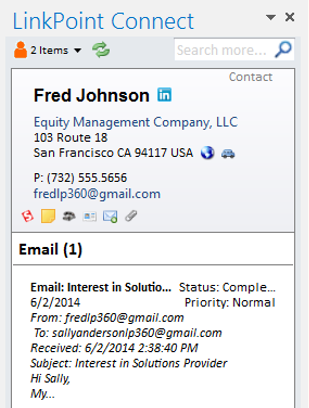  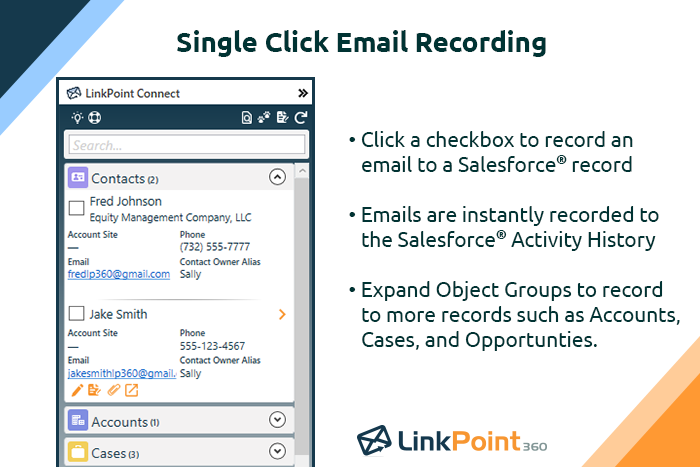   |




