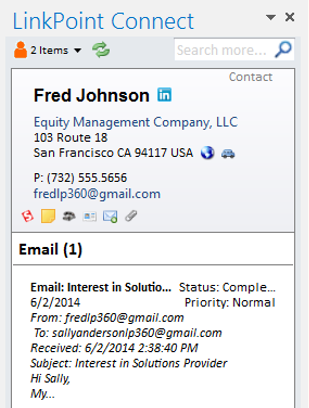
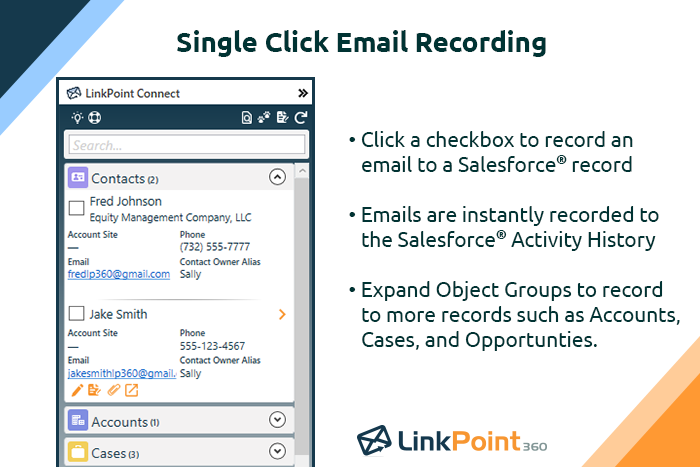
LinkPoint Connect promises to streamline data entry and access by enabling users to instantly view CRM data within their email client. This sales intelligence solution integrates Salesforce and Microsoft Dynamics CRM data in Outlook or IBM Notes. According to the vendor, key capabilities include: View real-time Salesforce data without ever leaving your email. Click on an email, and the LinkPoint Connect Side Panel instantly displays that contact’s information directly from…
$192
per user, per year
Pricing
LinkPoint Connect
Editions & Modules
LinkPoint Connect for Outlook + Salesforce
$192
per user, per year
LinkPoint Connect for Outlook + Microsoft Dynamics CRM
$192
per user, per year
LinkPoint Connect for IBM Notes + Salesforce
$228
per user, per year
LinkPoint Connect for IBM Notes + Microsoft Dynamics CRM
$228
per user, per year
Offerings
Pricing Offerings
LinkPoint Connect
Free Trial
Yes
Free/Freemium Version
No
Premium Consulting/Integration Services
Yes
Entry-level Setup Fee
$16 per user per year
Additional Details
Subscriptions are billed annually. Discounts available for non-profits. Volume discounts available. LinkPoint Connect Solutions are available for Outlook and IBM Notes users. These include preconfigured implementations for Advologix, Apto, Apttus, FinancialForce.com, Jobscience, Navatar, Pardot, Salesforce Shield, and TaskRay.
Principal at Cerity Partners (Financial Services, 201-500 employees)
Chose LinkPoint Connect
Prior to our move to LinkPoint, we used the Salesforce add-in for Outlook. This required manual syncing of email and calendar items and no easy to use interface between the two programs. It was very cumbersome for me to use, to the point where I quit using it altogether some …
A de minimis incentive was given to thank the reviewer for their time. The incentive was not used to bias or drive a particular response, nor was the incentive contingent on a positive endorsement. More Info
A de minimis incentive was given to thank the reviewer for their time. The incentive was not used to bias or drive a particular response, nor was the incentive contingent on a positive endorsement. More Info
Verified User
Chose LinkPoint Connect
Cirrus Insight was a huge fail for us as it searched and pulled in matching records looking at all custom and standard email fields. We have a lot of emails fields that contained employee email addresses (for notifications) so it pulled in records that didn’t match making the …
A de minimis incentive was given to thank the reviewer for their time. The incentive was not used to bias or drive a particular response, nor was the incentive contingent on a positive endorsement. More Info
LinkPoint is well suited to any situation where Outlook is used for email correspondence and calendar items and there is need to have a record of those items and/or perform connected actions (schedule tasks, follow up reminders, etc.) in Salesforce. Automating this process and removing as much duplication of work as possible is the primary goal and the primary benefit that LinkPoint provides. In addition to efficiency, automating the process also provides a pretty substantial increase in accuracy, removing ca. 50% of the chance for human error. It's pretty simple functionality in concept, but extremely valuable in execution.
A de minimis incentive was given to thank the reviewer for their time. The incentive was not used to bias or drive a particular response, nor was the incentive contingent on a positive endorsement. More Info
A de minimis incentive was given to thank the reviewer for their time. The incentive was not used to bias or drive a particular response, nor was the incentive contingent on a positive endorsement. More Info
A de minimis incentive was given to thank the reviewer for their time. The incentive was not used to bias or drive a particular response, nor was the incentive contingent on a positive endorsement. More Info
A de minimis incentive was given to thank the reviewer for their time. The incentive was not used to bias or drive a particular response, nor was the incentive contingent on a positive endorsement. More Info
Prior to our move to LinkPoint, we used the Salesforce add-in for Outlook. This required manual syncing of email and calendar items and no easy to use interface between the two programs. It was very cumbersome for me to use, to the point where I quit using it altogether some time ago. I found it far less frustrating to just switch back and forth between Outlook and Salesforce and manually perform the requisite actions, create tasks or other items, enter the required data, etc.
A de minimis incentive was given to thank the reviewer for their time. The incentive was not used to bias or drive a particular response, nor was the incentive contingent on a positive endorsement. More Info
A de minimis incentive was given to thank the reviewer for their time. The incentive was not used to bias or drive a particular response, nor was the incentive contingent on a positive endorsement. More Info