Cisco Business Edition 6000 (BE6000) was a telephony and VoIP business phone with unified communications features from Cisco, targeted at SMBs. The product is discontinued, and superseded by functionality found in Cisco Webex Calling.
N/A
Ooma Office
Score 9.2 out of 10
N/A
For businesses of all sizes, Ooma provides advanced voice and collaboration features which they describe as flexible and scalable. With plans starting at $19.95 per user per month, Ooma Office is available without contracts or long-term commitments so as to make it easy for a small business to scale its office phone system with Ooma as its business grows. Ooma Office features include: Unlimited Calling in U.S., Canada, Mexico and Puerto Rico Free Local…
$9.95
per month
Pricing
Cisco Business Edition 6000 (discontinued)
Ooma Office
Editions & Modules
No answers on this topic
Local Phone Number
$9.95
per month
Toll Free Number
$9.95
per month
Toll Free Calling Plan
$15.00
per month
Base Price
$19.95
per month
User Extension
$19.95
per month
Pro
$24.95
per month
Ooma Linx
$49.99
per month
Ooma Wireless Adapter
$49.99
per month
Ooma DP1 Desk Phone
$89.99
per month
Expansion Base Station
$99.99
per month
Yealink IP Phones
$99.99
per month
Cisco IP Phones
$109.99
per month
Yealink Conference IP Phones
$399.99
per month
Conference Bridge
Free
Ring Groups
Free
Virtual Receptionist
Free
Number Porting
Free
Offerings
Pricing Offerings
Cisco Business Edition 6000 (discontinued)
Ooma Office
Free Trial
No
No
Free/Freemium Version
No
No
Premium Consulting/Integration Services
No
No
Entry-level Setup Fee
No setup fee
$19.95 per user/month
Additional Details
—
Ooma Office offers plans starting at $19.95 per user/month with no contracts, ever.
More Pricing Information
Community Pulse
Cisco Business Edition 6000 (discontinued)
Ooma Office
Features
Cisco Business Edition 6000 (discontinued)
Ooma Office
Cloud PBX
Comparison of Cloud PBX features of Product A and Product B
Cisco Business Edition 6000 (discontinued)
8.6
Ratings
8% above category average
Ooma Office
8.0
Ratings
1% above category average
Hosted PBX
8.00 Ratings
8.40 Ratings
Multi-level Interactive Voice Response (IVR)
9.10 Ratings
7.80 Ratings
User templates
8.40 Ratings
00 Ratings
Call reports
8.30 Ratings
00 Ratings
Directory of employee names
9.10 Ratings
8.00 Ratings
Call Management
Comparison of Call Management features of Product A and Product B
Cisco Business Edition 6000 (discontinued)
8.8
Ratings
5% above category average
Ooma Office
8.4
Ratings
0% above category average
Answering rules
8.80 Ratings
8.50 Ratings
Call recording
9.10 Ratings
7.50 Ratings
Call park
8.80 Ratings
9.00 Ratings
Call screening
8.90 Ratings
9.00 Ratings
Message alerts
8.40 Ratings
8.00 Ratings
VoIP system collaboration
Comparison of VoIP system collaboration features of Product A and Product B
Cisco Business Edition 6000 (discontinued)
8.7
Ratings
9% above category average
Ooma Office
9.2
Ratings
14% above category average
Video conferencing
9.10 Ratings
00 Ratings
Audio conferencing
8.80 Ratings
9.20 Ratings
Video screen sharing
8.20 Ratings
00 Ratings
Instant messaging
8.50 Ratings
00 Ratings
Mobile apps
Comparison of Mobile apps features of Product A and Product B
Cisco Business Edition 6000 (BE6000) is well suited on small and medium sites that need entry-level voice and IP telephony capabilities, together with powerful, easy-to-use collaboration tools. However , if a single user interface or VMware servers are deal breakers for you, I suggest another call system will likely be a better fit.
[Ooma Office has] good customer service: this is important in our business as we have 24/7 phone service and rely on any tech issues being solved quickly. The price point is very good for small businesses. Being able to block robo / spam calls with one click is a huge plus as it saves us time on the phone and cleans up our incoming calls for the future.
Happy with Cisco Business Edition 6000 (BE6000); works great for us and costs to maintain it are well in hand. it also fits our current and future requirements going forward.
We have found it very easy to configure, manage, and expand our phone operations with Ooma Office. We needed a reliable phone network as this is the first means of communication for our customers - Ooma has made it a lot easier for us to manage. Their support is also available 24x7 so that's a huge plus.
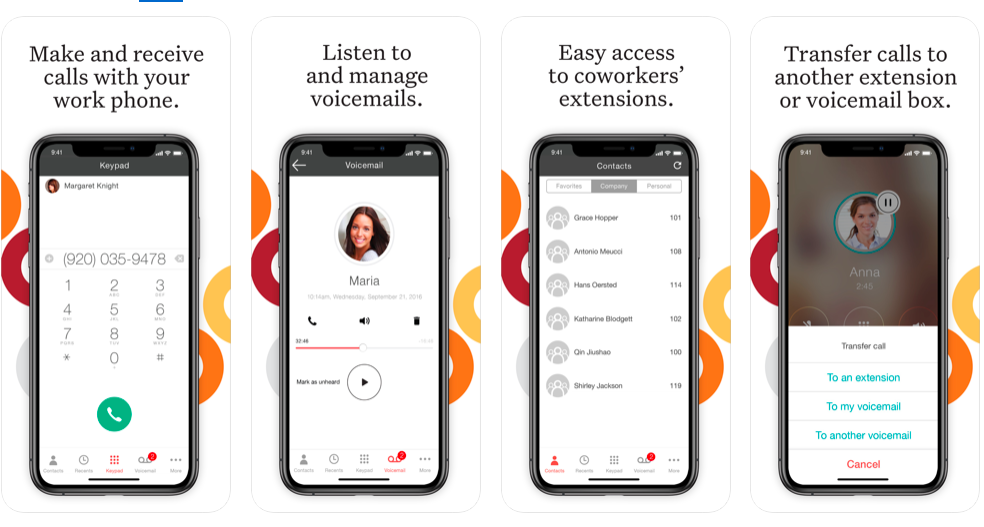
If I had to rate Ooma Office’s overall usability on a scale from 1 to 10, I’d give it a solid 9 out of 10.From my experience, the setup was incredibly straightforward — honestly one of the easiest systems I’ve ever rolled out for a small business. The dashboard is clean, user-friendly, and doesn’t take a tech-savvy person to navigate. Within a short time, our team was up and running without needing IT support.What I really appreciate is how intuitive the call handling features are — forwarding, voicemail, virtual receptionist — it’s all laid out in a way that just makes sense. Plus, the mobile app makes it super convenient to stay connected when I’m not in the office.
Overall, the product provides excellent value for money. Our employees may interact at the same time on the Cisco Business Edition 6000 without disrupting the conversation. We have a significant number of employees that perform the same thing with calls, texting, and presence, and none of them have an issue.
Ooma Office support is always available. I've never been on the phone with them for longer than 5 minutes. They are knowledgable, have great active listening skills, are able to make recommendations on how to make Ooma Office work even better for you, and wait times to speak with an agent are reasonable and typically less than 1 minute.
Have a plan in place before you start the implementation, open communication with the staff on the changes being made, prepare a reference guide on the system and how to navigate the new setup. Budget and allocate time for helping staff learn the new system. Consolidate and coordinate all the questions internally before reaching out to support.
Both Mitel and [Cisco Business Edition 6000 (BE6000)] allow the benefit of virtualization. If desired you could have an entirely virtual system. Cisco handles the virtualization a little better, however Mitel MiCollab is easier to integrate presence and calls. Cisco underlying architecture seems to be a little more stable, Mitel seems to be a little more user friendly. There are pros and cons and both are good solutions.
We use Ooma Office for everyone in the company including mobile users. It has allowed us to eliminate the spam callers as well give our mobile and remote users the ability to make business calls - from any device, from anywhere, at any time - without having to worry about any long distance charges, or without giving up their personal telephone numbers (at home or cellular).