TrustRadius: an HG Insights company

Zoho Forms

Score7.8 out of 10

61 Reviews and Ratings

What is Zoho Forms?

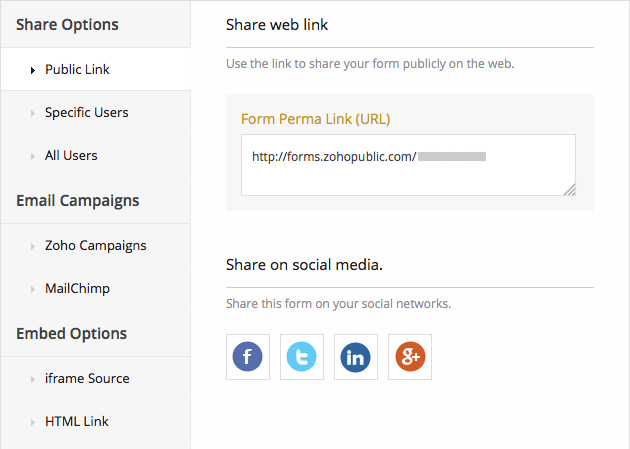
Zoho Forms is an online form builder that lets users create mobile-ready online forms. Forms can be shared with select users via email, or via a public link. This solution includes a drag-and-drop form builder that is responsive on all mobile devices. Zoho Forms also offers native mobile applications for iOS and Android devices.

According to the vendor, key benefits include:

  • A web and mobile form builder. Drag and drop fields to add them to a form.

  • Field and form rules so that users can set a spontaneous flow for a form.

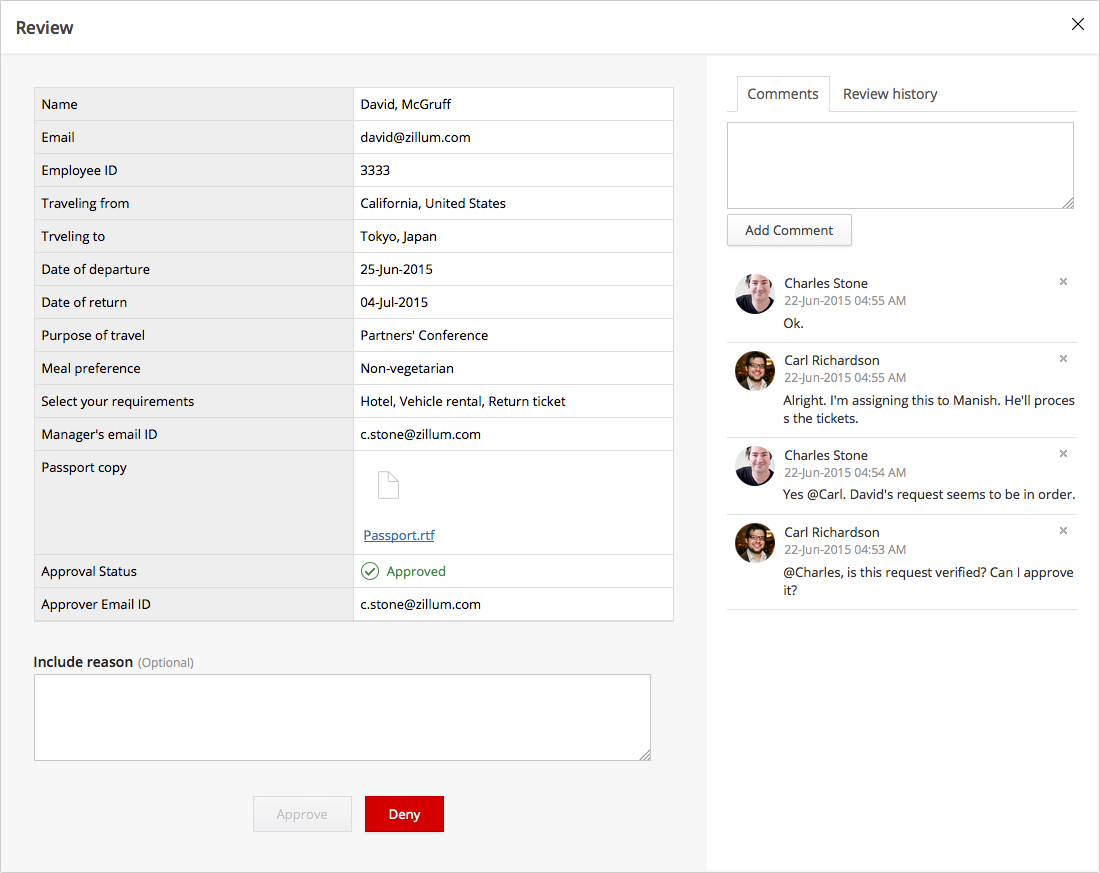
  • Task assignments and approval workflows to keep productivity on the move.

  • Graphical analytics to track entries, conversion rates, and response errors.

  • Mobile apps, and offline support so that users can save data on their devices and sync them when they're back online.

Categories & Use Cases

Media

1 / 10

Top Performing Features

  • Data export

    Data collected within the tool can be exported to another program for additional reporting/analysis.

    Category average: 8.9

  • Multiple question types

    Supports a variety of question types, such as multiple choice, select all that apply, ratings, text responses, etc.

    Category average: 8.7

  • Standard reports

    Includes canned reports that allow users to generate and share accurate survey results.

    Category average: 8.2

Areas for Improvement

  • Changes to live survey

    Users can make changes to live surveys after they are published.

    Category average: 8.3

  • Access controls

    Administrators can limit users’ ability to access data and edit content.

    Category average: 8.9

  • Custom reports

    Allows users to report on custom metrics, choose which metrics to include in a report, run reports with advanced segmentation and/or customize the look and feel of a report.

    Category average: 8

A Great Customer Survey Solution For Business

Use Cases and Deployment Scope

We have Zoho Forms deployed across several departments and I use it in the customer care department. It makes collecting data/feedback easy and this is made possible thanks to effortless customization and sharing of online forms. It automates the whole process of data collection and it ensures no tiring manual work. It has greatly help us understand our customer needs and how to improve our services thanks to the effective/successful customer surveys.

Pros

  • It makes creating online forms easy.
  • Customizing forms and sharing forms is easy.
  • Makes data/feedback collection easy.
  • It comes with great automation features.

Cons

  • Challenges integrating with third-party apps.
  • While it supports automation, it has no AI features.

Return on Investment

  • It makes surveying easy.
  • With Zoho Forms, we understand our customer needs better thanks to feedback collection.
  • Customization of forms means we can collect any form of data.

Usability

Other Software Used

Adobe Customer Journey Analytics, OpenText Documentum, Zoho Meeting

Zoho Forms - a great suite of tools

Use Cases and Deployment Scope

Zoho has a great collection of solutions that work great together, & the Zoho Forms solution is a great feature. I've used many of their other products in conjunction with this. There are a lot of solutions for forms but some can be very costly. Zoho offers free and low cost solutions that have helped in many cases with my own business. I like the signature feature that is hard to find on many of the other form solutions I've searched for & is rare to find. Jotform offers signature solutions but much more costly compared to this. It is easy to create a form, & forms are saved & works great on desktop or mobile for the end user. I would highly recommend.

Pros

  • Ease of use in creating Zoho Forms(drag and drop)
  • Mobile or desktop functionability
  • Signature solutions for Zoho Forms
  • Storage of completed Zoho Forms
  • low or no cost solutions
  • Zoho has a suite of products that works well with each other (one sign in solution for a lot of processes)

Cons

  • I. implementation would be interesting to see
  • Connection to signature pads for in office signing would be a great added feature
  • More integration with other solutions

Return on Investment

  • I've used it for data collection for onboarding clients
  • I've used the Zoho Forms for feedback from clients
  • I've used the Zoho Forms to improve services that clients are most interested in.

Usability

Alternatives Considered

Jotform and Cognito Forms

Other Software Used

GoFormz, Lunacal.ai, PDF24 Tools

A user support review of Zoho Forms

Use Cases and Deployment Scope

We use Zoho Forms to request feedback from our customers after a new product release or beta release as well as for feedback after completion of a training seminar (externally) or to send out employee surveys as to upcoming events. Post COVID we used forms as a health screening that was required of anyone who wanted to enter the building. In the past we also used forms to track customer registration for an appreciation golf outing we hosted, we were able to register the customer as well as obtain allergen information/dietary requests and notate if the customer would be needing rental clubs.

Pros

  • Reporting and analytics on forms responses
  • Tracking of response/No response

Cons

  • Zoho Forms could improve if the Super Admin had access to view all reports from org users, not just view the name
  • Audit history tracking needs to be extended, many of our older forms show no history past the creation date

Return on Investment

  • Positive impact it has had was to save time when we have re-occcuring surveys that we need to send to the same group of users/customers
  • Negative impact it has had was that there is not a way to add tracking notes to a form to notate what a user likes/does not like or why the project is no longer being used

Other Software Used

Zoho CRM, Zoho Desk, Zoho Analytics

Simple to set up and use. Could have better integration though.

Use Cases and Deployment Scope

We have a small number of information gathering forms that enable our teams evaluate and manage services we provide to our customers. Zoho Forms is a relatively simple solution as there are not too many technical difficulties to overcome meaning it is ideal for our administrative teams to manage. Design of forms is mostly drag and drop so that is quite simple. Our main bugbears with it are the creation and management of branded templates and integration with Zoho Sign which is not particularly user friendly, especially when it is created by the same company...

Pros

  • Simple Design
  • Form Creation
  • User Friendly

Cons

  • Integration with other platforms e-sign etc
  • Company branding
  • Sharing Forms

Return on Investment

  • Reduced time on labour intensive Word docs
  • Imports data direct to CRM
  • Can use data within CRM to facilitate completion for users

Other Software Used

RingCentral Contact Center

The one and only Online Form Builder you should be using for your business workflows.

Use Cases and Deployment Scope

We are using Zoho Forms to capture leads from our website to Zoho CRM; in the form of a contact form which is embedded with the live chat as well as in the contact us page or landing pages of different industries we provide services to. It is also being used to capture trouble tickets from our existing users which in turn initiates a ticket in Zoho Desk.

Pros

  • It is a drag and drop custom form builder.
  • It is able to send email/SMS and app notifications once it is submitted.
  • It integrates with other Zoho services like Zoho CRM, Zoho Desk, etc.

Cons

  • The free version has only 1 user which should be at least 3 as with the case with all other Zoho apps.
  • The Zoho Forms website is not mobile friendly which is a disappointment.
  • As with the case with most of the apps of Zoho, "Control Panel" should be renamed to "Settings" as it cause confusion for new users.

Return on Investment

  • The biggest pain point we had was getting notified in time of form submission which Zoho Forms has solved and now we do not miss any form submission from a potential lead.
  • Our existing customers (50+) were using conventional methods to inform us about issues being faced which was a major hassle for us in providing good customer services. But thanks to Zoho Forms, we now document each issue properly, respond to it in a timely manner and get it resolved with the SLAs.
  • We have also used Zoho Forms to have our live chat channel integrated with Zoho Forms to be able to get a form submission from them instantly while chatting with our CSRs.

Alternatives Considered

Bitrix24

Other Software Used

Zoho CRM, Zoho Desk, Zoho SalesIQ

Usability