TrustRadius: an HG Insights company

TeamDynamix IT Service Management (ITSM)

Score8.8 out of 10

10 Reviews and Ratings

What is TeamDynamix IT Service Management (ITSM)?

TeamDynamix offers a combined Service & Project Management platform: ticketing, incidents, problems, asset / configuration, change management and project portfolio management – all in one. The vendor describes the solution as highly flexible and configurable – configured to the user's level of ITIL adoption – with a WCAG 2.0 AA compliant portal branded to the user's company. Project Portfolio Management supports waterfall, agile, card wall or task lists, depending on the project type. The platform is operate with no coding/scripting. Webhooks & APIs accommodate integration and all is supported by a full service implementation & support team at TeamDynamix.

Categories & Use Cases

Media

Screenshot of Incidents and Problems - When you run a service desk, you need to have fast routing, the ability to group tickets, and a great communication platform.
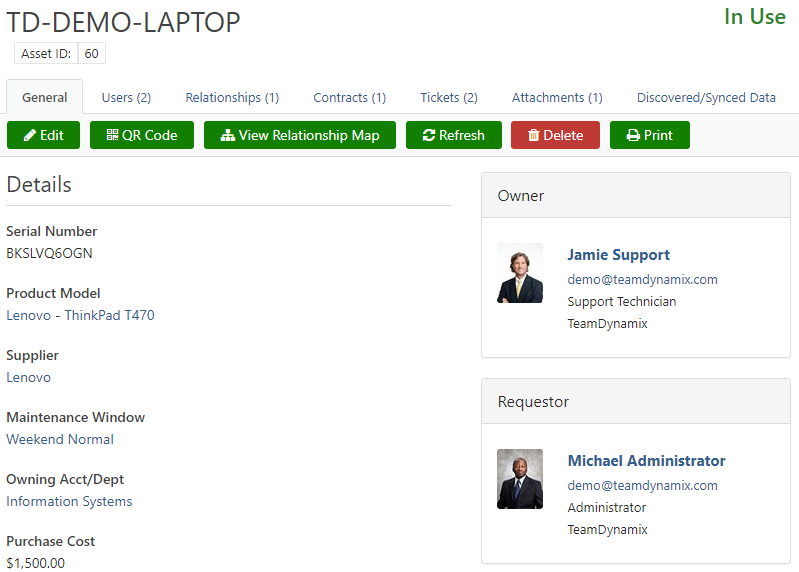
Screenshot of Asset Management - Asset Discovery Services and CMDB help you stay on top of replacement costs, refresh cycles, and contract renewals.
Screenshot of Change Management - Even the most carefully executed IT deployments can lead to downtime. With TeamDynamix IT Service Management (ITSM), you get control over the entire process
Screenshot of Service Portal and Knowledge Base -  IT Service Management platform with a self-service catalog and an easily searchable knowledge base drives adoption
Screenshot of Dashboard and Reports - With transparency at the core, we have developed a flexible platform that allows you to share as much or as little as you like.
Screenshot of Release Management - With an IT Service Management solution that aligns with ITIL, you can follow the release management process and keep your production environment running smoothly.
Screenshot of Workflow Automation - With TeamDynamix, you can easily configure and test workflows using a visual map without any coding or scripting.
Screenshot of Project management - Convert tickets into projects, tasks, or cards. Optimize/allocate resources against tickets and projects in one view. Use the right approach: Waterfall, Agile, Kanban, Card Wall, task lists. With a single platform approach for ITSM and PPM, you can operate within the ITIL framework, while also adopting best practices in project management.

1 / 8

Screenshot of Incidents and Problems - When you run a service desk, you need to have fast routing, the ability to group tickets, and a great communication platform.

Top Performing Features

  • Organize and prioritize service tickets

    Prioritize tickets to ensure most urgent are tackled first

    Category average: 9

  • Expert directory

    Directory of IT and businesses services available to customers to help route tickets to appropriate subject matter experts

    Category average: 7.9

  • Service restoration

    Impact assessment and automated fixes for common problems

    Category average: 8.2

Areas for Improvement

  • Change requests repository

    Single repository of all planned changes and releases

    Category average: 8.4

  • Policy and contract enforcement

    Ensuring that requesters have eligibility before fullfullment

    Category average: 7.9

  • Change calendar

    Calendar showing change schedule to stakeholders

    Category average: 8.5

Who Buys & Uses TeamDynamix IT Service Management (ITSM)

This application gives the combined organizations and bunch organization programs.

Use Cases and Deployment Scope

TeamDynamix is profitable in making the energetic organization programs interior the system to run and handle unusual circumstances.

Pros

  • This application gives the total time and fetched taking after for laborers to give the advantageous payrolls and alter the charge sheets with correct information.
  • All data is secured and guaranteed with exceedingly capable pass codes.
  • . The computer program is incredible in taking after the commerce headway and making a fitting estimation around contemplation and organizing.

Cons

  • This computer program isn't a single advantage provider and oversees the data inside the shape of records and envelopes.
  • There were no keys to segment the data and allocate the single individual at the time.
  • There needs to be the extension of many more keys to approaching the single record.

Return on Investment

  • TeamDynamix is an uncommonly charming and correct application in overseeing with wanders and smart considerations. We are ready to execute the considerations without any burden and the gadget is uncommonly accommodating for making the cutting edge orchestrate to progress the commerce.
  • This radiant application makes a distinction to convey the workers' unpretentious components with each detail.
  • Thus, we utilize this instrument in making the paychecks and requesting them without any botch. The time is taken after and the worker’s capabilities are measured by utilizing this program. Everyone knows roughly his/her capacity though overseeing this device with the framework.

Great company and a great tool!

Use Cases and Deployment Scope

Our company needed an efficient way to track trouble tickets and help us automate tasks that sometimes are only preformed a few times a year. We operate an IT service desk, but we also have several departments that also run their own service desks for daily issues our end-users face. We had also recently started up a new project management office, and we were currently using multiple websites to accomplish all these tasks. We were looking for an all-in-one solution. We wanted to create efficiencies and condense our services into one centrally located solution.

Pros

  • Ticket tracking and entry.
  • Project Tracking
  • Service Catalog Offerings
  • End-User Portal Portal
  • Reporting

Cons

  • Many decisions must be made to implement the tool, which can be a challenge for companies that don't already have an established ticketing or project management system.
  • The modules you create such as ticketing applications can't be deleted once they are made.
  • You can't copy all your settings from one application module to another.

Return on Investment

  • We have already been able to have insight into how many tickets for service requests we do in any particular time frame. We were surprised to find that we had as many as 300 tickets on our small support team in just a month's time.
  • We can centrally locate all of our how-to documents and other information that usually lives just in the memories of our employees. We have hundreds of documents that will now not be spread over Teams, workstations, and document folders but will be centrally located and searchable for years to come.

Alternatives Considered

SolarWinds Web Help Desk (WHD), ServiceNow Customer Service Management and monday.com

Other Software Used

Microsoft Teams, Microsoft 365

Highly Customizable and Easy to Integrate ITSM

Use Cases and Deployment Scope

My team uses TeamDynamix IT Service Management (ITSM) to manage the entire scope of support processes for End-User devices. We manage the imaging and deployment, support, all the way through a surplus of old devices. We utilize the ticketing functions, project management functions, asset management functions, and reporting heavily.

Pros

  • Integrates with external systems
  • Allows for customized reports
  • Provides tools to customize the product to meet your needs

Cons

  • More modern user interface
  • Mobile app (coming soon)

Return on Investment

  • TeamDynamix IT Service Management is a very cost-effective tool.
  • The lifecycle management of devices has been greatly simplified.
  • Integrations with external systems make data management easier.

Alternatives Considered

ServiceNow DevOps and Atlassian Jira Align

Other Software Used

Microsoft 365, Workday Financial Management

An Easy ITSM/ESM Product to Configure

Use Cases and Deployment Scope

We use TeamDynamix as an ESM service to cover a lot of grounds throughout our company. Outside of IT, Facilities and Quality Assurance/Engineering are some of the groups that manage tickets when necessary. The IT team also uses the asset management piece, as it linked together with Sassafras for software inventory management, a crucial piece for us.

Pros

  • Customizable reports
  • Very user friendly
  • Cost-effective tool
  • Customizable ticket forms to fulfill certain queue needs
  • View and Manage tickets via mobile version

Cons

  • Needs the ability to show ticket submitters who owns the ticket
  • Needs dark mode
  • Clicking on a ticket to manage opens a new window; can get lost with hundreds of open windows without knowing

Return on Investment

  • Easy integrations with external systems via API keys
  • More automation = less manual work for technicians

Alternatives Considered

Zendesk Suite