






TrustRadius: an HG Insights company

SmartDraw

Score5.9 out of 10

39 Reviews and Ratings

What is SmartDraw?

SmartDraw is a diagramming and flow chart building tool from SmartDraw Software in San Diego, California.

Media

Screenshot of where to create diagrams, including: flowcharts and swimlanes, organizational charts, mind maps, CAD drawings & floor plans, project charts, network diagrams, and wireframes & mockups.
Screenshot of a workspace that combines brainstorming with technical diagrams. SmartDraw can be used to visualize processes, organizations, roadmaps, and even generate diagrams from data.
Screenshot of SmartDraw's templates and tools used to make flowcharts, swimlanes, and process maps.
Screenshot of the org chart tool, used to document organizational structure and work as a team to plan for growth or manage change. Data can be imported to generate a chart automatically.
Screenshot of the CAD drawing and floor plan tools, used to design a home or optimize office space to improve traffic flow in a retail space.
Screenshot of an example of the built-in templates for landscapes, gardens, backyards used to design outdoor spaces. Users can drag-and-drop flowers, shrubs, and other plants, or add sprinkler systems, lights, and walkways, and apply photo-realistic textures for a professional finish.
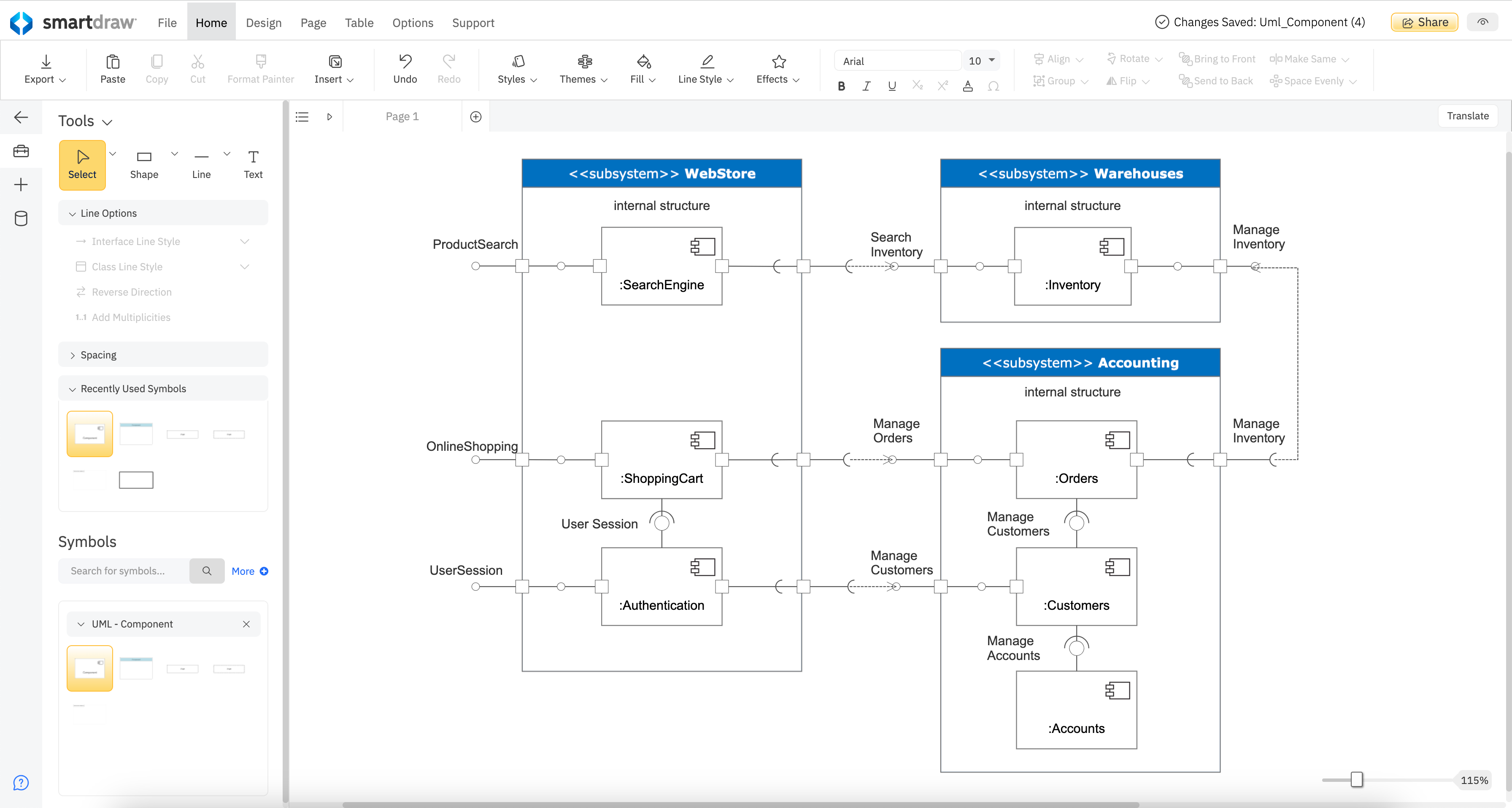
Screenshot of a UML diagram. These can streamline communication on large-scale projects by visualizing system architecture, interactions, and workflows that may be difficult to communicate otherwise.
Screenshot of where to document, troubleshoot, or optimize cloud infrastructure by connecting to either AWS or Azure. Users can create reports or work on future plans as a team.
Screenshot of where to create product roadmaps to share strategic context, document development goals, and plot features.

1 / 9

Screenshot of where to create diagrams, including: flowcharts and swimlanes, organizational charts, mind maps, CAD drawings & floor plans, project charts, network diagrams, and wireframes & mockups.

Making thoughts visible and expressible in 2D!

Use Cases and Deployment Scope

Ever since we moved to virtual mode of communicating with colleagues and having meetings and discussions online, SmartDraw has made the entire process of explaining ideas, expressing and describing thoughts as easy as possibly it can be.
We use it for discussing application flows. We use it for High level designs. We are still discovering new use out of this awesome tool.

Pros

  • Flowcharts
  • Structural design
  • Sharing and Collaboration

Cons

  • The application is a little heavy on my system and takes some time to load
  • UI can be improved for touch screen interface.
  • Nothing i can think of! Its awesome

Most Important Features

  • Sharing and Collaboration
  • Flow Diagram
  • Structural Design

Return on Investment

  • Increased productivity
  • Attractive and appealing flow diagrams for client
  • Its totally worth what the org spent on it.

Other Software Used

draw.io, Miro

SmartDraw is a fun easy to use drawing tool.

Use Cases and Deployment Scope

Smart Draw is an amazing drawing tool. I use it for floor plans and room layouts. It has some unique objects that are not in Visio. We have also used it for network diagrams. It’s very easy to use, and the customer service is excellent.

Pros

  • Draws layouts and diagrams.
  • Easy to use.
  • Extensive pre built library of objects.

Cons

  • The licensing and installation could be a little more straightforward.

Most Important Features

  • Support
  • Easy to use.
  • Unique libraries of objects.

Return on Investment

  • Allows us to lay out seating and floor plans.
  • We use it to map and diagram our network.

Alternatives Considered

Microsoft Visio

Other Software Used

OnBase, Verkada Guest

SmartDraw is Next Level!

Use Cases and Deployment Scope

Charts! Charts! And more CHARTS! SmartDraw ROCKS when it comes to making org charts, flow charts, seating charts, and charts of responsibility to name a few. SmartDraw is a HUGE timesaver when creating expansive charts and a truly modern alternative to the traditional tools offered by Microsoft Office tools that are often times too limited.

Pros

  • Charts of all kinds
  • Wire Framing
  • Easily customizable templates

Cons

  • A month-to-month plan would be ideal for users that don't have a need to create many projects
  • The sidebar navigation can be a little confusing with all of the tools listed.
  • Offering customizable plans with only the feature you need would simplify navigation

Most Important Features

  • Wide range of ready to use templates
  • The ability to add imagery to charts
  • Minimal learning curve

Return on Investment

  • Expanded our ability to create a variety of charts quickly
  • Reduced turn around time for customers
  • Increased client satisfaction with end results.

Alternatives Considered

Microsoft Publisher, Microsoft Excel and Microsoft Powerpoint

Other Software Used

Canva, PosterMyWall, Adobe PhotoShop

Really nice online tool for designing diagrams and evacuation diagrams

Pros

  • Create diagrams.
  • Convert diagrams to other formats like PDF and JPEGS.
  • Stores your designs in the cloud.

Cons

  • The autosave function does not always save your changes.
  • When creating diagrams and linking shapes together, they do not always stay linked.
  • Not enough customizations and example shapes and objects.

Most Important Features

  • Ability to make building floor plans.
  • Ability to make building evacuation plans.
  • Ability to make process flowcharts.

Return on Investment

  • It allows me to offer another level of support for my business.
  • Gives me the opportunity to help smaller businesses and houses of worship develop safety plans.
  • price is within budget.

Alternatives Considered

Microsoft Visio and Lucidchart

Other Software Used

Kofax Power PDF (formerly Nuance), Zoom, Microsoft Powerpoint

Free trial IS NOT free

Use Cases and Deployment Scope

I tried to use the free trial on this software. As soon as I finished the drawing I couldn't export, share or print without purchasing. Furthermore I tried to sign in, figuring I could at least save it online to show my builder the plans and got notified that my trial had now expired and I had to pay if I wanted to access my plans again. So basically if I want to see my plans ever again that I spent the last 2 hours drawing, I have to pay smartdraw, and they only have an option to purchase annually. In my opinion, it's super underhanded and sneaky the way they try to get people to pay for their software, as a result, if ever I need any design software, I will most definitely NOT be using or recommending smartdraw. Thanks for wasting 2 hours of my life smartdraw.

Pros

  • Nothing
  • Nothing
  • Nothing

Cons

  • Everywhere
  • Everywhere
  • Everywhere

Most Important Features

  • nothing
  • nothing
  • nothing

Return on Investment

  • Wasted my time
  • Made me incredibly frustrated
  • Felt cheated