TrustRadius: an HG Insights company

Redwood RunMyJobs

Score9.6 out of 10

32 Reviews and Ratings

What is Redwood RunMyJobs?

Redwood Business Process Automation is a workload automation and job scheduling solution designed for and delivered via Software-as-a-Service (SaaS). It transforms the digital enterprise with scalability and integration with all technologies in the modern enterprise. Redwood unifies workflows across on-premises, private, hybrid and public cloud environments. It bridges gaps in complex processes that function between mainframe, distributed, virtual and cloud resources. Clients use Redwood to create intelligent process flows that support diverse IT processes for business including managed file transfer, hybrid cloud automation, complex data management, and DevOps. Redwood enables people to focus on innovation instead of daily management of repeated processes.

Media

Screenshot of Dashboard users see when first logging in.
Screenshot of Shows a specific process definition, how a user would edit that definition.
Screenshot of Built in testing environment to run the definition without leaving the definition
Screenshot of Editing a whole process chain, not just a single process
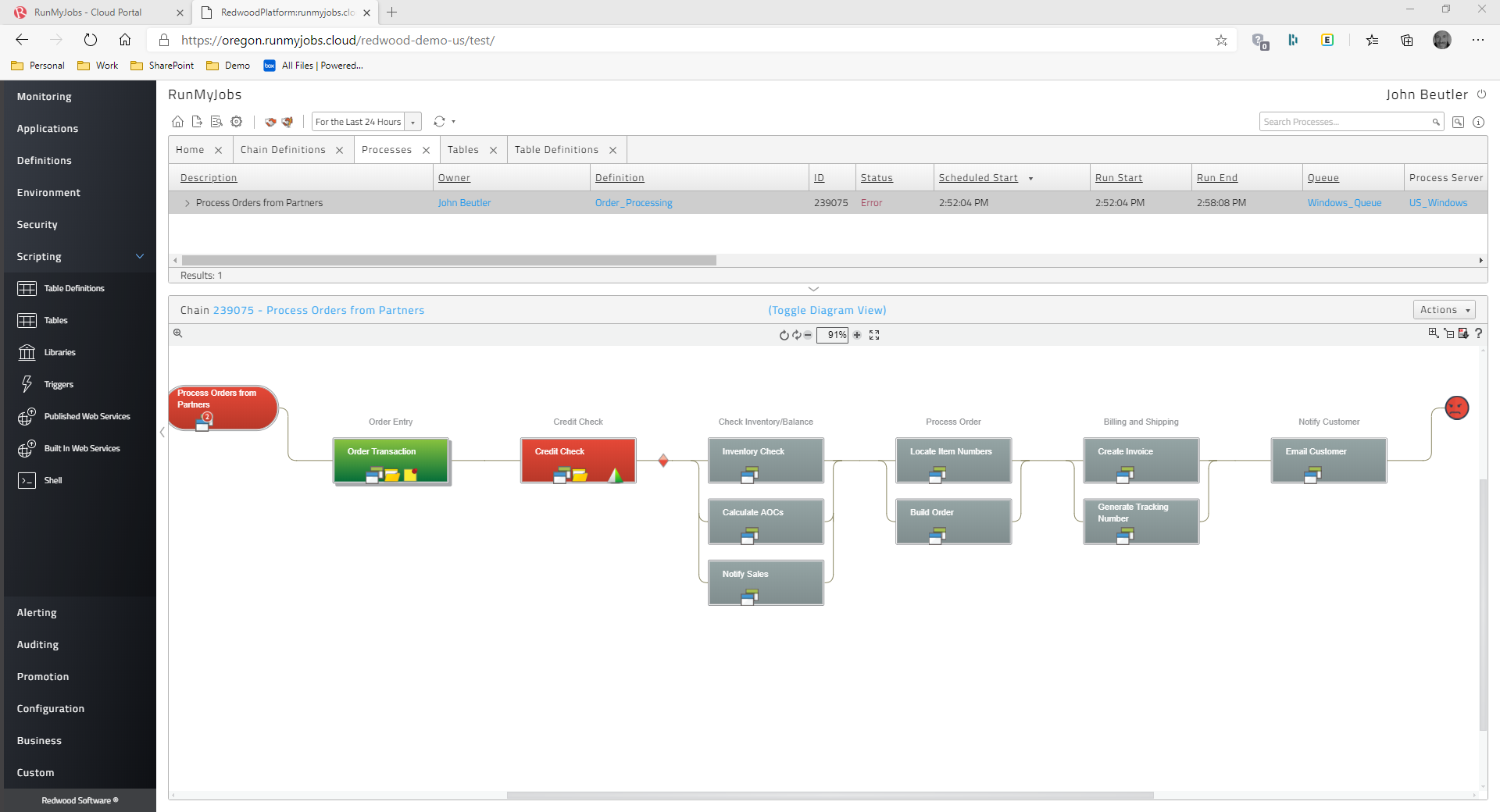
Screenshot of Shows the Process Monitor where we can see the status of the chain execution, this instance is with an error
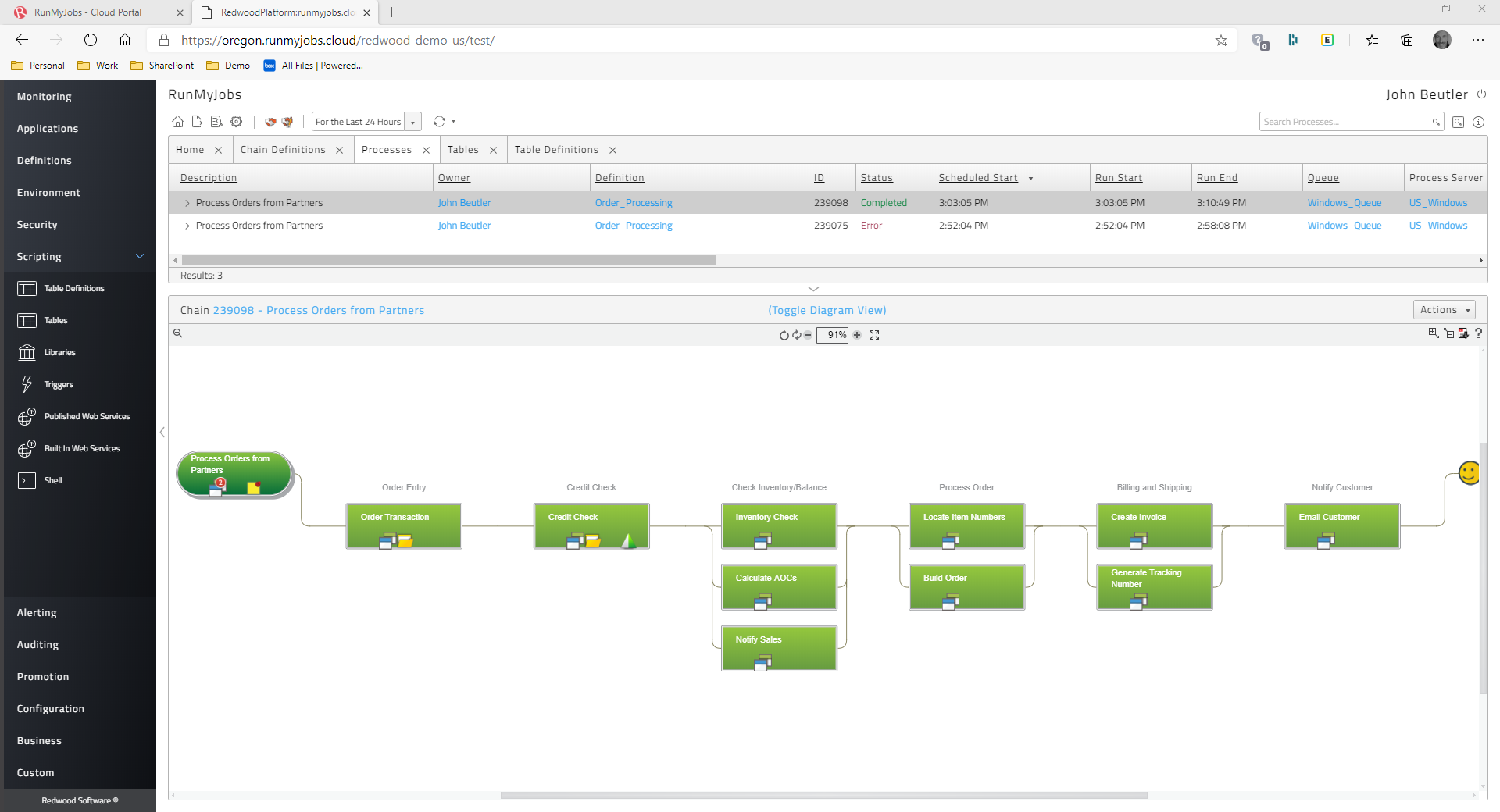
Screenshot of Shows the Process Monitor where we can see the status of the chain execution, this instance is without an error
Screenshot of Dashboard that tracks high level aggregate oriented metrics, such as total errors,etc.
Screenshot of This is a visual dashboard that shows various process metrics

1 / 8

Screenshot of Dashboard users see when first logging in.

Top Performing Features

  • Multi-platform scheduling

    Multi-platform scheduling is the ability to centrally manage a business process from end-to-end

    Category average: 9.2

  • Analysis and visualization

    Analysis and visualization tools provide clear understanding of critical errors and helps prioritize errors

    Category average: 8.3

  • Central monitoring

    A central monitoring dashboard provides data on trends and forecasts

    Category average: 9

Areas for Improvement

  • Logging

    Logging and audit trails to ensure regulatory compliance

    Category average: 8.6

  • Alerts and notifications

    Alerts and notifications enabling management by exception

    Category average: 8.6

  • Application integration

    Integration with a broad range of enterprise applications

    Category average: 8.4

Who Buys & Uses Redwood RunMyJobs

""Redwood for Workload Automation""

Use Cases and Deployment Scope

"Redwood for Workload Automation" Redwood provides the workload automation solution for delivery as SaaS where it manages all services including automation upgrades, dependencies and patches. The software helps us focus more on automation by reducing manual efforts on the tasks. It has helped to set flexible load balancing and process on priorities across multiple applications. Redwood provides centralized control and support for on-premises, hybrid and pure cloud environments which is an excellent feature!

Pros

  • Redwood can automate anything seamlessly
  • Since it is designed as SaaS solution, 99% uptime is guaranteed
  • It provides flexible, pay-as-you-go, cloud based automation as service

Cons

  • It would be great if the customer service is improved for better response
  • The Software set up can be a little challenging to configure at initial stages.

Return on Investment

  • By automating the tasks, the productivity increases there by providing smooth delivery and increase in ROI

Alternatives Considered

Tidal Automation

Other Software Used

Tidal Automation

Streamline Your Business Processes with Redwood Workload Automation: An Efficient and Scalable Solution

Use Cases and Deployment Scope

A software programme called Redwood Workload Automation was created to assist businesses in automating their business procedures. It offers a central platform for organising complex tasks across several systems and programmes. Organizations may enhance productivity, eliminate manual involvement, and streamline their IT processes using Redwood Workload Automation.A wide range of corporate operations, including financial transactions, report generating, batch processing, and file transfers, can be automated using the programme. Moreover, it may be integrated with a wide range of programmes and platforms, including SAP, Oracle, and Salesforce.Redwood Workload Automation has a wide range of use cases that might change depending on the requirements of the organisation. Large corporations frequently employ it because their sophisticated IT infrastructures require automation to lessen manual labour and guarantee functionality. In conclusion, Redwood Workload Automation is an effective solution for streamlining company procedures across several platforms. It can assist enterprises with a wide range of business issues, including minimising manual labour, boosting efficiency, and optimising IT operations.

Pros

  • Redwood Workload Automation's capacity to automate workloads across a variety of platforms, including Windows, Linux, Unix, and other cloud environments, is one of its strongest points. Organizations may combine their IT activities into a single platform thanks to its cross-platform flexibility, which lowers complexity and boosts productivity.
  • Redwood Workload Automation can be set up to launch workflows in response to a variety of situations, including the delivery of files, database updates, and system warnings. This feature enables businesses to respond to real-time events by automating their business operations, which lowers the need for manual intervention and boosts overall operational effectiveness.
  • Due to Redwood Workload Automation's close interaction with SAP systems, businesses may automate intricate business procedures inside of SAP settings. This entails automating SAP operations, managing SAP spools, and scheduling SAP jobs.

Cons

  • Particularly for customers who are unfamiliar with the software, Redwood Workload Automation's user interface might be challenging to navigate. Users might traverse the platform more swiftly and easily if the user interface were to be improved.
  • Redwood Workload Automation can automate workloads in cloud environments, but there is room for improvement in terms of how well it integrates with cloud platforms. For instance, offering closer connection with well-known cloud platforms like AWS, Azure, and Google Cloud could simplify the management of workloads in these environments for enterprises.
  • Redwood Workload Automation workflow creation and configuration can be a challenging and time-consuming procedure. It might be simpler and quicker to develop and configure processes if drag-and-drop functionality were added to the workflow design capabilities.

Return on Investment

  • Customers have reportedly experienced considerable increases in productivity and cost savings after deploying Redwood Workload Automation, according to Redwood Software. A 90% reduction in manual effort and a 50% reduction in processing time, for instance, have been observed by some clients, which can result in significant cost savings and increased productivity.
  • Additionally, Redwood Workload Automation's ability to automate complex business processes can help organizations improve their overall business agility and responsiveness. This may result in a shorter time to market, more consumer satisfaction, and increased market competition.
  • Redwood Workload Automation can assist businesses in lowering operational expenses, reducing downtime, and maximising resource usage, all of which can lead to a profitable return on investment. The complexity of the workloads, the extent of the automation, and the organization's particular business objectives will all affect how the ROI is actually impacted.

Alternatives Considered

BMC Automated Mainframe Intelligence (AMI), IBM Workload Automation and CA Server Automation

Other Software Used

Google Workspace for Education

Best Automation tools in the market for "Scheduling and Monitoring "

Use Cases and Deployment Scope

In the Redwood tool we can triggered out jobs as per the business/client requirements. The main thing of this tools is very user-friendly because there is no coding and scripting need to be written. We can easily perform all the things which is predefined in this tool.
There is a pre-defined tab like alerting, application, environment, promotion and configuration.
In Redwood workload automation there is 5 most used action which is commonly used New, Edit, Delete, Export and refresh.
We can easily connect Redwood Workload Automation to SAP ABAP, Java, Oracle Application and People soft.

Pros

  • Exporting of jobs from one environment to other environment.
  • Easily creation, deletion and monitoring of the jobs.
  • We can easily schedule the alerting system which notified us for any failure of jobs.
  • Less coding and scripting

Cons

  • A dashboard for checking the overall health of the tool
  • Direct excel export option is unavailable to transport the jobs.
  • Mobile notification is also helpful for those user who worked in 24*7 shift. if this option will available it is very useful for those user who needs to check system again and again

Return on Investment

  • In Redwood we can easily findout the reports as per the client requirement either it is related to running job or failured jobs
  • As compared to earlier now we are investing less time or efforts for scheduling and monitoring the jobs
  • Overall they are delivering the standard accuracy for the different different applications and i think it is most perfect thing in this tool.

Alternatives Considered

Broadcom Automic Automation

Other Software Used

Broadcom Automic Automation

Flexible Software

Use Cases and Deployment Scope

Redwood is so flexible, we can monitor all business process automation jobs from different system. Scheduling also very easy jobs can run in parallel and we can set limit also. The updated dashboard is useful when any jobs are skipped from schedules. The custom calendar feature helps us to run jobs only when we need that.

Pros

  • Finance and Business - Good resource to run
  • Incident Management
  • It automatically Records the details of each incident and their solutions.
  • it helps in scheduling the jobs based on the requirement like monthly, weekly to keep the business process smoothly.

Cons

  • Main issues of Redwood Workload Automation is lack of helpful documentation.
  • If some reporting document or excel there means will be useful.
  • Auto incident creation

Return on Investment

  • Good to schedule jobs with limits
  • In case of failure or for reporting is needed
  • Easy and so flexible to use

Alternatives Considered

AWS Batch

Other Software Used

AWS Batch

Redwood Workload Automation is all time best tool for highly Flexible and Easy to use

Use Cases and Deployment Scope

HI We use the Redwood Workload Automation in your organization for scheduling the SAP background jobs. Generally we can use the scheduling background jobs with sap application. But in SAP application level we don't have more options when compared with redwood automation. By using redwood automation tools we can keep many conditions like weekly, hourly, events , monthly.

Pros

  • Compared sap, If you schedule the jobs in redwood automation, it will take very less time with minimum steps.
  • The Redwood automation tool is user friendly.
  • It is very helpful to suspend background jobs during OS patching.

Cons

  • During day light saving, we need to change the date and time manually. If it can be automatically change based day light saving , very helpful for sap support team.
  • The tool should be extended, as it has lot of options, it is easy to deploy, manage. Integrate with Incident Management tools.
  • The Redwood Software can be a little difficult. So please try make as simple as possible.

Return on Investment

  • The main positive things with redwood tools, we are not facing any memory issues.
  • By using redwood, we can increase the cost saving to our business clients
  • I haven't observed any major negative impact by using redwood

Alternatives Considered

IBM Tivoli Monitoring and SAP Access Control

Other Software Used

SAP Access Control, IBM Tivoli Monitoring, Tidal Automation