TrustRadius: an HG Insights company

Quire

Score8.1 out of 10

6 Reviews and Ratings

What is Quire?

Quire is a visual collaboration platform that enables task and project management. It allows users to visualize their workflows and improves real-time collaboration.

Media

Screenshot of Quire workspace overview
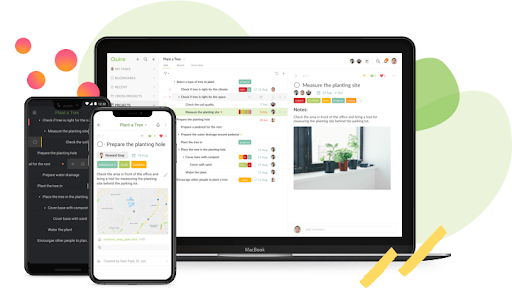
Screenshot of device sync
Screenshot of Quire project view

1 / 3

Screenshot of Quire workspace overview

Top Performing Features

  • Gantt Charts

    Gantt charts are charts that show tasks or events along the y-axis displayed against time along the x-axis.

    Category average: 8.3

  • Scheduling

    Scheduling capabilities allow users to set schedules on tasks, and create timelines and milestones.

    Category average: 8.2

  • Team Collaboration

    Team collaboration capabilities let team members work directly with each other and provide team updates.

    Category average: 9

Areas for Improvement

  • Task Management

    This includes the ability to plan, track, collaborate and report on tasks.

    Category average: 9.1

  • Mobile Access

    Mobile access is the ability to access the software from a smartphone or tablet.

    Category average: 8

The go-to software for task management

Use Cases and Deployment Scope

I use Quire to manage research projects. The nature of my research project is diverse, and I need a task-management software to help me assign tasks, record the progress, and share it my mentees. I also use to tag function to document the loading of a task, and it indirectly help me utilize my time more efficiently.

Pros

  • Sublist
  • nice interface
  • Tage function

Cons

  • Tutorial for advanced features
  • Price
  • Integration with other software

Inquiring about Quire? Here's what you need to know.

Use Cases and Deployment Scope

I used it to keep track of daily to-do's, project management, and collaboration with my colleagues (brainstorming boards, etc).

Pros

  • The ability to tag and label items.
  • The ability to set the priority level.
  • The ability to complete items and have them removed from the list.

Cons

  • The Workspaces are not intuitive.
  • No ability to set reminders for tasks.
  • More could be done with priority levels (instead of just arrows).

Most Important Features

  • Adding quick notes/to-do's.
  • Ability to check off and complete to-do's.
  • A place to store information for later.

Return on Investment

  • Helped us brainstorm and share ideas with each other.
  • The ability to assign items to others made work more efficient.
  • Negative - easy to clutter, when there are no reminders.

Alternatives Considered

Nuclino

Other Software Used

Rippling, GoodHire, Nuclino, Adobe Acrobat DC

EXCELLENT for free software! Minimal and efficient

Pros

  • Kanban boards that makes it easier to look at my tasks.
  • Categories that help me organize my tasks into To-Do, In Progress and Completed.

Cons

  • Quire syncs with your calendar, but it would be nice to see an actual calendar within the app as well.

Return on Investment

  • There has been a lot of time saved
  • Overall clarity

Alternatives Considered

Todoist

Other Software Used

Todoist, monday.com, Facebook Pages Manager