TrustRadius: an HG Insights company

ProProfs Project

Score8.3 out of 10

9 Reviews and Ratings

What is ProProfs Project?

ProProfs Project is an online project management software for managing both teams and multiple projects on one dashboard. From creating project goals and objectives to tracking work progress, this PM tool aims to allow users to meet project deadlines efficiently. The PM tool allows users to communicate with in-house or remote teams - anytime, anywhere.

Moreover, the vendor says users can generate insightful reports and accurate invoices in just a few clicks. Along with these features, the tool also offers budget management, shared calendar, milestone visualization, recurring tasks, team management, resource management, and more.

ProProfs Project promises to minimize project delays and improves team productivity for project managers handling remote teams and freelancers handling multiple clients alike. Users can sign up to the tool in just a few minutes, and the pricing packages are designed to be affordable compared to the competition, according to the vendor. The vendor's goal is for ProProfs Project to be a one-stop destination for delightful customers.

Categories & Use Cases

Media

Project Management
Manage Multiple Projects
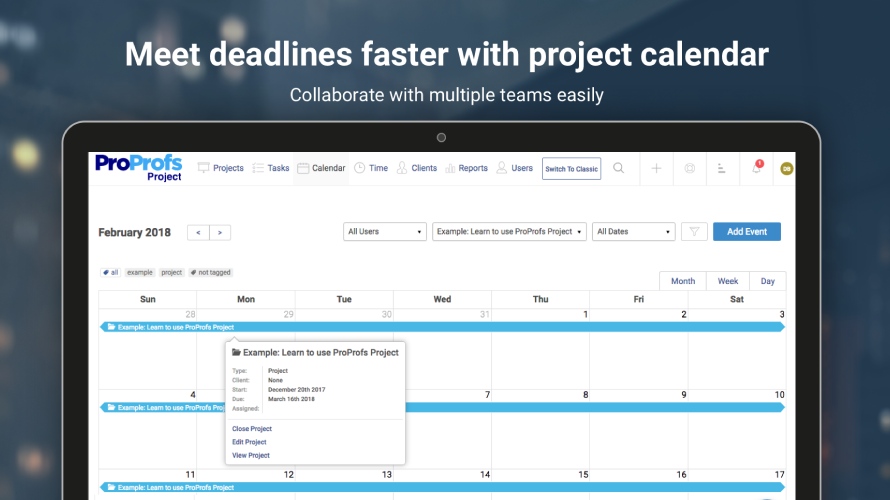
Project Calander
Project Reports
Time Management

1 / 5

Top Performing Features

  • Email integration

    Email integration allows work requests to be made directly from email.

    Category average: 8.3

  • Task Management

    This includes the ability to plan, track, collaborate and report on tasks.

    Category average: 9.1

  • Project & financial reporting

    Ability to analyze project and financial data based on custom criteria to gather insights and improve business performance

    Category average: 8.4

Areas for Improvement

  • Integration with accounting software

    Real-time, two-way sync with accounting or financial software to facilitate project and financial reporting

    Category average: 8.3

  • Mobile Access

    Mobile access is the ability to access the software from a smartphone or tablet.

    Category average: 8

  • Document Management

    Document management provides for centralized management of all project documents.

    Category average: 7.9

Manage creative projects like a pro!

Use Cases and Deployment Scope

Being creative professionals, our everyday processes are often all over the place. Priority tasks keep cropping up suddenly, hampering the regular routine of tasks. This tool helps us get a crystal clear workflow of all our projects by scheduling tasks and defining deadlines on the tool’s easy-to-access dashboard. Moreover, we can prioritize tasks and re-adjust the deadlines easily, ensuring nothing falls through the cracks.

Pros

  • Reports that help gain rich insights on key project metrics
  • Instant messaging and task comments for instant discussions and feedback
  • File sharing
  • Automated client billing
  • Calculate employee’s billable and non-billable hours

Cons

  • The mobile application needs a revamp

Return on Investment

  • I have certainly seen an improved and consistent ROI in the last year. I would say I owe it to the efficiency that the tool has brought in.


Awesome task management capabilities

Use Cases and Deployment Scope

As a project manager of a medium-sized organization, this tool has helped me manage multiple projects with ease. It lets me create tasks, assign resources, and define deadlines in just a few clicks. Also, I can track task progress in real-time and ensure that I never miss a project deadline.

Pros

  • Powerful dashboard: It has a simple and intuitive dashboard that offers easy navigation.
  • Single platform: Whether I'm in charge of managing one project or multiple, I can beautifully manage all in one place.
  • Multiple project views: Gantt charts, Kanban boards, Calendar view are great for project visualization.
  • Automation capability: It automates a lot of my recurring tasks.

Cons

  • Limited integration: I wish the tool had more integration options.

Return on Investment

  • Seamless task management has made delivering projects very convenient and hassle-free, which in turn has resulted in increased ROI with every project.

Pro Profs Project - A Great Tool for Tracking Any Level Project

Pros

  • Manages Projects - Well of course it does this well, it is what it was designed for.
  • One Easy Location - It is nice to be able to track project progress through one location.
  • Makes Communication Easier - What a time saver! We can easily communicate through ProProfs Project to keep everyone on task and involved.

Cons

  • For what we use it for, we do not have any suggestions for improvement, it has always been a great tool and we have experienced no issues with it.

Return on Investment

  • ProProfs Project has been a big time saver.
  • Communicating in one location keeps everything organized and everyone on the same page.
  • This is a great tool for businesses who operate along different time zones as you can communicate when you are available.

Alternatives Considered

Asana and Project Bubble

A must-have tool for enterprises!

Use Cases and Deployment Scope

I previously had to struggle with streamlining everyday processes across the organization. This tool has helped me overcome the challenge and deliver projects on time and within budget. Also, this tool’s intuitive dashboard has made scheduling and tracking tasks so much easier.

Pros

  • Create, schedule, and manage tasks within seconds
  • Easy-to-use dashboard
  • Drag and drop functionality
  • Automation for recurring tasks
  • Share project reports with stakeholders and clients instantly

Cons

  • Integration with third-party applications
  • The 15-day trial period of the tool seems a bit short to completely grasp the efficancy of the tool

Return on Investment

  • Onboarding this tool has definitely helped me achieve greater ROI. I believe the difference is due to streamlined processes and better collaboration among team members due to which we have been able to deliver projects successfully one after the other

Seamless Team Collaboration

Use Cases and Deployment Scope

Managing work across multiple teams and departments was a task before. With this tool, collaboration has become a cakewalk. My team members are able to connect with each other over instant messaging and task comments. This way, roadblocks get addressed instantly and projects are accomplished faster. Also, team members can share files with each other on the go.

Pros

  • AI-powered reports to gain insight on team performance
  • Multiple project views to view real-time project progress
  • Milestone tracking
  • Alerts and notifications to stay up-to-date
  • Dashboard customization

Cons

  • The tool’s mobile application can be improved. It is not very easy to use.

Return on Investment

  • It has helped me manage my team in a more efficient way and for that, we delivered everything within the deadline.
  • Its AI-powered automatic report generation has reduced my workload to a great extent, So I can focus on other important deliverables.