TrustRadius: an HG Insights company

Planview ProjectPlace

Score8.4 out of 10

422 Reviews and Ratings

What is Planview ProjectPlace?

Projectplace is a collaborative work management solution. The vendor says the product is built with teams of all sizes and complexity in mind, from virtual teams of five to entire global enterprises with tens of thousands of active users. It is also designed to incorporate waterfall and agile workflows.

Read more details.

Media

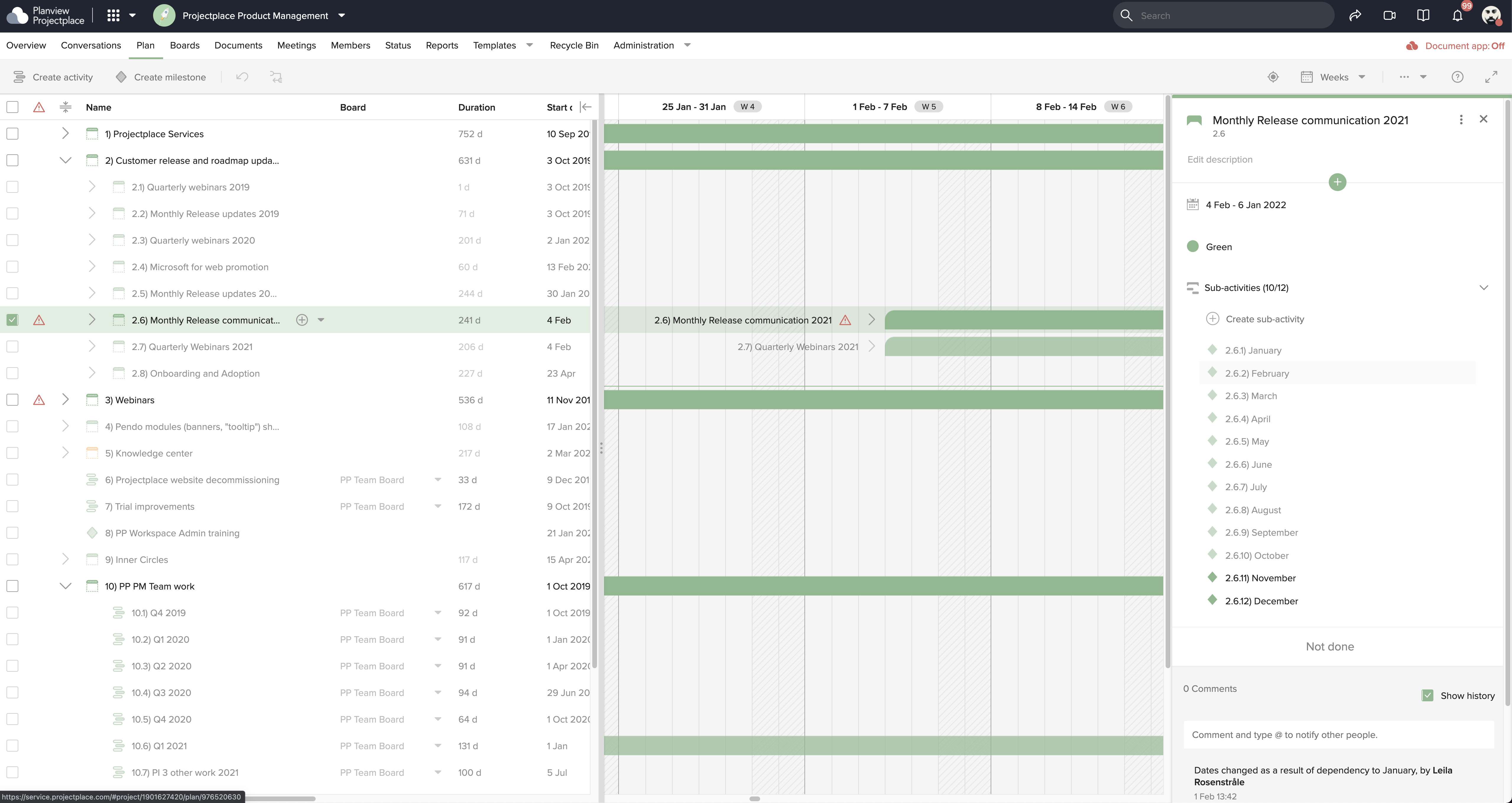
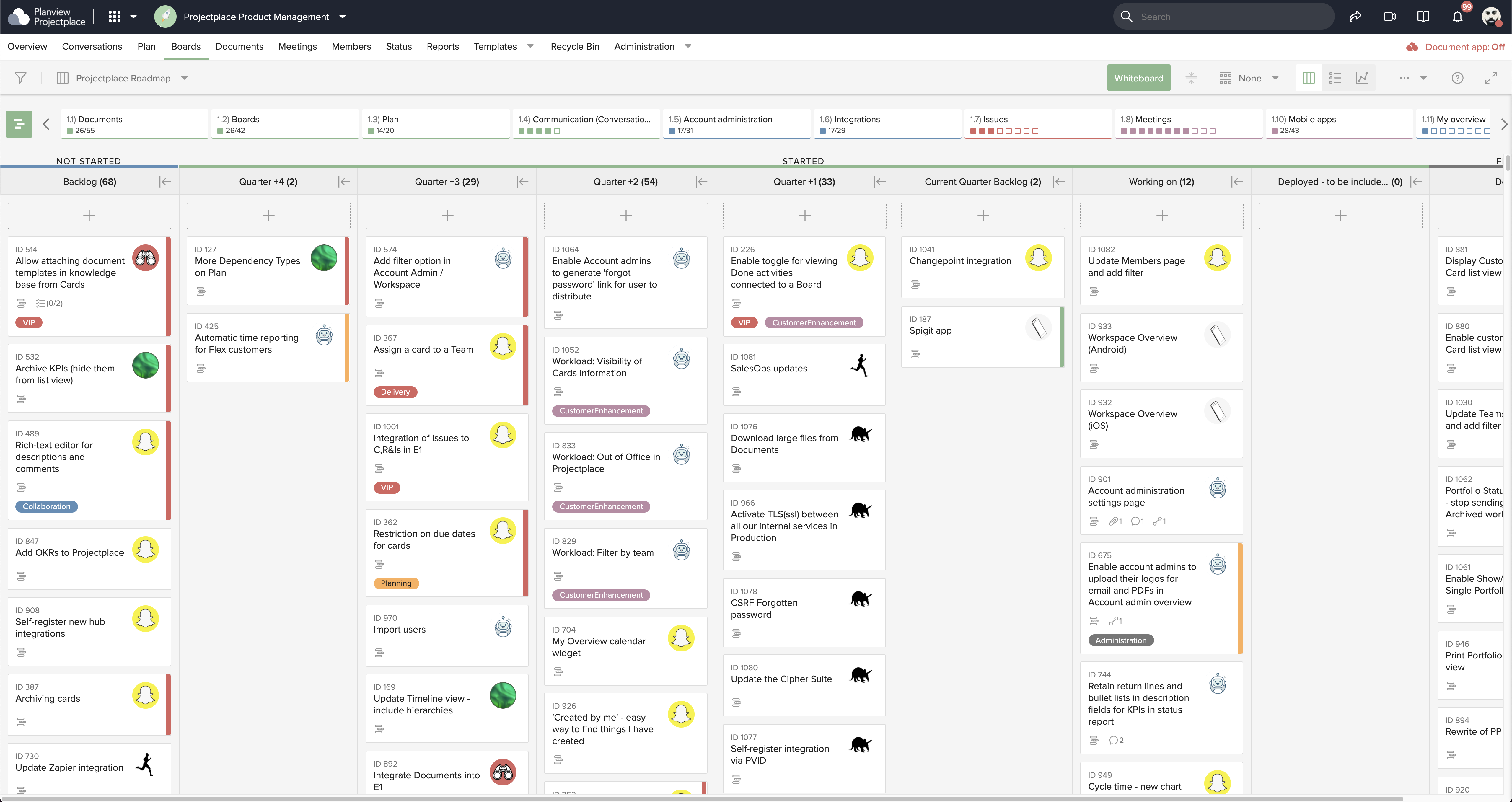
Screenshot of Collaborative Workstream: Streamlined interaction between activities, boards and cards. Users can plan and follow up in the Gantt while their teams execute and collaborate for optimum productivity on the Kanban boards.
Screenshot of Document Management: This helps to ensure changes to documents are visible in real-time. Version control ensures that team members see the latest document versions with access to document history.
Screenshot of Gantt Charts: These support planning and visualizing every step of enterprise work and projects with Projectplace Gantt Charts. Track progress to make sure you'll meet your deadlines and know when things are not happening on time.
Screenshot of Kanban Boards: This enables teams to execute and collaborate for optimum productivity, and includes activity notifications, messaging and visualizations of progress of day-to-day tasks.
Screenshot of Workload View: A visualization of the workload of members in all workspaces, used to determine whether a team member is overloaded with work, or has room to do more.
Screenshot of Workspace Overview: This offers an overview of all work and tasks that have been assigned across all workspaces. Personal tasks can be added that help offer a more complete picture of what's left to do.

1 / 6

Screenshot of Collaborative Workstream: Streamlined interaction between activities, boards and cards. Users can plan and follow up in the Gantt while their teams execute and collaborate for optimum productivity on the Kanban boards.

Top Performing Features

  • Document Management

    Document management provides for centralized management of all project documents.

    Category average: 8

  • Team Collaboration

    Team collaboration capabilities let team members work directly with each other and provide team updates.

    Category average: 9

  • Support for Agile Methodology

    Agile is a time boxed, iterative approach to development that builds software incrementally instead of trying to deliver it all at once near the end.

    Category average: 8.1

Areas for Improvement

  • Resource Management

    Resource management is workload planning to maximize resources.

    Category average: 8.7

  • Email integration

    Email integration allows work requests to be made directly from email.

    Category average: 8.4

  • Timesheet Tracking

    Timesheet tracking is the ability to track all billable and non-billable hours for each project.

    Category average: 8.4

Who Buys & Uses Planview ProjectPlace

Planview ProjectPlace improves the visibility of project progress & increases collaboration

Use Cases and Deployment Scope

Planview ProjectPlace has allowed us to improve our software upgrade process as it makes all of the steps/tasks visual and allows for collaboration. We were able to reduce our process by 3 weeks.

Pros

  • Project management
  • Manage tasks via kanban board
  • Allows flexibility for teams to work
  • Document Management

Cons

  • The project plan can be a little finicky to work with
  • Love they have a checklist for cards on the board, however the text field can be hard to work with

Return on Investment

  • We were able to reduce our upgrade process form 12 weeks to 7 weeks
  • We have been able to make the project management process plus task management more visible.
  • We were able to reduce the number of status meetings by 50% due to the collaboration & updates available in the tool.

Planview ProjectPlace great for your daily project work

Use Cases and Deployment Scope

We use Planview ProjectPlace for: Project management - Assign tasks, set milestones, and track the progress of the project in real-time.
Team collaboration - Discuss/communicate via the platform also with external partners. External partners sometimes only temporarily while the project is running.
Document management - In the context of projects and team collaboration, especially with external partners

Pros

  • Assign tasks, set milestones, and track the progress of the project
  • Communicate via the platform

Cons

  • Document management could be improved

Return on Investment

  • Fast, effective work even across company boundaries

Usability

Alternatives Considered

Microsoft 365 and Microsoft Planner

Other Software Used

Planview Portfolios

ProjectPlace is an easy tool to keep your project on track

Use Cases and Deployment Scope

I have been in my current role for 6 months. Over my career I have used many CRMs and Project Management tools, but this was my first experience with Planview ProjectPlace. I was shocked how easily I was able to get up and running. This tool is quite intuitive and easily facilitates collaboration with my team. We use it to manage all of our projects within one Kanban, as our document repository, and we use the white board for quick and easy brainstorming. I think an area for opportunity for this tool is around automation. It is quite restrictive and for some applications this could be limiting.

Pros

  • Collaboration
  • Card creation from an outlook email
  • Simple to use
  • Integrated with other more comprehensive tools, for us, Planview Portfolios

Cons

  • Allow for custom automations
  • A community forum that isn't behind a password wall

Return on Investment

  • This has made our team significantly more efficient.

Alternatives Considered

Trello, Notion, Microsoft Planner, Microsoft Project and Jira Software

Other Software Used

Planview Portfolios, Microsoft SharePoint, Microsoft Power BI

Review of ProjectPlace

Use Cases and Deployment Scope

This is a tool I regularly promote for product leaders to help manage their risks, decisions, issues, decisions & milestones. It is easy to use and can be customized to their needs. A benefit is that it also integrated with PPM Pro which is our PMO reporting tool.

Pros

  • manage milestones
  • manage risks

Cons

  • risks, dependency, issue integration with PPM Pro

Most Important Features

  • Manage risks
  • Manage milestones
  • Planning

Return on Investment

  • we have slow adoption of Planview tools

Protective Approach for Project Navigation and Support.

Use Cases and Deployment Scope

Planview ProjectPlace brings credible organization, where tasks are well shared and proper monitoring is conducted to bring substantial and useful results. More so, all activities are well scheduled, and systematic arrangements are implemented to bring team collaboration for accurate results. Further, Planview ProjectPlace ensures every role is well documented and proper referencing is done to bring safety storage. Lastly, Planview ProjectPlace has excellent integration with emails and other project-enhanced solutions.

Pros

  • The excellent tracking system, using time sheet.
  • The candid email integration, which is robust and safe.
  • The creative scheduling of every procedure.

Cons

  • Planview ProjectPlace lacks IOS access, which is a primary problem.
  • Planview ProjectPlace should accurately harmonize on prices for firms.
  • Planview ProjectPlace needs a constant and frequent online training for new users.

Return on Investment

  • Operational activity scheduling procedure for every business process.
  • Planview ProjectPlace has initiated a timely Gantt Chart that ensures all processes are well recorded.
  • Planview ProjectPlace initiates sustainable resource management very competent and idealistic.

Usability