TrustRadius: an HG Insights company

Ooma Office

Score9.2 out of 10

79 Reviews and Ratings

What is Ooma Office?

For businesses of all sizes, Ooma provides advanced voice and collaboration features which they describe as flexible and scalable.

With plans starting at $19.95 per user per month, Ooma Office is available without contracts or long-term commitments so as to make it easy for a small business to scale its office phone system with Ooma as its business grows.

Ooma Office features include:

  • Unlimited Calling in U.S., Canada, Mexico and Puerto Rico
  • Free Local Number– Keep your existing number or choose a new one for free.
  • Virtual Receptionist allows you to manage and route incoming calls easily
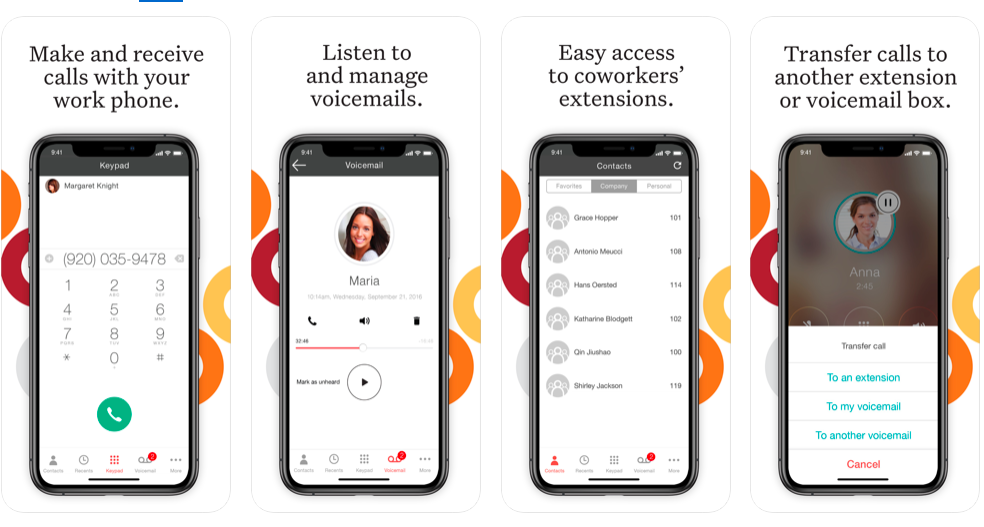
  • Mobile App– manage business phone calls from your cell phone.
  • SMS Messaging through the Ooma Office mobile app.
  • Call Park
  • Ring Groups
  • Music on Hold
  • Transfer Music
  • Extension dialing
  • Extension Monitoring
  • Call Forwarding
  • Virtual Extensions
  • Voicemail
  • Call transfer
  • Flexible Numbering
  • Company Directory
  • Call Logs
  • Conference bridge for up to 10 callers
  • Forward calls during device outages
  • Fax Online
  • 7-Digit Dialing
  • Call Blocking
  • Intercom

Advanced Features (Ooma Office Pro)

  • Call Recording
  • Enhanced Call Blocking
  • Overhead Paging
  • Voicemail Transcription
  • Higher usage limits for: Extension Monitoring, Call Park, Audio Conference Room Participants

Media

Ooma Business Phone Mobile App
Ooma Office Pro Desktop App
Customizable Virtual Receptionist
Configure System Settings through Ooma Office Manger Online Portal

1 / 4

Top Performing Features

  • Audio conferencing

    Audio conferencing credentials for all on the system.

    Category average: 8.5

  • Call park

    Ability to hold calls in virtual location and subsequently access from any phone in system

    Category average: 8.1

  • Call screening

    Ability to block numbers or send calls directly to voicemail

    Category average: 8.3

Areas for Improvement

  • Call recording

    Automatic recording of inbound and outbound calls

    Category average: 8.4

  • Mobile app for iOS

    App for iPhone and iPad

    Category average: 7.8

  • Mobile app for Android

    Android app

    Category average: 7.8

Ooma Office Provides A Flexible Reliable Business Phone Solution.

Use Cases and Deployment Scope

Ooma Office is our primary office phone. While we have old-school office phones, we primarily use them on our mobile devices with the Ooma Office app, allowing us to "be in the office" from anywhere. The virtual assistant is suitable for routing calls and handling frequently asked questions, and although we have used it in the past, we currently ring through. It's a full-featured solution for a very reasonable price.

Pros

  • Saving money: Ooma Office saves a bundle compared to what we were paying for Verizon business phone services.
  • The mobile app is the most helpful part of Ooma Office for us. We can be "in the office" anywhere, even if we're telephonically.
  • The automated assistant can be invaluable in routing calls and handling frequently asked questions.

Cons

  • Transcribed voicemail would be very helpful in the basic tier of service.
  • Better caller ID reporting. Often, the caller ID is missing from incoming calls in the Ooma system.
  • Better SPAM call filtering at the basic tier of service.

Return on Investment

  • Ooma has saved a *bundle* compared to what we were paying Verizon for less capable service.
  • The mobile app has been our biggest win so far. Helping us capture business we might have otherwise missed.
  • The call assistant has helped us save time by handling frequent questions for info.

Usability

Alternatives Considered

RingCentral Contact Center

Other Software Used

Microsoft 365 Business Premium, Nuance Dragon Speech Recognition, Mozilla Firefox

Ease of Setup and Use

Use Cases and Deployment Scope

Ooma office provides the phones and VOIP for our company phone needs. We have both physical phones and services through their mobile app where our office can both send and receive calls and messages. The service is internet based and does not require any hard line installations. We are a construction company of about 75 employees.

Pros

  • Mobile phone app
  • VOIP phone setup and connection
  • Easy to setup and get started
  • Customized office phone solutions

Cons

  • The service is not as good as expected even with a high speed internet connection
  • Calls are dropped
  • customer service and changes on the account can be difficult to make

Return on Investment

  • For the price, the investment is minimal when setting up an office phone solution,
  • we have used this and their mobile features instead of purchasing company phones for our staff.
  • Reduced cost instead of having a mobile phone plan

Usability

Ooma Office has been great

Use Cases and Deployment Scope

I have 2 phone lines for my business, with 2 desk phones. I also have the soft phone on my computers both at work and at home. Ooma Office also has an app that I loaded onto my cell phone. I have phone access everywhere that I am at all times. Ooma Office also has a texting platform, so I have business texts everywhere at all times. I often need to fax documents or receive faxes and Ooma Office comes with fax service. I also have a toll free number for customers that have not gone the Cell phone or VOIP route, that way they do not have to pay to call me. Call recording is a handy feature and I have used it many times to back up information given in a phone call.

Pros

  • Text messaging
  • call quality
  • call recording
  • soft phone and mobile app

Cons

  • the soft phone app does not always keep up to date throughout the day, so I need to logout and back in to fix it
  • I have difficulty with the Ooma Office online navigation, because it does so much

Return on Investment

  • I have saved money off other VOIP services
  • I have saved money by not needing separate text service through work
  • I have saved customers by having availabity beyond the normal business hours.
  • During Covid, I was able to move my phone to my house and provide same level of service out of my house.

Usability

Alternatives Considered

Vonage Business Communications and RingCentral Contact Center

Other Software Used

Salesforce CMS, BombBomb

Best VOIP service at a reasonable price

Use Cases and Deployment Scope

We use it for our phone service and the cost is amazing affordable. It is a VOIP just plug the phone into the modem for internet and it is all set to use. It was simple when moving from an office to work from home I just had to plug in the phone into my internet modem and it was all set to use. Best service and product to use.

Pros

  • VOIP
  • Cost
  • Customer service

Cons

  • It works just fine for us

Return on Investment

  • Saves money on phone

Usability

Simple, Professional and Saves Money

Use Cases and Deployment Scope

We use Ooma Office to received calls for ticket purchases and event sales inquiries.

We have a detailed outgoing message with options to connect to our team members or hear details like directions or class info.

We also use it to distribute calls to team member's cell phones.

Pros

  • transfers calls easily
  • excellent automated attendant
  • we can use our own recordings for outbound messages

Cons

  • should prevent spam calls at entry level
  • needed better security on calling in to change plans or for support

Return on Investment

  • Saved at least $100 per month for last 13 years. At least.
  • Makes us sound professional - we have good recordings with our own voices recorded in Apple Logic Pro X
  • Easy for customers to use - they don't get frustrated.

Usability

Other Software Used

Squarespace, Corsizio, Suggestion Ox, Flodesk