

LinkPoint Connect
4 Reviews and Ratings
What is LinkPoint Connect?
LinkPoint Connect promises to streamline data entry and access by enabling users to instantly view CRM data within their email client. This sales intelligence solution integrates Salesforce and Microsoft Dynamics CRM data in Outlook or IBM Notes.
According to the vendor, key capabilities include:
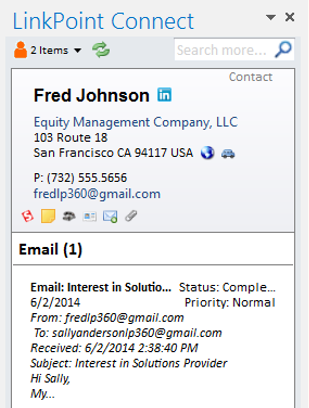
- View real-time Salesforce data without ever leaving your email. Click on an email, and the LinkPoint Connect Side Panel instantly displays that contact’s information directly from Salesforce.
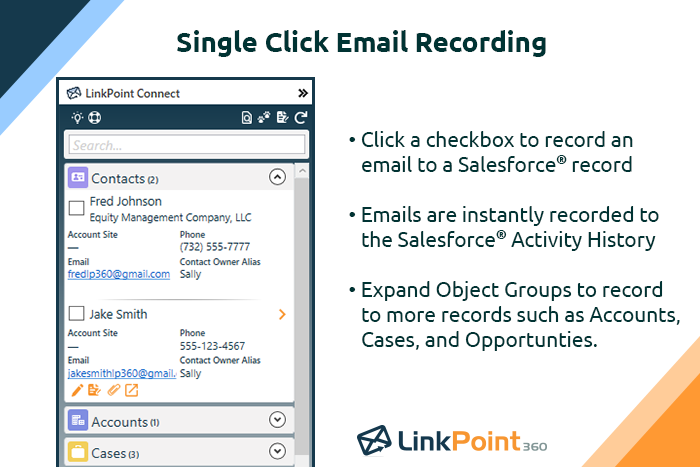
- Record emails to Salesforce when sending or receiving messages. LinkPoint Connect makes it easy to associate emails with the right contacts and opportunities with just a few clicks.
- Create new records with ease…and without the hassle of copy and paste actions between your email and CRM. Drag and drop email signatures or leverage Smart Forms to create new records.
- Sync calendars, contacts, and tasks with one-way or two-way sync between email and the CRM with independent rules.
- And with an upgraded Desktop Plus Edition, users have the added capability to log meeting notes that map directly to Salesforce fields. Choose the questions or data that mean the most to your organization's workflow, and LinkPoint Connect will prompt you team to input their meeting feedback.
- PC installation and web cloud access.
Categories & Use Cases
Screenshots




1 / 8
Screenshot of Record emails to your CRM when sending messages via your email application. LinkPoint Connect makes it easy to associate emails with the right contacts and opportunities with just a few clicks in your email.
Technical Details
| Deployment Types | On-Premise, SaaS |
|---|---|
| Operating Systems | Windows |
| Mobile Application | No |
| Supported Languages | English, French, Spanish, German, Portuguese, Norwegian, Danish, Japanese, Simplified Chinese, Italian |
FAQs
What are LinkPoint Connect's top competitors?
Salesforce Sales Cloud are common alternatives for LinkPoint Connect.