TrustRadius: an HG Insights company

Lightning Tools DeliverPoint

Score8.2 out of 10

2 Reviews and Ratings

What is Lightning Tools DeliverPoint?

DeliverPoint supports reporting and managing SharePoint permissions. Site Owners, Site Collection Administrators, and SharePoint Administrators can run permission reports that reflect the permissions of every user. Site collections, Teams Channels, Hub Sites, SharePoint Sites, OneDrive, Lists, Folders and Items can all be reported on individually or in bulk. Permissions can be modified, transferred, copied or deleted between accounts as staff changes occur.

Videos

Screenshots

Screenshot of CONTEXTUAL SHAREPOINT PERMISSION REPORTING
SharePoint Permissions are not just the responsibility of IT. Business Users (Content Owners) can create sites, lists, libraries and of course list and library content. The business user is capable of sharing the content with internal users, but perhaps also external users. Sharing such content can result in users gaining permissions to sites or content not intended to be shared. For example, if a site is shared, the user who the site is shared with becomes a member of the members group by default. That members group may have Edit permissions to other sites or content elsewhere within the site collection. DeliverPoint gives visibility of such permissions to support better SharePoint permission decisions from within the Site, List or Library itself.
Screenshot of GRANULAR SHAREPOINT CONTENT PERMISSION REPORTS
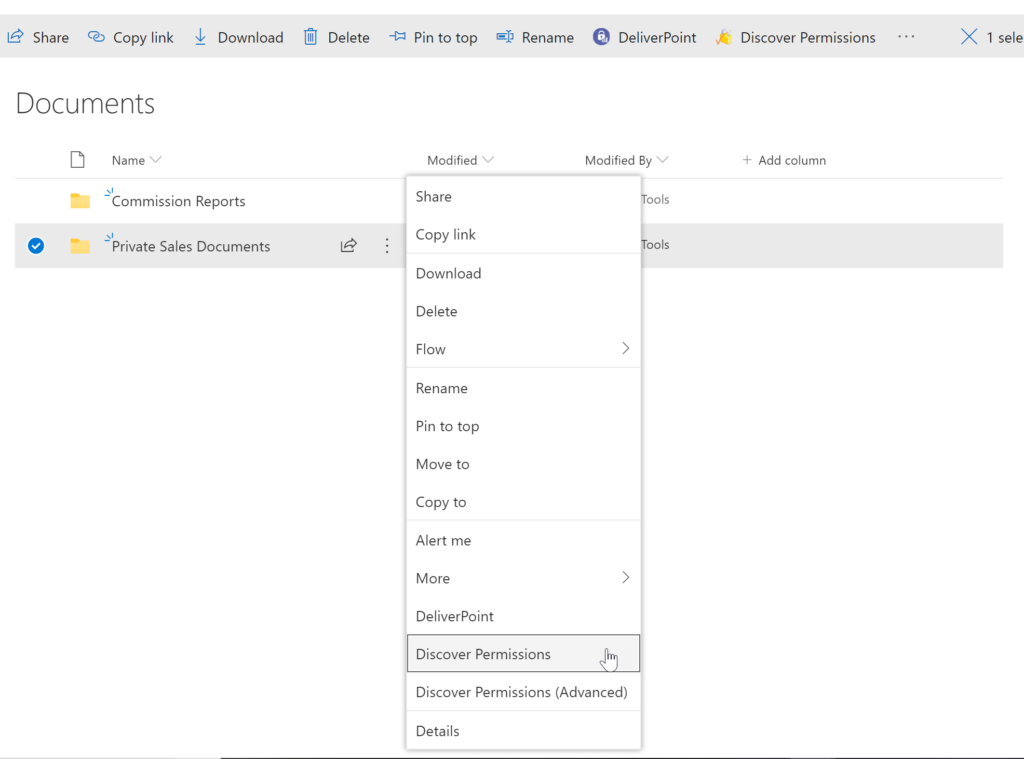
The DeliverPoint Discover Permissions report displays a full transparent report of all users that have permissions to the site, list/library or item. This displays what permissions each account has to the selected object, as well as how the permissions were assigned. Filter can be used for each user to check for duplicate permissions, filter by Permission Level to see which users are granted each permission level, and also filter by the ‘Permissioned Via’ column to see who has received permissions via a particular SharePoint, Microsoft 365 Group, or Azure AD Security group. The Discover Permissions report can be executed against multiple documents or items, lists and within the site or subsites.
Screenshot of EXTERNAL SHARING LINKS REPORTING AND MANAGEMENT
Within SharePoint, users can share links with anyone, internal users and external users. DeliverPoint provides an External Sharing Links report that can be used within a site or across sites. The user can see who shared the link, when they shared the link, and optionally remove the link if it’s required.
Screenshot of REPORT AND MANAGE PERMISSIONS FROM WITHIN MICROSOFT TEAMS
DeliverPoint is also available within Microsoft Teams. Team Owners can produce Microsoft Teams Permission reports within their Teams Channels and across Private Channels. The reports provide confidence and assurance that permissions are set correctly and that sharing isn’t out of control. Changes to permissions can be made contextually within a Team or centrally across multiple Teams should permissions need to be removed or managed.
Screenshot of MANAGE SHAREPOINT PERMISSIONS
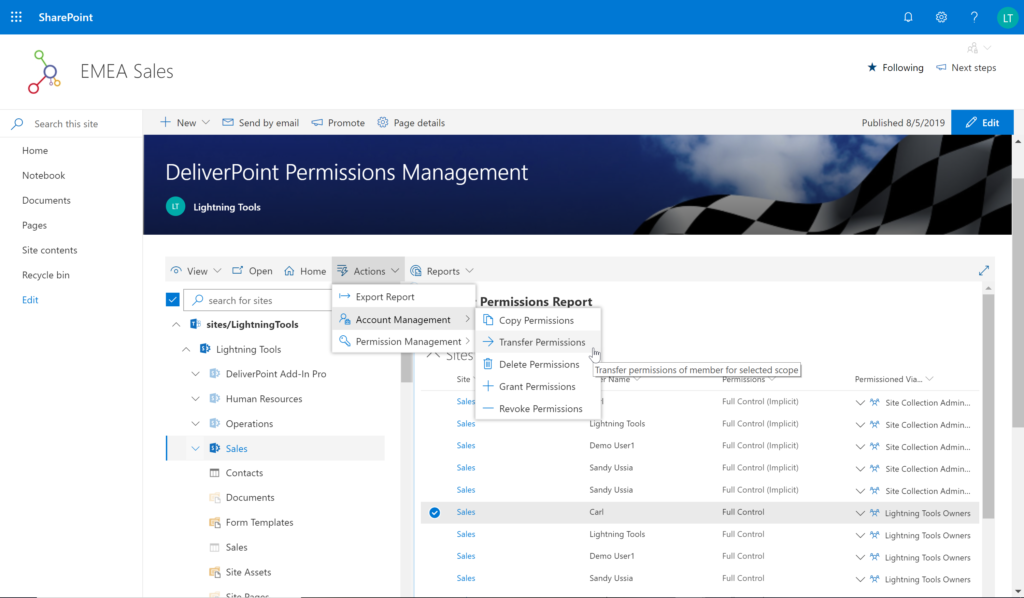
Using DeliverPoint, Site Owners, Site Collection Administrators and Tenant Administrators can manage permissions across the objects that they have Full Control to. Within organizations, users change roles, leave organizations, or join organizations. Making permission changes to accounts to reflect these changes is time consuming. DeliverPoint can be used to simply select the scope to change, and perform the change as one operation. The operations include Transfer, Delete, Copy or Revoke Permissions.
Screenshot of UNIQUE PERMISSION REPORTING
The DeliverPoint Unique Permissions Report enables Site Collection Administrators or SharePoint Administrators to view the permissions assigned to a specific user account or group throughout site collections. The report includes all Microsoft 365 Groups, SharePoint Groups and Active Directory Security Groups that the user is a member of. A list of Site Permissions, List Permissions and Item Permissions that the user has been assigned permissions to are listed, allowing  the permissions to be removed or transferred if they are incorrect.
Screenshot of DEAD ACCOUNT PERMISSION REPORTING
Dead Account Reporting enables Site Collection Administrators and Tenant Administrators to report on users or groups that are disabled or deleted from within the Active Directory, but still assigned permissions within Microsoft SharePoint. DeliverPoint can list the permissions assigned to such accounts, and then transfer the permissions to a new user, or it can be used to simply remove the dead account and permissions assigned to that account with one operation.
Screenshot of UNLICENSED USERS OR EXTERNAL USERS
DeliverPoint provides SharePoint Administrators with the ability to report on users that are permissioned but not longer have a SharePoint license associated with their user account in Microsoft 365. It also provides the option of removing all of the permissions associated with the accounts. A single report can also be executed displaying all of the external users and their permissions to SharePoint content.
Screenshot of ONEDRIVE PERMISSION REPORTING
DeliverPoint provides users with the ability to report on their own OneDrive’s. They can see a full list of files or folders that they have shared through Sharing Links or Direct Permissions. The report can be filtered to view users with specific permissions. Administrators can report on a specific user account to see OneDrive reports should a user leave the organization.

1 / 9

Screenshot of CONTEXTUAL SHAREPOINT PERMISSION REPORTING SharePoint Permissions are not just the responsibility of IT. Business Users (Content Owners) can create sites, lists, libraries and of course list and library content. The business user is capable of sharing the content with internal users, but perhaps also external users. Sharing such content can result in users gaining permissions to sites or content not intended to be shared. For example, if a site is shared, the user who the site is shared with becomes a member of the members group by default. That members group may have Edit permissions to other sites or content elsewhere within the site collection. DeliverPoint gives visibility of such permissions to support better SharePoint permission decisions from within the Site, List or Library itself.

Technical Details

Technical Details
Deployment TypesOn-Premise, SaaS
Operating SystemsWindows, Microsoft SharePoint On Premises and Online
Mobile ApplicationNo
Supported CountriesGlobal
Supported LanguagesEnglish, French, German, Spanish, Dutch, Japanese

FAQs

How much does Lightning Tools DeliverPoint cost?
Lightning Tools DeliverPoint starts at $2500.
What are Lightning Tools DeliverPoint's top competitors?
ShareGate, Syskit Point, and Quest Metalogix ControlPoint are common alternatives for Lightning Tools DeliverPoint.
Who uses Lightning Tools DeliverPoint?
The most common users of Lightning Tools DeliverPoint are from B2C.