TrustRadius: an HG Insights company

Jaspersoft

Score6 out of 10

274 Reviews and Ratings

What is Jaspersoft?

Jaspersoft commercial edition is an embedded business intelligence suite designed to be built-into SaaS products as an integrated reporting engine. It provides reports and dashboards for customer-facing applications without requiring app developers to build their own reporting engine.

Media

Report Design
Ad-hoc Reporting
Mobile Reporting
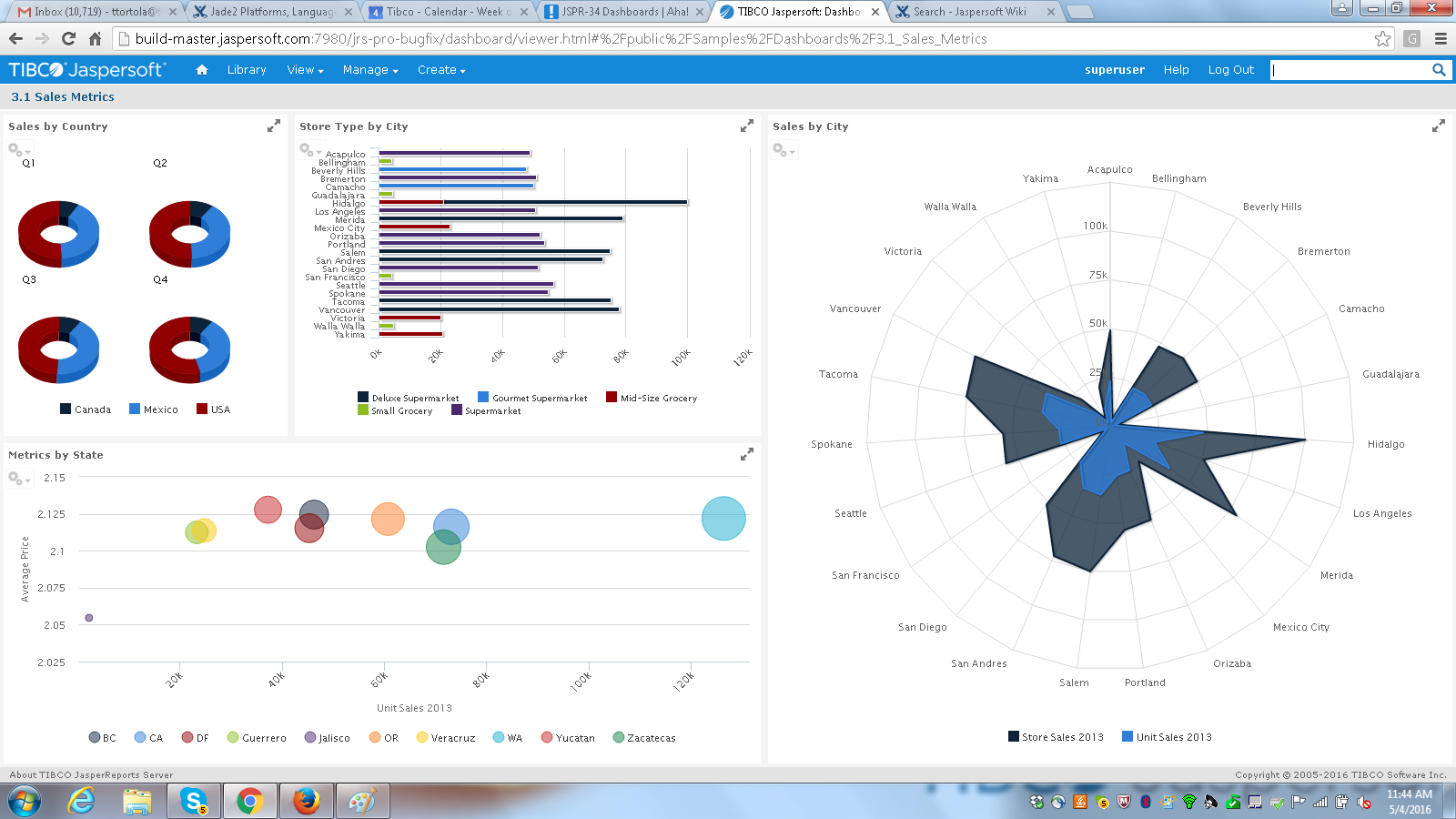
Dashboard

1 / 4

Top Performing Features

  • Publish to PDF

    Category average: 8.5

  • Multiple Access Permission Levels (Create, Read, Delete)

    Multiple access permission levels means that different levels of users have different rights.

    Category average: 8.3

  • Pre-built visualization formats (heatmaps, scatter plots etc.)

    Pre-built visualization formats are canned visualization types that can be selected to visualize different kinds of data.

    Category average: 8.1

Areas for Improvement

  • Location Analytics / Geographic Visualization

    Location analytics is the visualization of geographical or spatial data.

    Category average: 8

  • Themeable User Interface (UI)

    A themeable user interface means that a specific visual them can be applied to it

    Category average: 7.8

  • Mobile Application

    A dedicated app for iOS and/or Android.

    Category average: 7.4

Highly recommendations for this great BI tool.

Use Cases and Deployment Scope

We were migrating from the legacy point of sale system to the new version and different vendors altogether. There were a lot of challenges we were facing especially when it came to data mapping from enterprise to enterprise between two systems. With the help of this tool, we were able to resolve those issues very effectively and efficiently in a timely manner and meet project deadlines. The scope was included for both digitally online and mobile platforms with the help of this tool.

Pros

  • Breadth of mapping tags.
  • Easy sync across multiple systems.
  • Data migration security.

Cons

  • Performance issues once in a while may hamper the productivity of the project.
  • Introduction or how to do guide can be more better and comprehensive.

Return on Investment

  • Great tool with effective return on investment.
  • Positive impact and confidence on data integrity and security.

Alternatives Considered

Tableau Extension: Writeback

Other Software Used

Infor Birst OEM and embedded analytics

Usability

Best report generating tool with great feature set and reliable

Use Cases and Deployment Scope

Jaspersoft enables us to generate reports based on the input data given. It is swift enough to generate reports with small to medium data. We use it on our application back end to automatically generate reports based on filters, date range, and input data. It supports PDF, Excel, and HTML formats. It can also build graphs and charts for more interactive reports. It is easy to use and the learning curve is very minimal. Overall it's a great product with a minimalistic design and several important features.

Pros

  • Minimal design.
  • Reports can be generated swiftly.
  • Supports REST based applications.
  • Easy to use and quick to learn.

Cons

  • Cant handle large data efficiently.
  • No dashboards.
  • UI is outdated needs to be modernized.

Return on Investment

  • Faster reports saved lot of time.
  • Increased productivity.
  • Trust and reliability between us and clients.

Other Software Used

Cisco 3504 WLAN Controller, AWS Backup, Apache Maven, Gradle, Cisco Webex Board Series

Usability

Jaspersoft Products

Pros

  • Provides a great API with control over all of its Jasper server functionality allowing automation and external management and maintenance and deployment.
  • Very easily integrated reporting engine into Java applications. Very easy to integrate with external applications using the API for the server component and libraries for standalone.
  • The purely XML based report definitions make automation of generating report source very easy.
  • Handles a huge range of data sources out of the box and is very easy to develop custom data sources. It is fairly easy to find code examples for developers.
  • The documentation for users, admins, and developers is very good.
  • Extremely easy to deploy internally or cloud-based.
  • Provides a wide range of output and visualizations, not just typical "reports".

Cons

  • The JasperSoft Studio (Eclipse + plugins) is not always a joy to use. The choice of using Eclipse as an IDE base is understandable, but it comes with the issues and difficulty of Eclipse. The Eclipse integration lacks any useful debugging features and the error messages are vague and it makes it difficult for non-developers to determine what is actually wrong with the JRXML source in many instances.
  • The Jasper Server component (CE anyway) is difficult to brand and customize the web GUI.
  • Sub-report data sources can be quirky and overly complicated to define and get "right". Combing multiple data sources with multiple sub-reports is not easy.
  • How report variables work, specifically the increment types and reset types combined with where they get used in report bands, is very difficult for the average report writer to grasp.

Return on Investment

It allows our clients to consolidate what used to be a myriad of methods, applications and services to generate various BI functionality into a single product and architecture.

Exceptional support and great product to deal with

Pros

  • Exceptional response
  • Resolving issues that are raised by the user with upgrades.

Cons

  • Not much to say about cons.

Return on Investment

Helps for really old products which requires additional reporting capabilities

A great blend of open source software

Pros

  • Single sign-on works seamlessly.
  • The server is easy to manage.
  • Visualizer.js is excellent.

Cons

  • Not as glossy as Tableau.
  • Training materials are spread all over the place.
  • Not enough video training materials.

Return on Investment

We originally imagined reporting as being a necessary component of our main application.

Alternatives Considered

Tableau Online and Glow