TrustRadius: an HG Insights company

Insightly

Score7.4 out of 10

824 Reviews and Ratings

What is Insightly?

Insightly is presented as a modern, affordable CRM that is easy to use, simple to customize, and that scales with companies as they grow, designed to solve common pain points that legacy CRMs can't. Available in any vertical, Insightly CRM customers can add companion products for marketing automation, customer service, and integrations in the same platform. Insightly has more than a million users worldwide.

Media

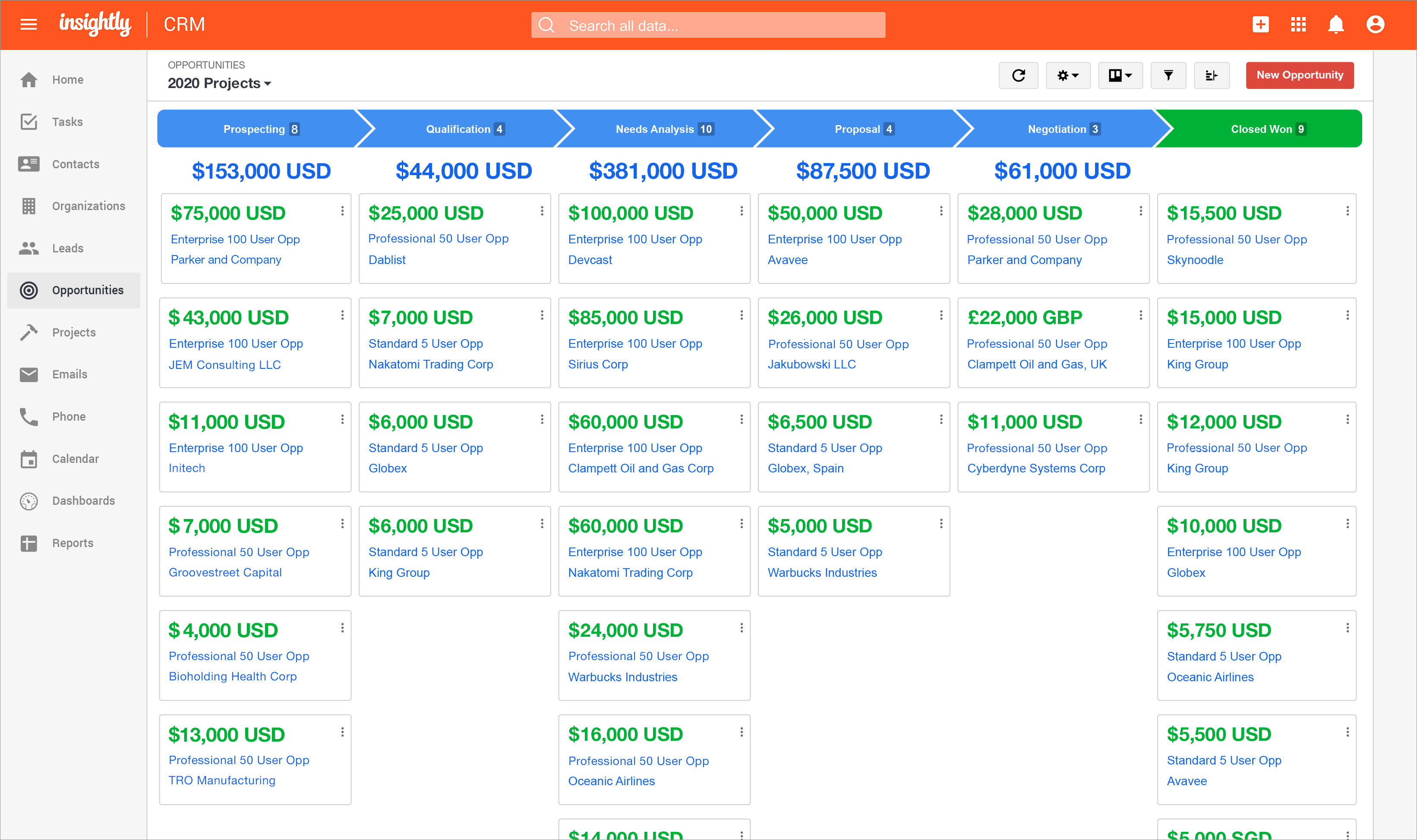
Insightly's lead status and activity tracking, available so that nothing falls through the cracks.
the reporting feature, which provides insight into sales and productivity performance.
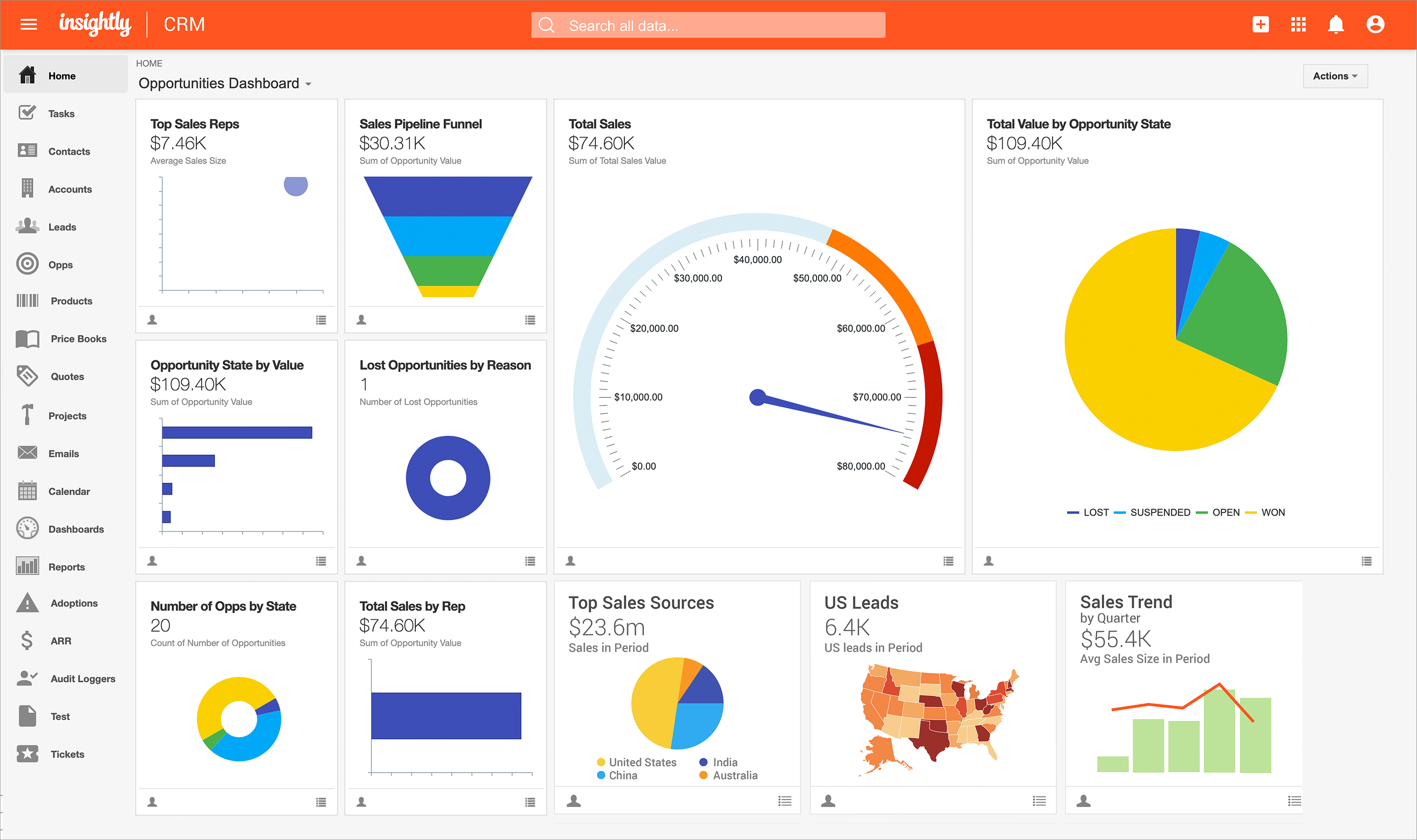
the Insightly Opportunities dashboard.
Insightly on mobile.

1 / 7

Top Performing Features

  • Customer data management / contact management

    The software acts as a single source for all customer data and enables users to access that data efficiently.

    Category average: 8.6

  • Opportunity management

    Users can track deals and create quotes.

    Category average: 8.1

  • Quote & order management

    Users can create, process and fulfill price quotations and sales transactions.

    Category average: 7.7

Areas for Improvement

  • Compensation management

    The software can integrate with compensation management software or sales commission software such as Xactly Incent or IBM’s Varicent.

    Category average: 8.5

  • Mobile access

    Users can access the CRM system via mobile or tablet device, and potentially leverage the unique capabilities of mobile devices, such as GPS and voice.

    Category average: 7.7

  • Email marketing

    This involves the ability to send mass email to groups of people based on particular qualifications.

    Category average: 7.2

Insightly - A Wonderful Tool for Small Businesses

Use Cases and Deployment Scope

We started using Insightly in order to better organize our internal customer database of ongoing and future orders. We needed a better way to keep tracking of customer contact information, addresses, and what their purposes was for contacting and working with our company. We keep track of all of our purchase orders, sales orders, invoices, estimates, and much more in Insightly.

Pros

  • Organization
  • Data Management
  • Report Writing
  • Customer Follow-Up Reminders

Cons

  • Ease of Use of the Program
  • Customer service has a hard time understanding directions
  • Features sometimes get removed without considered that we use those features
  • It is hard to copy and paste some fields from Insightly

Return on Investment

  • We do not have any hard numbers or stats on how Insightly has helped our business but it certainly has a positive effect on data organization and follow-up reminders with customers.

Usability

Alternatives Considered

Intuit Mailchimp, Canva and Microsoft SharePoint

Other Software Used

Canva, Intuit Mailchimp, CRM Assistant for Gmail™

Insightly Review

Use Cases and Deployment Scope

We use Insightly as a sales tool to database and track interaction with our clients. Primarily we will use it for prospecting new clients as well as keeping on top of our existing clients. We also use it to track activity and sales across the company and then split out over each individual account manager.

Pros

  • The ability to set up filters to generate lists based on just the categories I am interested in.
  • It's integration with our sales data so we can see customer spending trends across multiple years and seasons.
  • The ability to circle back to previous email correspondence to refresh on past conversations with individual clients.

Cons

  • It would be good if clients would be auto updated if we have interacted with their card. Rather than having to manually check the date of "updated".
  • I find that when Insightly imports a new contact via the email tag being added, they will not come into the company with the company's field included, and that needs to be manually added.
  • For example if a new contact at Department of Health gets added they do not come in with an Industry: Government that their organisation has already.
  • When generating lists to export is is frustrating that you can only work with one page at a time. For instance you can not manually check all the clients on page 1 then move to page 2 to check some more to add to the list. It does not remember the ones from the previous page once you move to the next.

Return on Investment

  • While I am working in a capacity that does not involve my input into the licensing or cost side of us having Insightly I can see that there is certainly a good ROI.
  • With 9 account managers utilising the system at any one time we can instantly keep track of our own sales and client data while also being able to see what others do.
  • Being able to track key KPIs as well with graphs and charts enables us to see where we sit within our targets and easily adapt to areas that need more attention.

Usability

Other Software Used

Adobe Acrobat, SketchUp, Adobe Illustrator CC

Insightly is a Solid CRM with Great Integrations But has a Learning Curvbe

Use Cases and Deployment Scope

All in all, Insightly is a solid CRM with a number of features to earn a recommendation, but there was definitely a learning curve. We've been using Insightly for a little over a year now, and overall, it’s been a reliable CRM that does what we need it to do. The biggest plus for us has been how well it integrates with tools like Gmail, Google Drive, and Slack. That’s made adoption across different departments a lot smoother.

The project management features built into the CRM are surprisingly helpful. It’s nice not having to switch between platforms to track deals and manage related tasks. The layout is clean, and once you get the hang of it, organizing pipelines and workflows becomes pretty intuitive. The two areas that it excels in is integration with the rest of our suite - this keeps us from bouncing from platform to platform which is definitely a time saver. The real bonus was the project management features which was especially useful in keeping all of us up to date on issues, resolutions, and rollouts. Kudos on that!

Pros

  • As mentioned, Insightly integrated with Google Suite so all of our communications, and especially our analytics and metrics, didn't miss a beat.
  • Slack integration was helpful too, as a number of tools I investigated prior to choosing Insightly, had third party apps used for integration. This is better than nothing, but Insightly's native integration was a real relief.
  • The project management feature was a life saver, not just for the DEV team, but also for the Sales team. This allowed us to skip service tickets and go right from us or a client, directly to DEV. The clients just got a much more personal touch and the turn around time was increased.

Cons

  • Once you are immersed in the platform, for all of its integration kudos, the platform became "intuitive" if that is the right word for it. There was some push back from staff on deployment.
  • The service and support team at Insightly was very responsive, but it seemed as if they had fielded similar complaints, and slower learning curves than we expected.
  • Unfortunately, while all has worked out nicely now and we are very happy with the platform, we had to have additional instruction time for all the staff during onboarding as workflows, dashboards, and pipelines were more time intensive than expected on the demo.

Return on Investment

  • For negative impact, the time setting up the various data fields and making sure the data was right and how it showed was not easy.
  • Having the integrations available has saved all of us time jumping from platform to platform. Definitely assisted with focus and probably scrubbed at least one meeting.
  • For the few issues we had setting up and customizing the tool, the ease of adoption across all the departments has been truly spectacular and beyond expectations.
  • Hoping the team will make it more plug and play for future rollouts and work on the mobile app and then this platform would be 100!

Usability

Alternatives Considered

Zoho CRM

Other Software Used

AWS Cloud9, Cloudflare Zero Trust Services, Adobe AIR

Insightly Powerful yet easy to use

Use Cases and Deployment Scope

Insightly is our CRM. We use it for customer relations as well as for our marketing. It is integral for all of our data. It is the central point for all of our information. We are able to engage with prospects then follow-up with them as they become leads. We can tehn create proposals and contract. Once they become a client we can manage that relationship through different projects we are working on with each client.

Pros

  • Ease of Use
  • Integration with other platform
  • Combination of Marketing and CRM

Cons

  • Addition of some minor additional design tools for landing pages
  • Mobile app for Marketing module

Return on Investment

  • Greatly reduced repetitive tasks
  • Marketing Journeys keep prospect engagement alive
  • Reporting and dashboards save hours of compiling of data
  • Integration with other apps allows us to utlize the best tools for the job

Usability

Alternatives Considered

Salesforce Lightning Platform

Other Software Used

Zapier, PandaDoc, ClickFunnels, EasyWebinar

Insightly Review

Use Cases and Deployment Scope

We use Insightly to keep track of our customers and their pipelines to know where we are in our sales. It helps us stay organized, it gives us a map to follow, and it gives us tasks to follow to keep up with our customers. I think it is most useful for our sales reps who have a lot of customers that they have a hard time keeping track of. Overall, it solves a lot of our organization and customer database problems.

Pros

  • Organizing customers
  • Pipeline instructions
  • Pretty fast at responding when having issues
  • Merging accounts option/ease of deletion

Cons

  • Gmail AI- reading the wrong part of the email and making new accounts of ones we already have
  • Complicated settings
  • Pretty fast at responding when we have inquiries however usually customer service needs really detailed responses and screenshots
  • More comprehensive user training- I joined the webinar and it just basically went over what you would be implementing, not how to use it
  • Proof of data privacy

Return on Investment

  • It has helped with revenue growth because we are able to keep track of customers so we don't lose them. The pipeline and contact helps with this.

Usability

Other Software Used

Quickbooks