TrustRadius: an HG Insights company

Global Shop Solutions ERP Software

Score6.4 out of 10

14 Reviews and Ratings

Get a Demo

Contact about Global Shop Solutions ERP Software

Please fill out the form below to get in touch.

Global Shop Solutions

Connect with Global Shop Solutions

What are you interested in?

Already have an account?

You hereby consent to have TrustRadius share the information supplied on this form with Global Shop Solutions so that Global Shop Solutions and TrustRadius may contact you in regard to the information requested.

What is Global Shop Solutions ERP Software?

Global Shop Solutions ERP software provides applications used to deliver quality parts on time, from quote to cash and everything in between including shop management, scheduling, inventory, accounting, quality control, and CRM. Available in the cloud or on premise, the solution aims to give its manufacturing customers real-time inventory accuracy, improved on-time delivery, lower administrative costs, increased sales and improved customer service. Headquarters in The Woodlands, Texas includes an R&D facility and Global Shop Solutions training center. Through its offices in the U.S., Mexico, Indonesia, Singapore, Australia, New Zealand and the United Kingdom, the company supports manufacturing facilities in over 25 countries and more than 30 industries.

Media

Main Menu
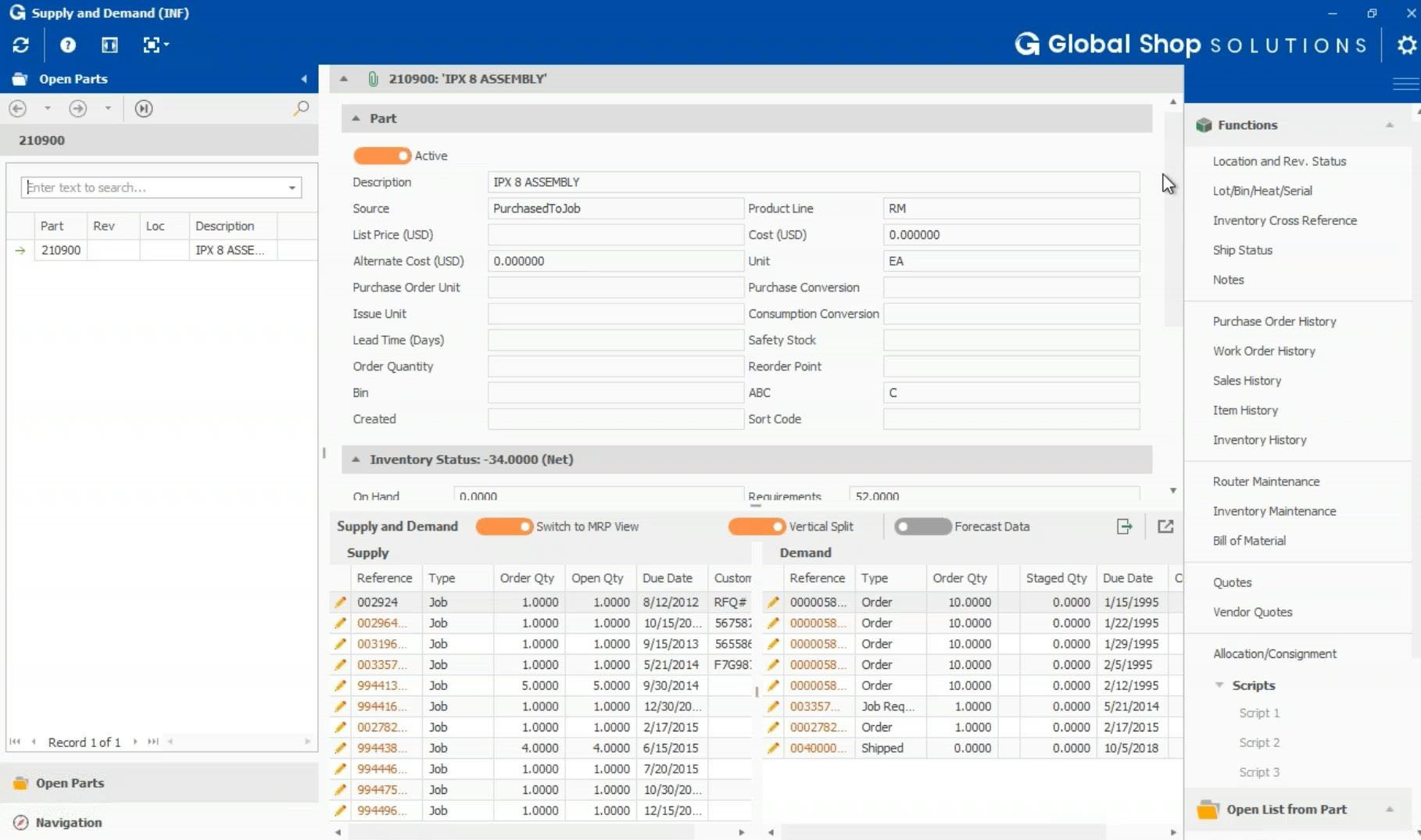
Supply & Demand screen in the Inventory module
Shop Floor Data Collection screen
Dashboard Designer

1 / 4

Top Performing Features

  • Cash and Asset Management

    Manage liquidity and cash requirements, asset transfers, disposals, reclassifications, and financial adjustments

    Category average: 7.8

  • Period Close

    Sustain fast close with integrated subledgers, intuitive dashboards, embedded collaboration

    Category average: 8.2

  • Cost of goods sold

    The software calculates the direct costs attributable to a finished product, such as materials and labor, and includes roll-up pricing.

    Category average: 8

Areas for Improvement

  • Custom reports

    Users can create custom reports.

    Category average: 7.6

  • Pricing

    Users can set up complex and unique pricing requirements.

    Category average: 7.8

  • Plug-ins

    A number of third-party plug-ins are available to expand the core functionality of the software.

    Category average: 7.6

The rarest of the rare an actual Software Unicorn that delivers on its promises

Use Cases and Deployment Scope

This software has been like a Swiss Army Knife for our Organization and not only does it serve several purposes it does them all extremely well without much if any hassles. The open ended nature of the platform really allows you to tailor things to your needs, regardless of what industry you're in. This software is truly a unicorn.

Pros

  • Invoicing, billing, accounting
  • Inventory control and documentation
  • Asset tracking

Cons

  • Our Accounting department is the power user and they use it for dozens of applications
  • We track depreciation and run time, as well as inventory for IT
  • We use it's backend tables for budgets and financial forecasts

Return on Investment

  • The ROI on this software is incredible, I seldom gush but I genuinely cannot see any industry where this wouldn't be applicable and useful.
  • The forecasting alone is worth the price of admission
  • We love the simplicity and elegance of handling our IT inventory
  • About the closest thing to a complaint would be sometimes the updates can be a little fiddly with specific dot.net requirements but they're great about supporting even aging hardware and OS's.

Usability

Alternatives Considered

QuickBooks Desktop Enterprise

It's just okay...

Pros

  • The CRM has really advanced and allows us to track the efforts of our sales staff, as well as identify trends. We are heavily using this system to track our sales team's progress and utilize the events, opportunities and to-do tasks as well as identifying the customer history all in one spot.
  • Supply and Demand section is used by pretty much everyone. This allows us to identify what is on-hand and the history of the parts' use. It is easy to follow and make changes.
  • Order Entry allows us to track all orders in an easy fashion. This is very straightforward and simple to use.

Cons

  • The layout is dated and hard to navigate at times. You need to go into different sections to access functions of the system, which can be confusing - this is one of the largest frustrations we face because we need to search for sections that are not commonly used.
  • Updates seem to cause issues with the overall system and it takes several attempts with customer service to get issues resolved. We are behind in our updates because of this. Each update push causes us to shut down because sections then don't work correctly due to patches needing support to completely update them. We were unable to access customer transactions for a good part of the day because of the last update.
  • Errors happen more often than not. We have random errors pop up that cause us to have to close out the system in its entirety, losing any work we have done. We need to restart the system and hope other errors don't populate before we can move forward. Calling customer support is not helpful with this, we are told that these errors happen sometimes. There is not a fix.
  • Part/Router numbers randomly disappear. The Router/Part number will need to be rebuilt before we can move forward. It's frustrating. Again, customer support can not tell us the root cause of the issue.
  • Help section of Global Shop Solutions is not helpful - it has a lot of technical jargon and at times is not easily understood. There are many sections that look to be more IT-based than user-based. Also, there are out of date sections so you might not be able to find what you are looking for. Training modules available for an extra cost.

Return on Investment

  • We have used the CRM for the last 9 months to support our sales team. Now we can see interactions, followup practices, opportunities and adjustments in one section. This has allowed us to better service our customers and make sure that followup is done.

Global Shop Solutions

Pros

  • We have recently upgraded to the latest version and it moves pretty quick going from screen to screen.
  • It is able to capture labor dollars per work order as well as materials to each job well.
  • You can track the flow of materials pretty easily.

Cons

  • You are unable to match a debit and a credit on a customer or vendor account to remove it from the open ledger.
  • Reports (and some processes) tend to change with little notification.
  • Many of the company options are not "common sense." What you think they would mean, actually do something very different. This makes it difficult to get your settings correct without ample research and testing.

Return on Investment

  • It's been pretty inconsistent. We do a lot of "button pushing with fingers crossed" because we "thought a process worked a certain way but there were times when you never knew what you were going to get.

Alternatives Considered

Unit 4 and Peachtree