TrustRadius: an HG Insights company

dbForge Studio (Edge)

Score8 out of 10

50 Reviews and Ratings

What is dbForge Studio (Edge)?

dbForge Studio is provided by Devart and is a universal front-end client for database management, administration and development. Devart's GUI tool provides utilities to compare, synchronize, and back up databases (e.g. MySQL, Oracle, SQL Server, PostgreSQL, etc.) with scheduling, and includes the possibility to analyze and report MySQL tables data. For example, dbForge Studio for MySQL works with any MariaDB database servers, and supports all MariaDB objects types. This solution enables users to visually design database structures, execute SQL queries and scripts, and manage MariaDB users and privileges. dbForge Edge - multidatabase solution that covers an all-consuming range of tasks for various database systems.

Media

Code Completion
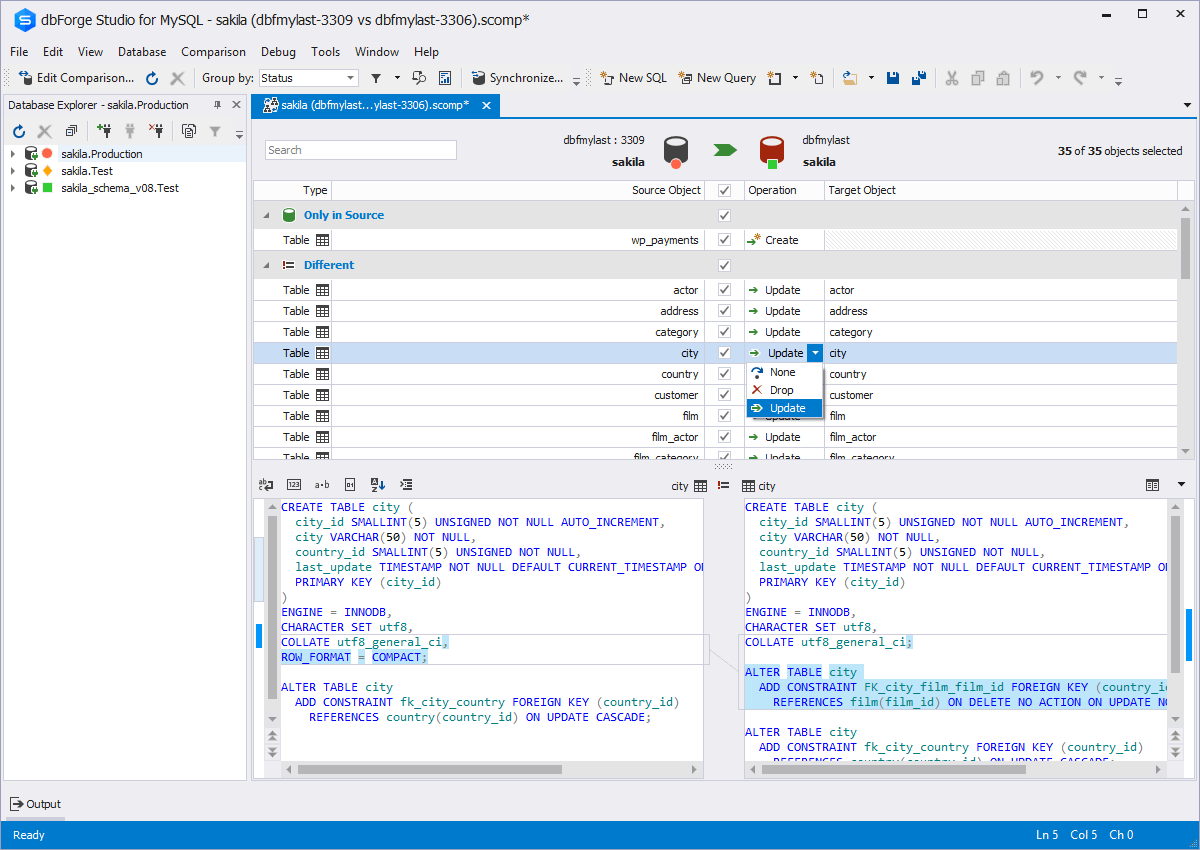
Schema Compare
Database Diagram
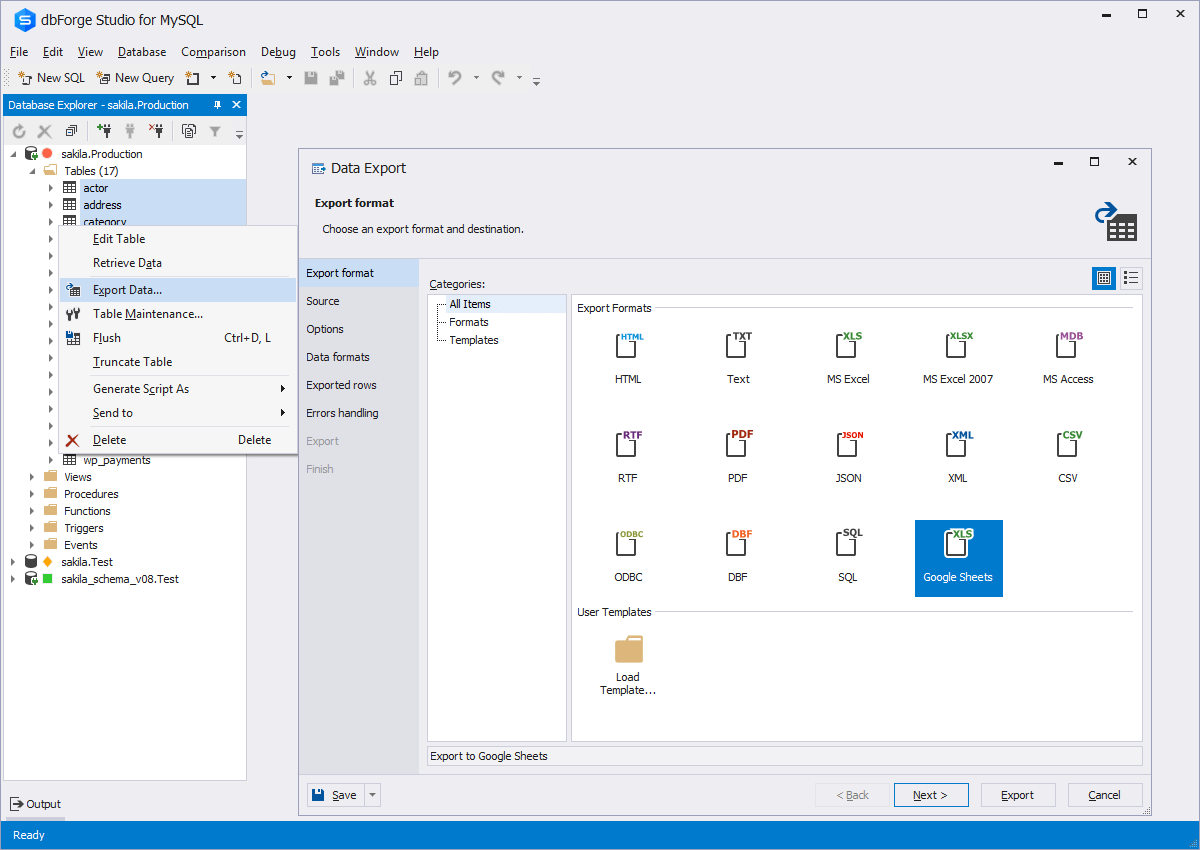
Data Export
Database design & development
Visual query building

1 / 6

Top Performing Features

  • Database change management

    Automated scripts for implementing database changes

    Category average: 8.7

Areas for Improvement

Good experience with dbForge Studio for MySQL

Pros

  • Code Completion
  • Its support run time query, which we can automate
  • It gives suggestions for joint operations
  • Easy to debug
  • We can see physical view models of the database
  • Easy to take backup and restore

Cons

  • It has only 30 day trial periods
  • Some time suggestions of joint operations are not accurate
  • For students it should be free

Most Important Features

  • It helps us execute and create different types of queries
  • It supports runtime and debugging
  • We can automate database object queries

Return on Investment

  • Database Administration is useful for security
  • It saves a lot of time for development because of its auto completion feature
  • Easy to understand because everything is visible with a simple UI

Alternatives Considered

MySQL, SQLite and Microsoft SQL Server

Other Software Used

Microsoft SQL Server, SlickPie, Oracle MySQL Cloud Service

dbForge Studio for MySQL creates a nice warm hearth for database management and automation

Pros

  • Import and Export wizards from and to many different sources with a lot of options and a very handy wizard. I am able to import data to tables that other import tools choke on. The wizard is able to export or import to 15 different options.
  • It can compare data between tables or databases, which is great as it is, but it also has a schema comparison tool. It makes an all around set of tools useful for upgrades or syncing up databases.
  • The create view/edit view tool makes that process as easy as dragging and dropping without losing functionality. You can drag from any tables, perform functions on any field, and visually see all of your joins, grouping, and other criteria both visually and in generated SQL.
  • The database explorer is really nice as it allows grouping, and coloring databases based the type of environment.
  • I could keep going, but I'll end with the command-line generation, which allows the creation of a snippet of script code that automates the tool. We have some repetitive tasks that are completely executed at the command-line via a script.

Cons

  • The import wizard is really good, but I would like to have a direct import from a SQL Statement.
  • The Create View or Modify View function generates the SQL, and you can edit the SQL directly. This is really handy, but directly editing the SQL sometimes produces errors in the view's logic. The conversion from SQL to the visual tool is not always clean.
  • In the database explorer, I like to keep all of my database connections all neat and orderly in there, which works great with color coding, but it would be a nice to have non-connection objects to create spacing and other organizational functions.

Return on Investment

  • Positive impact on reducing need for additional staff and ability for staff to perform DBA tasks on their own. I would say approx. 20% savings.
  • Automation of critical tasks like various data exports/imports. ROI was greater there, nearly 70% since it eliminates entire tasks.
  • Positive impact on an objective to enabling remote management in one tool for our database management.
  • We wanted to make database management easier, and the tool makes it about 30% easier. The tasks still require specific knowledge, but it's a good start.

Alternatives Considered

DBeaver and Navicat Premium

Other Software Used

Microsoft Visual Studio Code, Visual Studio IDE, Trello

The best platform for managing SQL Server databases

Use Cases and Deployment Scope

We use various databases--SQL Server being one--and we use dbForge clients to access them all. dbForge Studio for SQL Server is significantly easier to use than SQL Management Studio and has additional functionality that allows me to be a lot more productive.

<div>The software has very well-implemented features including

</div><ul><li>Database documenter</li><li>Database schema comparison and database data comparison</li><li>Unit test</li><li>Code formatting</li><li>Source control</li><li>Database designer</li><li>Index manager</li><li>Data generator</li><li>Search</li><li>Monitor</li><li>Backup and restore</li><li>Debugger</li><li>Query profiler</li><li>IntelliSense</li></ul>

Pros

  • Visual query designer
  • Great SQL editor
  • Simple to create tables and associated columns

Cons

  • Make it easier to enlarge/zoom table view
  • Don't automatically add columns to "group by" in query designer
  • No multi-editing

Return on Investment

  • Very quick to design and run queries
  • Easy to import/export data
  • Simple to create/edit tables and associated columns/data types

Other Software Used

dbForge Studio for MySQL, Adobe PhotoShop, DaVinci Resolve, Adobe Dreamweaver, FileZilla, Sublime Text

Quick Database Comparisons

Use Cases and Deployment Scope

As part of an Oracle Utilities Suite upgrade implementation, dbForge Studio is being used to compare schemas between our current production environments and test upgraded environments. This tool has been essential in identifying DDL, index, partitioning, and PK and constraint errors. Because of our ability to quickly compare schema details between environments, we are able to quickly respond to Oracle SRs to ask about discrepancies we see between our base version installs and their product documentation. Identification of missing columns, columns with incorrect data types and character lengths, and missing tables have been key to keeping the infrastructure and data conversion side of our project on track.

Pros

  • Quick, high-level comparison of thousands of tables and their details
  • Intuitive identification of findings, such as discrepancies, inconsistencies, things that are equal, and source/target environment changes

Cons

  • The ability to parameterize searches more would be advantageous. For example, being able to specify to only look for certain columns, certain data type changes, etc.
  • The output reports from dbForge are very plain and could contain more detail, and perhaps be structured more like a pivot table form Excel

Return on Investment

  • Time saved is hard to measure, but perhaps weeks of cumulative analysis has been saved by having the application able to quickly compare schematics and data.
  • Removing estimations and assumptions around deployed environments is also hard to measure. For example, instead of deploying a new patch, and trusting that high-level queries based on previous exercises will catch discrepancies, dbForge is able to examine all tables, views, indexes, jave components, triggers, and really any other common database object.

Alternatives Considered

DBeaver

Other Software Used

Adobe Acrobat DC, Oracle Utilities Meter Data Management (MDM), Oracle Customer Care and Billing

dbForge Data Compare is a great tool for managing and syncing databases in multiple environments

Use Cases and Deployment Scope

Our dev team uses dbForge Data Compare for MySQL to sync data between pre-prod environments, look for differences in data for troubleshooting, and generate update scripts to sync other environments. Data Compare's comparisons can be customized for different scenarios and saved for re-used and sharing among the team. It also allows you to sync different sets of data between environments.

Pros

  • Compare entire or subset of MySQL tables between databases
  • Configure comparison rules
  • Sync data between compared databases depending on differences
  • Save comparison rules for reuse and sharing
  • Break down differences between missing/new records, or different records
  • See differences highlighted per field
  • Execute sync immediately, or save as an SQL script file
  • Command-line tool that can be used to add comparisons to deploy scripts

Cons

  • Comparison can be very slow on large datasets.
  • Comparing records that are *different* is clunky, especially for tables with many fields.

Return on Investment

  • Improve developer productivity by making data syncing quicker and easier.
  • Reduce risk of deployment by ensuring data is in sync.
  • Reduce issue resolution time by making "bad data" investigations quicker.