TrustRadius: an HG Insights company

BigTime Software

Score6.8 out of 10

68 Reviews and Ratings

What is BigTime Software?

BigTime IQ is time and expense tracking software from Chicago-based BigTime Software.

Media

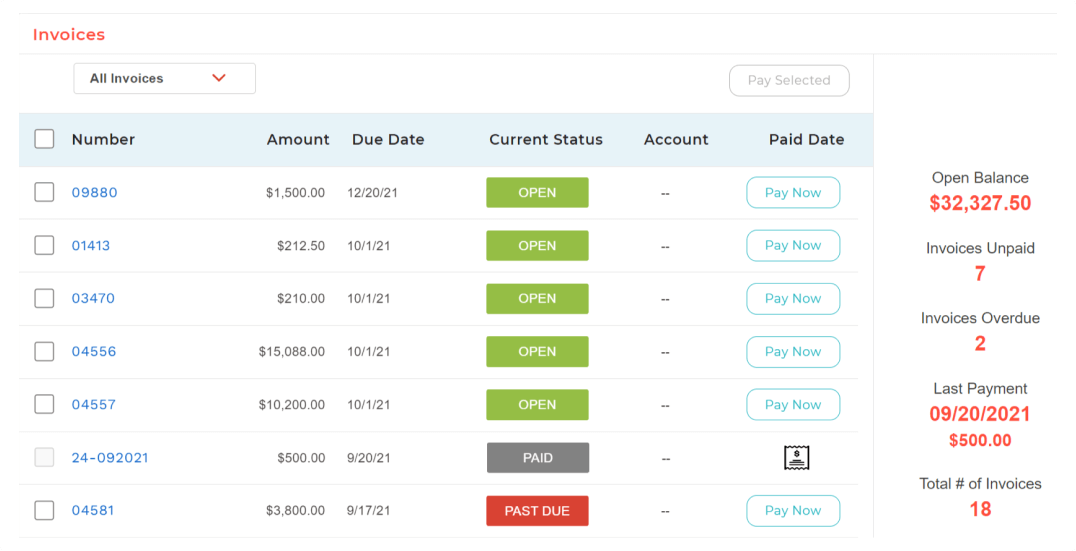
BigTime Wallet provides clients with a personalized experience to pay on time from anywhere, in one click.
A big-picture view into operational insights to make adjustments to how resources are managed.
Real-time, actionable insights for professional services firms.
The platform is designed to work within existing workflows and software stack, acting as a single source of truth for data.
BigTime's invoicing engine supports dozens of industry-standard billing scenarios and enough options to satisfy exacting customer needs.

1 / 5

Its ok

Use Cases and Deployment Scope

as an operation team this tool helps you track the progress of projects nut for a project manager aspect it doesn't cover all of those needs

Pros

  • invoice tracking
  • invoice payments
  • project tracking

Cons

  • could give more details for project managers
  • should allow more detailed tracking to be broken down daily

Return on Investment

  • there is room for improvement

Usability

Alternatives Considered

monday.com

Yes to BigTime Software!

Use Cases and Deployment Scope

Our Architecture firm of around 10 is currently using BigTime Software to manage project time frames and budgets, enter/submit timecards, and generate and send invoices. We are also able to receive payments using BigTime Wallet directly to the software.

The BigTime Software platform has allowed us to keep everything project related all in one place and be able to pull data/reports that can and look at project budgets, project time frames, staff utilization, estimates, remaining, and projections of hours and fees of contracted work.

Using BigTime Software has allowed staff and Project Managers alike to have a better view of hours remaining on a task and be able to manage projects more proactively, which helps with efficiency and client relationships.

We have found the BigTime Software interface to be user friendly and clean. Although the software platform is very capable of all our needs, it does not feel overwhelming or cluttered.

We are using the lower to mid-level tier of options and for our needs it has been working really well.

Pros

  • Thorough and clean setup of each project/client - they have almost everything you need at your fingertips to manage data for each project/client.
  • The Financials Tab - this is a quick overview of all the time/expense for each project and provides easy access if/when I need to move incorrectly logged time from a staffer.
  • Time Entry - simple and easy to use. My staff are able to log time on their schedule which could mean on the fly throughout the day, end of each day, end of the week, end of the pay period. It saves previously entered Project/Tasks and all you have to do is enter hours. This saves time and is a feature our owner loves.
  • BigTime Software Live Chat is a wonderful resource that I utilize regularly.
  • Overall company friendliness and willingness to help and improve. BigTime Software is excellent in this area, their company culture seems to promote involvement from all levels and all areas and is always looking for ways to improve.

Cons

  • More customization in invoice formatting (that I have control over)
  • Reports - I definitely prefer the old layout view, but they are not as easy to use as I'd like
  • The categories are not always clear to understand, what is what and/or how they are calculated can create extra work in excel post processing
  • Printing to paper w/out having to export a PDF first
  • Printing options in general (formatting, date ranges, details, etc.)
  • This area is incredibly lacking in options

Return on Investment

  • I have found a 40% time savings in the invoicing process since switching to BigTime Software. Allowing me to focus on the multitude of other tasks on my plate.
  • With PMs and Staff having an up-to-date view of remaining hours on a task, we've been able to reduce overages / write-offs from that aspect.
  • Being able to quickly pull up a utilization report we have conversations with staff more clearly and quickly if they are not meeting their goals.

Alternatives Considered

BQE CORE, Kantata PS Cloud, Monograph, Projector PSA, Projectworks, Ruddr.io and Zoho One

Other Software Used

Microsoft Excel

Usability

Chat Review

Use Cases and Deployment Scope

I required an expense report for no reimbursable items, [...] was very helpful in creating the report and providing suggestions for the report. Thanks [...]!

Pros

  • Reporting
  • Time / Expense Entries
  • Configuration for multiple clients

Cons

  • Some reporting functions are not available
  • Filters and additional details on approvals
  • Creating a payroll / expense report.

Most Important Features

  • Invoice configuration
  • Billing Flexibility
  • Invoice Calculators

Return on Investment

  • Faster invoice turn around times
  • Client specific invoice configurations

From Bill4Time to BigTime Software

Use Cases and Deployment Scope

We use it for time and expenses tracking and invoicing our clients.

Pros

  • I like the prebill invoice review process
  • Invoice formatting is easy to use.
  • Creating new clients and projects is quick and easy

Cons

  • We run into issues with BigTime Software syncing with Sage Intaact.
  • I think the clients account information needs to be displayed better. It's not as clear cut as it should be when looking for a customers balance.

Most Important Features

  • Ease of use for time entry
  • Good expense report process

Return on Investment

  • The invoice review process has been much faster than our previous system.
  • Expense reports are handled much quicker than previously.

Other Software Used

Zoho Desk

Good software

Use Cases and Deployment Scope

We use BigTime for time and entry, using tasks and work codes assigned to a staff member. We also utilize the budget section as well as the Quick Books and tax software integration system.

Pros

  • QuickBooks integration.
  • Tax software integration.
  • Budget section.

Cons

  • Allow for a date range in allocation screen being we have tasks yearly as opposed to a one time deal.
  • A two year comparison report.

Most Important Features

  • time and billing
  • budgets
  • Quick Books Integration
  • Tax software integration

Return on Investment

  • We have only had this product for approx. 8 months so I can not give an honest opinion yet

Other Software Used

QuickBooks Online, Intuit Lacerte