TrustRadius: an HG Insights company

Adobe Experience Manager

Score8.2 out of 10

296 Reviews and Ratings

What is Adobe Experience Manager?

Adobe Experience Manager is a combined web content management system and digital asset management system. The combined applications of Adobe Experience Manager Sites and Adobe Experience Manager Assets is offered by the vendor as an end-to-end solution for managing and delivering marketing content.

Media

AEM Forms - Creates an adaptive form
AEM Forms - themes library
AEM Forms - where to create a template
AEM Forms - the interactive communications editor
Adobe Experience Manager Sites - document-based authoring enables marketers to create and publish content with familiar tools.
Adobe Experience Manager Sites - Universal Editor, an advanced visual editor, empowers marketers to edit and publish content.
Adobe Experience Manager Sites - Content Fragment editor enables teams to create and manage structured modular content at scale.
Adobe Experience Manager Sites - built-in experimentation lets teams set up and run A/B tests within authoring workflows.
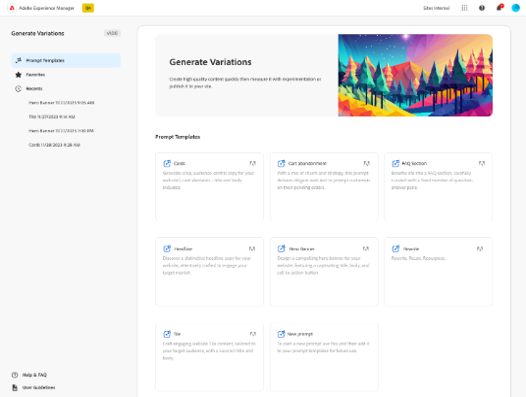
Adobe Experience Manager Sites - can create on-brand, audience-specific content variations at scale with Generate Variations.

1 / 9

Top Performing Features

  • Role-based user permissions

    Permissions to perform actions or access or modify data are assigned to roles, which are then assigned to users, reducing complexity of administration.

    Category average: 8.2

  • Publishing workflow

    The software allows users to set up a custom workflow for updating the website, including approval processes.

    Category average: 7.8

  • Internationalization / multi-language

    The software supports multiple languages, countries, currencies, etc.

    Category average: 8.2

Areas for Improvement

  • Community / comment management

    Users can put post/page comments through an approval process, auto-approve commenters based on their email addresses, block commenters by IP address, delete comments, etc.

    Category average: 7.8

  • Admin section

    The admin page is easy to navigate and use.

    Category average: 7.9

  • Code quality / cleanliness

    Code generated by WYSIWYG editor is clean and validates according to W3C standards.

    Category average: 7.1

AEM the game changer tool

Use Cases and Deployment Scope

Our organisation is using this platform from the past 3 years for maintaining almost 100 plus application of assets and content. It offers omni channel from there we can change content across all the application at the same time without any downtime. It is easy to integrate with almost every type of application or website. It provides full of control all over the application from this single platform. It gives flexibility and transparency. Adobe product never disappoint allow it is fulfilling our needs superbly.

Pros

  • Easy to design new pages or component as well as easy to reuse.
  • Easy to integrate with other Adobe services for better productivity and smooth experience.
  • Centralised system provide extra security and ensure zero downtime.

Cons

  • Bugs troubleshooting is challenging sometimes, needs developers.
  • Pricing is also high, not pocket friendly.
  • AI generated content sometimes creates issue.

Return on Investment

  • Reusing of components and pages reduce application size.
  • Saves manual efforts for maintaining all application.
  • Improves traffic and makes consistency across all our application.
  • Ensure better security, scalability and makes our applications more robust.

Usability

Disappointing experience

Use Cases and Deployment Scope

We use Adobe Experience Manager to create & maintain the websites for over 150 individual brands/locations. AEM was supposed to allow us to maintain those websites easily and in a scalable way, and allow us to have great-looking websites without requiring much coding or development work, but that has not necessarily been the case.

Pros

  • shows all sites in one place
  • allows you to change colors to something else in the palette

Cons

  • UI is not intuitive at all
  • can't sort site list alphabetically
  • SEO optimization opportunities are very limited
  • difficult to change things outside of specified templates, limited customization
  • universal components must be manually installed on every site, somewhat defeating the purpose of their existence

Return on Investment

  • complicated editing process for certain elements, takes time away form other tasks
  • limited template editability means our sites don't look great, likely a deterrent for customers
  • limited SEO opportunities mean that we are likely not showing up in search as often as we should

Usability

Alternatives Considered

WordPress, Squarespace and Wix

Other Software Used

Adobe Marketo Engage, Adobe Experience Platform, Adobe Customer Journey Analytics

Recommended CMS DAM Solution By Adobe

Use Cases and Deployment Scope

We are using this Adobe software from last 3 years for managing content across every channel from the single platform. From maintaining content or assets for the digital forms. it ensure to deliver the best for our websites. It allow us to create responsive forms for our clients with secure e-sign. It also helps in engaging customers, increase sales, giving training to our partners and improving our employee skills.

Pros

  • Provide end to end digital forms.
  • Centralised system for managing content as well as assets.
  • Increase customer engagement and improves our services.

Cons

  • Sometimes Adobe upgrades create issues in current workflows.
  • Subscription based application.
  • Always required developers for managing anything.

Return on Investment

  • Deliver content very quickly that saves time.
  • It increased SEO traffic.
  • Enhanced content and reduce risk.

Usability

Incredible Enterprise Grade CMS

Use Cases and Deployment Scope

This is the most superb & reliable CMS in the market. It is very helpful for us to manage digital assets, multiple sites, and give multilingual support. Seamlessly integrates with various CRM & ERP for better productivity, like Salesforce or SAP. It ensures Omni-channel delivery of content across all our web, mobile, and apps very efficiently. Also, we can deliver content via API to any frontend framework with no hassle. It boosts our business productivity and scalability.

Pros

  • Centralized system for managing assets like images & video.
  • Omni channel content delivery improves productivity.
  • Lots of CRM & ERP integration supported.

Cons

  • One of the most expensive CMS.
  • implementation & maintenance needs developer.
  • It require strong server configuration.

Return on Investment

  • Improves business scalability.
  • Beast for enterprise level application.
  • Handle heavy content without any lag.
  • Offers personalized customer experience.

Usability

Outstanding Adobe Product

Use Cases and Deployment Scope

Adobe Experience Manager is platform where we can handle more than 1 website without any lag & downtime. It helps us to maintain the traffic on our websites. Easy to manage content across all websites quickly and securely. It gives the centralised system where we can manage our all assets like images and video that we are using in our websites. It optimise the performance. We can easily integrate with other services like Adobe analytics and adobe target for better productivity.

Pros

  • Centralised control for managing assets.
  • Secure and robust helps in optimisation.
  • Low code so that anyone can use.

Cons

  • Not suitable for handling complex websites.
  • Subscription cost is high for startups.

Return on Investment

  • Saves money by reduce maintenance cost.
  • Boost productivity and security.
  • Boost user experience content.

Usability