Readymode vs. InsideSales.com / XANT PowerDialer for Salesforce (discontinued)

Overview
ProductRatingMost Used ByProduct SummaryStarting Price
Readymode
Score 10.0 out of 10
N/A
Readymode (formerly Xencall) is a cloud-based predictive dialer used to connect sales and call center agents with more leads in less time. The outbound call center platform helps agents dial smarter and connect faster, so call centers can increase contact rates and make every call count. Readymode will also automate manual customer data entry with its included call center CRM software, so reps can focus on the conversation. Immediate access to customer profiles…
$150
per month per license
InsideSales.com / XANT PowerDialer for Salesforce (discontinued)
Score 7.0 out of 10
N/A
PowerDialer for Salesforce, from InsideSales.com / XANT is a discontinued sales dialer.N/A
Pricing
ReadymodeInsideSales.com / XANT PowerDialer for Salesforce (discontinued)
Editions & Modules
Readymode - starting at
$150
per month per license
No answers on this topic
Offerings
Pricing Offerings
ReadymodeInsideSales.com / XANT PowerDialer for Salesforce (discontinued)
Free Trial
NoNo
Free/Freemium Version
NoNo
Premium Consulting/Integration Services
NoNo
Entry-level Setup FeeRequiredRequired
Additional Details17% discount for annual pricing.
More Pricing Information
Community Pulse
ReadymodeInsideSales.com / XANT PowerDialer for Salesforce (discontinued)
Features
ReadymodeInsideSales.com / XANT PowerDialer for Salesforce (discontinued)
Preview Dialer
Comparison of Preview Dialer features of Product A and Product B
Readymode
7.3
Ratings
1% above category average
InsideSales.com / XANT PowerDialer for Salesforce (discontinued)
7.3
Ratings
1% above category average
Contact preview7.00 Ratings8.00 Ratings
Call notes & tags7.50 Ratings7.00 Ratings
Automatic call logging7.50 Ratings6.00 Ratings
Dialer-CRM integration00 Ratings8.00 Ratings
Core Dialer
Comparison of Core Dialer features of Product A and Product B
Readymode
7.9
Ratings
3% above category average
InsideSales.com / XANT PowerDialer for Salesforce (discontinued)
7.0
Ratings
9% below category average
Outbound dialing8.00 Ratings8.00 Ratings
Inbound routing8.00 Ratings7.00 Ratings
Custom caller ID8.00 Ratings7.00 Ratings
Click-to-call7.50 Ratings7.00 Ratings
Dialer contact import8.00 Ratings7.00 Ratings
Campaign & list management8.10 Ratings7.00 Ratings
Recorded voicemail drop00 Ratings6.00 Ratings
Call Follow-up and Quality Assurance
Comparison of Call Follow-up and Quality Assurance features of Product A and Product B
Readymode
6.8
Ratings
10% below category average
InsideSales.com / XANT PowerDialer for Salesforce (discontinued)
6.7
Ratings
12% below category average
Follow-up calls8.00 Ratings7.00 Ratings
Dialer reporting & analytics6.00 Ratings6.00 Ratings
Dialer compliance6.50 Ratings7.00 Ratings
Best Alternatives
ReadymodeInsideSales.com / XANT PowerDialer for Salesforce (discontinued)
Small Businesses
Salesmate
Salesmate
Score 10.0 out of 10
Salesmate
Salesmate
Score 10.0 out of 10
Medium-sized Companies
CloudTalk
CloudTalk
Score 7.2 out of 10
CloudTalk
CloudTalk
Score 7.2 out of 10
Enterprises
Dialpad Sell
Dialpad Sell
Score 9.5 out of 10
Dialpad Sell
Dialpad Sell
Score 9.5 out of 10
All AlternativesView all alternativesView all alternatives
User Ratings
ReadymodeInsideSales.com / XANT PowerDialer for Salesforce (discontinued)
Likelihood to Recommend
5.5
(0 ratings)
8.0
(0 ratings)
Usability
-
(0 ratings)
8.0
(0 ratings)
Support Rating
-
(0 ratings)
8.0
(0 ratings)
User Testimonials
ReadymodeInsideSales.com / XANT PowerDialer for Salesforce (discontinued)
Likelihood to Recommend
XenCall is well suited for any company looking to make outbound calls to prospects more efficiently and effectively. It might not be appropriate for calls where you want to have a more quality conversation unless you stick with the 1 line dialer. Using multiple lines allows companies to hit many prospects in one day.
Read full review
Outbound dialing is where it excels. It's especially good with larger teams of reps. Organizing through campaigns and seek lists is very powerful once you understand how to use it. There is definitely a learning curve with seek lists (I've spent tons of time on the phone with their support staff) but once you understand it the possibilities are endless. You can sort which leads show up by a variety of filters. Even with a list of 10,000+ leads and 5 reps calling on it, you can ensure no leads show up in two reps lists, the reps are calling specific territories, and even skipping leads that are likely on their lunch break! One my of favorite tricks with seek lists and only calling people with titles like Director/VP/C-Level before 8:30am or after 5pm their time, when those people are more willing to pick up the phone. They also appreciate a sales rep who is putting in the extra time to call during those blocks.
Read full review
Pros
  • Call logging
  • Agent monitoring
  • Agent reporting
  • File organization
Read full review
  • Creates competition between teammates, I have used several outreach tools and this one provides the best interaction with a points system to give that competitive edge to outreach
  • Accurately tracks metrics, near realtime tracking of your own and team's metric attainment on a day-to-day basis
  • Integrates with Salesforce, having click to dial and a widget embedded in Salesforce made using this tool very easy
Read full review
Cons
  • Customer Support.
  • Complaints team.
Read full review
  • No call parking features for inbound calls, if on a call through the dialer, one cannot place that call on hold to take the second call.
  • All notes are lost when another inbound call comes in, whether or not you accept that call.
Read full review
Usability
No answers on this topic
I like that it is simple, functional and I can rely on it to help me get my work done everyday. My job became much harder without InsideSales.com. The new CRM I am using has confusing features and too much going on sometimes. There are so many fields and functions that I find unnecessary--what sucks is when I look at my screen at all these empty fields, it makes me feel incomplete. With InsideSales.com, I knew what to put in every box and why it would be important. I could put it in once and whether it was my manager, case admin or data analyst or me, we all knew where to find it. With our new system, I find myself having to do more input and data entry for other people to benefit--no longer a "one shot, one kill" deal.
Read full review
Support Rating
No answers on this topic
They are providing good support. We can contact any time to raise our query.
Read full review
Alternatives Considered
Aircall provides chat, phone, and email support in less than an hour if the chat agent is unable to help you he will book you a call with a technician who will do the zoom meeting with you and solve the issue then and there. They will ask for the screen control and take care of setting up everything as per your need which means you don't have to sit and wait.
Read full review
[PowerDialer for Salesforce, from XANT (formerly InsideSales.com) is] cost effective and can use it without any training that saves lot of time. It helps to connect more [clients] and getting more business. We can easily track inbound and outbound calling. We can check leads to call. Support team is also there for us to help.
Read full review
Return on Investment
  • Improved customer contact.
  • QA improvement.
Read full review
  • Because it manages leads, we call the hottest leads first no matter what time of the day they come in.
  • I am able to make more calls every day which helps me to contact more people and create more opportunities for our company.
  • It keeps our company up to date with Salesforce helping us know better about what is happening with the lead and opportunity.
Read full review
ScreenShots

Readymode Screenshots

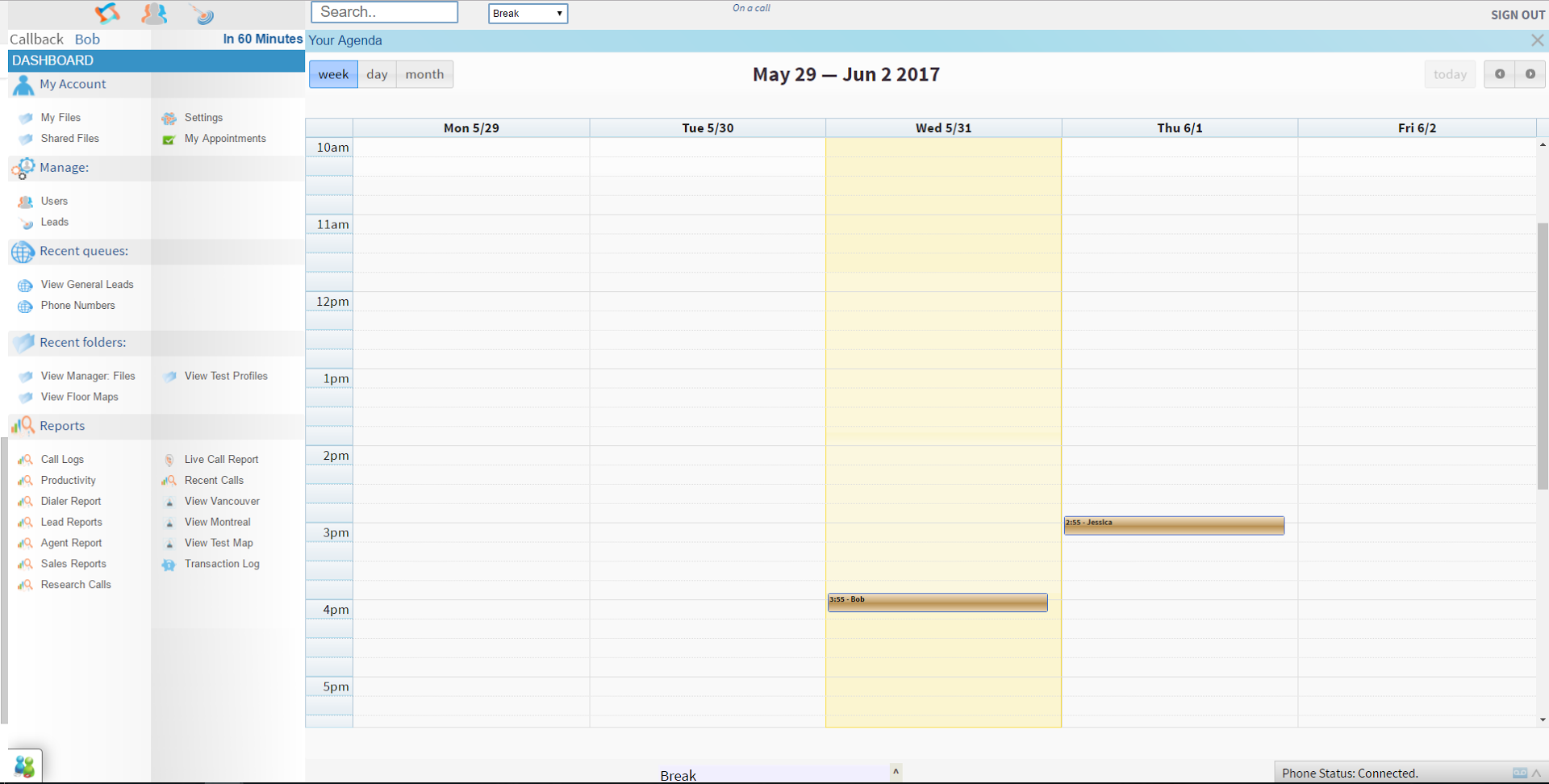
Screenshot of the custom profile fields for info on leads and customers.Screenshot of productivity data on call center agents.Screenshot of the custom calendars for appointments and phone meetings with leads and clients.Screenshot of info and performance data on call center agents.

InsideSales.com / XANT PowerDialer for Salesforce (discontinued) Screenshots

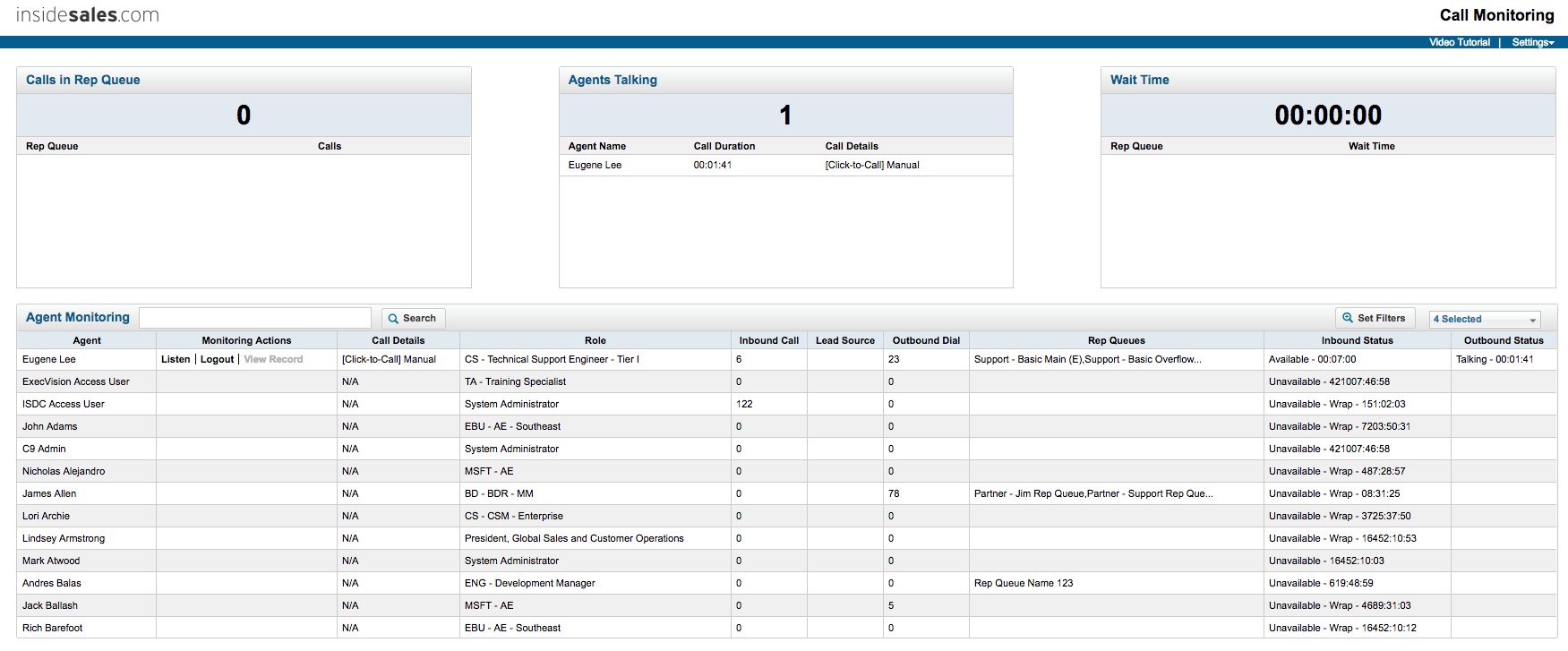
Screenshot of Click-to-call panel in SalesforceScreenshot of Logging a call within Salesforce using the click-to-call panel.Screenshot of PowerDialer interfaceScreenshot of Live call monitoring