OmniFocus vs. Workflowy

Overview
ProductRatingMost Used ByProduct SummaryStarting Price
OmniFocus
Score 8.0 out of 10
N/A
OmniFocus is a project management platform for iOS: Mac, iPad, and iPhone. It has features such as task management, Siri capture, and workflow automation.
$4.99
per month
Workflowy
Score 9.6 out of 10
N/A
Workflowy is a note-taking and organizational tool designed to help users manage their tasks, notes, and projects. Its simplicity and features make it a choice for individuals and teams looking to streamline their workflow. Infinite Nesting Structure: Workflowy allows users to create lists within lists to an infinite degree, enabling a detailed and structured way to organize information Global Search: Its search function is used to search through all their…
$0
per user
Pricing
OmniFocusWorkflowy
Editions & Modules
Web Add-On Subscription
$4.99
per month
Cross-Platform Subscription
$9.99
per month
OmniFocus 3 Standalone (Mac only)
$49.99
per month
OmniFocus 3 Standalone (iPhone only)
$49.99
per month
Workflowy basic
$0
per user
Workflowy pro - Monthly
$8.99
per month per user
Workflowy pro - Yearly
$83.88
per year per user
Offerings
Pricing Offerings
OmniFocusWorkflowy
Free Trial
NoYes
Free/Freemium Version
NoYes
Premium Consulting/Integration Services
NoNo
Entry-level Setup FeeNo setup feeNo setup fee
Additional Details
More Pricing Information
Community Pulse
OmniFocusWorkflowy
Features
OmniFocusWorkflowy
Project Management
Comparison of Project Management features of Product A and Product B
OmniFocus
6.6
Ratings
15% below category average
Workflowy
7.3
Ratings
5% below category average
Task Management8.00 Ratings6.40 Ratings
Resource Management7.00 Ratings00 Ratings
Gantt Charts6.00 Ratings00 Ratings
Scheduling7.00 Ratings00 Ratings
Workflow Automation7.00 Ratings00 Ratings
Team Collaboration5.00 Ratings00 Ratings
Support for Agile Methodology4.00 Ratings00 Ratings
Support for Waterfall Methodology8.00 Ratings00 Ratings
Document Management6.00 Ratings00 Ratings
Email integration7.00 Ratings00 Ratings
Mobile Access9.00 Ratings6.40 Ratings
Timesheet Tracking7.00 Ratings00 Ratings
Change request and Case Management6.00 Ratings00 Ratings
Budget and Expense Management5.00 Ratings00 Ratings
Search00 Ratings9.10 Ratings
Professional Services Automation
Comparison of Professional Services Automation features of Product A and Product B
OmniFocus
2.7
Ratings
95% below category average
Workflowy
-
Ratings
Quotes/estimates7.00 Ratings00 Ratings
Invoicing1.00 Ratings00 Ratings
Project & financial reporting2.00 Ratings00 Ratings
Integration with accounting software1.00 Ratings00 Ratings
File Sharing & Management
Comparison of File Sharing & Management features of Product A and Product B
OmniFocus
-
Ratings
Workflowy
7.3
Ratings
7% below category average
Video files00 Ratings7.30 Ratings
Document collaboration00 Ratings6.40 Ratings
Access control00 Ratings7.30 Ratings
Device sync00 Ratings8.20 Ratings
Best Alternatives
OmniFocusWorkflowy
Small Businesses
Stackby
Stackby
Score 9.0 out of 10
Stackby
Stackby
Score 9.0 out of 10
Medium-sized Companies
InEight
InEight
Score 8.3 out of 10
Troop Messenger
Troop Messenger
Score 9.8 out of 10
Enterprises
InEight
InEight
Score 8.3 out of 10
HCL Connections
HCL Connections
Score 9.0 out of 10
All AlternativesView all alternativesView all alternatives
User Ratings
OmniFocusWorkflowy
Likelihood to Recommend
8.0
(0 ratings)
9.1
(0 ratings)
Likelihood to Renew
10.0
(0 ratings)
-
(0 ratings)
Usability
9.0
(0 ratings)
8.2
(0 ratings)
Support Rating
9.1
(0 ratings)
-
(0 ratings)
User Testimonials
OmniFocusWorkflowy
Likelihood to Recommend
If someone is in the Apple ecosystem, it's the best choice. Far beyond a simple task manager, OmniFocus is the only software I've found that can reliably track every aspect of one's life. If I want anything in my life to be different than it currently is, there's a place for it in OmniFocus.
Read full review
It is one of the few apps I’ve ever found that handles outlining as well as the ancient program called “ThinkTank” did. It’s better in that it’s accessible anywhere I have web access. Anyway, to address the specific question: I think better if I can just pour my thoughts out onto the screen, and then worry about sorting, editing, and outlining afterwords. Before Workflowy, I was stuck trying everything else. But all the outlining programs were too complex, and all the word processors that offered outlining SUCKED at outlining. Workflowy hits that sweet spot.
Read full review
Pros
  • Managing projects at both a broad and a granular level.
  • Allowing you to build customized views of your work.
  • Helping you review projects that have not been looked at in while.
  • Separating projects from different aspects of your life (e.g. work, home, consulting)
Read full review
  • Task management
  • Planning - Short and long-term
  • Viewing my information from different perspectives. I am visual so I can fully exploit the visual nature of Workflowy and still get granular if and when I need to
Read full review
Cons
  • I would really like to see graphic presentations of how I allocate my time, what categories of tasks don't get accomplished, etc.
  • I would like to see OmniFocus include Gantt chart functionality, such as allowing me to see how long it took me to accomplish a task from start to finish. Allowing me to actually input time spent, and seeing it on a Gantt chart, would be icing on the cake.
Read full review
  • I think a scheduling feature would be a powerful addition. Users should be able to set points to pop up again on a schedule.
Read full review
Likelihood to Renew
Over the past 4 years of use I still haven't found any product that comes close in terms of capability
Read full review
No answers on this topic
Usability
This is a super usable tool to use. I really like the front-end user experiences, which makes using it really clear
Read full review
I now have 12+ years of notes stored in Workflowy - everything from song lyrics to book outlines to classroom notes. It makes it VERY easy to find, VERY easy to sort, and VERY easy to organize.
Read full review
Support Rating
I have not had to call support for this product, so I don't really have any specific experience in that regard. I guess the good news is that the product has worked as advertised, so I haven't needed the support!
Read full review
No answers on this topic
Alternatives Considered
OmniFocus is built for the user with a lot going on - consequently, it does a great job at organizing lots of things in a manageable workload. It's perfect for taking a project and breaking it down into small tasks for yourself or teams. Once you get past the learning curve, it's quick at adding new tasks. Overall, it's an excellent product.
Read full review
There is also IndiGrid and Calculist. Workflowy outshines them all with it's various layouts, which other apps do not have (except maybe Todoist). Did I mention the ability to keep my hands on the keyboard while I can think and create without interruption?
Read full review
Return on Investment
  • OmniFocus keeps our tasks moving forward. Using a free script you can search all your current projects for projects that have no next step assigned to it to ensure nothing falls through the cracks.
  • When we serve our clients, the attention to detail we are able to give them comes from accurate tracking of what we need to deliver.
  • We complete projects 25% faster than before and we can see where the bottlenecks are immediate. We have also been forced to document tasks in a more concrete manner which allows for better execution.
Read full review
  • Workflowy allows me to keep all of my business and personal information in one place. I can quickly organize, reorganize, link, and add information whether on my phone or on my laptop.
Read full review
ScreenShots

Workflowy Screenshots

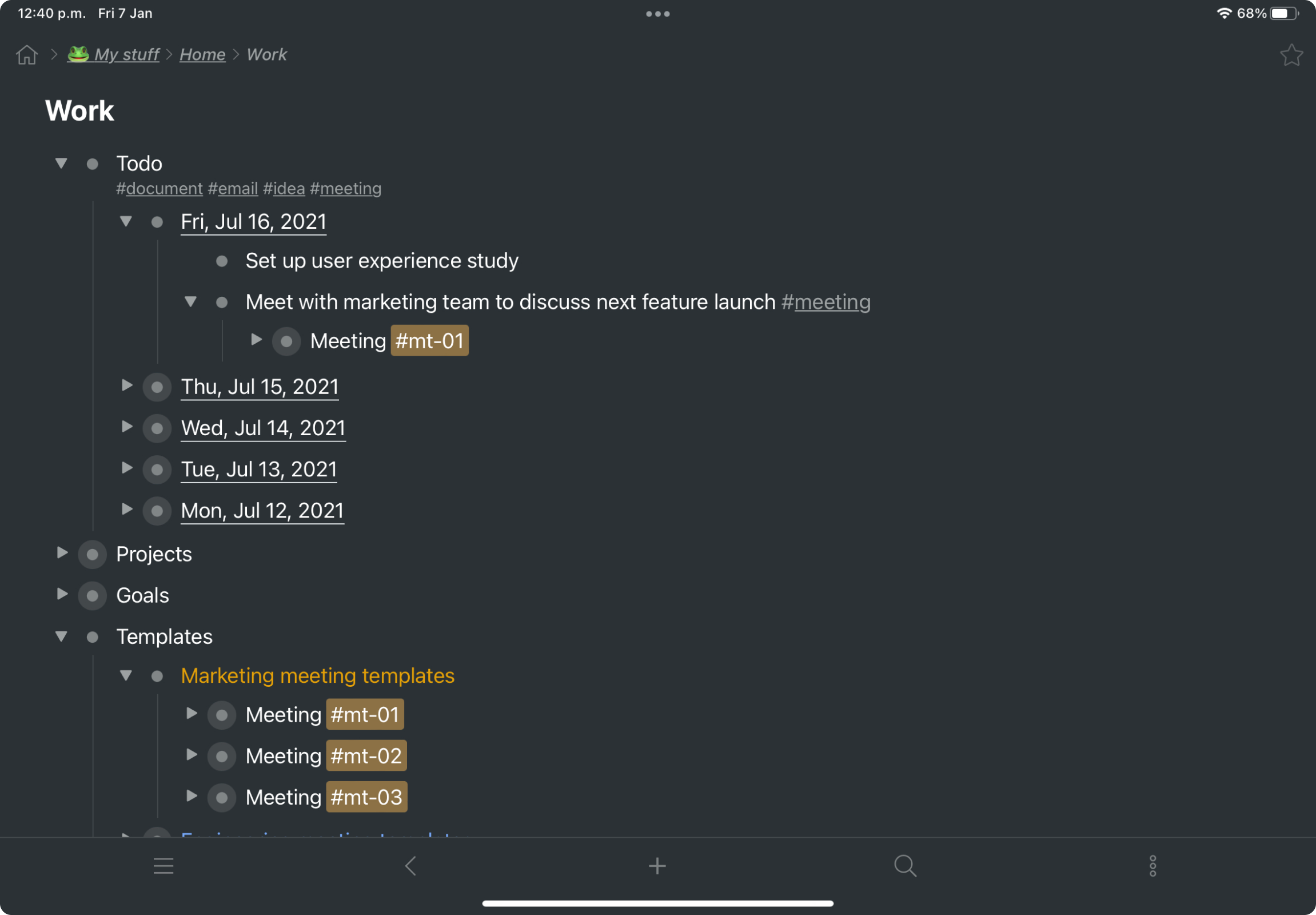
Screenshot of a kanban board in Workflowy, used to organize files and images.Screenshot of the interface to draft complex documents and artistic works while keeping everything organized.Screenshot of Workflowy's task management interface, where boards boards and lists can be managed and combined.Screenshot of item highlighting, with search by highlight color.Screenshot of tags, used to find anything in an account, no matter where it is.