TrustRadius: an HG Insights company

Save this comparison

Save this comparison

Add Product

Recommended Comparisons

    Overview
    ProductRatingMost Used ByProduct SummaryStarting Price

    N-able N-sight RMM

    Score8.7 out of 10
    N/ASolarWinds Remote Monitoring & Management (RMM) is a cloud-based system monitoring offering for Managed Service Providers. It provides a full monitoring and management suite, including automation and threat detection capabilities, and can integrate with other SolarWinds products.N/A

    SolarWinds Engineer's Toolset

    Score9.3 out of 10
    N/ASolarWinds® Engineer’s Toolset (ETS) helps users monitor and troubleshoot a network with over 60 tools for network management. ETS allows users to monitor and receive alerts in real time on network availability and health, and perform network diagnostics for faster troubleshooting and resolution of complex network issues. With ETS users can deploy an array of network discovery tools including Port Scanner, Switch Port Mapper or advanced Subnet Calculator, manage Cisco® devices with specialized…

    $1,585

    Per Instance

    Pricing
    N-able N-sight RMMSolarWinds Engineer's Toolset
    Editions & Modules
    No answers on this topic
    One Time Price
    $1,585
    Per Instance
    Offerings
    Pricing Offerings
    N-able N-sight RMMSolarWinds Engineer's Toolset
    Free Trial
    YesYes
    Free/Freemium Version
    NoNo
    Premium Consulting/Integration Services
    NoNo
    Entry-level Setup FeeNo setup feeNo setup fee
    Additional Details——
    More Pricing Information
    Community Pulse
    N-able N-sight RMMSolarWinds Engineer's Toolset
    Considered Both Products
    N-able
    No answer on this topic
    SolarWinds
    No answer on this topic
    Key User Insights
    Would buy again
    78%
    Would buy again
    7 Answers
    100%
    Would buy again
    11 Answers
    Delivers good value for the price
    100%
    Delivers good value for the price
    6 Answers
    90%
    Delivers good value for the price
    9 Answers
    Happy with the feature set
    100%
    Happy with the feature set
    9 Answers
    100%
    Happy with the feature set
    11 Answers
    Lived up to sales and marketing promises
    75%
    Lived up to sales and marketing promises
    6 Answers
    100%
    Lived up to sales and marketing promises
    10 Answers
    Implementation went as expected
    100%
    Implementation went as expected
    9 Answers
    100%
    Implementation went as expected
    10 Answers
    Features
    N-able N-sight RMMSolarWinds Engineer's Toolset
    Monitoring Tasks
    Comparison of Monitoring Tasks features of N-able N-sight RMM and SolarWinds Engineer's Toolset
    Feature
    N-able N-sight RMM
    10.0
    15 Ratings
    30% above category average
    SolarWinds Engineer's Toolset
    -
    Ratings
    Remote monitoring10.015 Ratings00 Ratings
    Network device monitoring10.014 Ratings00 Ratings
    Management Tasks
    Comparison of Management Tasks features of N-able N-sight RMM and SolarWinds Engineer's Toolset
    Feature
    N-able N-sight RMM
    10.0
    15 Ratings
    29% above category average
    SolarWinds Engineer's Toolset
    -
    Ratings
    Patch Management10.015 Ratings00 Ratings
    Policy-based automation10.015 Ratings00 Ratings
    Best Alternatives
    N-able N-sight RMMSolarWinds Engineer's Toolset
    Small Businesses
    Panda Systems Management
    Score9.8 out of 10
    Pulseway
    Score9.9 out of 10
    Medium-sized Companies
    N-able N-central
    Score8.9 out of 10
    Cisco Meraki Dashboard
    Score9.3 out of 10
    Enterprises
    No answers on this topic
    Cisco Prime LAN Management (discontinued)
    Score8.5 out of 10
    All AlternativesView all alternativesView all alternatives
    User Ratings
    N-able N-sight RMMSolarWinds Engineer's Toolset
    Likelihood to Recommend
    6.2
    (28 ratings)
    8.6
    (11 ratings)
    Usability
    9.3
    (2 ratings)
    8.2
    (1 ratings)
    Support Rating
    7.4
    (2 ratings)
    8.2
    (1 ratings)
    User Testimonials
    N-able N-sight RMMSolarWinds Engineer's Toolset
    Likelihood to Recommend
    N-able
    SolarWinds patch management has had issues over the years. Sometimes requiring manual intervention to get resolved. The UI [with N-able RMM (formerly Solarwinds RMM)] makes it easy to see status of systems and identify any alerts easily. Remotely monitoring the status of servers/computers. Managing the systems, patching, systems maintenance and remote support.
    Incentivized
    Read full review
    SolarWinds
    I have found the toolset especially useful for scanning subnets to discover devices, and for setting up temporary real-time monitors when we are troubleshooting or setting up new connections. The most useful aspect has been the ability to apply the tools to help troubleshoot and pinpoint intermittent issues. More general tools like Orion often do not have the granularity to detect issues like intermittent packet loss which are especially impactful to applications like Voice. The toolset gives us another level of capability to dig into issues.
    Incentivized
    Read full review
    Pros
    N-able
    • It provides fantastic remote access capabilities. The Take Control tool gives us a robust platform that is capable of remote controlling almost any endpoint we need to and the chat, file transfer, and screen recording tools are all exceptionally useful.
    • SolarWinds RMM is particularly useful as a single pane of glass solution that allows us to monitor and manage thousands of endpoints across dozens of different clients. It does a solid job of allowing us to sort, organize, and filter based off of who and what we want to see at any given time.
    • Due to its client based nature, the platform excels at in-depth monitoring of services, event logs, and the functionality of systems with custom script checks.
    Incentivized
    Read full review
    SolarWinds
    • Various monitoring
    • Stores history
    • Suggests indices
    • Helps to find the SQL query text
    • Helps to see what machines/users the bad queries are coming from
    • Shows current blocking session
    Incentivized
    Read full review
    Cons
    N-able
    • UI speed and threading across multiple windows (1 window refreshing, causes all refreshes to hang).
    • Load times in certain menus, regardless of server specs.
    • Integration with 3rd party applications.
    • Speed of dev team response in regards to existing features malfunctioning, or major bugs that Solarwinds does not consider major.
    Incentivized
    Read full review
    SolarWinds
    • The unifying component that is intended to be the initial interface to the tools seems clunky. I prefer to start the tools individually rather than using it.
    • The port scanner could use some improvements to make it easier to use.
    Incentivized
    Read full review
    Usability
    N-able
    The interface is easy to navigate. Setting up policies is straight forward. The antivirus and web filter are simple and exceptions are easy to make. Upgrading the agent is made simple and creating scripts is made fool proof. (Well, almost)
    Incentivized
    Read full review
    SolarWinds
    Very easy to use and intuitive. Just be careful with the WAN Killer...it does what it says.
    Incentivized
    Read full review
    Support Rating
    N-able
    The ease of use, full functionality, reliability and excellent support.[N-able RMM (formerly Solarwinds RMM)] gives users a full suite of tools with a single installable file. Unlike standard tools, you don't have to install several different executables to be able to have fully protected end points.
    Incentivized
    Read full review
    SolarWinds
    Our organization uses it regularly. It is reliable, and we keep finding new uses for it
    Incentivized
    Read full review
    Alternatives Considered
    N-able
    SolarWinds definitely is the the most ready out of the box as far as getting is up and running and you can start using it where other system go from need ing a little setup like importing MIBS to completely needing to configure the system. As far a performance once things are up and working I feel they all do a good job at basic monitoring and management. The difference is that SolarWinds does a good job at having things templated but allows you to customize some attributes. If you are want to make major customization for alerts and monitoring and other things SolarWinds is not the best option. But, then again, you will not need a team just to manage the system.
    Incentivized
    Read full review
    SolarWinds
    I haven't compared any tools similar to SolarWinds Engineer's Toolset. This might be because I'm pretty biased when it comes to monitoring, and reporting solutions. I've found that SolarWinds provides the biggest bang for the buck in my opinion. I'm sure there are other solutions on the market that compete, but I haven't tried any of them because I've been very satisfied with SolarWinds.
    Incentivized
    Read full review
    Return on Investment
    N-able
    • The ROI is immediate for us. The advanced alerting alone makes this product an ace in our bag. The confidence you have in your network is wonderful.
    • Another big ROI we get from the advanced alerting is the peace of mind that our engineers feel. We are a 24/7 shop, so being on-call goes from being hectic to extremely manageable.
    • The only negative I can honestly say is when the time comes to patch the product. Micro-patches are easy enough, but jumping versions can be a bit taxing.
    Incentivized
    Read full review
    SolarWinds
    • Spend less time downloading free buggy tools
    • All the tools in one spot, so you don't have to look around for tools
    • Get to the solution sooner
    Incentivized
    Read full review
    ScreenShots

    N-able N-sight RMM Screenshots

    Screenshot of N-able RMM Dashboard

    SolarWinds Engineer's Toolset Screenshots

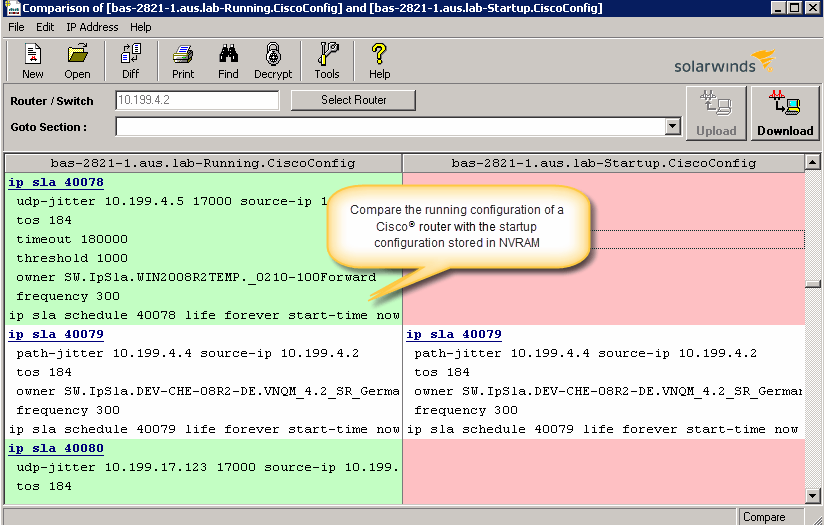
    Screenshot of Perform network stress tests with Engineer's Toolset WAN Killer. You don’t need to use real traffic for studying network activities, like testing traffic and load balancing. Instead, deploy Engineer's Toolset WAN Killer to help interactively test connections and adjust the IP traffic generated to achieve the desired network load based on your requirements.Screenshot of Quickly troubleshoot your network with enhanced ping capabilities and packet route tracing, among other network bandwidth usage and monitoring tools included in ETS.Screenshot of Using ETS, you can run scans to gain insight into how routers, hubs switches, and other devices are configured by analyzing SNMP queries and viewing MIB attributes. ETS is designed to help you more easily understand whether your network and ports are using appropriate settings.Screenshot of Config Compare, a part of ETS, is built to compare the running configuration of a Cisco router with the startup configuration. With the Cisco configuration compare tool, you can easily detect the changes made to the network, switch, and router configurations that are not committed to non-volatile memory (NVRAM).Screenshot of Manage your IP network from discovery to address tracking. Discover subnets on a seed router and scan the subnet or a range of IP addresses, generate a list of subnets along with their mask, size, range, and broadcast address and actively monitor subnets to identify and track which IP addresses are in use on your network.