The MasterControl Quality Excellence suite bundles a number of products supporting work quality and compliance including training and exams, incidents and corrective actions (CA), documents and change, and other modules.
$25,000
per year
Teamcenter
Score8.1 out of 10
N/A
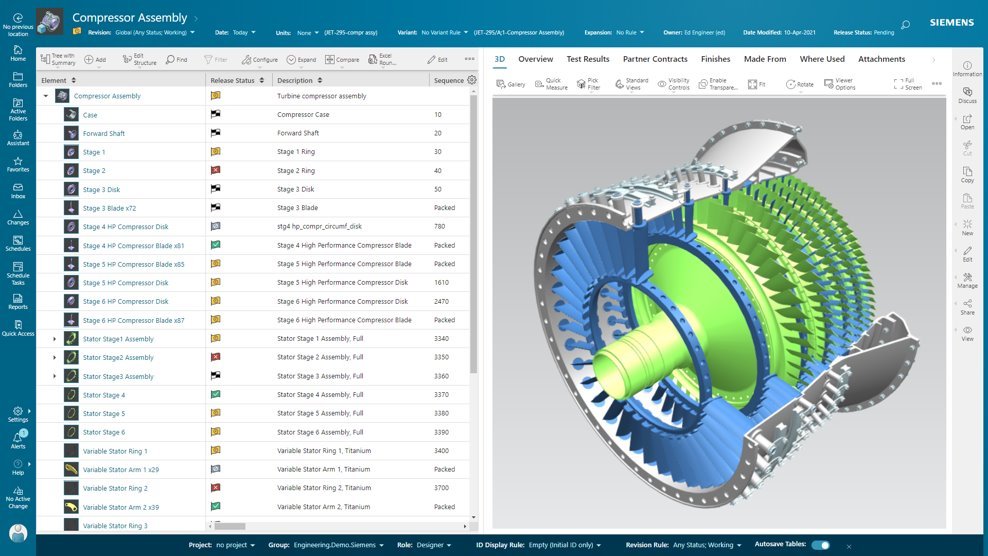
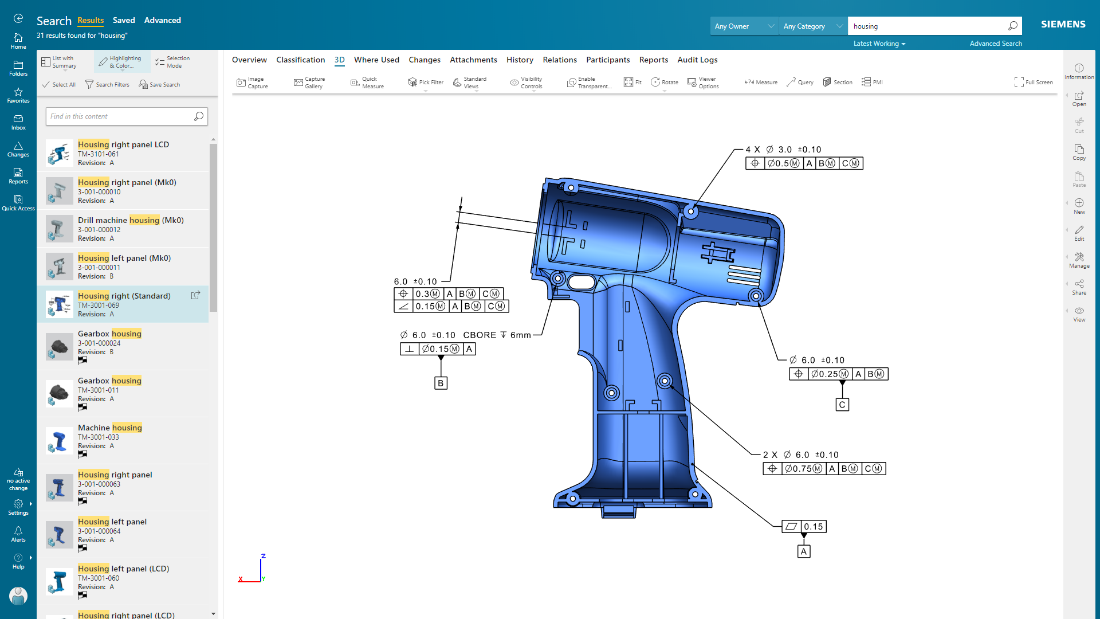
Teamcenter is a product lifecycle management system designed to help organizations integrate and standardize product development processes across functional silos.
The MasterControl Quality Excellence suite is well suited for the life sciences and biotechnology as well as manufacturing companies that could benefit from the regulatory compliance that this suite of products offer. This product is highly recommended for industries that want to reduce paper overhead and digitally transform their QMS into a singular location
Teamcenter is perfect for working in large-scale projects related to manufacturing and engineering where collaboration and management of data are crucial. It is evident where the complexity of the products is high such as in automobile and aerospace industries. Some of its features may seem too elaborate for the small business with a less complex process and therefore too expensive. It is less useful in organizations that do not have complex PLM needs or have less IT capacity to implement the system.
A de minimis incentive was given to thank the reviewer for their time. The incentive was not used to bias or drive a particular response, nor was the incentive contingent on a positive endorsement. More Info
A de minimis incentive was given to thank the reviewer for their time. The incentive was not used to bias or drive a particular response, nor was the incentive contingent on a positive endorsement. More Info
Teamcenter is a great PLM tool that allows collaboration between our teams, it’s possible to create a variety of teams that can all collaborate in one environment and share relevant information, I like that all the data can be integrated into the application so that it’s more organized and structured.
When working with Teamcenter, the roles can be properly distributed so it’s easy to see all the workflows and things that need to be done.
The interface is very nice and you can work through it if you don’t know some features. I like how well-integrated everything is and how easy it is to use and implement into your daily work routine.
One of my favorite aspects of Teamcenter is its reporting tools, they are definitely some of the best tools I have tried, allowing me to integrate data from different places into the platform and analyze it in different ways. Analyzing a variety of key metrics is possible and helps us have better results in our sales.
A de minimis incentive was given to thank the reviewer for their time. The incentive was not used to bias or drive a particular response, nor was the incentive contingent on a positive endorsement. More Info
License model can become very expensive for small startup businesses.
More development with validation and more transparent information on how the improvements and or fixes may impact the current configuration. Currently, everything is listed, but it is not tailored to my system.
More information regarding the transition of previous processes to new processes. i.e., FBS to AQEM. I am currently working on the ADV/FBS forms and will eventually transition to AQEM/ADAPT. Still, I would like more information regarding the transition to inform current stakeholders about the improvements on the horizon.
A de minimis incentive was given to thank the reviewer for their time. The incentive was not used to bias or drive a particular response, nor was the incentive contingent on a positive endorsement. More Info
A de minimis incentive was given to thank the reviewer for their time. The incentive was not used to bias or drive a particular response, nor was the incentive contingent on a positive endorsement. More Info
would rate MasterControl Quality Excellence a 7 out of 10 because, while it offers strong compliance tools, centralized document control, and effective audit readiness features, there are still areas that could be improved to enhance the overall user experience. The platform can sometimes feel complex and unintuitive, especially for new users, and customizing workflows to fit specific organizational needs can be challenging. Additionally, integration with other enterprise systems isn't always seamless, which can slow down processes. Despite these drawbacks, the system remains a reliable and valuable tool for maintaining quality and regulatory compliance.
A de minimis incentive was given to thank the reviewer for their time. The incentive was not used to bias or drive a particular response, nor was the incentive contingent on a positive endorsement. More Info
Because of our current customer needs, we will most likely maintain use of Siemens PLM products for some time. Aside from the initial software cost, we pay for yearly maintenance. Maintaining our yearly maintenance licensing with Siemens, we receive access to all of the latest software releases, as well as premier technical support
A de minimis incentive was given to thank the reviewer for their time. The incentive was not used to bias or drive a particular response, nor was the incentive contingent on a positive endorsement. More Info
Some tasks require the users and SysAdmin to access multiple modules at a time. For example: to create a training course and an exam for a document in the system, the user needs to finish creating the document in the doc module, then go to the training module to create a course and an exam separately. Ideally, from the document page we should be able to access the training course, which could have some fields auto-populated. And from there, also create and link an exam, all without leaving the document page.
A de minimis incentive was given to thank the reviewer for their time. The incentive was not used to bias or drive a particular response, nor was the incentive contingent on a positive endorsement. More Info
As previously mentioned, due to the intense amount of features and modules present in the software, the usability of the software suffers greatly. Many of the features are not used in our context, and many of the modules are not purchased, but the options are still present on the interface leading to a lot of clutter, much of which is never used. The interfaces suffer from a lack of design and tend to feel like a conglomerate of Windows 98 elements.
A de minimis incentive was given to thank the reviewer for their time. The incentive was not used to bias or drive a particular response, nor was the incentive contingent on a positive endorsement. More Info
A de minimis incentive was given to thank the reviewer for their time. The incentive was not used to bias or drive a particular response, nor was the incentive contingent on a positive endorsement. More Info
A de minimis incentive was given to thank the reviewer for their time. The incentive was not used to bias or drive a particular response, nor was the incentive contingent on a positive endorsement. More Info
The Technical Support team has grown exponentially over the last couple years. Some front line support staff are new to the system and so know less than the clients do. Back line staff are more seasoned and provide immediate assistance to the front line staff. They have an extensive knowledge bank to assist them as well as client access to most KB articles. Annual user group conference gives us chance to meet the support staff an also to resolve any outstanding issues. Any critical vendor notices are emailed immediately when found and a patch offered at the same time. These are rare, but quickly resolved.
A de minimis incentive was given to thank the reviewer for their time. The incentive was not used to bias or drive a particular response, nor was the incentive contingent on a positive endorsement. More Info
In the time that we have used Teamcenter we have received a good response from the support team, they have great customer service, we have solved the problems that have arisen very quickly, and they are attentive and answer us if we have any questions.
A de minimis incentive was given to thank the reviewer for their time. The incentive was not used to bias or drive a particular response, nor was the incentive contingent on a positive endorsement. More Info
I rated the MasterControl in-person training a 10 because it was clear, practical, and well-paced. The trainer explained concepts thoroughly and answered questions effectively. I appreciated the hands-on walkthroughs, which made it easier to understand how to apply the system in real scenarios. Overall, it was a valuable learning experience that boosted my confidence in using MasterControl.
A de minimis incentive was given to thank the reviewer for their time. The incentive was not used to bias or drive a particular response, nor was the incentive contingent on a positive endorsement. More Info
transparent and immediate when the documents are updated. Easy to check on training and customizable to the company's expectations. Allows easy exam creation with GXP assist and the correlation between job codes and courses has proven reliable. What i would advocate is that you see who has trained on the course in the Course Infocard, to the document infocard
A de minimis incentive was given to thank the reviewer for their time. The incentive was not used to bias or drive a particular response, nor was the incentive contingent on a positive endorsement. More Info
The implementation of MasterControl Quality Excellence was largely successful, earning an 8 out of 10. The project was well-structured, and the implementation team provided solid guidance throughout the process. Key milestones were met on time, and the system was configured to meet most of our core requirements. One of the most valuable aspects was the hands-on training and support during go-live, which helped ensure user adoption. However, there were some challenges around data migration and aligning the system’s capabilities with our existing workflows, which required more time and effort than anticipated. Overall, the experience was positive, and the lessons learned have positioned us well for future system enhancements.
A de minimis incentive was given to thank the reviewer for their time. The incentive was not used to bias or drive a particular response, nor was the incentive contingent on a positive endorsement. More Info
A de minimis incentive was given to thank the reviewer for their time. The incentive was not used to bias or drive a particular response, nor was the incentive contingent on a positive endorsement. TR verified that a representative sample of customers was invited. More Info
The products we evaluated were considered as potential replacements for MasterControl Quality Excellence. At this time, we continue using MasterControl Quality Excellence primarily due to the significant volume of data in our system and the operational impact of a platform transition. Intellect QMS emerged as a strong alternative, offering extensive, intuitive business process development tools and a wide range of built-in QMS processes out of the box. MasterControl Quality Excellence currently maintains the advantage solely because of the logistical and business burden associated with migrating to a new system.
A de minimis incentive was given to thank the reviewer for their time. The incentive was not used to bias or drive a particular response, nor was the incentive contingent on a positive endorsement. More Info
Earlier, some of the companies acquired by my organization were using PTC Windchill, but the overall stability, user experience and depth of functionality which are provided by Teamcenter doesn't match with any other PLM software and thus, all the acquired companies which were earlier using PTC Windchill has now slowly started into moving towards Teamcenter.
A de minimis incentive was given to thank the reviewer for their time. The incentive was not used to bias or drive a particular response, nor was the incentive contingent on a positive endorsement. More Info
A de minimis incentive was given to thank the reviewer for their time. The incentive was not used to bias or drive a particular response, nor was the incentive contingent on a positive endorsement. More Info
Teamcenter is easily on the best scalable solution. The single source of product information allows us to collaborate more effectively on the product lifecycle. Also, being a cloud solution, it is pretty straightforward to scale as the maintenance required is quite low . In addition, the overall cost is also easily manageable for businesses like ours.
A de minimis incentive was given to thank the reviewer for their time. The incentive was not used to bias or drive a particular response, nor was the incentive contingent on a positive endorsement. More Info
A de minimis incentive was given to thank the reviewer for their time. The incentive was not used to bias or drive a particular response, nor was the incentive contingent on a positive endorsement. More Info
Definitely, it has a very positive impact so to speak. What we are trying to do through our program, we are utilizing the full capacity of Teamcenter to produce one structure in an effective way. So before we implement this activity, the user has to prepare 10 to 15 structures to reach to our best possible data that can be set across the systems. But now with the complete capability of Teamcenter, we are able to do all these things into one structure itself and then let the system do all the automation or the things that users do not have to concentrate on. All of the automations are done behind the systems and then it is improving not only the efficiency of the end user, but also making a standardized way in order to proceed and transfer the data holistically towards other systems like SAP.
A de minimis incentive was given to thank the reviewer for their time. The incentive was not used to bias or drive a particular response, nor was the incentive contingent on a positive endorsement. TR verified that a representative sample of customers was invited. More Info