FormAssembly vs. InfoReady

Overview
ProductRatingMost Used ByProduct SummaryStarting Price
FormAssembly
Score 8.6 out of 10
N/A
The FormAssembly Data Collection Platform helps organizations collect, connect, and protect data. It features a no-code form builder that simplifies the process of collecting data in the most complex environments. Multi-stage workflows automate manual processes and business-critical integrations – including Salesforce, Google, and Microsoft – provide a connected data ecosystem that ensures data is where it’s needed, when it’s needed. Its operational standards, combined with…N/A
InfoReady
Score 0.0 out of 10
Enterprise companies (1,001+ employees)
InfoReady is submission and award management software for higher education that centralizes and consolidates form building, application and document collection, routing, review, notification and reporting into a single web-based platform. Its built-in workflow tools allow administrators to define, track and oversee a process from start to finish. InfoReady increases the work capacity of administrators by converting nearly any application, competition, and…N/A
Pricing
FormAssemblyInfoReady
Editions & Modules
Basic
Contact Sales
Enterprise
Contact sales
Government
Contact sales
Team
Contact Sales
Essentials
Contact Sales
No answers on this topic
Offerings
Pricing Offerings
FormAssemblyInfoReady
Free Trial
YesNo
Free/Freemium Version
NoNo
Premium Consulting/Integration Services
NoNo
Entry-level Setup FeeOptionalNo setup fee
Additional Details
More Pricing Information
Community Pulse
FormAssemblyInfoReady
Features
FormAssemblyInfoReady
Survey Format & Appearance
Comparison of Survey Format & Appearance features of Product A and Product B
FormAssembly
9.4
Ratings
17% above category average
InfoReady
-
Ratings
Survey templates9.80 Ratings00 Ratings
Themes8.50 Ratings00 Ratings
Custom logo/branding10.00 Ratings00 Ratings
Survey Content
Comparison of Survey Content features of Product A and Product B
FormAssembly
10.0
Ratings
16% above category average
InfoReady
-
Ratings
Changes to live survey10.00 Ratings00 Ratings
Question design help10.00 Ratings00 Ratings
Multiple question types10.00 Ratings00 Ratings
Survey Logic
Comparison of Survey Logic features of Product A and Product B
FormAssembly
10.0
Ratings
19% above category average
InfoReady
-
Ratings
Survey logic flexibility10.00 Ratings00 Ratings
Survey Reporting & Analytics
Comparison of Survey Reporting & Analytics features of Product A and Product B
FormAssembly
9.5
Ratings
15% above category average
InfoReady
-
Ratings
Response tracking10.00 Ratings00 Ratings
Data export10.00 Ratings00 Ratings
Standard reports10.00 Ratings00 Ratings
Custom reports10.00 Ratings00 Ratings
Analytics7.50 Ratings00 Ratings
Survey Administration & Security
Comparison of Survey Administration & Security features of Product A and Product B
FormAssembly
9.0
Ratings
3% above category average
InfoReady
-
Ratings
Access controls7.90 Ratings00 Ratings
Compliance10.00 Ratings00 Ratings
Survey Distribution
Comparison of Survey Distribution features of Product A and Product B
FormAssembly
7.9
Ratings
4% below category average
InfoReady
-
Ratings
Vendor-offered crowdsourcing6.00 Ratings00 Ratings
Respondent restrictions9.70 Ratings00 Ratings
User Ratings
FormAssemblyInfoReady
Likelihood to Recommend
10.0
(0 ratings)
-
(0 ratings)
Likelihood to Renew
8.5
(0 ratings)
-
(0 ratings)
Availability
10.0
(0 ratings)
-
(0 ratings)
Support Rating
10.0
(0 ratings)
-
(0 ratings)
User Testimonials
FormAssemblyInfoReady
Likelihood to Recommend
FormAssembly has been an essential tool to have in our back pocket. It's best when you need a form quickly and can compromise on some of the dynamic elements that would be possible in Visualforce. It serves a particularly critical need when skilled developers are at a premium, but clever admins are available.
Read full review
No answers on this topic
Pros
  • SalesForce integration is really nice. You can map to specific fields with form values, or you can use detailed formulas. You can also choose to bypass assignment rules on a per-form basis, and create customized logic for when cases are created, when leads are created/merged, etc. It's very robust.
  • Form creation in general is very simple. They've gotten good over the years of creating an intuitive, drag and drop interface that's quick to edit. I like that you can also assign values to fields so conditional form building gets easy.
  • I like that you can customize how responses are viewed in the response window. Choose what columns show up so you can find records with ease, and with just one glance. OR you can download everything to excel in a snap too.
Read full review
No answers on this topic
Cons
  • The information coming from Salesforce to use in the choices for an answer does not always appear as needed. (API vs name).
  • Ability for Admins to see and edit every user's forms. This would be useful in the event that someone is no longer with the institution.
  • When a form is cloned, it would be nice if the connector were also cloned but not active. This would allow us to verify and turn on without having to rebuild everything.
Read full review
No answers on this topic
Likelihood to Renew
One major point for us is our migration to a completely Microsoft infrastructure. IN addition to that, the afore mentioned need to ingest external data resources means that we do have our eyes open toward the landscape so that we can fill these needs. This in no way indicates a move away from FormAssembly: their support is first rate, and so far the product has always stood up to the tests we've put it through.
Read full review
No answers on this topic
Usability
Given how many sophisticated features appear in the form builder itself, the back-end management can feel strikingly skimpy at times. More dynamic or visually appealing confirmation messages/email notifications would realign these with the existing capabilities of the forms themselves. This is a small issue though because data capture is our primary priority in form fills and it is always excellent in Salesforce!
Read full review
No answers on this topic
Support Rating
While it's not a true development package and misses some features like ingestion of external data for lists, etc... the product is fast, stable, easy to use, and will suit the needs of anyone needing online form functionality with SalesForce and other connectors available for your marketing needs.
Read full review
No answers on this topic
Alternatives Considered
Form Assembly allows for advanced data mapping, pre-filling forms with Salesforce data, and working with custom objects. FormAssembly excels in Salesforce Integration, as it is highly specialized and deeply integrated. Often considered the industry leader for Salesforce forms, Formstack has strong integration, but may not offer the same level of granular control as FormAssembly.
Read full review
No answers on this topic
Return on Investment
  • FormAssembly allows for us to take manual spreadsheet driven processes and standardize them in a scalable manner.
  • FormAssembly allows for our customers to own a process of sales (print shipment allocations) that previously our reps were burden with.
  • FormAssembly integrates well with our TechStack.
Read full review
No answers on this topic
ScreenShots

FormAssembly Screenshots

Screenshot of Screenshot of Screenshot of Screenshot of Screenshot of

InfoReady Screenshots

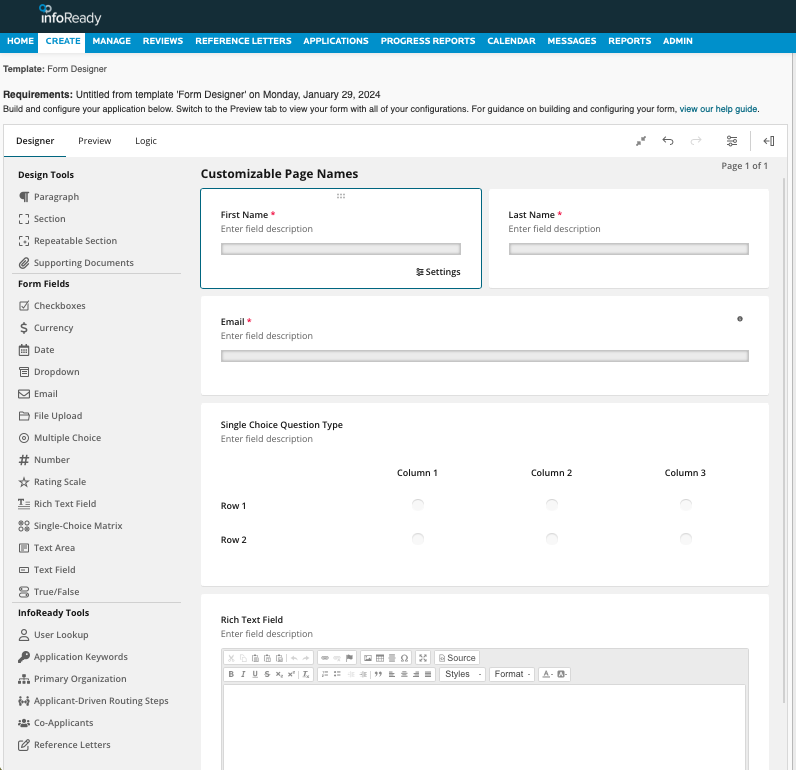
Screenshot of the InfoReady Homepage - Custom branded to match institutionScreenshot of the Form Designer - Drag and drop questions, conditional logic, and repeating sections.Screenshot of InfoReady's Data Grid Admin View - Customizable views, data management, and reporting