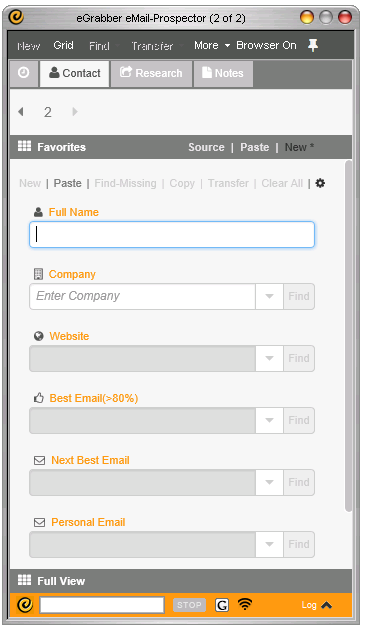
eGrabber's eMail-Prospector is a desktop tool built for sales teams who do their own prospecting.
The vendor says that eMail-Prospector finds anybody's business email address. Users just type in a name and company. The software then searches the Internet to find the person's work email address and phone.
According to the vendor, this tool automatically does all the Internet research, so that users can start prospecting faster, and focus on what is important. It sources the email…
N/A
LinkedIn Sales Navigator
Score 8.7 out of 10
N/A
LinkedIn Sales Navigator is a sales intelligence software solution offered by LinkedIn.
$79.99
per month
Pricing
eGrabber eMail-Prospector
LinkedIn Sales Navigator
Editions & Modules
No answers on this topic
Professional
$79.99
per month
Team
$134.99
per license
Enterprise
Contact sales team
Offerings
Pricing Offerings
eGrabber eMail-Prospector
LinkedIn Sales Navigator
Free Trial
Yes
No
Free/Freemium Version
No
No
Premium Consulting/Integration Services
No
No
Entry-level Setup Fee
No setup fee
No setup fee
Additional Details
—
—
More Pricing Information
Community Pulse
eGrabber eMail-Prospector
LinkedIn Sales Navigator
Features
eGrabber eMail-Prospector
LinkedIn Sales Navigator
Prospecting
Comparison of Prospecting features of Product A and Product B
eGrabber eMail-Prospector
7.5
Ratings
3% below category average
LinkedIn Sales Navigator
7.5
Ratings
3% below category average
Advanced search
7.40 Ratings
7.90 Ratings
Identification of new leads
9.00 Ratings
7.50 Ratings
List quality
7.00 Ratings
7.60 Ratings
List upload/download
8.70 Ratings
6.90 Ratings
Ideal customer targeting
6.70 Ratings
7.80 Ratings
Load time/data access
6.40 Ratings
7.40 Ratings
Sales Intelligence Data Standards
Comparison of Sales Intelligence Data Standards features of Product A and Product B
eGrabber eMail-Prospector
5.8
Ratings
29% below category average
LinkedIn Sales Navigator
7.1
Ratings
9% below category average
Contact information
7.40 Ratings
7.30 Ratings
Company information
5.00 Ratings
7.10 Ratings
Industry information
5.00 Ratings
6.90 Ratings
Data Augmentation & Lead Qualification
Comparison of Data Augmentation & Lead Qualification features of Product A and Product B
eGrabber eMail-Prospector
5.4
Ratings
32% below category average
LinkedIn Sales Navigator
7.1
Ratings
4% below category average
Lead qualification process
5.00 Ratings
5.70 Ratings
Smart lists and recommendations
6.00 Ratings
7.10 Ratings
Company/business profiles
5.00 Ratings
8.50 Ratings
Data hygiene
5.00 Ratings
6.40 Ratings
Automatic data refresh
5.00 Ratings
6.50 Ratings
Tags
6.00 Ratings
6.30 Ratings
Filters and segmentation
6.00 Ratings
9.10 Ratings
Salesforce integration
00 Ratings
6.30 Ratings
Alerts and reminders
00 Ratings
7.50 Ratings
Sales Intelligence Email Features
Comparison of Sales Intelligence Email Features features of Product A and Product B
I would say eGrabber is well suited for those looking for specific large amount (100+) individuals and their email addresses and to increase the probabilities of getting directly in front of prospect. Probably does not make much sense for those looking for 01-99 contacts as the time spent maybe not worth the cost. This really is a cost benefit item. What's your time worth?
As a new scale-up business, we are heavily focused on winning new business; businesses like ours cannot function without it, as we would not be able to build target profiles, create new business lists, and establish product-market fit. It's a key tool in our sales and GTM strategy.
The "gatekeeper" is the toughest obstacle you will face while trying to reach a possible prospect. The eMail-Prospector gives you the opportunity to bypass that obstacle. All you need is the contact name and company.
Fast and Efficient. In less than a minute, you can obtain the contact information you need. It's amazing how efficient the program is by producing correct information that is verifiable.
Ease of Use. The program is so easy yet very sophisticated. All you need is a name and the company information - and you're already halfway there to getting viable contact information.
Value. Within the first few weeks of using eMail-Prospector - it had basically paid for itself. By having the information for the correct contact person - my percentage of closing possible sales prospects increased by 50%.
Search Functionality: LinkedIn Sales Navigator has one of the most powerful search functions. The filters are not unnecessary and some are very well thought of. You can drill down to finding a needle in a haystack of 20000 employee company when it comes to using LinkedIn Sales Navigator if done in the right manner.
Smart Links: Gone are the days of attached Decks. One can simply create their deck online using this feature on LinkedIn Sales Navigator, or even upload an existing ppt. A smart link is shareable as well as trackable for opens and clicks.
Fewer Clicks: With a single click, I can filter out decision-makers in any company. With a single click, I can import contacts from LinkedIn Sales Navigator to Salesforce. Lesser clicks are actually less stressful if you think.
This question is a no-brainer. The tool is the industry standard for anyone tied to sales and marketing. The name "LinkedIn Sales Navigator" is synonymous with streamlining relevant customer and account data in an easy to use format that is actionable and intelligent. The focus on continuous improvement and richer means of communicating with customers and prospects is evident each time new features are rolled out. The social component of the tool even includes a gamification component to ensure that peers remain relevant among each other, which is refreshing and enjoyable for those who engage the tool on a daily basis.
It lets you pull people with specific titles in specific areas and with the criteria you choose--job changes, mutual connections based on schools, roles, and companies, etc. It is easy to upload these lists into other software or download and save them to a drive.
I would recommend LinkedIn Sales Navigator entirely. It has been the most user-friendly tool to use starting off in a sales role. I genuinely enjoy the navigation of the tool and how easy it is to save lists and see job changes within those lists. Generating leads and finding the most up to date information on prospects is all housed within this tool.
I am unsure of the rollout, as I was not involved. I was an early adopter, and I have had a lot of success with the tool personally at multiple organizations, but I have no idea whether the implementation process encountered any errors. I can personally say that it works, and that I have not encountered significant issues with the tool since adoption, although a few issues like messages showing up as being unread even though they have been opened have been an on-again/off-again issues throughout the past few years. Overall, the company is doing a great job, and our implementation seems to have been effective.
I haven't used a similar product, nothing is even close to the quality of it. I have used some cheaper chrome extensions that have a 1/8 of the capability so there is not a comparison that I can make, which comes close to it
In my opinion, ZoomInfo and LinkedIn Sales Navigator serve different purposes. ZoomInfo is more for providing accurate contact information, while LinkedIn Sales Navigator is more for identifying the exact contacts you want to market to. Being built on top of the LinkedIn social network, it is ideal for nabbing the same person you need from each organization.