Egnyte vs. Workflowy

Overview
ProductRatingMost Used ByProduct SummaryStarting Price
Egnyte
Score 9.7 out of 10
N/A
Egnyte provides a unified content security and governance solution for collaboration, data security, compliance, and threat detection for multicloud businesses. More than 16,000 organizations trust Egnyte to reduce risks and IT complexity, prevent ransomware and IP theft, and boost employee productivity on any app, any cloud, anywhere.
$10
per employee/per month
Workflowy
Score 9.6 out of 10
N/A
Workflowy is a note-taking and organizational tool designed to help users manage their tasks, notes, and projects. Its simplicity and features make it a choice for individuals and teams looking to streamline their workflow. Infinite Nesting Structure: Workflowy allows users to create lists within lists to an infinite degree, enabling a detailed and structured way to organize information Global Search: Its search function is used to search through all their…
$0
per user
Pricing
EgnyteWorkflowy
Editions & Modules
Team (1-10 employees)
$10
per employee/per month
Business (10-100 employees)
$20
per employee/per month
Enterprise (50+ employees)
Contact sales team
Workflowy basic
$0
per user
Workflowy pro - Monthly
$8.99
per month per user
Workflowy pro - Yearly
$83.88
per year per user
Offerings
Pricing Offerings
EgnyteWorkflowy
Free Trial
YesYes
Free/Freemium Version
NoYes
Premium Consulting/Integration Services
NoNo
Entry-level Setup FeeNo setup feeNo setup fee
Additional Details
More Pricing Information
Community Pulse
EgnyteWorkflowy
Features
EgnyteWorkflowy
File Sharing & Management
Comparison of File Sharing & Management features of Product A and Product B
Egnyte
8.8
Ratings
5% above category average
Workflowy
7.3
Ratings
7% below category average
Versioning10.00 Ratings00 Ratings
Video files7.60 Ratings7.30 Ratings
Audio files7.60 Ratings00 Ratings
Document collaboration9.50 Ratings6.40 Ratings
Access control10.00 Ratings7.30 Ratings
File search9.50 Ratings00 Ratings
Device sync7.60 Ratings8.20 Ratings
Cloud Storage Security & Administration
Comparison of Cloud Storage Security & Administration features of Product A and Product B
Egnyte
10.0
Ratings
14% above category average
Workflowy
-
Ratings
User and role management10.00 Ratings00 Ratings
File organization10.00 Ratings00 Ratings
Device management10.00 Ratings00 Ratings
Cloud Storage Platform
Comparison of Cloud Storage Platform features of Product A and Product B
Egnyte
10.0
Ratings
16% above category average
Workflowy
-
Ratings
Performance10.00 Ratings00 Ratings
Reliability10.00 Ratings00 Ratings
Storage Reports10.00 Ratings00 Ratings
Project Management
Comparison of Project Management features of Product A and Product B
Egnyte
-
Ratings
Workflowy
7.3
Ratings
5% below category average
Task Management00 Ratings6.40 Ratings
Mobile Access00 Ratings6.40 Ratings
Search00 Ratings9.10 Ratings
Best Alternatives
EgnyteWorkflowy
Small Businesses
SugarSync
SugarSync
Score 5.8 out of 10
Stackby
Stackby
Score 9.0 out of 10
Medium-sized Companies
Druva Security Cloud
Score 9.7 out of 10
Troop Messenger
Troop Messenger
Score 9.8 out of 10
Enterprises
Druva Security Cloud
Score 9.7 out of 10
HCL Connections
HCL Connections
Score 9.0 out of 10
All AlternativesView all alternativesView all alternatives
User Ratings
EgnyteWorkflowy
Likelihood to Recommend
10.0
(0 ratings)
9.1
(0 ratings)
Likelihood to Renew
10.0
(0 ratings)
-
(0 ratings)
Usability
10.0
(0 ratings)
8.2
(0 ratings)
Performance
8.8
(0 ratings)
-
(0 ratings)
Support Rating
7.7
(0 ratings)
-
(0 ratings)
User Testimonials
EgnyteWorkflowy
Likelihood to Recommend
If you're simply sharing and syncing across devices and don't care about granular security permissions, this is an easy win. If you're needing more control over the ability to restrict users from deleting folders, sharing folders, and allowing only certain groups to be able to view a folder, this can work but will ultimately give you arthritis as you'll end up having to perform a multitude of clicks for a task that should be able to be done in a fraction of the action. Have a folder template that allows for the first two levels of folders to be view only and the third level allowing file/folder creation and deletion? Have fun setting each of the third level folder's permissions-- they should give out free wrist braces. When discussed with their engineers about this function, a suggested $28,000 custom script was suggested. I don't believe them when they say that they haven't heard of other customers wishing to assign rights to multiple folders-- Something any sort of real admin would require. It simply isn't important to them, which is fine. The current ability
Read full review
It is one of the few apps I’ve ever found that handles outlining as well as the ancient program called “ThinkTank” did. It’s better in that it’s accessible anywhere I have web access. Anyway, to address the specific question: I think better if I can just pour my thoughts out onto the screen, and then worry about sorting, editing, and outlining afterwords. Before Workflowy, I was stuck trying everything else. But all the outlining programs were too complex, and all the word processors that offered outlining SUCKED at outlining. Workflowy hits that sweet spot.
Read full review
Pros
  • Drive map tool on Windows and flexibility on client configuration, can change drive letters fairly easily if needed.
  • New user setup is straightforward and permissions not too difficult to set up and assign.
  • Support has been fairly responsive and helpful with issues as they have come up.
Read full review
  • Task management
  • Planning - Short and long-term
  • Viewing my information from different perspectives. I am visual so I can fully exploit the visual nature of Workflowy and still get granular if and when I need to
Read full review
Cons
  • We often have issues with WebEdit, changes not saving/overwriting
  • No functionality to drag and drop files/folders within the UI, can only move things by going through Move > Select location
  • When previewing Word files in the browser, tracked changes are not shown so there can be misunderstandings when quickly reviewing documents
Read full review
  • I think a scheduling feature would be a powerful addition. Users should be able to set points to pop up again on a schedule.
Read full review
Likelihood to Renew
We found that usage of Egnyte in our supported clients, with sufficient bandwidth, provided all the features and stability we required. The billing setup was fair and the support provided was ample for end users and well as our in house admins. There was a concern about high usage clients but this was taken into account during the vetting process.
Read full review
No answers on this topic
Usability
Really easy to use the interface. The web browser is very intuitive and I have not had any notable issues with this. It's easy to work on documents as a team, and the only issues we have to tend to come with Apple apps and downloading large files to WebEdit. It's very similar to the filing systems that come on Apple and Windows devices so not a steep learning curve.
Read full review
I now have 12+ years of notes stored in Workflowy - everything from song lyrics to book outlines to classroom notes. It makes it VERY easy to find, VERY easy to sort, and VERY easy to organize.
Read full review
Performance
Egnyte works very well across all platforms and as an add-on to other programs. Load time is close to nothing. Reports can be made in no time as well. All in all no performance issues. We can see that it depends on the local network connection. If you're running with fiber there won't be any issues.
Read full review
No answers on this topic
Support Rating
I never had to reach out to customer support for Egnyte. I don't know any coworkers who have had to reach out to Egnyte for support either. As far as I am concerned, the support team is doing a good job since I have not had to reach out to them.
Read full review
No answers on this topic
Alternatives Considered
Egnyte syncs with Windows machines better than any competitor I have come across. The service focuses on just this platform and their in depth focus shows in the end result. Google is not really made with Windows in mind. Box is cumbersome and the web portal is not easy to use. SharePoint sync to PC is terrible.
Read full review
There is also IndiGrid and Calculist. Workflowy outshines them all with it's various layouts, which other apps do not have (except maybe Todoist). Did I mention the ability to keep my hands on the keyboard while I can think and create without interruption?
Read full review
Return on Investment
  • The promising advantage of Egnyte is that user can access their files from the cloud anywhere without any cumbrance like connecting to VPN or other third-party soft wares.
  • No risk of data loss.
  • The platform is lacking in changing the parent administrator of a folder as if one person is the administrator of the file or folder and when needs to change it becomes clunky and does not supports it properly.
Read full review
  • Workflowy allows me to keep all of my business and personal information in one place. I can quickly organize, reorganize, link, and add information whether on my phone or on my laptop.
Read full review
ScreenShots

Workflowy Screenshots

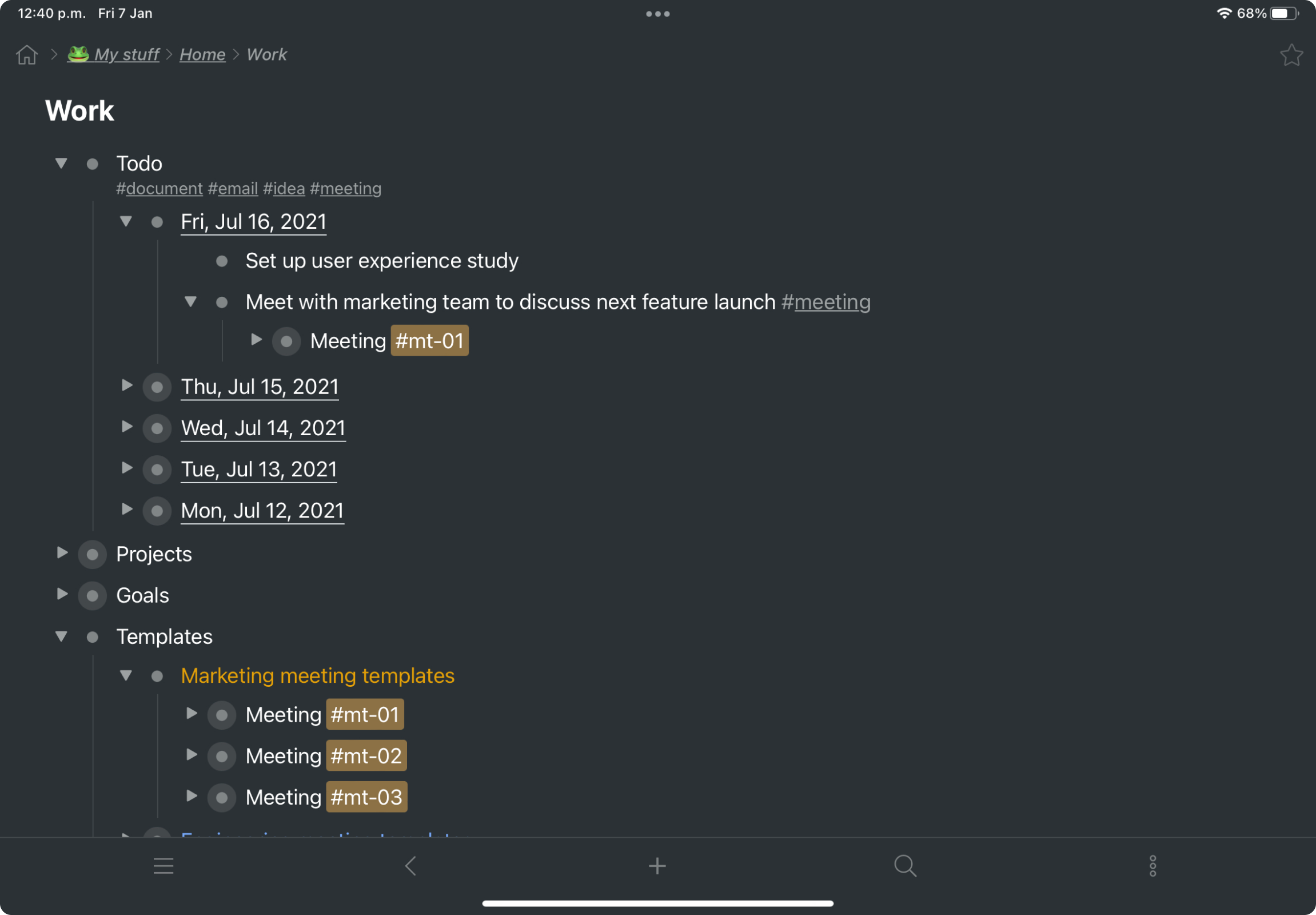
Screenshot of a kanban board in Workflowy, used to organize files and images.Screenshot of the interface to draft complex documents and artistic works while keeping everything organized.Screenshot of Workflowy's task management interface, where boards boards and lists can be managed and combined.Screenshot of item highlighting, with search by highlight color.Screenshot of tags, used to find anything in an account, no matter where it is.