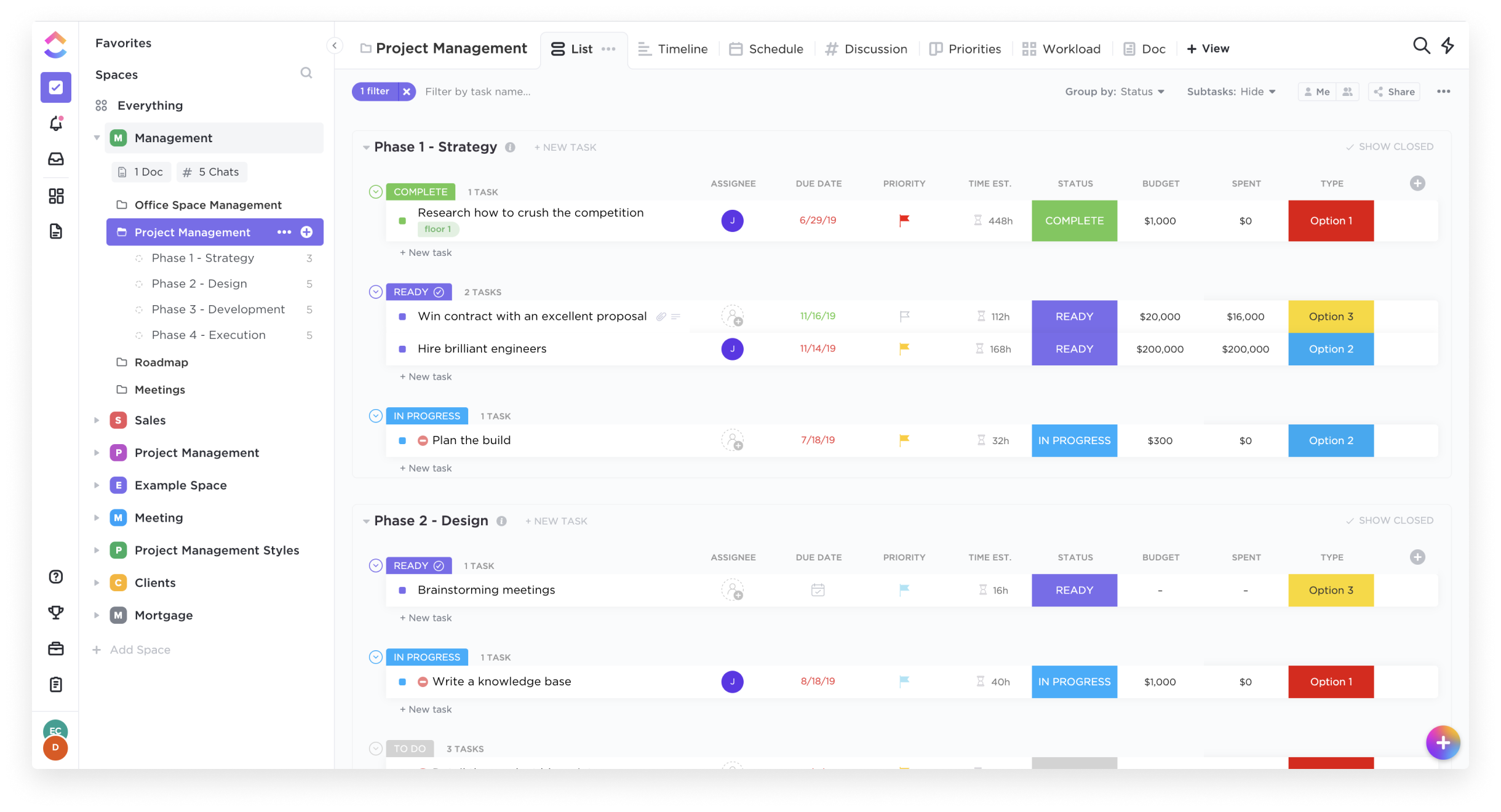
ClickUp is an all-in-one productivity platform. It’s a hub where teams can come together to plan, organize, and collaborate on work using tasks, Docs, Chat, Goals, and Whiteboard. Customized with just a few clicks, ClickUp helps teams of all types and sizes deliver work more effectively, to boost productivity to new heights. ClickUp aims to make the world more productive by removing friction caused by using many different applications. The platform boasts millions…
$0
per month per seat
Slack
Score9.1 out of 10
N/A
Slack is a group messaging or team collaboration app that aims to simplify communication for businesses. Features include open discussions, private groups, and direct messaging, as well as deep contextual search and message archiving, and file sharing. Slack integrates with a number of other tools, such as MailChimp, Dropbox, and Google Drive. Slack was acquired by Salesforce in December 2020.
The product is free to use, and also has paid plans with more features and greater controls.
The…
$8.75
per month per user
Pricing
ClickUp
Slack
Editions & Modules
Free
$0.00
Unlimited
$9.00 ($5.00)
per member per month (annual contract pricing)
Business
$19.00 ($12.00)
per member per month (annual contract pricing)
Business Plus
$29.00 ($19.00)
per member per month (annual contract pricing)
Enterprise
Contact Sales
Free
$0
Pro
$7.25*
per month per user
Business+
$12.50*
per month per user
Enterprise
Contact Sales
Offerings
Pricing Offerings
ClickUp
Slack
Free Trial
Yes
Yes
Free/Freemium Version
Yes
Yes
Premium Consulting/Integration Services
Yes
No
Entry-level Setup Fee
No setup fee
No setup fee
Additional Details
—
*Per active user, per month, when paying once a year.
Pro is $8.75 USD per active user when paying month to month. Business+ is $15.00 USD per active user when paying month to month.
More Pricing Information
Community Pulse
ClickUp
Slack
Considered Both Products
ClickUp
Verified User
Chose ClickUp
Slack has important integrations as Google Agenda and Google Drive. ClickUp can improve it to replace Slack.
A de minimis incentive was given to thank the reviewer for their time. The incentive was not used to bias or drive a particular response, nor was the incentive contingent on a positive endorsement. More Info
Advisor in Professional Services at Prosumia (Market Research, 51-200 employees)
Chose ClickUp
I still use both. ClickUp is a little "bigger" and has some more tunning over details. When someone ask me about which to choose, my answer is "you must try them"... start using both and you'll find the best using them and asking users how they feel.
A de minimis incentive was given to thank the reviewer for their time. The incentive was not used to bias or drive a particular response, nor was the incentive contingent on a positive endorsement. More Info
Verified User
Chose ClickUp
It combines them all with a user friendly interface and a really nice workflow. It keeps work in as less places as possible which makes it easy for new colleagues.
A de minimis incentive was given to thank the reviewer for their time. The incentive was not used to bias or drive a particular response, nor was the incentive contingent on a positive endorsement. More Info
A de minimis incentive was given to thank the reviewer for their time. The incentive was not used to bias or drive a particular response, nor was the incentive contingent on a positive endorsement. More Info
Verified User
Chose ClickUp
Clickup feels a lot more complete and professional.
A de minimis incentive was given to thank the reviewer for their time. The incentive was not used to bias or drive a particular response, nor was the incentive contingent on a positive endorsement. More Info
Director in Marketing at Webhive Digital (Marketing & Advertising, 1-10 employees)
Chose ClickUp
ClickUp's features were far superior in terms of what we could do for project management and flexible enough we could adjust it to our use case. We found Notion too basic and monday.com too restrictive. ClickUp is the perfect blend of what we need and their new features often …
A de minimis incentive was given to thank the reviewer for their time. The incentive was not used to bias or drive a particular response, nor was the incentive contingent on a positive endorsement. More Info
Implementation Project Manager in Professional Services at Verivest (Real Estate, 11-50 employees)
Chose ClickUp
I did not make the decision to move to ClickUp, but I did provide feedback and hear feedback from our internal team about how ClickUp centralizes a lot of the company wides resources into one space. I feel that ClickUp provides more dynamic workflow building beyond Jira and Karb…
A de minimis incentive was given to thank the reviewer for their time. The incentive was not used to bias or drive a particular response, nor was the incentive contingent on a positive endorsement. More Info
Project Manager in Product Management at Ancilla Ventures (Program Development, 1-10 employees)
Chose ClickUp
ClickUp is definitely a marked improvement in just about every way from Redmine. UI, functionalities, usability- all of it has been a much better experience in ClickUp. As for JIRA and Airtable, I think ClickUp's overall layout and organization style trumps those sites by …
A de minimis incentive was given to thank the reviewer for their time. The incentive was not used to bias or drive a particular response, nor was the incentive contingent on a positive endorsement. More Info
CEO in Marketing at Agência 23 (Marketing & Advertising, 1-10 employees)
Chose ClickUp
All of them are based on activity management, however ClickUp stands out in several areas: integrations with other tools, management of several spaces simultaneously through views/dashboards, the vast majority of the tools listed do not allow me to have visibility of everything …
A de minimis incentive was given to thank the reviewer for their time. The incentive was not used to bias or drive a particular response, nor was the incentive contingent on a positive endorsement. More Info
Verified User
Chose ClickUp
Much more flexible and complete, you can shape it for your liking.
A de minimis incentive was given to thank the reviewer for their time. The incentive was not used to bias or drive a particular response, nor was the incentive contingent on a positive endorsement. More Info
Owner in Corporate at Bbg, Inc. (Venture Capital & Private Equity, 1-10 employees)
Chose ClickUp
ClickUp can be very simple, yet very advanced. That helps us get started while providing something we can grow into as well, to avoid a future switch again.
A de minimis incentive was given to thank the reviewer for their time. The incentive was not used to bias or drive a particular response, nor was the incentive contingent on a positive endorsement. More Info
Verified User
Chose ClickUp
Custom Dashboards for Better VisibilityWe set up custom dashboards to track project progress, team workload, and deadlines in real time, eliminating the need for manual status meetings and Streamlining Team Collaboration & Task PrioritizationUsing priority flags and sprint …
A de minimis incentive was given to thank the reviewer for their time. The incentive was not used to bias or drive a particular response, nor was the incentive contingent on a positive endorsement. More Info
Head of Paid Search in Marketing at Understory (Marketing & Advertising, 11-50 employees)
Chose ClickUp
ClickUp can do basically all of the various things those tools can do, but in one platform that's more intuitive and has a lot more integrations so it has the potential for way more use cases and to solve more problems depending on how advanced you want to get with it.
A de minimis incentive was given to thank the reviewer for their time. The incentive was not used to bias or drive a particular response, nor was the incentive contingent on a positive endorsement. More Info
Verified User
Chose ClickUp
Firstly, due to price. Also, each of the tools is more suited for a different market, while ClickUp is diverse and customizable enough so that we can all use the same tool. Onboarding on Asana was much easier, for personal tasks it's a more user friendly tool.
A de minimis incentive was given to thank the reviewer for their time. The incentive was not used to bias or drive a particular response, nor was the incentive contingent on a positive endorsement. More Info
Verified User
Chose ClickUp
They don't compare against ClickUp. I joined my current agency with ClickUp already in place, but the user experience is by far the best. It's super easy to learn and there are so many ways to streamline processes. You do need a dedicated person to learn and be the implementor …
A de minimis incentive was given to thank the reviewer for their time. The incentive was not used to bias or drive a particular response, nor was the incentive contingent on a positive endorsement. More Info
Verified User
Chose ClickUp
Out of all the listed products I have used when it comes to project/product management ClickUp has been the most intuitive when it comes to user interface and functions. New functions and further development takes place regularly and the company is listening to its community …
A de minimis incentive was given to thank the reviewer for their time. The incentive was not used to bias or drive a particular response, nor was the incentive contingent on a positive endorsement. More Info
Systems implementation consultant in Information Technology at Exata Software e Automação Comercial (Computer Software, 1-10 employees)
Chose ClickUp
ClickUp over Runrun.it offers a wide range of functionality, including task management, automations, customizable views (lists, Kanban boards, calendar) and time tracking. It is highly flexible, allowing teams to configure their workflows according to their specific needs. And …
A de minimis incentive was given to thank the reviewer for their time. The incentive was not used to bias or drive a particular response, nor was the incentive contingent on a positive endorsement. More Info
Verified User
Chose ClickUp
ClickUp works best as a central project management tool.
A de minimis incentive was given to thank the reviewer for their time. The incentive was not used to bias or drive a particular response, nor was the incentive contingent on a positive endorsement. TR verified that a representative sample of customers was invited. More Info
Founder/CEO in Professional Services at Virtual Cathy (Executive Office, 11-50 employees)
Chose ClickUp
While some of the CRMs above have different functionalities, I have found that ClickUp is the most user-friendly, has the most viewable options, and is the most able to grow and scale with my business. ClickUp has the best team collaboration tools available and the best …
A de minimis incentive was given to thank the reviewer for their time. The incentive was not used to bias or drive a particular response, nor was the incentive contingent on a positive endorsement. TR verified that a representative sample of customers was invited. More Info
Verified User
Chose ClickUp
I personally think ClickUp has the best flexibility and user interface of any similar programs i have used.
A de minimis incentive was given to thank the reviewer for their time. The incentive was not used to bias or drive a particular response, nor was the incentive contingent on a positive endorsement. TR verified that a representative sample of customers was invited. More Info
Verified User
Chose ClickUp
ClickUp does more than the other competitors in their industry and the costs are very reasonable. It is easy to set up and most people do not need an extensive training on the tool. It has powerful connections which make it a great central tool that all teams can store …
A de minimis incentive was given to thank the reviewer for their time. The incentive was not used to bias or drive a particular response, nor was the incentive contingent on a positive endorsement. TR verified that a representative sample of customers was invited. More Info
Brand and UX+UI Designer at WIRO Agency (Design, 11-50 employees)
Chose ClickUp
I really like the flexibility of ClickUp and that it has an easy use of experience (once you know how to use it). I found other tools quite limiting in not being able to add specific logic or rules. It's really important to be able to show data in specific ways for our clients, …
A de minimis incentive was given to thank the reviewer for their time. The incentive was not used to bias or drive a particular response, nor was the incentive contingent on a positive endorsement. TR verified that a representative sample of customers was invited. More Info
Director in Information Technology at Devtics Technologies (Computer Software, 1-10 employees)
Chose Slack
I selected Slack because it is the combination of the two that are mentioned above. In ClickUp you can manage the projects and tasks, in Skype you can communicate. Whereas Slack single-handedly handles both of these features, It manages your projects / tasks and allows you to …
A de minimis incentive was given to thank the reviewer for their time. The incentive was not used to bias or drive a particular response, nor was the incentive contingent on a positive endorsement. TR verified that a representative sample of customers was invited. More Info
Accountant in Finance and Accounting at Rochester Montessori School (Education Management, 11-50 employees)
Chose Slack
I like Slack better than ClickUp, because I would spend 30-60 minutes a day updating my ClickUp tasks. The way ClickUp was used was very micromanaging. I billed by the hour, so I was willing to put in the time to alert the boss what tasks I was working on.
A de minimis incentive was given to thank the reviewer for their time. The incentive was not used to bias or drive a particular response, nor was the incentive contingent on a positive endorsement. TR verified that a representative sample of customers was invited. More Info
CX Manager in Customer Service at Dónde (Computer Software, 11-50 employees)
Chose Slack
Slack is the superior offering for what we do and who we communicate with. The other programs offer basic features, but Slack continues to innovate and is business-first, which is very helpful for our small team. The feature set and integrations are better in Slack than other …
A de minimis incentive was given to thank the reviewer for their time. The incentive was not used to bias or drive a particular response, nor was the incentive contingent on a positive endorsement. More Info
A de minimis incentive was given to thank the reviewer for their time. The incentive was not used to bias or drive a particular response, nor was the incentive contingent on a positive endorsement. More Info
Student in Engineering at PPSU (Education Management, 51-200 employees)
Chose Slack
Slack is widely used in IT organizations. It gives return values of we had [invested] in it. It provides most of [the] features which need in [the] organization like file sharing, chatting, etc. It has many app integration[s] for task management, meeting schedules, etc. UI is …
A de minimis incentive was given to thank the reviewer for their time. The incentive was not used to bias or drive a particular response, nor was the incentive contingent on a positive endorsement. More Info
Verified User
Chose Slack
Slack has a more modern feel as far as ease of use.
A de minimis incentive was given to thank the reviewer for their time. The incentive was not used to bias or drive a particular response, nor was the incentive contingent on a positive endorsement. More Info
A de minimis incentive was given to thank the reviewer for their time. The incentive was not used to bias or drive a particular response, nor was the incentive contingent on a positive endorsement. TR verified that a representative sample of customers was invited. More Info
Verified User
Chose Slack
I have yet to try any of these but for my needs and our smaller team - I suggest going with the simplest tool is the right choice for us. As we expand moving to a more developed tool with deeper integrations would make sense.
A de minimis incentive was given to thank the reviewer for their time. The incentive was not used to bias or drive a particular response, nor was the incentive contingent on a positive endorsement. TR verified that a representative sample of customers was invited. More Info
Great for project management, reoccurring task management, building trackers and keeping track of what everyone is up to. Like all software that has great functionality, having solid governance and control over access is essential. I recommend ensuring that your admins/owners have a close eye on what is going on across the space or it can turn into an unmanageable nightmare.
If you population likes technology, then I would recommend Slack. It is more difficult to implement if not everyone is on Slack or knows how to use it. Slack was used well by some employees who loved it. Slack allowed them to plan annual events and get feedback and ideas from those involved in the event
A de minimis incentive was given to thank the reviewer for their time. The incentive was not used to bias or drive a particular response, nor was the incentive contingent on a positive endorsement. TR verified that a representative sample of customers was invited. More Info
A de minimis incentive was given to thank the reviewer for their time. The incentive was not used to bias or drive a particular response, nor was the incentive contingent on a positive endorsement. More Info
A de minimis incentive was given to thank the reviewer for their time. The incentive was not used to bias or drive a particular response, nor was the incentive contingent on a positive endorsement. More Info
Would love a better integration with GitHub. For example, notifications when your PR is updated, when review is requested, @-mention in comments, etc.
Improved "Later" tab, for example the ability to create to-do lists or making the "Later" tab into a more powerful to-do list (annotate items with notes)
More powerful integrations, e.g. Google Calendar could render a calendar view within Slack, rather than sending the daily schedule
A de minimis incentive was given to thank the reviewer for their time. The incentive was not used to bias or drive a particular response, nor was the incentive contingent on a positive endorsement. TR verified that a representative sample of customers was invited. More Info
It has been a game-changer in terms of project tracking, as animation is a demanding product that requires multiple layers of analysis, revisions, tracking, scheduling, etc. ClickUp simplifies many approvals as anyone can easily add items, and you can tag the people who need to look at them.
A de minimis incentive was given to thank the reviewer for their time. The incentive was not used to bias or drive a particular response, nor was the incentive contingent on a positive endorsement. TR verified that a representative sample of customers was invited. More Info
To be more transparent, I give 10 because Slack serves our collaboration needs. It provide us a good platform for team communication relaying important update within the company, it has even mobile app where you can install in your phone to monitor any updates within that team that needs your immediate attention and intervention.
A de minimis incentive was given to thank the reviewer for their time. The incentive was not used to bias or drive a particular response, nor was the incentive contingent on a positive endorsement. More Info
Far easier to use than any other PM tool. ClickUp is incredibly intuitive and had us saving time and energy within the first week of implementation. In my opinion, PM software should make it easier to focus on the deliverables - it shouldn't take all your time and energy to learn how to use the tool in the first place. ClickUp is a user-friendly tool that actually helps us focus on what's important.
A de minimis incentive was given to thank the reviewer for their time. The incentive was not used to bias or drive a particular response, nor was the incentive contingent on a positive endorsement. More Info
Slack is one of the easiest platforms to use! It is very aesthetically pleasing and you can arrange the chats and other features the way you personally like it. They kept it pretty simple for people who aren’t looking to do anything more than streamlining communication, but they definitely have options for folks to build out the Workspace more.
A de minimis incentive was given to thank the reviewer for their time. The incentive was not used to bias or drive a particular response, nor was the incentive contingent on a positive endorsement. TR verified that a representative sample of customers was invited. More Info
For over a year ClickUp was unavailable to us just twice for a couple of hours. I would say for a system this big and working globally that was a minor issue. They managed to fix all the issues within a couple hours and then it was back up and running perfectly fine.
A de minimis incentive was given to thank the reviewer for their time. The incentive was not used to bias or drive a particular response, nor was the incentive contingent on a positive endorsement. More Info
Yes, the app works 24/7. I don't even recall having any period that we could not use since the implementation. Even the maintenance periods are barely noticeable and our work is not impacted by it when it happens.
A de minimis incentive was given to thank the reviewer for their time. The incentive was not used to bias or drive a particular response, nor was the incentive contingent on a positive endorsement. TR verified that a representative sample of customers was invited. More Info
The speed of ClickUp is average to be honest. This is one of the biggest flaws of the system, sometimes it's also lagging a little bit but we also have a lot of documents, lists etc. on our workspace. However, with the next version of ClickUp I've seen they are planning to increase the speed by almost 500%, probably by changing the technology, so I am more than looking forward to it.
A de minimis incentive was given to thank the reviewer for their time. The incentive was not used to bias or drive a particular response, nor was the incentive contingent on a positive endorsement. More Info
Slack is a soft app, we don't have many issues with it. I recall one or two people complaining about something during our usage period, but I didn't have a bad experience. When the app is slow, usually the problem is with my computer or my internet. The app works just fine.
A de minimis incentive was given to thank the reviewer for their time. The incentive was not used to bias or drive a particular response, nor was the incentive contingent on a positive endorsement. TR verified that a representative sample of customers was invited. More Info
I started using ClickUp when it was what most would consider a baby company. There were the occasional bugs that made working in ClickUp a little bit of a headache, but the support feature allowed me to chat with a real persona and communicate my issues. I would always get prompt support and someone willing to really help me, not just point me to FAQ pages. Not feeling like a number really makes a difference.
A de minimis incentive was given to thank the reviewer for their time. The incentive was not used to bias or drive a particular response, nor was the incentive contingent on a positive endorsement. More Info
Whenever I've had to troubleshoot an issue with Slack (which, to be honest, has not happened very often), their online documentation has been easy to locate, easy to understand, and effective in resolving my issue. Slack's ever-growing popularity also means that there's a large community of practice out there that can be depended upon.
A de minimis incentive was given to thank the reviewer for their time. The incentive was not used to bias or drive a particular response, nor was the incentive contingent on a positive endorsement. More Info
There are multiple guides on literally all of the functions you can find within the system, therefore it's easy to learn anything you'd really like to use, starting from project and people management, down to Gantts, mind maps, time tracking, inviting Clients as guests to work with you on the projects and so much more.
A de minimis incentive was given to thank the reviewer for their time. The incentive was not used to bias or drive a particular response, nor was the incentive contingent on a positive endorsement. More Info
Start small. Don’t try to build the most elaborate plans first. Resist the urge to get into Gantt charts if no one is used to them. Just get work written, add dates and assignees, and start getting used to it. If you did not use a work management tool before, you need to be gracious with yourself about the fact that you likely do not have the muscle memory for working this way yet. But you will get there.
And leverage people who know it if possible. Look for ClickUp experts and vendors. They can really supercharge your effectiveness at building the tool out and speed up the process.
A de minimis incentive was given to thank the reviewer for their time. The incentive was not used to bias or drive a particular response, nor was the incentive contingent on a positive endorsement. More Info
A de minimis incentive was given to thank the reviewer for their time. The incentive was not used to bias or drive a particular response, nor was the incentive contingent on a positive endorsement. TR verified that a representative sample of customers was invited. More Info
I did not make the decision to move to ClickUp, but I did provide feedback and hear feedback from our internal team about how ClickUp centralizes a lot of the company wides resources into one space. I feel that ClickUp provides more dynamic workflow building beyond Jira and Karbon, and tasks and questions are more searchable cross team, causing more time saved and less time reaching out to ask for an update. All Apps have their individual strengths, but ClickUp has it all live together in one space, making it easier overall for searching and updating items internally as a team.
Having had a lot of experience with Google Chat and Teams, Slack is far and away the better option. In comparison to Teams, Slack is much cleaner with a far more user friendly AI, Teams is far too clunky and feels tiresome to use, whereas it is super easy to pick up Slack and be able to configure it do exactly what you need. Whilst I don't find a massive difference between the usability and UI of Google Chat to Slack. Slack's range of features far outweighs Google Chat. The ease of external connections, workflows, file sharing, external connections for notifications (Make, Zapier etc), plus the huge range of apps you can connect to enhance your workspace is incredible. Google Chat does benefit from directly integrating into your Google Suite so you can get access to automatic status updates based on calendar activity, which would be nice for Slack to have
A de minimis incentive was given to thank the reviewer for their time. The incentive was not used to bias or drive a particular response, nor was the incentive contingent on a positive endorsement. TR verified that a representative sample of customers was invited. More Info
Scaling with ClickUp is superb. If you create a workflow best suited for your organization then it's all about creating new accounts and teaching the new employees the workflow you're using. It's that simple. There is no black magic when it comes to Clickup.
A de minimis incentive was given to thank the reviewer for their time. The incentive was not used to bias or drive a particular response, nor was the incentive contingent on a positive endorsement. More Info
Before ClickUp, my team would have multiple different project trackers, all in different locations, formatted in different ways. ClickUp has allowed us to move all those trackers into one location with a specified template and the ability to directly link tasks to tickets. This has greatly impacted project deliveries in a very positive way.
The time tracking feature of ClickUp has been amazing for our development team. Instead of them having to track in a separate document or at the end of every day, try to remember what they worked on and when, they instead can just hit a timer button on the ticket and go off to work. This alone has saved time and improved the accuracy of tracked time to projects.
A de minimis incentive was given to thank the reviewer for their time. The incentive was not used to bias or drive a particular response, nor was the incentive contingent on a positive endorsement. More Info