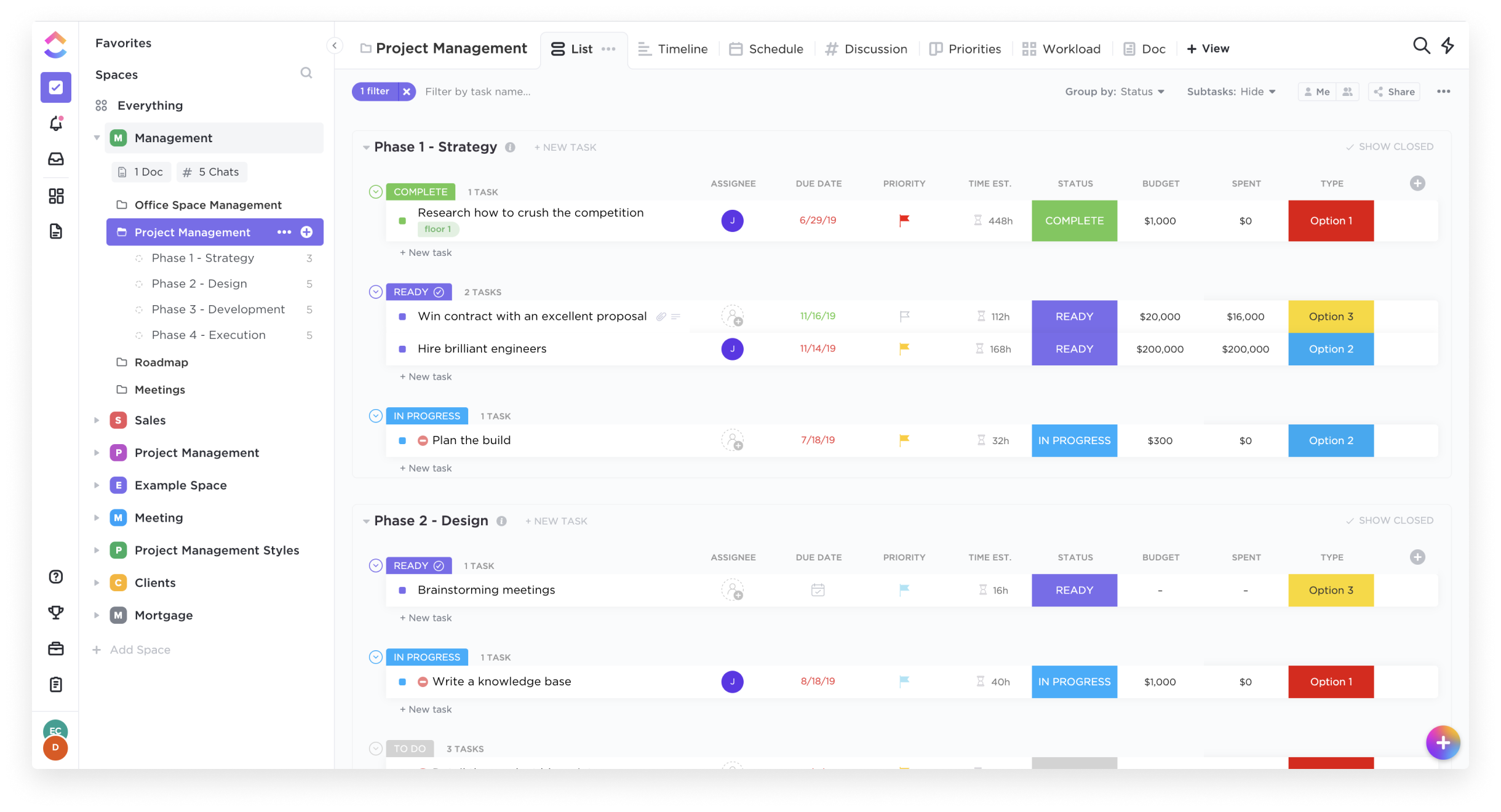
ClickUp is an all-in-one productivity platform. It’s a hub where teams can come together to plan, organize, and collaborate on work using tasks, Docs, Chat, Goals, and Whiteboard. Customized with just a few clicks, ClickUp helps teams of all types and sizes deliver work more effectively, to boost productivity to new heights. ClickUp aims to make the world more productive by removing friction caused by using many different applications. The platform boasts millions…
$0
per month per seat
Microsoft Teams
Score7.7 out of 10
N/A
Microsoft Teams combines video conferencing software with team collaboration tools. The communications platform allows MS Office users to conduct conference calls and share files via SharePoint, and join or initiate a group chat.
$4.80
per month per user
Pricing
ClickUp
Microsoft Teams
Editions & Modules
Free
$0.00
Unlimited
$9.00 ($5.00)
per member per month (annual contract pricing)
Business
$19.00 ($12.00)
per member per month (annual contract pricing)
Business Plus
$29.00 ($19.00)
per member per month (annual contract pricing)
Enterprise
Contact Sales
Microsoft Teams Essentials
$4.80
per month per user
Microsoft Teams Enterprise
$5.25
per month (paid yearly) per user
Microsoft Teams Enterprise
$5.25
per month per user
Microsoft 365 Business Basic
$7.20
per month per user
Microsoft 365 Business Standard
$15
per month per user
Offerings
Pricing Offerings
ClickUp
Microsoft Teams
Free Trial
Yes
Yes
Free/Freemium Version
Yes
Yes
Premium Consulting/Integration Services
Yes
No
Entry-level Setup Fee
No setup fee
No setup fee
Additional Details
—
Discounts are available for non profit organizations.
A de minimis incentive was given to thank the reviewer for their time. The incentive was not used to bias or drive a particular response, nor was the incentive contingent on a positive endorsement. More Info
Verified User
Chose ClickUp
I personally haven't been exposed to any similar sites or programs so I can't speak fully to this question.
A de minimis incentive was given to thank the reviewer for their time. The incentive was not used to bias or drive a particular response, nor was the incentive contingent on a positive endorsement. More Info
Verified User
Chose ClickUp
ClickUp is more complete than most of the other competitors on the list and is more focused on being awesome in providing the tools necessary for project management, including Agile methodologies, timetracking, and many more. For a software development company like mine, …
A de minimis incentive was given to thank the reviewer for their time. The incentive was not used to bias or drive a particular response, nor was the incentive contingent on a positive endorsement. TR verified that a representative sample of customers was invited. More Info
A de minimis incentive was given to thank the reviewer for their time. The incentive was not used to bias or drive a particular response, nor was the incentive contingent on a positive endorsement. More Info
Verified User
Chose ClickUp
ClickUp is quickly moving up the ranks to surpass other project management software options that aren't readily available to whole teams. For the past two years, I've witnessed close competition between ClickUp and monday.com for the top spot as the foremost emerging project …
A de minimis incentive was given to thank the reviewer for their time. The incentive was not used to bias or drive a particular response, nor was the incentive contingent on a positive endorsement. TR verified that a representative sample of customers was invited. More Info
Survey Manager at Atheneum (Research, 1001-5000 employees)
Chose ClickUp
The subscription price offers a very complete package compared to other similar products, so in terms of value for money, it is, in my opinion, the best deal. Even the free version is very complete, allowing you to get an excellent idea of how it would impact a person's …
A de minimis incentive was given to thank the reviewer for their time. The incentive was not used to bias or drive a particular response, nor was the incentive contingent on a positive endorsement. More Info
Verified User
Chose ClickUp
ClickUp's hierarchy and customizability is what led us to use ClickUp. The others cannot complete on this feature.
A de minimis incentive was given to thank the reviewer for their time. The incentive was not used to bias or drive a particular response, nor was the incentive contingent on a positive endorsement. TR verified that a representative sample of customers was invited. More Info
A de minimis incentive was given to thank the reviewer for their time. The incentive was not used to bias or drive a particular response, nor was the incentive contingent on a positive endorsement. More Info
Project Consultant in Finance and Accounting at Raymond James Financial (Financial Services, 5001-10,000 employees)
Chose ClickUp
there are some things ClickUp can do that Teams can't. For example, in ClickUp you have the ability to create and assign a subtask but in Teams you can only enter a subtask and not assign it to anyone.
A de minimis incentive was given to thank the reviewer for their time. The incentive was not used to bias or drive a particular response, nor was the incentive contingent on a positive endorsement. More Info
Head of consulting in Professional Services at Big Leap Real Estate Services (Outsourcing/Offshoring, 11-50 employees)
Chose ClickUp
I just find it more flexible and less clunky with the setup and management of the platform. It also gives more ways to view the same information across different use cases.
A de minimis incentive was given to thank the reviewer for their time. The incentive was not used to bias or drive a particular response, nor was the incentive contingent on a positive endorsement. More Info
Verified User
Chose ClickUp
I’m a big believer in the executive team at clickup. I don’t think any other productivity company out there has a bigger BHAG than the CEO of clickup.
So, with that being said, I know they will continue to strive to be better and better and help people save more and more of our …
A de minimis incentive was given to thank the reviewer for their time. The incentive was not used to bias or drive a particular response, nor was the incentive contingent on a positive endorsement. More Info
Verified User
Chose ClickUp
ClickUp had far more features and was easier to use than any of the other platforms we evaluated. It continues to "stand the test of time" as our organization rolls out new ideas for project management. It's flexibility and ease of use keeps it ahead of the game. ClickUp's …
A de minimis incentive was given to thank the reviewer for their time. The incentive was not used to bias or drive a particular response, nor was the incentive contingent on a positive endorsement. More Info
A de minimis incentive was given to thank the reviewer for their time. The incentive was not used to bias or drive a particular response, nor was the incentive contingent on a positive endorsement. More Info
Verified User
Chose ClickUp
ClickUp’s task management first approach, gives it a leg up on tools like notion and Coda. Microsoft struggles to offer one centralized tool that can do all of this in one tool.
A de minimis incentive was given to thank the reviewer for their time. The incentive was not used to bias or drive a particular response, nor was the incentive contingent on a positive endorsement. More Info
A de minimis incentive was given to thank the reviewer for their time. The incentive was not used to bias or drive a particular response, nor was the incentive contingent on a positive endorsement. More Info
Verified User
Chose ClickUp
Monday did not have as many levels (nests) in order to keep everything together, so we ended up recreating things separately and they would sometimes get lost. Ability to switch between views as easily wasn't there. Once the structure was set that was it, tough to change. Old …
A de minimis incentive was given to thank the reviewer for their time. The incentive was not used to bias or drive a particular response, nor was the incentive contingent on a positive endorsement. More Info
A de minimis incentive was given to thank the reviewer for their time. The incentive was not used to bias or drive a particular response, nor was the incentive contingent on a positive endorsement. More Info
Verified User
Chose ClickUp
ClickUp has more features, allows subtasks creation and management and costs less
A de minimis incentive was given to thank the reviewer for their time. The incentive was not used to bias or drive a particular response, nor was the incentive contingent on a positive endorsement. More Info
Program Manager at Utah Valley University (Higher Education, 10,001+ employees)
Chose ClickUp
Cost. This was our biggest motivator to leave Asana and search for another platform. There was a learning curve, however, the team enjoyed the wider range of customization that Asana did not have.
A de minimis incentive was given to thank the reviewer for their time. The incentive was not used to bias or drive a particular response, nor was the incentive contingent on a positive endorsement. More Info
Verified User
Chose ClickUp
Before ClickUp, we used Trello for a while. It is a great tool but very simple and limited. We tried a couple of different options like Asana and monday.com but in the end we decided to go with ClickUp because it was easier to get started and more customizable. If I remember …
A de minimis incentive was given to thank the reviewer for their time. The incentive was not used to bias or drive a particular response, nor was the incentive contingent on a positive endorsement. More Info
Creative Producer & Project Manager in Marketing at Purple Bunny (Design, 1-10 employees)
Chose ClickUp
At first, all these apps are quite overwhelming. ClickUp's UX is intuitive. It's more robust and offers better customization for different industries, business scales, goals, and user types. The multiple views, the dashboard, sidebar, are key to adapting the app to your needs. …
A de minimis incentive was given to thank the reviewer for their time. The incentive was not used to bias or drive a particular response, nor was the incentive contingent on a positive endorsement. More Info
newsman in Social Media at GamingSociety (Media Production, 11-50 employees)
Chose ClickUp
It's one place when I have all my stuff, notes, tasks, on one single dashboard I can place my tasks as in Jira and inside of them I can do all kings of notes about them, create substasks, dependencies, etc. And one click away from that part I can store all my other notes so …
A de minimis incentive was given to thank the reviewer for their time. The incentive was not used to bias or drive a particular response, nor was the incentive contingent on a positive endorsement. More Info
Digital Marketing Specialist in Marketing at Worcester Interactive (Marketing & Advertising, 1-10 employees)
Chose ClickUp
ClickUp has better UI and organization features than either Monday, Teams, or Trello. But even more than that, it's highly customizable. Many of my teammates use different views and tags to best represent their projects. For example, I use Calendar view, whereas the web design …
A de minimis incentive was given to thank the reviewer for their time. The incentive was not used to bias or drive a particular response, nor was the incentive contingent on a positive endorsement. More Info
Project Manager at Mayo Clinic (Education Management, 10,001+ employees)
Chose ClickUp
We only looked at platforms with an existing contract with Mayo. ClickUp compared to Aha! was an interesting comparison. At face value, they appeared to do very similar things. However, Aha! was much more technical in its look and feel and seemed about as "user-friendly" as MS …
A de minimis incentive was given to thank the reviewer for their time. The incentive was not used to bias or drive a particular response, nor was the incentive contingent on a positive endorsement. More Info
Microsoft
Verified User
Chose Microsoft Teams
Different teams can be created in Microsoft Teams. Communication can happen in the channels of these teams along with document sharing and collaboration with other members who have joined that team. It supports various file formats. Microsoft Teams integrates well with other …
A de minimis incentive was given to thank the reviewer for their time. The incentive was not used to bias or drive a particular response, nor was the incentive contingent on a positive endorsement. More Info
Verified User
Chose Microsoft Teams
Microsoft team is most powerful software that helps organization to improve the working process throw maintaining the better communication between them and most reliable to communication between each of us. you can chat with any person who is on Microsoft team and you can do …
A de minimis incentive was given to thank the reviewer for their time. The incentive was not used to bias or drive a particular response, nor was the incentive contingent on a positive endorsement. More Info
Great for project management, reoccurring task management, building trackers and keeping track of what everyone is up to. Like all software that has great functionality, having solid governance and control over access is essential. I recommend ensuring that your admins/owners have a close eye on what is going on across the space or it can turn into an unmanageable nightmare.
Positive: The virtual workspace created for a work team within the same company, for the resemblance of information and communications in one place.Negative: The access for members of a non-profit organization who have external emails from the host but need the same access as an internal person since their volunteer work is part of the very core of the federation.
A de minimis incentive was given to thank the reviewer for their time. The incentive was not used to bias or drive a particular response, nor was the incentive contingent on a positive endorsement. More Info
A de minimis incentive was given to thank the reviewer for their time. The incentive was not used to bias or drive a particular response, nor was the incentive contingent on a positive endorsement. More Info
A de minimis incentive was given to thank the reviewer for their time. The incentive was not used to bias or drive a particular response, nor was the incentive contingent on a positive endorsement. TR verified that a representative sample of customers was invited. More Info
The feature of notifications in the mobile application could be improved. Sometimes notifications of different teams are not visible and are only visible when the application is opened.
It uses lots of computational resources while running and thus, slows down the system sometimes.
It allows a few channels per team. The number of channels could be increased for better productivity.
A de minimis incentive was given to thank the reviewer for their time. The incentive was not used to bias or drive a particular response, nor was the incentive contingent on a positive endorsement. More Info
It has been a game-changer in terms of project tracking, as animation is a demanding product that requires multiple layers of analysis, revisions, tracking, scheduling, etc. ClickUp simplifies many approvals as anyone can easily add items, and you can tag the people who need to look at them.
A de minimis incentive was given to thank the reviewer for their time. The incentive was not used to bias or drive a particular response, nor was the incentive contingent on a positive endorsement. TR verified that a representative sample of customers was invited. More Info
Microsoft Teams is included with our Office 365 subscription and we have no intention of migrating off of Office 365 and Microsoft products. Since Microsoft Teams is included for free with our Office 365 subscription, and since we enjoy all the features, benefits, and functionality, there is no question that our team will continue to use the product
A de minimis incentive was given to thank the reviewer for their time. The incentive was not used to bias or drive a particular response, nor was the incentive contingent on a positive endorsement. More Info
Far easier to use than any other PM tool. ClickUp is incredibly intuitive and had us saving time and energy within the first week of implementation. In my opinion, PM software should make it easier to focus on the deliverables - it shouldn't take all your time and energy to learn how to use the tool in the first place. ClickUp is a user-friendly tool that actually helps us focus on what's important.
A de minimis incentive was given to thank the reviewer for their time. The incentive was not used to bias or drive a particular response, nor was the incentive contingent on a positive endorsement. More Info
User experience has been much better than the previous Skype for Business app. It has an easy-to-use interface with persistent chats. The search feature is very fast and useful. MS Teams has mostly focused on Collaboration and team building features which are very useful for organizational communications. Since Teams is accessible from multiple platforms like Laptop, Desktop, Mobile phones, etc it has been very convenient from a Mobility perspective.
A de minimis incentive was given to thank the reviewer for their time. The incentive was not used to bias or drive a particular response, nor was the incentive contingent on a positive endorsement. More Info
For over a year ClickUp was unavailable to us just twice for a couple of hours. I would say for a system this big and working globally that was a minor issue. They managed to fix all the issues within a couple hours and then it was back up and running perfectly fine.
A de minimis incentive was given to thank the reviewer for their time. The incentive was not used to bias or drive a particular response, nor was the incentive contingent on a positive endorsement. More Info
A de minimis incentive was given to thank the reviewer for their time. The incentive was not used to bias or drive a particular response, nor was the incentive contingent on a positive endorsement. More Info
The speed of ClickUp is average to be honest. This is one of the biggest flaws of the system, sometimes it's also lagging a little bit but we also have a lot of documents, lists etc. on our workspace. However, with the next version of ClickUp I've seen they are planning to increase the speed by almost 500%, probably by changing the technology, so I am more than looking forward to it.
A de minimis incentive was given to thank the reviewer for their time. The incentive was not used to bias or drive a particular response, nor was the incentive contingent on a positive endorsement. More Info
A de minimis incentive was given to thank the reviewer for their time. The incentive was not used to bias or drive a particular response, nor was the incentive contingent on a positive endorsement. More Info
I started using ClickUp when it was what most would consider a baby company. There were the occasional bugs that made working in ClickUp a little bit of a headache, but the support feature allowed me to chat with a real persona and communicate my issues. I would always get prompt support and someone willing to really help me, not just point me to FAQ pages. Not feeling like a number really makes a difference.
A de minimis incentive was given to thank the reviewer for their time. The incentive was not used to bias or drive a particular response, nor was the incentive contingent on a positive endorsement. More Info
Using Microsoft Teams has resulted in much faster business communications with both co-workers and consultants. There has been little need for support with this software as the interface is very intuitive and the product is overall very well designed. We did encounter an issue with the built-in phone service, however, this was quickly resolved by the support team.
There are multiple guides on literally all of the functions you can find within the system, therefore it's easy to learn anything you'd really like to use, starting from project and people management, down to Gantts, mind maps, time tracking, inviting Clients as guests to work with you on the projects and so much more.
A de minimis incentive was given to thank the reviewer for their time. The incentive was not used to bias or drive a particular response, nor was the incentive contingent on a positive endorsement. More Info
Start small. Don’t try to build the most elaborate plans first. Resist the urge to get into Gantt charts if no one is used to them. Just get work written, add dates and assignees, and start getting used to it. If you did not use a work management tool before, you need to be gracious with yourself about the fact that you likely do not have the muscle memory for working this way yet. But you will get there.
And leverage people who know it if possible. Look for ClickUp experts and vendors. They can really supercharge your effectiveness at building the tool out and speed up the process.
A de minimis incentive was given to thank the reviewer for their time. The incentive was not used to bias or drive a particular response, nor was the incentive contingent on a positive endorsement. More Info
A de minimis incentive was given to thank the reviewer for their time. The incentive was not used to bias or drive a particular response, nor was the incentive contingent on a positive endorsement. TR verified that a representative sample of customers was invited. More Info
I did not make the decision to move to ClickUp, but I did provide feedback and hear feedback from our internal team about how ClickUp centralizes a lot of the company wides resources into one space. I feel that ClickUp provides more dynamic workflow building beyond Jira and Karbon, and tasks and questions are more searchable cross team, causing more time saved and less time reaching out to ask for an update. All Apps have their individual strengths, but ClickUp has it all live together in one space, making it easier overall for searching and updating items internally as a team.
Our company and IT department previously used Skype for our communication needs. Skype was not dependable in my opinion, because it seems each time I used it during a call and/or a meeting, I and several other team members would get disconnected more than once. This caused a great interruption of our meeting, caused team members to have to ask others to repeat themselves and caused a general lack of interest in employee attendance during meetings.
Honestly, this tool is worth every penny. Yes, it's not free and you pay for the quality of services and the license. But the ROI and the benefits are all there. Also, the renewal, negotiation, and contract terms are all very well explained by our Microsoft account manager, and she's a charm.
Scaling with ClickUp is superb. If you create a workflow best suited for your organization then it's all about creating new accounts and teaching the new employees the workflow you're using. It's that simple. There is no black magic when it comes to Clickup.
A de minimis incentive was given to thank the reviewer for their time. The incentive was not used to bias or drive a particular response, nor was the incentive contingent on a positive endorsement. More Info
A de minimis incentive was given to thank the reviewer for their time. The incentive was not used to bias or drive a particular response, nor was the incentive contingent on a positive endorsement. More Info
I used Skype for Business to take calls, hold conferences, and provide remote assistance to users. Microsoft Teams, on the other hand, is superior to Skype for Business in my opinion. My job entails a lot of screen sharing.
Before ClickUp, my team would have multiple different project trackers, all in different locations, formatted in different ways. ClickUp has allowed us to move all those trackers into one location with a specified template and the ability to directly link tasks to tickets. This has greatly impacted project deliveries in a very positive way.
The time tracking feature of ClickUp has been amazing for our development team. Instead of them having to track in a separate document or at the end of every day, try to remember what they worked on and when, they instead can just hit a timer button on the ticket and go off to work. This alone has saved time and improved the accuracy of tracked time to projects.
A de minimis incentive was given to thank the reviewer for their time. The incentive was not used to bias or drive a particular response, nor was the incentive contingent on a positive endorsement. More Info