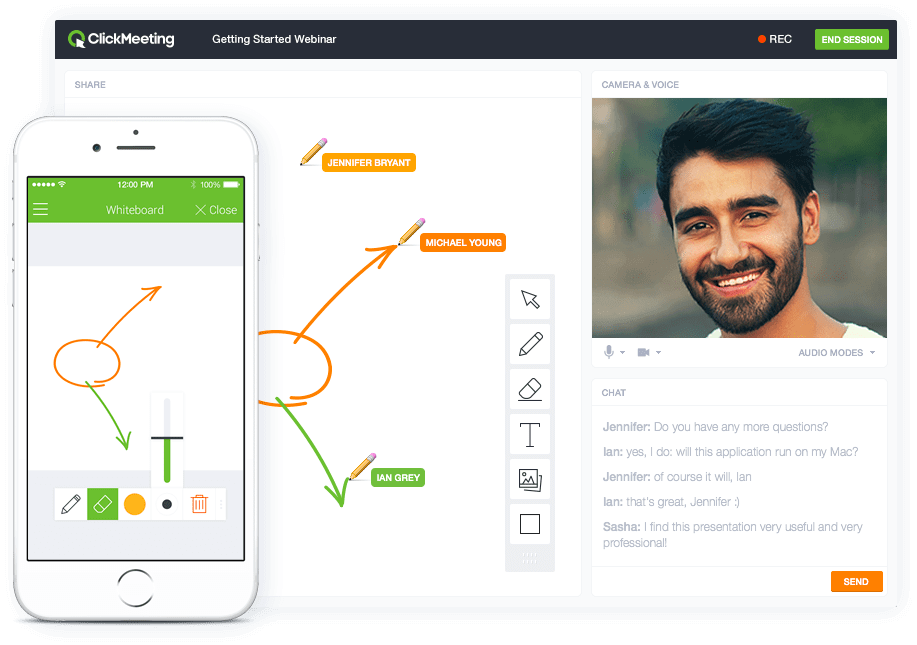
ClickMeeting is a webinar solution formerly owned by GetResponse, an email marketing software company. ClickMeeting's online meeting and collaboration tools are designed to support the sales, marketing, e-learning, and training needs of business of all sizes.
$25
per month
Zoom Rooms
Score8.7 out of 10
N/A
Zoom's conference rooms that make it easy to run or join video meetings with a tap of a button. Zoom Rooms bring HD video collaboration into any space – in the office, in the classroom, or at home – and enables in-person and remote participants to interact in real time. The solution also makes it simple to start a meeting, book a room, and share content.
ClickMeeting serves a dual purpose within our organization. Firstly, it acts as a reliable platform for hosting staff meetings, enabling effective communication and collaboration among team members. Whether it's for updates, discussions, or brainstorming sessions, ClickMeeting provides the necessary tools for seamless engagement.Secondly, ClickMeeting is instrumental in delivering online courses to our students. It empowers us to create interactive learning experiences regardless of geographical constraints. We can easily share course materials, conduct live or pre-recorded lectures, and facilitate interactive discussions and Q&A sessions. ClickMeeting ensures our students have access to high-quality education and a supportive learning environment.In summary, ClickMeeting is an invaluable tool for both internal staff communications and student-centered online courses. It fosters collaboration, engagement, and knowledge sharing in a flexible and accessible manner, enhancing our overall productivity and educational offerings.
User friendly, reliable and inclusive to remote audiences. The product grows organically for us which speaks for itself ; the business at sites we could not equip with our initial investments requests it. We have made the choice of Zoom rooms 5 years ago and it is still one our our star products supporting frictionless collaboration.
ClickMeeting is user-friendly, the admin and user panel is simple, intuitive!
When conducting training, you can use default settings such as edu mode and it saves time, I don't have to worry if I'm sure I've muted everyone and if I'm the only one visible.
ClickMeeting is also integrated with the Moodle e-learning platform, so it's a great support in organizing blended-learning processes.
Individual Audio Controls. I'd love to be able to adjust the audio for each of the presenters within the platform, as the host. Not all presenters are tech savvy and sometimes don't know how to adjust this themselves.
Additional Saved Color Schemes. I'd love to be able to create/save multiple custom color schemes that I can use for various events instead of a single one.
A de minimis incentive was given to thank the reviewer for their time. The incentive was not used to bias or drive a particular response, nor was the incentive contingent on a positive endorsement. More Info
Support is prompt, but not always the most immediately knowledgable or helpful.
Admin portal is convoluted. There's gotta be a better way to assign scheduling permisissions.
Zoom account managers are constantly being reassigned. It is nearly impossible to keep track of who presently is our account manager. When we were going through the process of looking into Zoom Phone, our manager was literally switched twice, resulting in us working with three total managers during that two-month process.
A de minimis incentive was given to thank the reviewer for their time. The incentive was not used to bias or drive a particular response, nor was the incentive contingent on a positive endorsement. More Info
ClickMeeting's overall usability is commendably excellent. Its intuitive, user-friendly interface makes it remarkably easy for users of all skill levels to navigate. The platform delivers a seamless, streamlined experience from setting up meetings to engaging with participants. Despite some advanced features having a slight learning curve, the platform remains user-friendly, efficient, and reliable.
A de minimis incentive was given to thank the reviewer for their time. The incentive was not used to bias or drive a particular response, nor was the incentive contingent on a positive endorsement. More Info
User friendliness (experience very similar to the already familiar Zoom app), consistency of the UX across locations and manufacturers. Screen sharing is made super easy (proximity). Zoom rooms support strategic needs for Hybrid work and reduced travels. Backend admin interface is simple (that's good) and provides useful dashboards for trend analysis.
It takes a bit of time to get to grips with the platform at first, but it's short and there is an online help chat available. People on the chat are very helpful and available for a long time - also on weekends, which greatly improves work. Really very good support.
- does not require installation - clear interface - fast chat technical support - available in Polish language - provides a stable connection - it allows us to share presentations - we can also record the meeting - the process of creating the meeting is quick and easy also for beginners
I personally think Zoom Rooms is superior to Teams. I have setup 3 or 4 Zooms Rooms for my organisation and it is pretty straightforward to do without any formal training or education on Zoom Rooms. My experience with Teams was the opposite. A horrible interface and options deliberately hidden away in menus levels deep. On top of which, Zoom Room outperforms Teams Rooms in both video and audio. On the desktop, Teams is a bloated app whereas, in my experience, Zoom Rooms works well.
A de minimis incentive was given to thank the reviewer for their time. The incentive was not used to bias or drive a particular response, nor was the incentive contingent on a positive endorsement. More Info
Strengthening the image of the ITAKA Foundation as an institution that comprehensively deals with the subject of disappearances and can share knowledge in this area.
Time savings in the preparation of internal meetings (e.g. thanks to the possibility of placing an accurate schedule).
Reaching a greater number of webinar recipients (e.g. thanks to the possibility of live broadcast via social media).