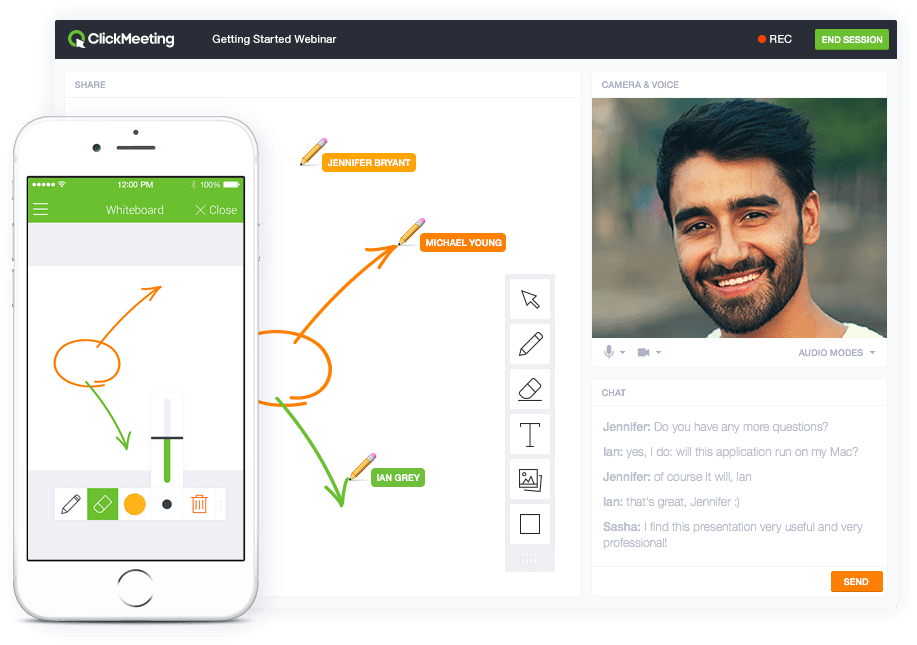
ClickMeeting is a webinar solution formerly owned by GetResponse, an email marketing software company. ClickMeeting's online meeting and collaboration tools are designed to support the sales, marketing, e-learning, and training needs of business of all sizes.
A de minimis incentive was given to thank the reviewer for their time. The incentive was not used to bias or drive a particular response, nor was the incentive contingent on a positive endorsement. More Info
Verified User
Chose ClickMeeting
ClickMeeting stands out due to its more visually appealing interface and simplified usability. The layout feels more intuitive, especially for hosting webinars and interactive sessions. The platform is easier to navigate for both hosts and participants. Another strength of …
A de minimis incentive was given to thank the reviewer for their time. The incentive was not used to bias or drive a particular response, nor was the incentive contingent on a positive endorsement. More Info
CFO in Finance and Accounting at Fundacja ITAKA (Non-profit Organization Management, 51-200 employees)
Chose ClickMeeting
For several years we have been using the ClickMeeting platform exclusively for our webinars. As for meetings within the organization - here we previously used other platforms. However, since we have ClickMeeting we also use this platform to organize meetings for our teams. …
A de minimis incentive was given to thank the reviewer for their time. The incentive was not used to bias or drive a particular response, nor was the incentive contingent on a positive endorsement. More Info
Online Education Manager in Social Media at The European Fertility Society (Health, Wellness and Fitness, 11-50 employees)
Chose ClickMeeting
We selected ClickMeeting for its specialized focus on webinars and virtual events, which aligns with our organization's needs. ClickMeeting's dedicated webinar features and ease of use make it an ideal choice for hosting engaging and interactive online presentations and live Q&A…
A de minimis incentive was given to thank the reviewer for their time. The incentive was not used to bias or drive a particular response, nor was the incentive contingent on a positive endorsement. More Info
marketing specialist in Marketing at Fundacja Hospicyjna (Hospital & Health Care, 51-200 employees)
Chose ClickMeeting
The interface is clear and legible, user-friendly. The quality of audio-video is outstanding, as with the other platform we sometimes encountered some issues. ClickMeeting has a lot better registration tools and other user engaging features (polls and surveys). The technical …
A de minimis incentive was given to thank the reviewer for their time. The incentive was not used to bias or drive a particular response, nor was the incentive contingent on a positive endorsement. More Info
I only use ClickMeeting to conduct online meetings and webinars. I don't need to change the program to another one. I am satisfied with the functionalities that the program offers. The ability to upload your own files and record meetings is very nice. The program helps a lot in …
A de minimis incentive was given to thank the reviewer for their time. The incentive was not used to bias or drive a particular response, nor was the incentive contingent on a positive endorsement. More Info
Marketing and PR Manager in Marketing at Innovations Hub Foundation (Non-profit Organization Management, 11-50 employees)
Chose ClickMeeting
While Google Meet is a reliable product for small, internal meetings, the specific features and functionalities of ClickMeeting make it a better fit for the purposes of organizing large scale events and webinars. Whether through the ability to add multiple event managers, …
A de minimis incentive was given to thank the reviewer for their time. The incentive was not used to bias or drive a particular response, nor was the incentive contingent on a positive endorsement. More Info
Verified User
Chose ClickMeeting
ClickMeeting distinguishes itself as a standout EU solution primarily due to its GDPR compliance, a feature that sets it apart in the competitive market. Unlike Teams and Zoom, which often grapple with GDPR-related issues, ClickMeeting's adherence to these regulations makes it …
A de minimis incentive was given to thank the reviewer for their time. The incentive was not used to bias or drive a particular response, nor was the incentive contingent on a positive endorsement. More Info
Board Member at Śląski Yacht Club przy Politechnice Śląskiej w Gliwicach (Non-profit Organization Management, 51-200 employees)
Chose ClickMeeting
In addition to its benefits for staff meetings and online courses, ClickMeeting offers a range of teaching tools that enhance the learning experience. These tools allow for interactive presentations, real-time collaboration, and engaging multimedia content. Furthermore, …
A de minimis incentive was given to thank the reviewer for their time. The incentive was not used to bias or drive a particular response, nor was the incentive contingent on a positive endorsement. More Info
A de minimis incentive was given to thank the reviewer for their time. The incentive was not used to bias or drive a particular response, nor was the incentive contingent on a positive endorsement. More Info
CEO (Chief Executive Officer) in Corporate at InnovationsHub Foundation (Non-profit Organization Management, 11-50 employees)
Chose ClickMeeting
While Google Meet is a reliable platform for simple meetings, ClickMeeting offers a more comprehensive set of features tailored for webinars and large-scale events. These include advanced event management, interactive engagement tools like polls and Q&As, and seamless screen …
A de minimis incentive was given to thank the reviewer for their time. The incentive was not used to bias or drive a particular response, nor was the incentive contingent on a positive endorsement. More Info
A de minimis incentive was given to thank the reviewer for their time. The incentive was not used to bias or drive a particular response, nor was the incentive contingent on a positive endorsement. More Info
Owner in Corporate at DeutschTutor (E-Learning, 1-10 employees)
Chose ClickMeeting
We chose ClickMeeting because this solution offers us the optimal basis for our language teaching. Working with the ClickMeeting platform comes in our opinion closest to the possibilities of a face-to-face language training. All classroom tools can be found on the platform, …
A de minimis incentive was given to thank the reviewer for their time. The incentive was not used to bias or drive a particular response, nor was the incentive contingent on a positive endorsement. More Info
Specialist in the marketing and communications department in Marketing at Polski Związek Żeglarski (Sports, 11-50 employees)
Chose ClickMeeting
Our organization considered using Skype, but it did not seem safe in terms of data security. Skype also offered fewer features than the ClickMeeting platform. Clickmeeting is a very secure platform. It offers a number of different functions. There is a possibility to conduct …
A de minimis incentive was given to thank the reviewer for their time. The incentive was not used to bias or drive a particular response, nor was the incentive contingent on a positive endorsement. More Info
Marketing Director in Marketing at Auctria (Non-profit Organization Management, 11-50 employees)
Chose ClickMeeting
ClickMeeting is better priced, has post-event abilities that I am looking for. LOVE the automated webinars. Love being able to make a separate studio room for a tech check with guest presenters. Been using for so long, the product is very stable, tech support chat is really …
A de minimis incentive was given to thank the reviewer for their time. The incentive was not used to bias or drive a particular response, nor was the incentive contingent on a positive endorsement. More Info
Coordinator of FASD Center at FUNDACJA NA RZECZ DZIECKA I RODZINY FASCYNACJE (Non-profit Organization Management, 11-50 employees)
Chose ClickMeeting
Zoom is fine for education, however, it has no support for earning with it ClickMeeting gives us suport for conntact with clients, we can manage webinars easily, it's integrated with FB, it save our time fo administration and organizational work it's really adopted for need of …
A de minimis incentive was given to thank the reviewer for their time. The incentive was not used to bias or drive a particular response, nor was the incentive contingent on a positive endorsement. More Info
A de minimis incentive was given to thank the reviewer for their time. The incentive was not used to bias or drive a particular response, nor was the incentive contingent on a positive endorsement. More Info
press officer at ITAKA Foundation (Non-profit Organization Management, 201-500 employees)
Chose ClickMeeting
- does not require installation - clear interface - fast chat technical support - available in Polish language - provides a stable connection - it allows us to share presentations - we can also record the meeting - the process of creating the meeting is quick and easy also …
A de minimis incentive was given to thank the reviewer for their time. The incentive was not used to bias or drive a particular response, nor was the incentive contingent on a positive endorsement. TR verified that a representative sample of customers was invited. More Info
Verified User
Chose ClickMeeting
ClickMeeting is more intuitive and provides more stable connectiond during meeting. It also reduces risk of sudden disconnection or logout.
A de minimis incentive was given to thank the reviewer for their time. The incentive was not used to bias or drive a particular response, nor was the incentive contingent on a positive endorsement. More Info
A de minimis incentive was given to thank the reviewer for their time. The incentive was not used to bias or drive a particular response, nor was the incentive contingent on a positive endorsement. More Info
CEO & Founder in Professional Services at Krawczak Consulting (E-Learning, 1-10 employees)
Chose ClickMeeting
First of all, ClickMeeting is simpler to use. It has default modes that I can use right away, and there is an option to integrate with Moodle. This makes for an interesting ecosystem for learning. In terms of usage alone, for me Zoom was not as intuitive as ClickMeeting. …
A de minimis incentive was given to thank the reviewer for their time. The incentive was not used to bias or drive a particular response, nor was the incentive contingent on a positive endorsement. More Info
board member and head of PR Department at Fundacja ITAKA -Centrum Poszukiwan Ludzi Zaginionych (Non-profit Organization Management, 201-500 employees)
Chose ClickMeeting
ClickMeeting is an intuitive and easy-to-use
platform. You can use the ClickMeeting platform from your browser, you don't
need to download any application. We also value this tool for its good video
A de minimis incentive was given to thank the reviewer for their time. The incentive was not used to bias or drive a particular response, nor was the incentive contingent on a positive endorsement. More Info
ClickMeeting serves a dual purpose within our organization. Firstly, it acts as a reliable platform for hosting staff meetings, enabling effective communication and collaboration among team members. Whether it's for updates, discussions, or brainstorming sessions, ClickMeeting provides the necessary tools for seamless engagement.Secondly, ClickMeeting is instrumental in delivering online courses to our students. It empowers us to create interactive learning experiences regardless of geographical constraints. We can easily share course materials, conduct live or pre-recorded lectures, and facilitate interactive discussions and Q&A sessions. ClickMeeting ensures our students have access to high-quality education and a supportive learning environment.In summary, ClickMeeting is an invaluable tool for both internal staff communications and student-centered online courses. It fosters collaboration, engagement, and knowledge sharing in a flexible and accessible manner, enhancing our overall productivity and educational offerings.
ClickMeeting is user-friendly, the admin and user panel is simple, intuitive!
When conducting training, you can use default settings such as edu mode and it saves time, I don't have to worry if I'm sure I've muted everyone and if I'm the only one visible.
ClickMeeting is also integrated with the Moodle e-learning platform, so it's a great support in organizing blended-learning processes.
Individual Audio Controls. I'd love to be able to adjust the audio for each of the presenters within the platform, as the host. Not all presenters are tech savvy and sometimes don't know how to adjust this themselves.
Additional Saved Color Schemes. I'd love to be able to create/save multiple custom color schemes that I can use for various events instead of a single one.
A de minimis incentive was given to thank the reviewer for their time. The incentive was not used to bias or drive a particular response, nor was the incentive contingent on a positive endorsement. More Info
ClickMeeting's overall usability is commendably excellent. Its intuitive, user-friendly interface makes it remarkably easy for users of all skill levels to navigate. The platform delivers a seamless, streamlined experience from setting up meetings to engaging with participants. Despite some advanced features having a slight learning curve, the platform remains user-friendly, efficient, and reliable.
A de minimis incentive was given to thank the reviewer for their time. The incentive was not used to bias or drive a particular response, nor was the incentive contingent on a positive endorsement. More Info
It takes a bit of time to get to grips with the platform at first, but it's short and there is an online help chat available. People on the chat are very helpful and available for a long time - also on weekends, which greatly improves work. Really very good support.
- does not require installation - clear interface - fast chat technical support - available in Polish language - provides a stable connection - it allows us to share presentations - we can also record the meeting - the process of creating the meeting is quick and easy also for beginners
Strengthening the image of the ITAKA Foundation as an institution that comprehensively deals with the subject of disappearances and can share knowledge in this area.
Time savings in the preparation of internal meetings (e.g. thanks to the possibility of placing an accurate schedule).
Reaching a greater number of webinar recipients (e.g. thanks to the possibility of live broadcast via social media).