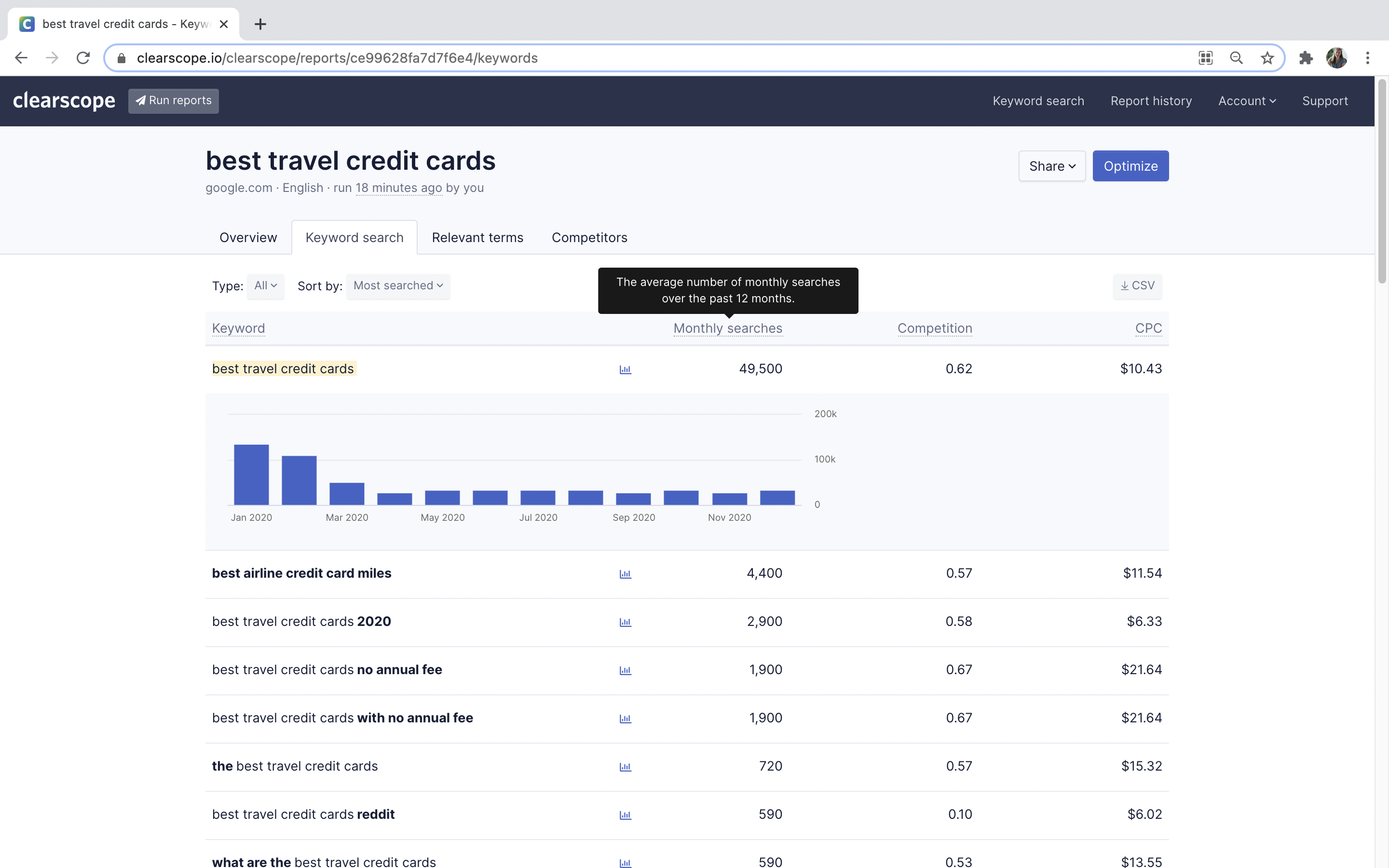
Clearscope, from the company of the same name (also known as Mushi Labs) is an AI-powered SEO platform designed to make it easy to get more out of content.
N/A
Yoast
Score 9.3 out of 10
N/A
Yoast offers a set of tools developed by Joost de Valk and team, founder of yoast.com and Wordpress enthusiast. These tools are designed to help content rank higher and are subsumed under the Yoast Complete pack, which includes Video SEO for rank climbing with embedded videos in a Wordpress site, WooCommerce SEO for the WP ecommerce plugin, News SEO for rank climbing in Google news, Local SEO for (as the name implies) climbing in local listings with more complete information so can be located…
$118.80
per year
Pricing
Clearscope
Yoast
Editions & Modules
No answers on this topic
Premium
$118.80
per year
Offerings
Pricing Offerings
Clearscope
Yoast
Free Trial
No
No
Free/Freemium Version
No
Yes
Premium Consulting/Integration Services
No
No
Entry-level Setup Fee
No setup fee
No setup fee
Additional Details
—
—
More Pricing Information
Community Pulse
Clearscope
Yoast
Features
Clearscope
Yoast
SEO
Comparison of SEO features of Product A and Product B
Clearscope
6.4
Ratings
19% below category average
Yoast
7.4
Ratings
4% below category average
Keyword analysis
8.00 Ratings
10.00 Ratings
Competitive analysis
8.00 Ratings
4.00 Ratings
Site recommendations
3.60 Ratings
10.00 Ratings
Task management
5.90 Ratings
2.00 Ratings
Backlink management
00 Ratings
9.00 Ratings
SERP ranking tracking
00 Ratings
6.00 Ratings
Page grader
00 Ratings
10.00 Ratings
Site audit / diagnostics
00 Ratings
8.00 Ratings
SEO Channels
Comparison of SEO Channels features of Product A and Product B
Clearscope
6.0
Ratings
24% below category average
Yoast
5.0
Ratings
41% below category average
Local SEO
6.30 Ratings
2.00 Ratings
Mobile SEO
5.80 Ratings
6.00 Ratings
Social SEO
00 Ratings
6.00 Ratings
Global SEO
00 Ratings
6.00 Ratings
SEO Platform & Account Management
Comparison of SEO Platform & Account Management features of Product A and Product B
Clearscope shines if you're using freelance writers or even just need a way to easily keyword optimize long-form content. While it can be used for marketing pages, I've found it does best with longer-form blog content in the hands of writers. So, if you have inexperienced writers or those less savvy/comfortable about SEO optimization, I'd recommend only using it for blogs. articles or other long-form content. Have some SEO experience under your belt? Use it for EVERYTHING that needs keyword optimization and is over 300 words. It'll help give you ideas and give you a better idea of how to work in that semantic SEO.
For quick WordPress installations and configurations, Yoast is fast to set up and helps guide you through the common configuration options. It tries to be helpful whether you are coming at things from a technical or non-technical background. The emphasis on white hat SEO topics like improved content, keywords, descriptions, and titles is really appreciated by someone like me who doesn't utilize gray and black hat SEO tactics.
If you are an SEO expert, and you want finite control of each individual aspect of your site, Yoast, like most plugins, engines, tools, etc, hides a lot from you or gives you limited options. It really is meant for someone who wants to apply a general strategy to a whole site. That being said, you can manage Yoast per page on a WordPress site, but even then, I know some SEO experts prefer other tools that are meant for very specific purposes.
Overall, Yoast is the best plugin for SEO in WordPress when applied as a whole.
Yoast Wordpress SEO Plugin is really good at copy and link scanning and optimizing, however, I have not been able to find any assistance on image optimization on our pages and posts. That would be a good update!
Yoast Wordpress SEO Plugin is good at ranking pages and posts individually. I would like to see an overall dashboard of your entire website/blog's SEO health according to the software.
It's super easy to use. Really, it requires little-to-know tutorials or walkthroughs at all — it explains everything you need to know in the description and tooltips built straight into the tool. I've never had to google a how-to or tutorial to use Yoast — it just works, and it works well
I gave it a 4 just because it is helpful if you are just getting started with SEO, it guides you and shows you what you need to do in order for your website to be up and running properly. As a seasoned SEO analyst I wouldn't recommend it just because I can do things better my way.
They're all similar but different. We use Frase and MarketMuse during other parts of our content creation process. I have used Surfer when clients supply reports and think it's also a solid tool. But nothing beats Clearscope when it comes to content optimization as you finish drafting.
Yoast Wordpress SEO Plugins was a little easier to understand and offered a real-time guided plugin that helped me write throughout my drafting process. Semrush was much more helpful as a reporting tool, not so much in content creation. Both tools are useful in different ways, it is just a matter of knowing each one's strengths and weaknesses.
Findability: I love few things more than hearing, "I just found you on Google!" and knowing that they found us on Google because our SEO is on point.
Using the Yoast SEO Plugin over time has taught me to create better, more optimized content from the start, rather than having to edit that content after I realize it's not very SEO friendly. This saves a lot of time and lets me put my energy into other things.
The plugin has helped us make our sometimes-dense content more readable and sharable, which absolutely improves stakeholder engagement.