TrustRadius: an HG Insights company

WorkBright

Score7.4 out of 10

12 Reviews and Ratings

What is WorkBright?

For businesses that are rapidly, seasonally, or just plain constantly hiring, WorkBright aims to take the cumbersome and traditionally paper-heavy process of onboarding and puts it all online.

They make it possible for new employees to fill out their W4s, upload photos of licenses and certifications, sign digitally, and complete any paperwork from their laptop, tablet, or smartphone before they show up for their first day on the job. Integrations and an open API allow users to move data to E-Verify or other platforms.

The vendor describes WorkBright's advantages:
- Complete the entire onboarding process 100% remotely - including Section 2 of the I-9.
- Made for mobile, so that 80% of employees complete all paperwork from a smart phone.
- Streamlined administrative processes like error correction workflows built in to the platform.
- Unique seasonal hiring features like "rehiring" built in.
- 5 Star Customer service with a dedicated, local representative on every account.

Media

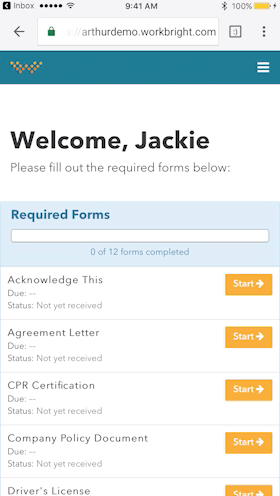
Works on any Device - Not just ‘mobile friendly’ but mobile FIRST! Designed to complete all forms quickly and efficiently from any smart enabled device.
Automatic Reminders - Reminders are automatically sent out to employees who have not completed their forms with increasing urgency and frequency.
Fingertip Signature - Best in class eSignatures allows employees to sign forms with their fingers on mobile devices including timestamp and IP address.

1 / 3

WorkBright is a Truly Mobile HR Software

Use Cases and Deployment Scope

Workbright used to work as an extended branch for Human resource team.

It helps the Human resource team in the following ways:

1. It helps with all new employee onboarding documentation using a smart phone

2. For Mass hiring process, you can still work with a lean HR team

3. All the hiring forms are getting a digital makeover and easy to use Forms

4. Hassle free and hundred percent compliant process

Pros

  • It has a remote onboarding process
  • Virtual onboarding makes the process faster and easier
  • It supports digital signature
  • It has error correction workflow

Cons

  • Money back guarantee could be extended to 90 days
  • E-verification process and IRS process should have an extra layer of verification

Most Important Features

  • Security of personal identification
  • Audit trails using time stamp feature
  • All types of mobiles like iphone and android are supported

Return on Investment

  • As an organisation it helps with scaling of teams from 50 to 500 people with a lean HR team
  • We can still scale to bigger team size with a small Audit team
  • Background verification is not required
  • Self guided onboarding system saves time and manpower

Alternatives Considered

Workstream and Truework

Other Software Used

Workstream, Truework

Want to contract digitally? Work Bright is the best on the market

Use Cases and Deployment Scope

For starters, WorkBright works in organizations as software that eliminates all the bureaucracy of hiring. With it, it is possible to carry out the entire process of hiring an employee completely digitally. From registration to delivery of all documentation. In times of pandemic, we can bring in new employees by eliminating steps such as handing over documents, going to a stationery store to make copies of documents, and all that bureaucratic part.

Pros

  • Being able to share candidate information with other supervisors or team members and others involved in the hiring process.
  • The convenience of filling in new employee hiring forms.
  • Create groups, organize all paperwork and send to employees with just one click.

Cons

  • I find it super interesting that the software forwards our ads to the main employment pages.
  • When we assign a form to a group, the system sends it to all members and this hurts a little when we only want new employees to fill it out. I think they can insert some filtering function to decide who, within a group, will receive the forms.
  • I think the system doesn't need to crash due to inactivity. If you spend a few moments using another tool, when you return to the WB, it will have disconnected.

Most Important Features

  • Alerts/Notifications.
  • Email Templates.
  • Employee Database.

Return on Investment

  • The efficiency of the hiring process has increased incredibly.
  • Allows HR to focus on other tasks while WorkBright makes it easier, faster, and more convenient to hire new employees.
  • It also helps us to communicate better with our new employees by sending all documents.

Best digital contracting software on the market

Use Cases and Deployment Scope

Well, within the research, I will call the software WB, and to explain how it has been useful: It has worked to eliminate all bureaucracy in the hiring process within the organization. It brings practicality and since 2020 it has been very useful in caring for the health of our new employees. Thus, we can contract without any physical contact and avoid any risk of contamination from the pandemic.

Pros

  • The reports are great
  • Applicant Tracking
  • Candidate Profiles
  • Employer profile

Cons

  • I miss a feature to upload multiple files at once
  • Lack of notification to employees when employees finish filling out something or signing a document

Most Important Features

  • Document Management
  • Electronic Forms
  • Employee Self Service

Return on Investment

  • Improvement in the hiring process, making it more efficient to find the right candidates.
  • Separate the team to perform tasks other than rh while the WB works and does the entire process.

WorkBright enhanced our entire HR department!

Use Cases and Deployment Scope

The hiring and retention for our company were very disorganized and not time efficient. A lot of our processes were done manually and by paper so things were missed. We decided to use WorkBright to automate the hiring process as well as ensure compliance. Our forms have all been digitized and we are now able to use a dashboard for tracking as well as reporting metrics.

Pros

  • Email reminders and onboarding status notifications
  • Customizable reporting features
  • Batch functionality to edit information for multiple users at once

Cons

  • WorkBright can improve by continuing to add different software to integrate

Most Important Features

  • Security
  • Automation
  • Batch processing

Return on Investment

  • Time and productivity has increased significantly
  • Employee training and awareness has improved
  • Reduced paper waste

Alternatives Considered

ClearCompany

Other Software Used

Pulse Secure Unified Client, Citrix Workspace, Logitech Connect

Great Software for Companies Who Receive Applications Daily

Pros

  • Reporting - Able to really narrow down insights.
  • Customization - Able to create different statuses within the software so that multiple people across our HR team can be involved with each applicant.
  • Integrations - Able to integrate with various other platforms/software.

Cons

  • Onboarding Paperwork - It would be great if there was only one website we had to log into. For example, I have to log into one to send paperwork, and then log into another domain to check the paperwork sent.
  • Note Timeline - Anytime any application is touched, viewed, etc. a note is made. We also utilize the note feature to communicate about each applicant. However, it gets quite messy when their are over 40 notes and you are not able to sort or organize them.
  • Attachments - Can't attach items in notes, would be nice feature for attaching images, snippets, pdfs, etc.

Most Important Features

  • Reporting.
  • Labeling/organizing/tagging.
  • Onboarding.

Return on Investment

  • Increased efficiency of hiring process.
  • Allowed more time to focus on other HR goals.
  • Able to communicate/move applications faster.

Alternatives Considered

ADP Workforce Now

Other Software Used

Canvas, ADP Workforce Now, Canva, Trello