

Wisp
What is Wisp?
Wisp Analyst Review
For enterprise-level organizations, managing physical workspaces can be a huge challenge. Wisp is a workspace planning tool designed by Genlser, an architecture, design, and planning company. Gensler believes that “the power of design can spark positive change,” and Wisp is intended to bring this mantra to the workplace.
Wisp is both a product and an ongoing service. The “product” portion of Wisp includes a suite of tools for planning workspaces, managing internal moves, creating floor plans, reserving desks, and locating specific areas or people. The “service” segment covers implementation, advisory services, and maintenance of core diagrams and floor plans. Essentially, clients can use Wisp to track, plan, and improve their workspaces while relying on Wisp’s experts to keep their workspace drawings accurate and consistent.
This combination of on-site SaaS and ongoing customized service is how Wisp distinguishes itself in the workspace management space. Most of its competitors require customers to create and maintain their own maps. For instance, iOFFICE and Tango Space support maps imported from various computer-aided design (CAD) tools, but their additional services are limited to consulting, analytics, and standard customer support. Wisp’s promise to keep your maps updated, consistent, and standardized is a big value-add.

Wisp Competitors
Wisp Features
Wisp advertises the following features:
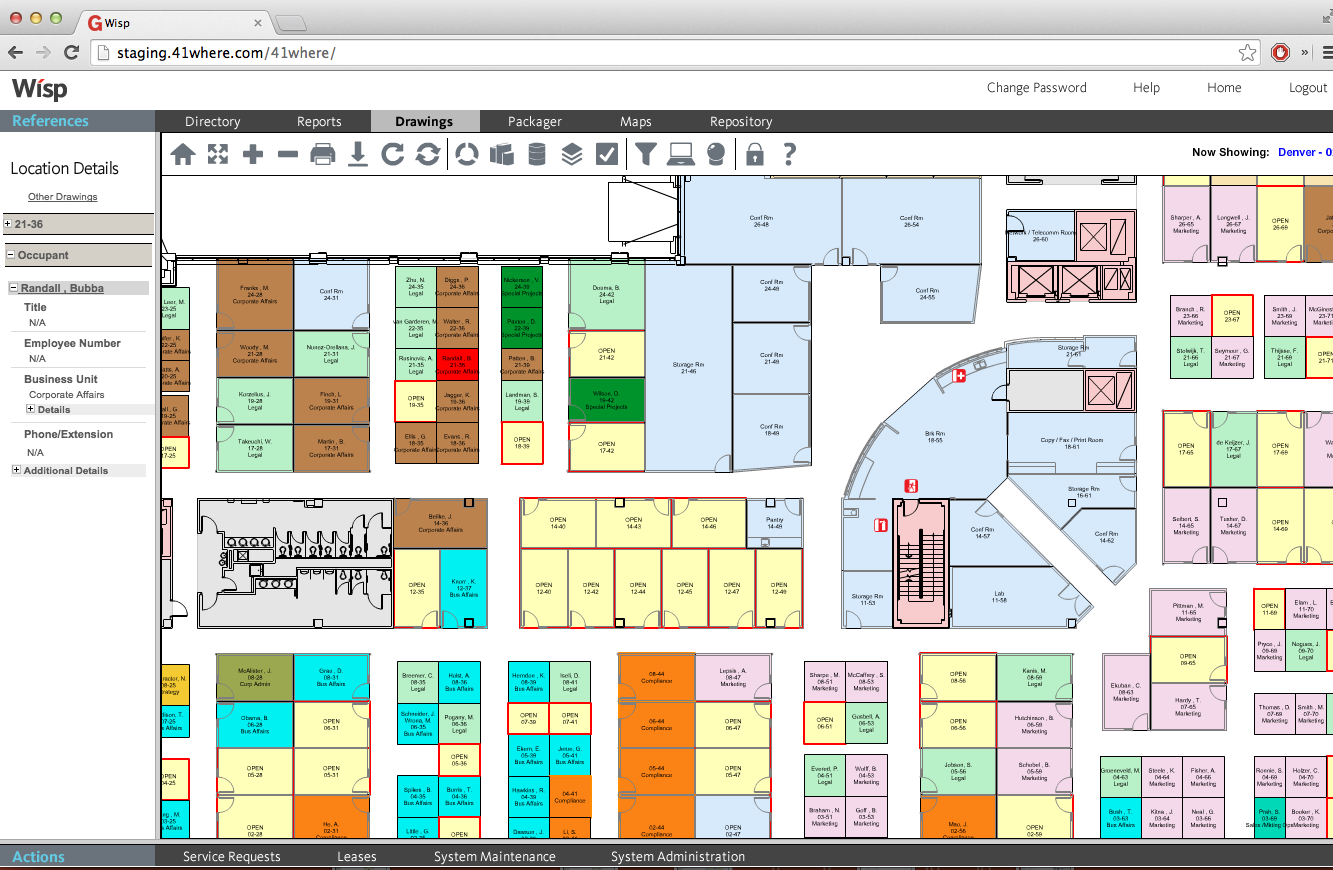
Floor plans with multiple layers for furniture, walls, and other details
Move management workflow
Drag-and-drop floor plan customization
Wayfinding tools to find seating, rooms, or other users
Color coding for departments, vacancies, space designations, and more
Rent allocation tools to prorate space usage
Support for free-address or hot-desking seating assignments
Service request notifications and workflow
Lease tracking and document storage
Interactive graphical reports and analytics
Resource tracking for equipment or other resources
Data export into other analysis tools
Corporate-branded interface
Implementation, drawing, and advisory services
Competitive Comparison
For employees, Wisp’s functionality is very similar to competing space management products. Interactive floorplans on both desktop and mobile devices are standard, as are desk and office reservation tools. It’s also very common for products to include locations of safety and emergency resources. Wayfinding, QR code desk check-in, and hot-desking support are also quite common. Used properly, Wisp, Condeco, or Robin can keep track of where any employee is working at any given time.
For facility managers and executives, Wisp starts to distance itself from the pack. The big difference, again, is that Wisp takes the burden of updating and maintaining maps away from your organization. Wisp employs dedicated CAD specialists to update and standardize the drawing files that form the foundation of your office maps. You won’t get that service from Robin, Condeco, or iOFFICE.
Wisp also includes implementation services in their standard package. This is another distinguishing feature. Most space management tools have self-service implementation resources available, but Wisp dedicates time and effort towards a bespoke implementation experience for every customer.
Wisp’s features for managing and understanding space utilization are robust, but in line with its competition. Even simple tools like Teem include space usage analytics and visualization. Many tools also support nontraditional workspaces without assigned locations, helping businesses get valuable information by defining usage “neighborhoods” on their floor plans. This allows reporting and analysis on space usage for both well-defined and free-form office layouts.
Overall, Wisp is cram-packed with features for every level of user, from office visitor to CEO. While its competitors match it on core functionality, Wisp’s additional services and support set it apart. For more details, check out Wisp’s Solutions page.
Customer Experience
Overall, reviewer sentiment for Wisp is positive. Users consistently speak highly of Wisp’s customer service and support, often thanking their account managers by name in their review. Most reviewers also say that Wisp is easy to use, although you’ll see the occasional complaint about a clunky menu or a sluggish load time.
Wisp’s core feature set has positive feedback. Reviewers say Wisp does exactly what it sets out to do: help employees understand, navigate, and reserve workspaces; help organizations measure and analyze usage; and take much of the hassle out of scheduling, mapping, reservations, and asset tracking. Complaints about these features are usually very minor, such as previous employees not being deleted automatically, missing customization options, or clunky workflow for specific scenarios (such as moving users between floors).
For users responding to service requests, it’s notable that Wisp’s mobile app doesn’t appear to fully support the service request system. A response from Wisp in August 2022 indicates that their development team is looking into it, but it’s uncertain when full support will be implemented.
Finally, it’s worth noting that Wisp is solely responsible for making changes to your floor plan files. At least one user was frustrated that they couldn’t manually make quick, simple edits to their floor plans, since all requests have to go through Wisp’s team. If you choose Wisp, remember that you’re sacrificing some amount of autonomy over your own map files. The benefit, of course, is that you can offload large, complex requests to Wisp’s team. You also get the assurance that your floor plans will stay consistent and standardized. Still, if you want to keep the ability to make quick, small changes to your CAD files, Wisp might not be for you.
Wisp Pricing
Wisp’s enterprise-grade features and services come at an enterprise-grade cost. Wisp’s pricing page doesn’t give every detail of their pricing structure, but it’s a great place to start.
Wisp charges a one-time implementation fee and an ongoing subscription fee with unlimited user licenses. Wisp starts at $6,250 for the initial implementation and $600/month thereafter. This is Wisp’s minimum pricing, offering “core space management functionality” for clients with 75,000 square feet or less of space to manage.
Other workspace management products start off much, much cheaper. Teem is simpler than Wisp, but it costs as little as $12.50 monthly ($150 annually) per managed room. Robin has a completely free option for up to 25 users on a single floor. Skedda offers a limited free tier for up to 5 booked desks, albeit with greatly reduced features. WorkInSync’s enterprise tier is $6.00 monthly per user; you could get WorkInSync’s highest tier for 100 users for less than the price to get started with Wisp. Overall, the significant price difference highlights Wisp’s focus on enterprise organizations with multiple large, complex office spaces.
Although Wisp offers tiered discounts as square footage increases, they don’t specify the actual costs of additional square footage or product functionality. Their site also doesn’t specify which features count as “core space management functionality” and which features are “add-ons.” You’ll have to reach out to Wisp for a customized quote if you want more details for your specific needs.
Wisp Use Case
If you have a remote or hybrid workforce, or if you just don’t have many employees at all, Wisp probably isn’t for you. Wisp reports that its clients have an average seat churn rate of 49%, meaning almost half of their employees relocate at least once per year. This metric illustrates who Wisp is designed for: big businesses with many employees in varied office spaces.
If your office footprint is small, you’ll be wasting most of Wisp’s functionality. You can probably get by just fine with a more lightweight floor plan, room reservation, or meeting scheduling product. Wisp’s large up-front sticker price and hefty monthly fee are going to be tough to rationalize. Robin’s starting tier is a great option for smaller teams.
For large enterprises with complex office spaces and an ever-shifting workforce, Wisp can be a great solution. Their on-call advisors and in-depth tools help manage everything from relocating a single worker to planning an entire office migration. Wayfinding tools can help your employees and visitors navigate a labyrinthine office complex.
Categories & Use Cases
Screenshots
Product Demos
Technical Details
| Deployment Types | SaaS |
|---|---|
| Mobile Application | No |